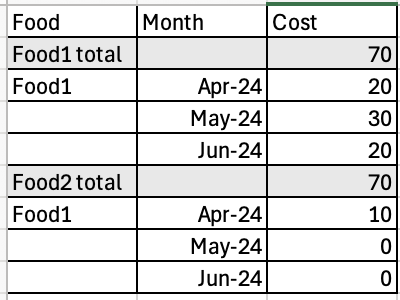
I need the subtotal row to appear first before the other calculations. Here's an example of how I want it to be positioned:
Is there a feature in Data Visualization that can handle this requirement?
Hi @Rashmi Jadhav-Oracle ,
In Data Visualization, you have to use a Pivot visualisation. In the Properties panel, select the Totals tab, and change the Total Rows Position property to Above.
You can change the background color from the Properties panel > Edge Labels tab > Header Font (you have to do it for each column). As an alternative you can set a custom background color for everything in the visualisation: Properties panel > General tab > expand Style and set Background to Custom
Thanks, @Federico Venturin! Your approach worked, but the Pivot visualization is highlighting a column that I want to avoid. Is there a way to prevent this column from being highlighted?
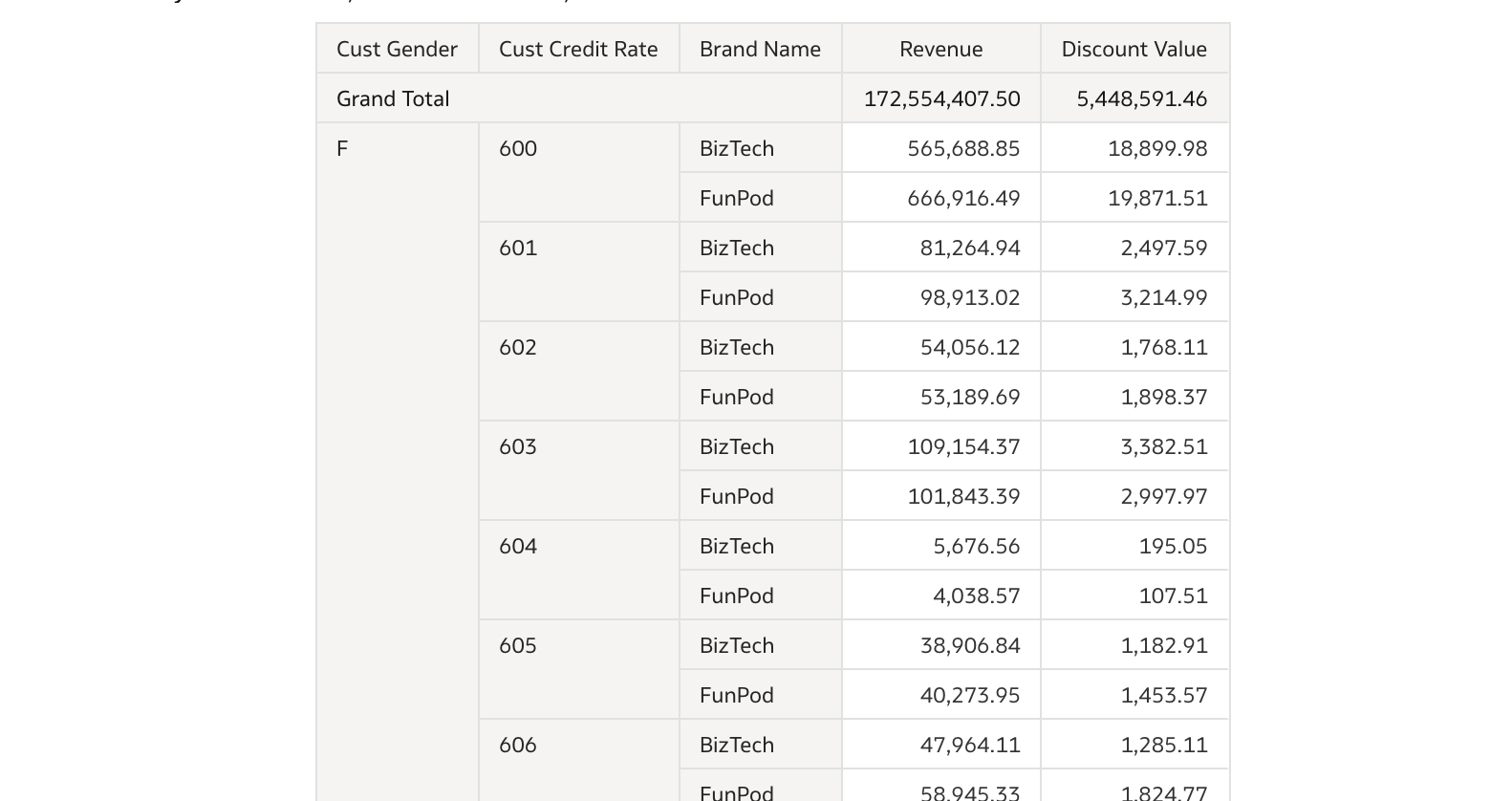
Alternatively, if it's not possible to adjust the subtotal, can I move the grand total to the top in the table visualization?
@Rashmi Jadhav-Oracle - Yes, grand total can be moved to the top of visualization and it will look as below:
Thanks.
Sumanth V -Oracle, Is the screenshot you shared from a pivot table visual?
Do you know how to prevent one of the columns from being highlighted? We only have three columns, and highlighting two columns doesn't look good. Any thoughts on how to fix this?
@Rashmi Jadhav-Oracle , you seem to be working with a DV workbook (always better to say, when you ask a question, which part of the product you are using: DV workbook, "classic" analysis or Publisher report, and also what product: OAC or OAS as they have different features).
Some features that exists for more than 10 years in "classic" analyses aren't available in DV workbooks, like saying to show totals on top in a table view. Using a pivot as posted by Federico is a workaround, and comes with some downside you can try to fix (like the column highlight, but changing the color of those columns is then another workaround).
You can also post ideas in https://community.oracle.com/products/oracleanalytics/categories/idealab-oracle-analytics-cloud-server requesting that option to be added. It shouldn't take long to implement, and I'm not really sure why such basic things are missing.
@Sumanth V -Oracle , sorry but you post a screenshot of a pivot, which is what was said in the reply just before with OP mentioning the downside of the background coloring. If you are still positive that for a table (NOT a pivot) the option is there, then you should be using a special version of the product that nobody else has.
@Gianni Ceresa - Yes, it's from Pivot view only showing how the grand total looks based on OP's comments, I even marked 'Agree' on that comment, just that it over lapped with Rashmi's update. You can see it's almost at the same time. Thanks.
Explore how to build agents using code in AI Data Platform. We'll create an agent that examines and analyzes the contents of a Github repository and reports its findings. The session demonstrates how to use different developer tools to create agents including the AIDP extension for VS Code and Codex. Using these tools we…
The user icon in the upper-right corner of OAC (DV) is displaying more menu options for our non-admin users than we wish to display. We would like to restrict these to only "Profile" and "Sign Out" for regular users. Is there a way to customize these menu items? Especially if we can control this via security, that would be…
What is wrong with this code
Am I missing something or is there no way to search through previous posts to make sure I don't duplicate a question? All I see on the filter options are tags or status… a general search for a word or phrase would be helpful.
We were under the impression that when exporting a visualization in DV to CSV format hidden columns would be include from the grammar panel. This is not happening. See below for a screenshot showing 3 hidden columns that do not appear when exporting the pivot table to CSV. This seems to have worked a month or so back but…
Migrated RPD from obiee12c to OAS 2024. post migration when we try to access dashboards on OAS we are getting below error: State: HY000. Code: 10058. [NQODBC] [SQL_STATE: HY000] [nQSError: 10058] A general error has occurred. (HY000) State: HY000. Code: 43275. [nQSError: 43275] Message returned from OBIS…