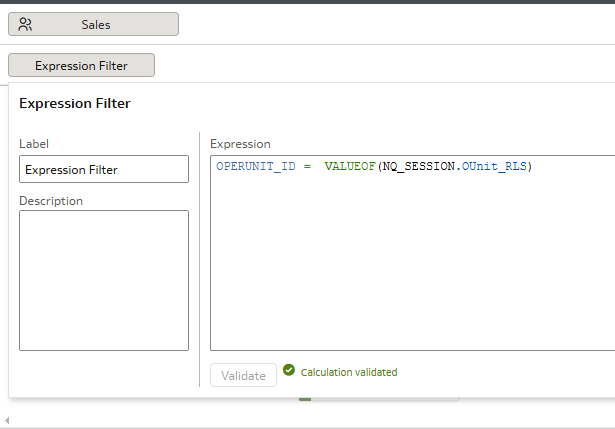
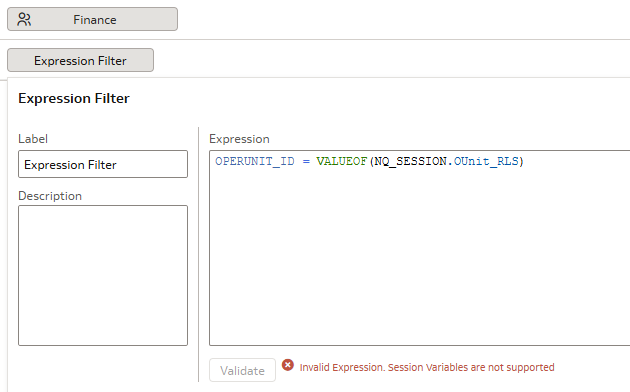
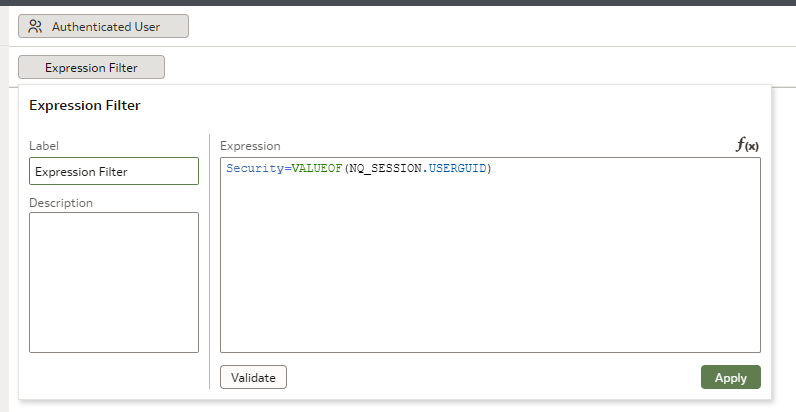
We are getting inconsistent behavior trying to use Session Variables in Datasets Expression Filters.
Anyone have success?
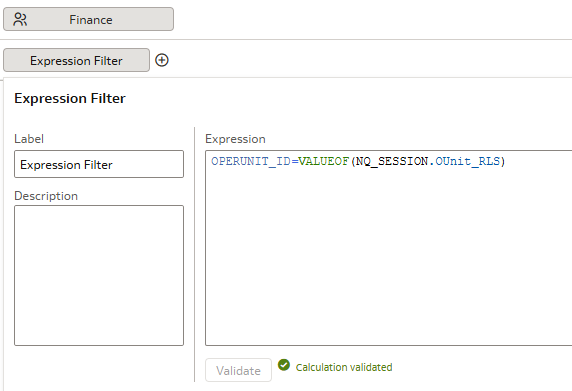
So… If I remove the space before and after equal sign it works
Hi Wayne,
How did you get the first one to parse in the first place? In all test cases I tried it is shown as unsupported.
Hi,
I never managed to get a valid validation, always got the "Invalid Expression. Session variables are not supported".
And I tried a number of times…
@Christian Berg-0racle - got lucky. I can get you in a zoom call to show you. First one was done by one of my colleagues and he nor I cannot replicate (my second screen cap) in different dataset.
His first one actually works which is great.
Interesting… We were able to copy the reference to Session Variable out of working into different Dataset and it Validated.
Now I'm curious: when it validate, does it work as expected?
Because if it does, I'm very much curious to know why the not-validating message is that the session variables are not supported there.
"His first one actually works which is great."
No it's not it's rather extremely preoccupying 🤣 I'll try to use the copy+paste approach in a sample.
Update: It works when you write it without any space. h/t to @Gianni Ceresa
Imagine how great it would be if we could still see the raw object definition to find out just how that JSON is written and what the interface tries to write today…
Thanks Wayne for the 'space' hint, that is the key to get it validated.
The fun thing is that the validation error doesn't come from the backend, it's a front-end limitation.
With a space after the '=' the front-end javascript doesn't even send a request to /ui/dv/ui/api/v1/queryvalidation/wheresto check for validation, it does display the error directly. I'm quite sure that if I send a validation request to that URL (it's a POST call to that URL) with the space, it will probably return result: 'pass'as well.
/ui/dv/ui/api/v1/queryvalidation/wheres
result: 'pass'
Therefore, I would say it's a bug: a front-end javascript check isn't aligned with the back-end check.
And confirmed!
/ui/dv/ui/api/v1/queryvalidation/whereswill happily validate the usage of a session variable there, even spaces around the = .
It's really just the front-end blocking the validation, and not even sending the async call to the back-end for it.
Explore how to build agents using code in AI Data Platform. We'll create an agent that examines and analyzes the contents of a Github repository and reports its findings. The session demonstrates how to use different developer tools to create agents including the AIDP extension for VS Code and Codex. Using these tools we…
What is wrong with this code
Am I missing something or is there no way to search through previous posts to make sure I don't duplicate a question? All I see on the filter options are tags or status… a general search for a word or phrase would be helpful.
We were under the impression that when exporting a visualization in DV to CSV format hidden columns would be include from the grammar panel. This is not happening. See below for a screenshot showing 3 hidden columns that do not appear when exporting the pivot table to CSV. This seems to have worked a month or so back but…
Migrated RPD from obiee12c to OAS 2024. post migration when we try to access dashboards on OAS we are getting below error: State: HY000. Code: 10058. [NQODBC] [SQL_STATE: HY000] [nQSError: 10058] A general error has occurred. (HY000) State: HY000. Code: 43275. [nQSError: 43275] Message returned from OBIS…
There is no option for legend title in many visualization types.