Categories
- All Categories
- Oracle Analytics and AI Learning Hub
- 54 Oracle Analytics and AI Sharing Center
- 26 Oracle Analytics and AI Lounge
- 312 Oracle Analytics and AI News
- 57 Oracle Analytics and AI Videos
- 16.4K Oracle Analytics and AI Forums
- 6.7K Oracle Analytics and AI Labs
- Oracle Analytics and AI User Groups
- 117 Oracle Analytics and AI Trainings
- 24 Oracle Analytics and AI Challenge
- Find Partners
- For Partners
Enhancements to the Limit Values Feature and Impacts to Fusion Data Intelligence (FDI) Applications

What is Being Announced
UPDATE (Dec 12, 2025): The OAC November release will now appear in the FDI Fleet between January 7-16 depending on your region.
Inconsistent workbook filter behaviors that have contributed to confusion with workbook usage and authoring are being addressed. Workbooks may need to be updated and/or a setting turned off in the near-term.
These inconsistencies stem from the fact that workbook filters can be set in three places: 1) on the Filter Bar, 2) Dashboard Filters on the canvas, 3) on the Viz itself. The rules for one filter limiting another have been sometimes unpredictable. This is being rationalized by adding an obvious and documented hierarchy of filter precedence as well as clearer ways of disregarding the hierarchy if desired.
To summarize the changes:
- Filters with the “Limit Values By” setting will now always respect other filters from the same or higher scope/location unless explicitly excluded(
- The “Custom” option for Limit Values By will be restricted to filters within the same location, preventing unintended overrides from higher-scope filters
- A fix has addressed a bug where dashboard filters could bypass author-designed Limit Values By behavior
Feature Announced in Community News
https://community.oracle.com/products/oracleanalytics/discussion/27543/enhancements-to-[…]values-by-setting-for-filters-in-oracle-analytics/p1?new=1
Feature Blog
https://blogs.oracle.com/analytics/enhancements-to-the-limit-values-by-setting-for-filters-in-oracle-analytics
What Actions Should I Take?
Filters present in workbooks today may behave differently after the change if they rely on cross-location or cross-scope interactions. Please review your workbooks and ensure the filter logic still aligns with your design intent. You have until roughly April to update workbooks if needed, but a setting will need to be changed in January to maintain the current behaviors.
To summarize, you will want to:
- Analyze all workbooks for potential impact with the console setting ON so you can test the new behavior.
- Turn the console OFF for time to complete #1 and #3. We expect to remove the setting in the March update to OAC which will be seen in FDI in April, 2026.
- Update affected workbooks as needed using the steps provided in this article.
How Can I Change the Console Setting?
An advanced system setting controls the Filter behavior. We expect this setting to be removed in the OAC March release. This is called “Enable Enhancement to Limit Values By in Workbooks.” An Admin user can find in the FDI Console. You can turn this setting ON to test workbook behaviors before January when FDI 25.R4 will uptake the OAC November release.
After January you can turn this OFF to restore the original behavior. In the March update to OAC we expect the setting will be removed. This will be seen in FDI in April, 2026.
Release Timing Summary
- OAC Now - present in FDI 25.R3
System toggle is OFF, and can be turned ON - OAC November 2025 Release - will land Jan 7-16
System toggle is ON by default, and can be turned OFF - OAC January Release - will land in February
System toggle is ON by default, and can be turned OFF - OAC March Release - will land in April
System toggle will be removed; and the new behavior becomes the only behavior
What Changes Should I Make in Workbooks?
If cross-location or cross-scope filter interactions are present in your custom workbooks you will want to update these filters to work with the new, rationalized filter behavior.
FDI Factory Workbooks
FDI has reworked the factory workbooks already present in shipping versions of FDI to work with either setting. You may want to review this change for suitability in your own content.
The following example shows AP Aging Analysis (LC), however the fix is universal across all workbooks.
Behavior before making changes
Prior to the content update with all the filters in single filter viz (as shown below) we saw:
- The Fiscal Calendar Name filter was not listing any values.
- The Ledger Name filter was not being limited by the Accounting Calendar Mapping filter selection.
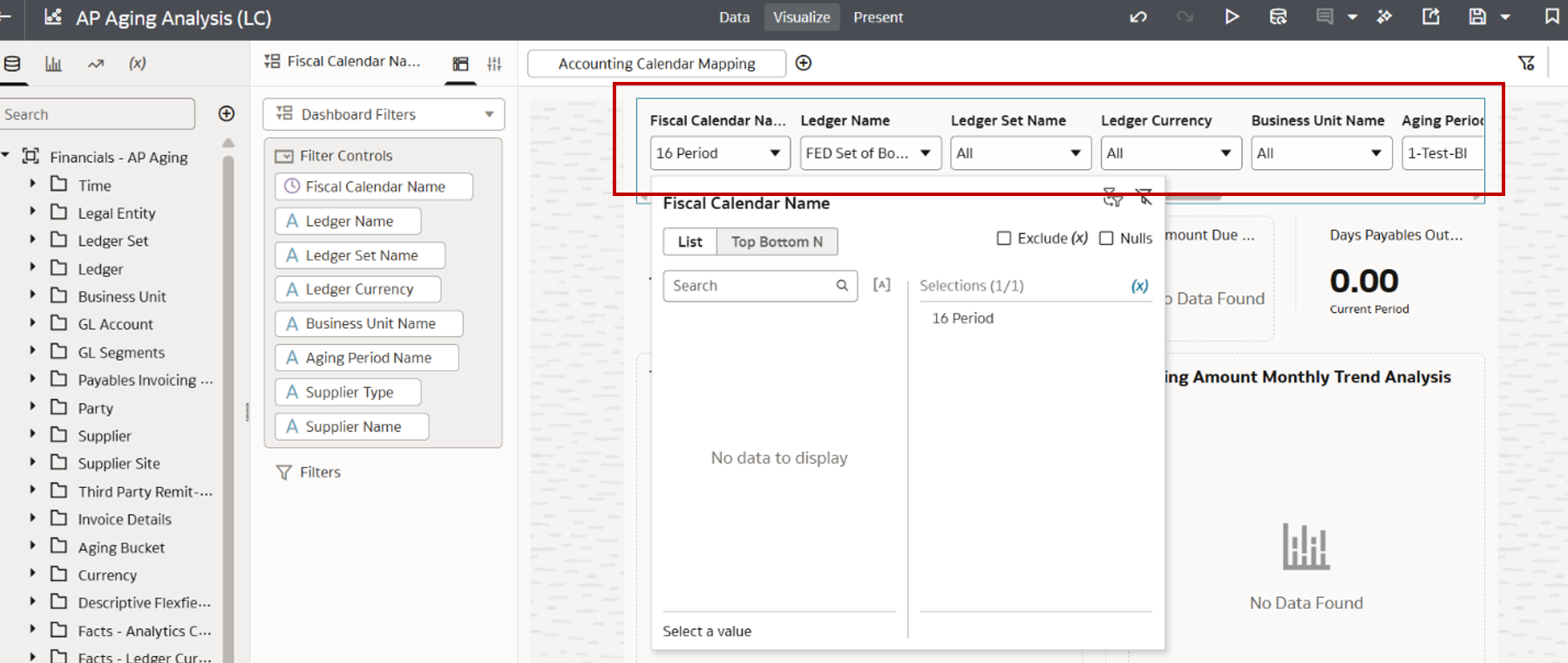
One Filter Viz/Container Before the Fix
How FDI addressed this
To fix this workbook we created three Dashboard Filter viz on the canvas and placed:
- Fiscal Calendar Name as the first filter viz
- Ledger Name in the second independent filter viz
- The rest of the filters in a third filter viz
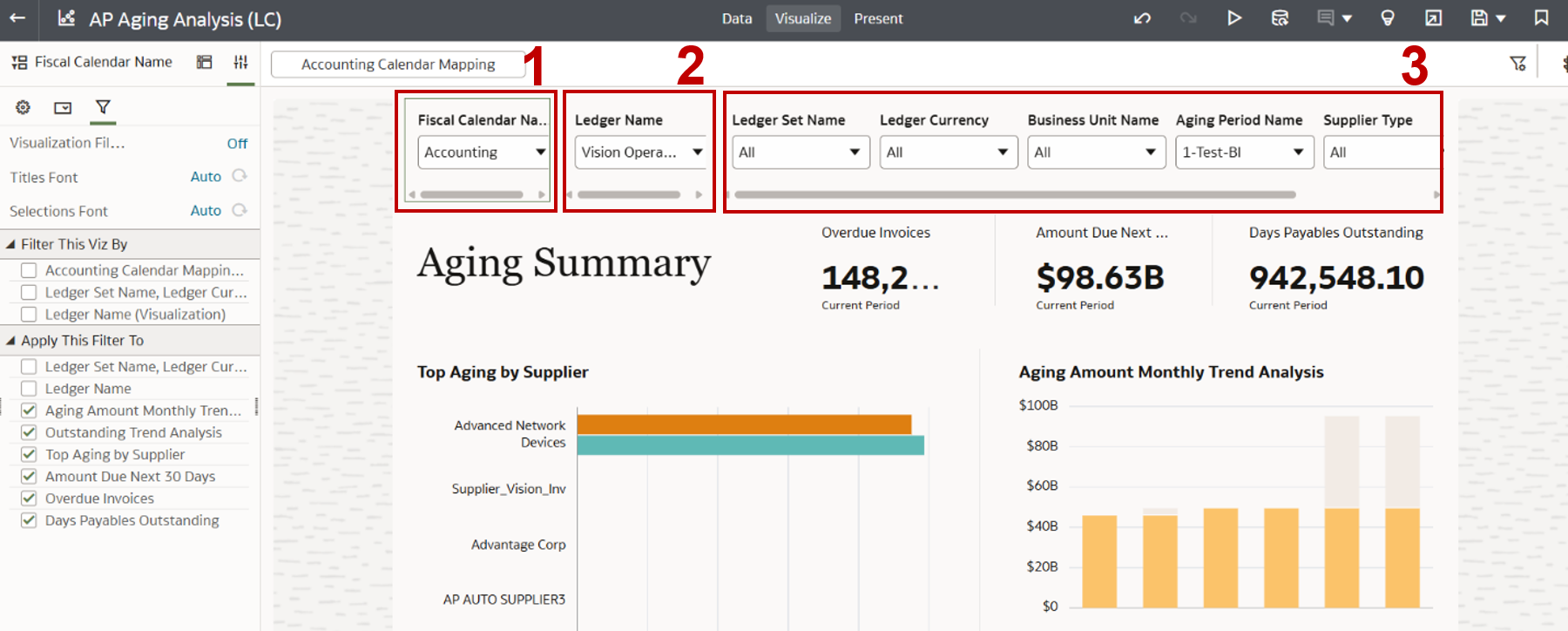
Three Filter Visualizations/Sections
Fiscal Calendar Name Filter
We don’t want Fiscal Calendar Name limited by any other filters, so we deselected Filter this Viz By for all filters. We do want this filter to apply this to all the non-filter “working” viz on the canvas so we kept these viz all selected for the Apply This Filter To section.
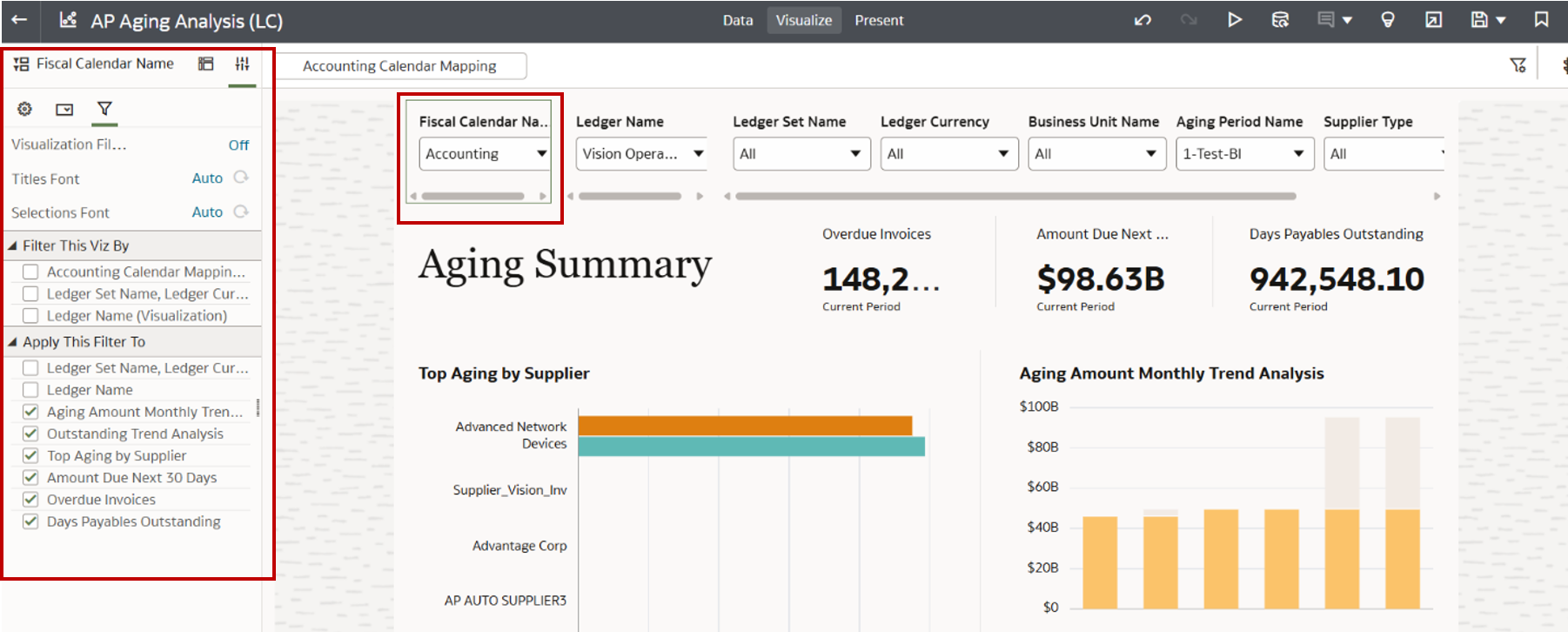
Fiscal Calendar Name Config
Ledger Name Filter
We want the Ledger Name filter to be limited by the Accounting Calendar Mapping in the Filter Bar so we selected this checkbox in Filter this Viz By. We also want to apply this to all the non-filter viz on the canvas so we kept these all selected. Incidentally, Accounting Calendar Mapping gets the Fiscal Calendar from a Logical SQL expression bound to a Fiscal Calendar parameter.
"Financials - AP Aging"."Ledger"."Accounting Calendar Name" IN(@parameter ("Fiscal Calendar")(''))
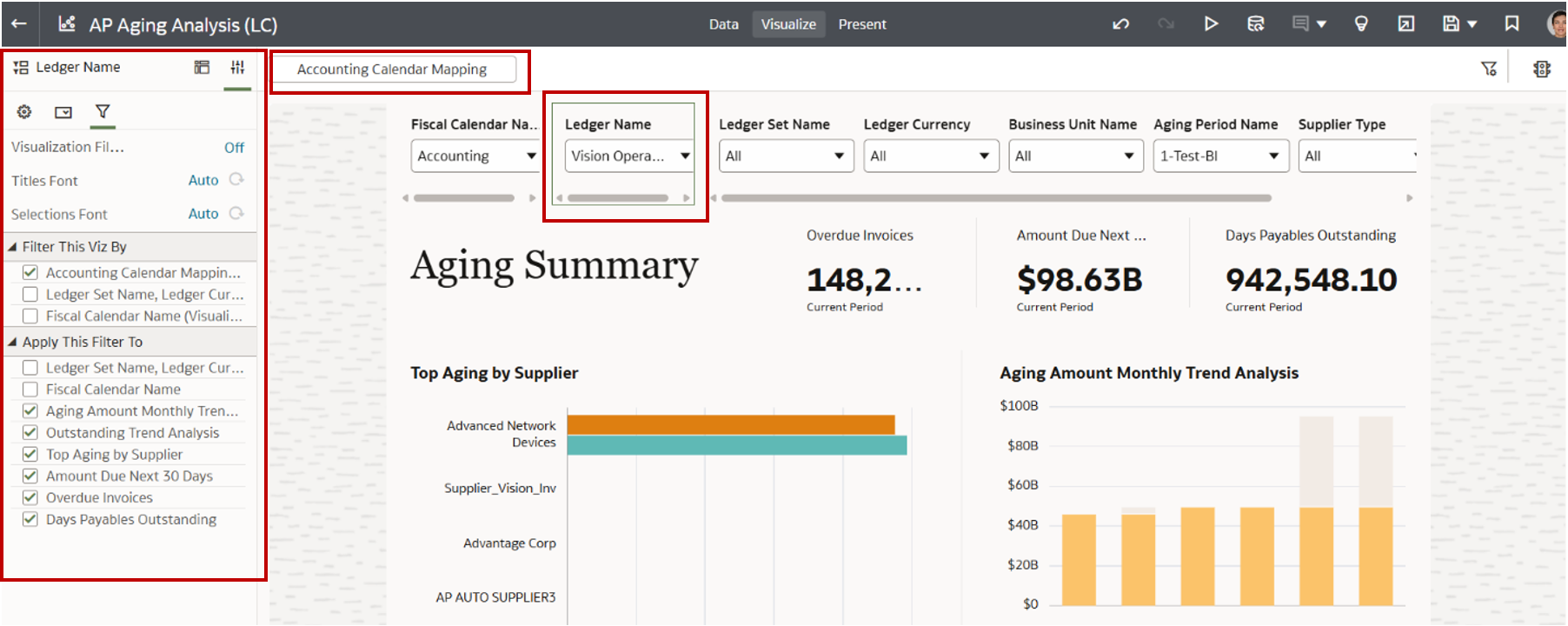
Ledger Name Config
Third Filter Section
These filters we want to operate independently (not limited by other filters) so we deselected all filters, yet we kept these applied to all the non-filter viz on the canvas.
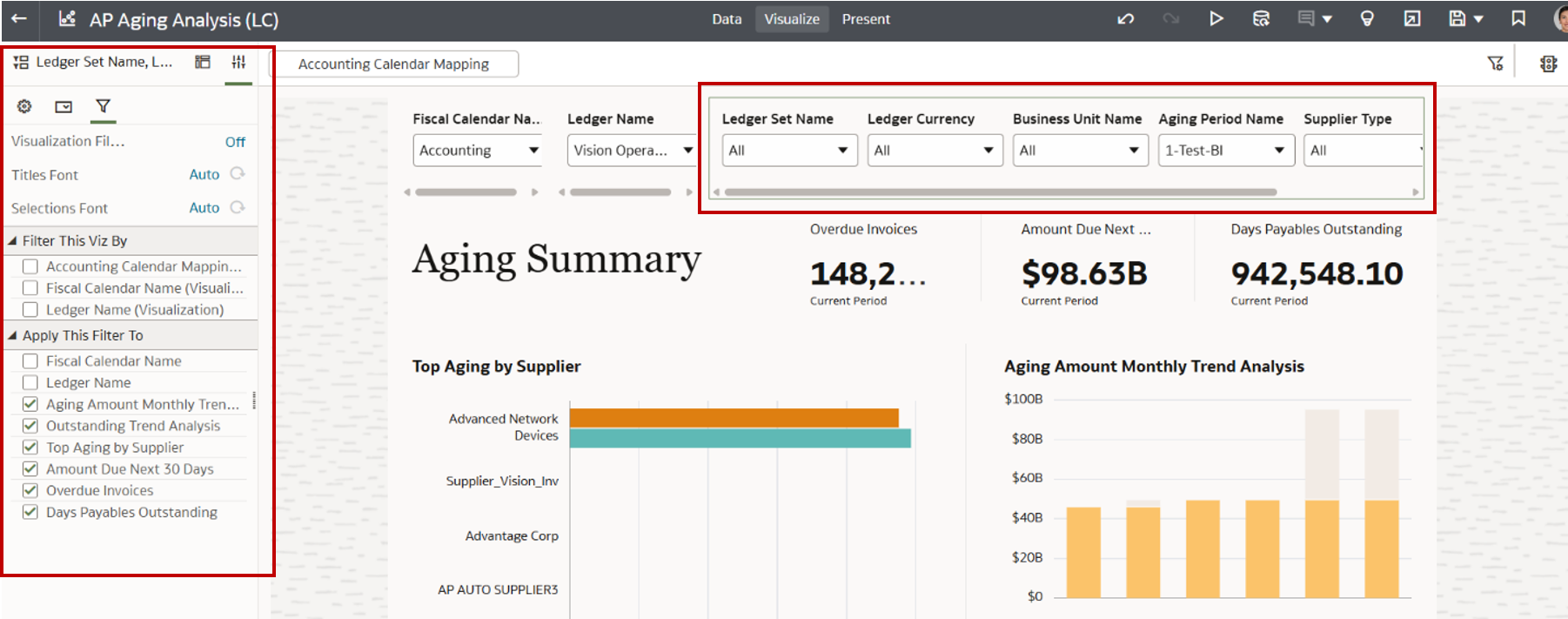
Third Filter Section Config
With changes complete the updated workbook works as expected and looks like this in the Presentation mode.
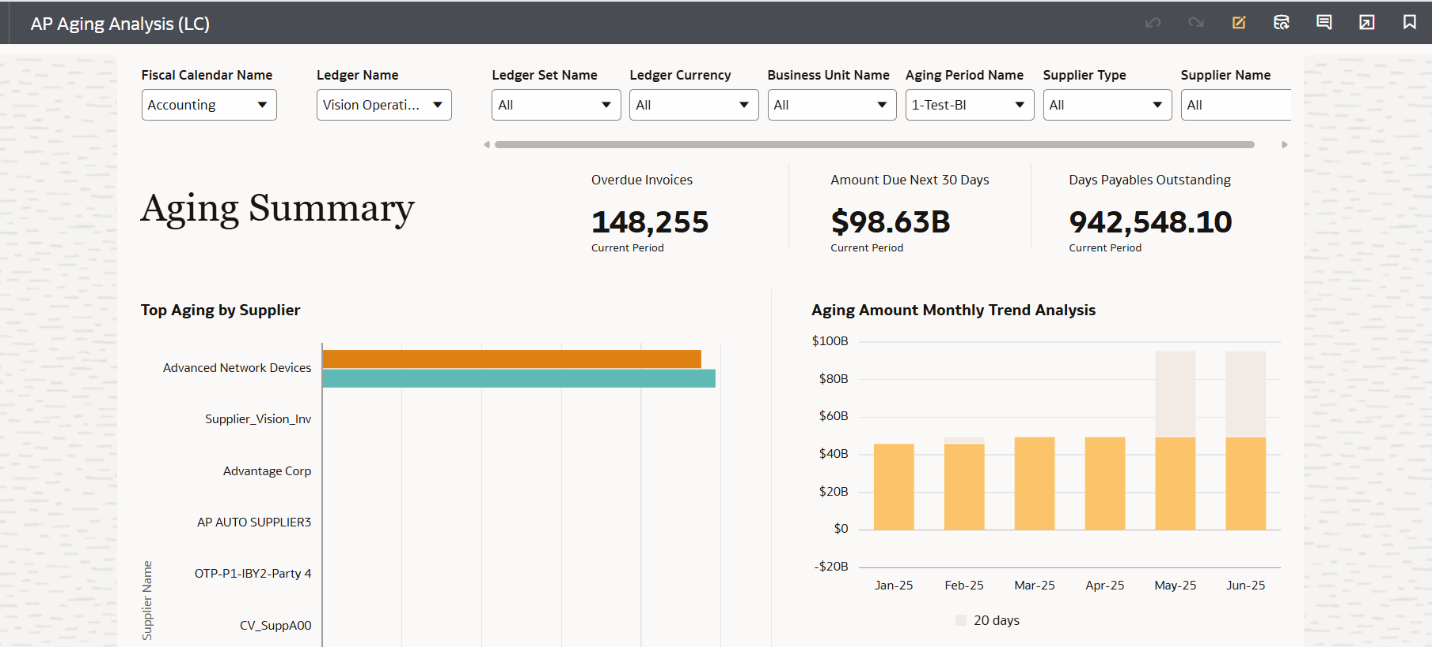
Three Filter Viz in Presentation mode
Please post any questions here. We'll monitor this blog. Thank you.
Oracle Product Management
Comments
-
Thanks for sharing the details; it'll be very helpful.
Appreciate your help.
0 -
Thanks for the enhancement, appreciate it.
0 -
Appreciate the details; this helps a lot..
0 -
Excellent Enhancement!
1 -
What does "cross-location or cross-scope" refer to? Does cross-location refer to something like multiple Canvases on a single Workbook?
1 -
The most immediate interpretation of cross-location/cross-scope would be internal to the workbook: i.e., filter bar filters relative to dashboard filters (canvas) relative to viz-level filters. Context passed across multiple canvases internal to the workbook or across multiple workbooks would be additional, related facets of this.
0