Oracle Analytics Forum

Welcome to the Oracle Analytics Community: Please complete your User Profile and upload your Profile Picture

Double Data type values coming in Analysis as integer values

Accepted answer
53
Views
6
Comments
User_V9V6Z
User_V9V6Z Rank 1 - Community Starter

Recently we have migrated OBIEE 12c (Backend: Netezza) to OAS (Backend: Databricks) by migrating RPD and catalog as such. But while running analysis could see measures from double/float data type with precision values are showing only integer values and decimal places values are coming as 0.

Eg: Sales values 145677.755 is showing in report as 145677.00. Physical query does not have any data type conversion functions.

Any solution for this to fix it globally instead of making change in each measures.

Best Answer

  • Brendan T
    Brendan T Rank 6 - Analytics & AI Lead
    Answer ✓

    The loss of precision (e.g., 145677.755 appearing as 145677.00) following a migration to an Oracle Analytics Server (OAS) instance with a Databricks backend is a recognized challenge related to how the BI Server interprets numerical data types across different database drivers.

    While individual column formulas can be adjusted, the sources identify several administrative and metadata-level configurations that can resolve this issue globally at the environment or Semantic Model (RPD) level.

    1. Update the Physical Database Type and Features

    In the Physical Layer of your semantic model, the BI Server uses the "Database Type" and "Features" settings to determine how to fetch and represent data from the backend.

    • Verify Database Type: Ensure the Physical Database in the RPD has been updated from Netezza to the appropriate Databricks or Spark version supported by OAS. If a specific Databricks type is not available in your version of Model Administration Tool, using a generic "ODBC - Advanced" or "JDBC" type can sometimes resolve mapping errors.
    • Numerical Feature Overrides: Navigate to the Features tab of the physical database object in the RPD. Check parameters such as CONVERT_NUMERIC_BITMASK or CONVERT_REAL_BITMASK. If these are incorrectly configured, the BI Server may assume the backend does not support high-precision floating points and truncate the values to integers during the fetch process.

    2. Check for "Double Arithmetic" Blending

    If your analysis combines a Subject Area with an external Dataset, the sources note that OAS may force the calculation to use binary floating-point approximations (DOUBLE arithmetic). This computing limitation can lead to precision errors where numbers are not represented exactly. If your measures are part of a blended visualization, verify if the "true" 0 or precise decimal is being lost during the join/blending process.

    3. Leverage OAS System-Level Access (Global Fix)

    Unlike Oracle Analytics Cloud (OAC), which is a restricted PaaS, OAS allows administrators to access and work on the system level, OS, and configuration files.

    • Because OAS runs in the same manner as OBIEE 12c, you can inspect the NQSConfig.ini and DBFeatures.ini files.
    • You can globally modify how the BI Server handles floating-point numbers or specific Databricks-specific data type mappings within the DBFeatures.ini for the corresponding driver to force the server to treat these columns as DECIMALor NUMERIC rather than INT.

    4. Manual SQL Workaround

    If global configuration changes do not resolve the issue, the documented workaround in the sources is to "manually convert a data column to a supported type by entering SQL commands". While you requested a global fix, wrapping your measures in a CAST function (e.g., CAST(Sales AS DOUBLE)) in the logical layer of the RPD is the standard method to force OAS to recognize the fractional part of the data if the underlying driver is misreporting the column precision.

Answers

  • Aman Jain-Oracle
    Aman Jain-Oracle Rank 6 - Analytics & AI Lead

    Hi @User_V9V6Z, Welcome to the Oracle Analytics Community!

    Could you please help clarify the following questions? This will ensure we understand the environment and the specifics of the issue:

    1. What is the underlying data type for these measure columns in Databricks, and how are they defined in the RPD Physical layer after migration?
    2. When running a direct SQL query in Databricks (outside OAS), do the measures display with correct decimal precision?
    3. Is this issue observed for all measures and subject areas, or is it limited to certain tables or columns?

    Looking forward to your response.

  • User_V9V6Z
    User_V9V6Z Rank 1 - Community Starter

    1. What is the underlying data type for these measure columns in Databricks, and how are they defined in the RPD Physical layer after migration?
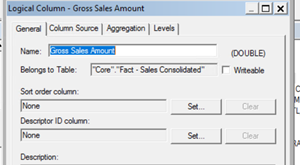
      1. Data type is double in databricks. In RPD physical layer also it is defined as double as it is before in previous version.
    2. When running a direct SQL query in Databricks (outside OAS), do the measures display with correct decimal precision?
      1. Yes we are getting actual decimal precision from backend. Also we tried to import the same table and created another subject area for testing. In new subject area we are getting decimal precision. Where as existing subject area pointing to same physical table not showing the decimal precision.
    image.png

    3. Is this issue observed for all measures and subject areas, or is it limited to certain tables or columns

    All the the migrated subject area measures have this issue.

  • Aman Jain-Oracle
    Aman Jain-Oracle Rank 6 - Analytics & AI Lead

    @User_V9V6Z Thanks for sharing the details!

    could you please test the following: In any of your affected analysis, navigate to the measure column's properties, override the default data format, and set the decimal places to 3 and check if that gives the correct decimal values ?

  • User_V9V6Z
    User_V9V6Z Rank 1 - Community Starter

    Thanks for the solution. we have worked on the DBfeatures and the issue got fixed.