Categories
- All Categories
- Oracle Analytics and AI Learning Hub
- 54 Oracle Analytics and AI Sharing Center
- 25 Oracle Analytics and AI Lounge
- 308 Oracle Analytics and AI News
- 57 Oracle Analytics and AI Videos
- 16.4K Oracle Analytics and AI Forums
- 6.6K Oracle Analytics and AI Labs
- Oracle Analytics and AI User Groups
- 118 Oracle Analytics and AI Trainings
- 22 Oracle Analytics and AI Challenge
- Find Partners
- For Partners
How to create subfolders in the semantic layer

Hello,
I created a semantic layer in OAS where the presentation layer shows 3 table names with fields inside them.
When the user opens a new workbook, he see 3 folders - account + time + credit cards, each folder containing a table with its fields.
Is it possible to create subfolders? For example, inside an accounts folder, there will be an account properties folder with more fields inside it.
Thank you very much.
Answers
-
Hi,
Welcome to the Oracle Analytics and AI community and forum.
Do you mind posting a screenshot of what you see in your workbook or of your presentation layer tree in your semantic model?
Because I'm not sure what you are having in front of you, what the "3 folders - account + time + credit cards" are…
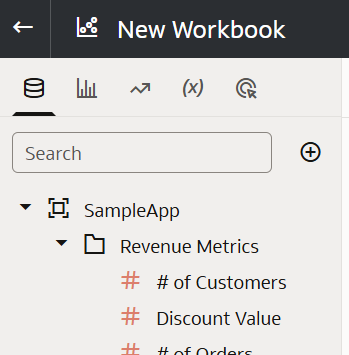
Usually, when you create a workbook based on a subject area, what you see is like the following:
- "SampleApp" is a subject area
- "Revenue Metrics" is a presentation table
- "# of Customers" (and the others) being presentation columns
In your case there seem to be already 2 layers between the subject area and the presentation columns (3 folders each containing a table).
 1
1 -
I meant I have 3 presentation tables.
"account" + "time" + "credit cards" like "Revenue Metrics".
All presentation tables are under the same subject area.
0 -
Ok, so you now have the usual 3 levels (subject area, presentation table, presentation column) and you would like a 4th level in between subject area and presentation table (because that's the only place where you can have one).
If you are using the model administration tool, you can create an empty presentation table, not having any column, and if you look at the properties you see the tab "Child Presentation Tables" that allows you to select an existing presentation table that visually will be part of a folder (the presentation table without columns become the folder).
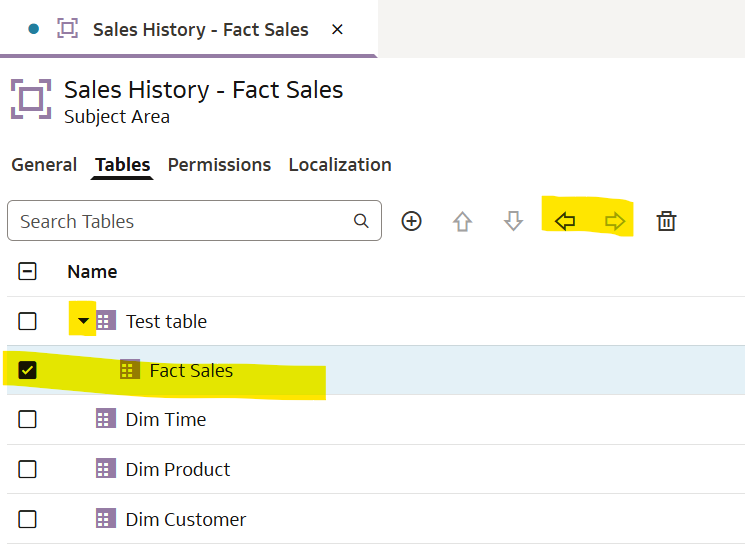
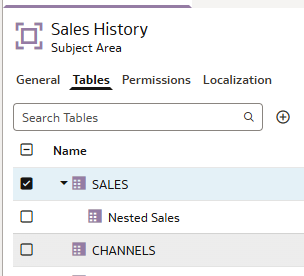
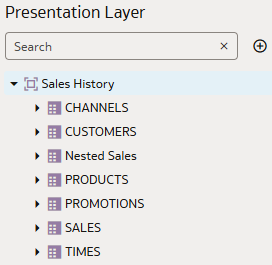
If you are using the Semantic Modeler, you have left-right arrows when you look at Tables inside the Subject area object. You can build your hierarchy using those left-right indentation arrows.
 0
0 -
My goal is to create another presentation table under "Revenue Metrics" that will contain presentation columns.
Will look like a subfolder.
Is this possible?
0 -
What I described above will give you an hierarchy of presentation tables, with multiple levels.
I don't have a deployed model with that inside, therefore I can't test it right here and now.
Just found this picture online on how it does look like in "classic".
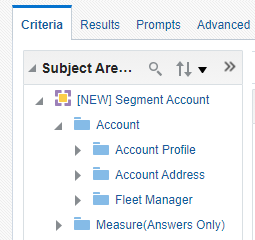
I like to think it will do the same in a DV workbook. If not, it means DV workbooks do not support that feature that is in the product for more than 15 years. If this is the case, the only option is to ask for this feature to be added to DV. There is maybe already an idea for it in , and if not, you can ask for it.
0 -
Are you using Admin Tool or Semantic Modeler?
0 -
Semantic Modeler
0 -
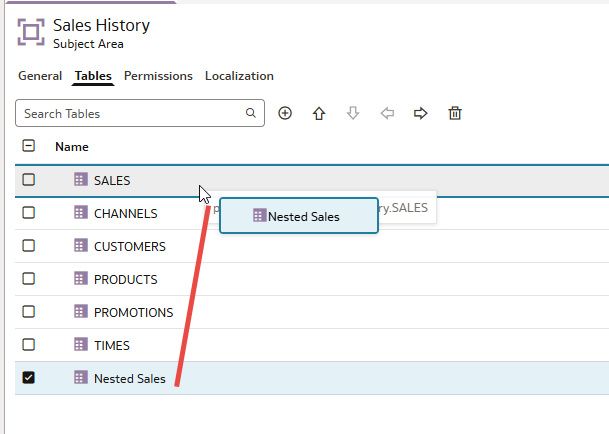
Try this
 2
2

