
Best Of
Are there Bookmark Limitation in the Second Level of table of contents in RTF templates..
I am trying to create a Bookmark in 2 different levels. It is not working for the second level and It prints only the first tag in the second level.
Are there Bookmark Limitation in the Second Level of table of contents in RTF templates..

Re: An issue on Self-service Fluid Life Event Page
Hello User_80227,
These are the worst kind of issues…the ones that happens 'sometimes'. Did you open an SR with support to see if any other customers have reported this issue (and if we have a fix)? If you are able to replicate it again, patterns I would check for are - does this employee have multiple jobs, current job data action/reason, future dated job rows, pending benefits events, does it only happen on Thursday…
Thanks,
-Julie
Re: Error when attempting to Preview the Integrator: No Integrators exist. Please contact your support r
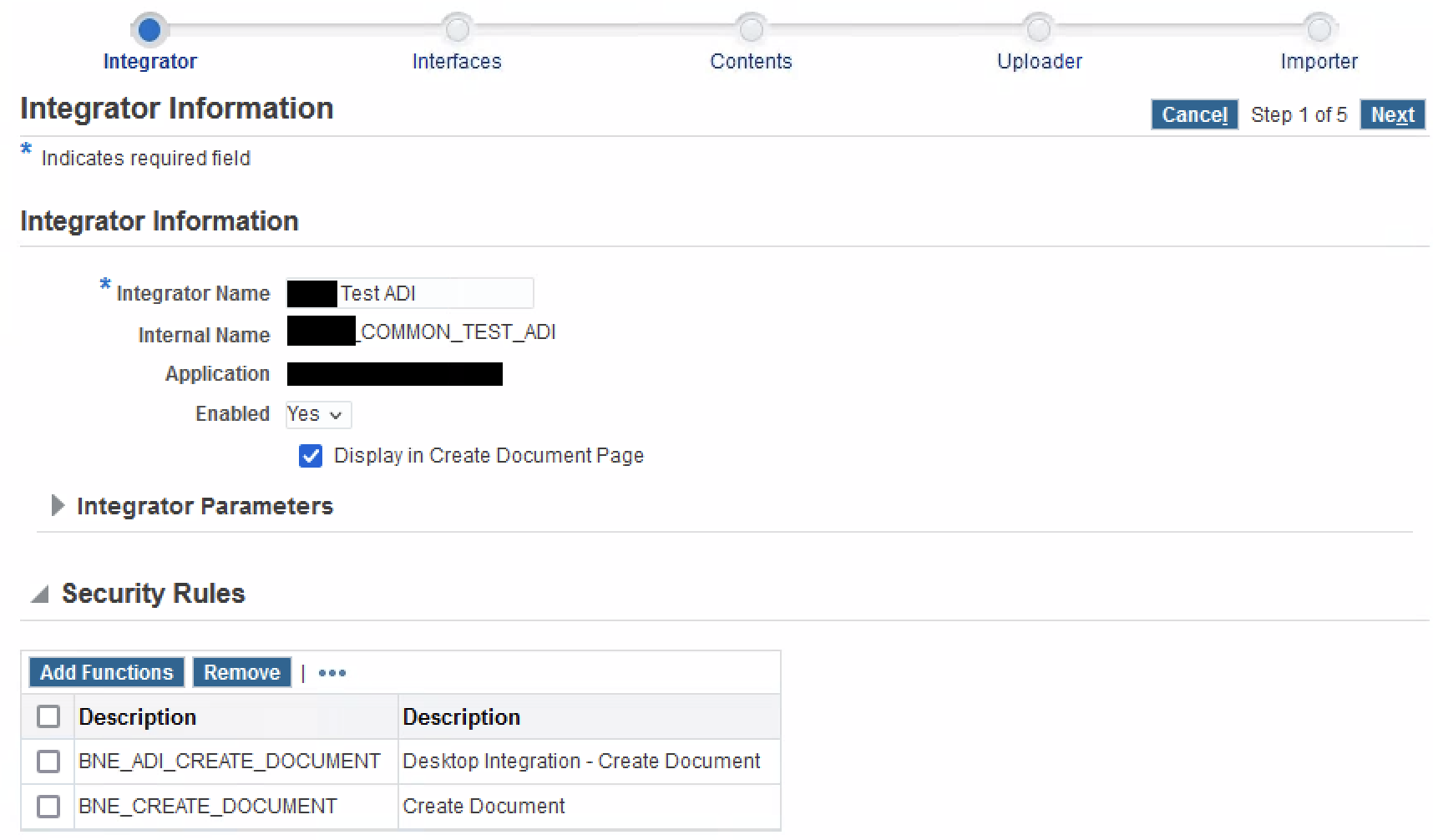
Done, and works fine. Far better approach than attaching random form functions to get past the issue. Redacted screenshot attached in case it helps anyone else experiencing this issue. Thanks @Chandra Sekhar Kadali-Oracle

Re: Remote worker scenario with TLS
Hello Pedro
yes I confirm , with a valid TLS license tls-profile under sip-port will be unlocked .
TLS for HTTPS does not require a specific license .
Cheers
Antonio

Re: Procurement Spend Analysis and Payment Spend Analysis tile configuration
Response to my SR:
In the research done, it cannot find references of questions addressed with respect of Purchasing Operations Dashboard. Changing the delivered configuration cannot be done without customization. Attached SR3-41722417131 -SCM9.2-2.docx file with suggestion of changing the (1) ‘From Date and To Date’ and (2) ‘add additional facets to search by’. In my test the last one did not work, possible there are some limitations to avoid performance issues. And I’ve found out some PeopleTools KMs that indicate this is PT specific rather than Purchasing application.
Steps:
1. Check PO Spend Analysis from Portal PT
Navigation PeopleTools > Portal > Structure Fluid Structure Content > Fluid Pages > Procurement Operations >
Notice the grid name under PO Spend Analysis
2. Open Pivot Grid Wizard
Navigation Reporting Tools > Pivot Grid > Pivot Grid Wizard
Search for PO_SPEND_TYPE_MP_FL_PVG pivot.
3. Press Next until ‘Specify Data Model Values’
4. Go to Select Query Prompt Values at the bottom of the page
Here you may change the parameters From Date = 01/01/2006 and To Date = 12/31/2015, but this is consider customization.
5. Query Manger
Press Ok to message < Query is being used as datasource by other definition(s). (139,356) >
Notice Prompts
I’ve run a trace and the Procurement Spend Analysis (Navigation Fluid Pages > Procurement Operations > PO Spend Analysis) is build based on the query PO_SPEND_TYPE_MP_FL_PVG that is using prompts from PSPGQRYPROMPT record.
6. Add new facet to Pivot
At step 3 of PO_SPEND_TYPE_MP_FL_PVG pivot, Data Model, go to specify Axes and Filters: Rows, Columns, and Filters.
Press yes to message
<Confirm Column Type change. (268,153)
Changing the Column Type selection for a saved entry will make all the Views associated with the model invalid and these views will be removed. It will also remove any user customizations previously made for this model. Are you sure you wish to proceed?>
Here, the system does not recommend more than 12 axis:
< More than 12 axis type of columns are not recommended in a Pivot Grid Model.
It is not recommended to have more than 12 axis type of columns in the Pivot Grid Model for two reasons -
1. This model will fail on the Microsoft SQL Server due to database platform limitations.
2. More than 12 axis type of columns can lead to a slower performance of the Pivot Grid.>
Then add a Facet (Filter) under the data columns section, locate the field you want to use as a facet/filter.
Save and Finish the Wizard.
The Supplier ID is available, the requestor ID not because is not included from the query manger.
So in both case you need to customize the pivot and query that is not either recommended or supported.
Also more details are in the PeopleBooks > Configuring Procurement Analysis Inquiries
https://docs.oracle.com/cd/F88359_01/fscm92pbr49/eng/fscm/spog/ConfiguringProcurementAnalysisInquiries-9f3eee.html?pli=ul_d4592e544_spog
Understanding PeopleSoft Fluid User Interface with Procurement Operations Pages
https://docs.oracle.com/cd/F88359_01/fscm92pbr49/eng/fscm/spog/UnderstandingPeopleSoftFluidUserInterfaceWithProcurementOperationsPages.html?pli=ul_d4592e544_spog
KM Docs:
E-PG: Pivot Grids Missing Saved Filters If More Than 10 Facets ( Doc ID 2533932.1 )
E-PG: Pivot Grid Incremental Facet Count ( Doc ID 2525700.1 )
Re: Is there a way to calculate a percent discount on a purchase order?
Hi Lauren,
I've not found a way to add an adjustment based on the PO total dollars.
This is the existing KM where it suggests adding a discount line.
How To Record Discounts Or Service Charges In A Purchase Order? (Doc ID 2554131.1)
I think one other option is to add a header negative misc charge. It looks like you need to allocate on the lines though. The misc charge should be visible though and it's based on user entering the discount amount rather than a calculation being done for you.
Recommending adding this in idea spaces for this PO order total price adjustments.
Thank you,
Nick