Best Of
Re: Critical Vulnerability in Siebel IP 25.1 catalina.jar file
It's not supported combination having AI and SES running different versions. This has not been tested by Oracle Engineering/QA. You are recommended to bring all your installation to the same version.
Regards,
Michael Harada

Re: How can I setup the Column set to generate the FSG Trend report only for that Financial year
Hi,
You cannot use conditions in Column set.
You can review the following note:
&POI: Enter &POI (period of interest), followed by a number from -999 to +999 that refers to the relative period offset of your column. For example, enter &POI0 to display amounts for the period you specify at runtime, enter &POI-1to display amounts one period before the period you specify at runtime, and so on. Generally, the relative period offset you use to define a &POI heading corresponds to the period offset of the column.
&CPOI: Enter &CPOI (constant period of interest), followed by a number that refers to a constant period of interest control value representing a period number and relative year for that column. For example, enter &CPOI2 to refer to the constant period of interest as defined in control value number 2 to label the column with the name of the constant period selected.
You can review the following notes: R12 How to Use CPOI Token in FSG (Doc ID 463505.1) and
How to Compare Current PTD Actuals to Prior Year's PTD Actuals in an FSG report (Doc ID 1050478.6).
Thanks and regards,
Anca

How to Add Fluid TA Links to Fluid Expenses Workcenter?
Version: 9.2 Image 54, PeopleTools 8.60.10
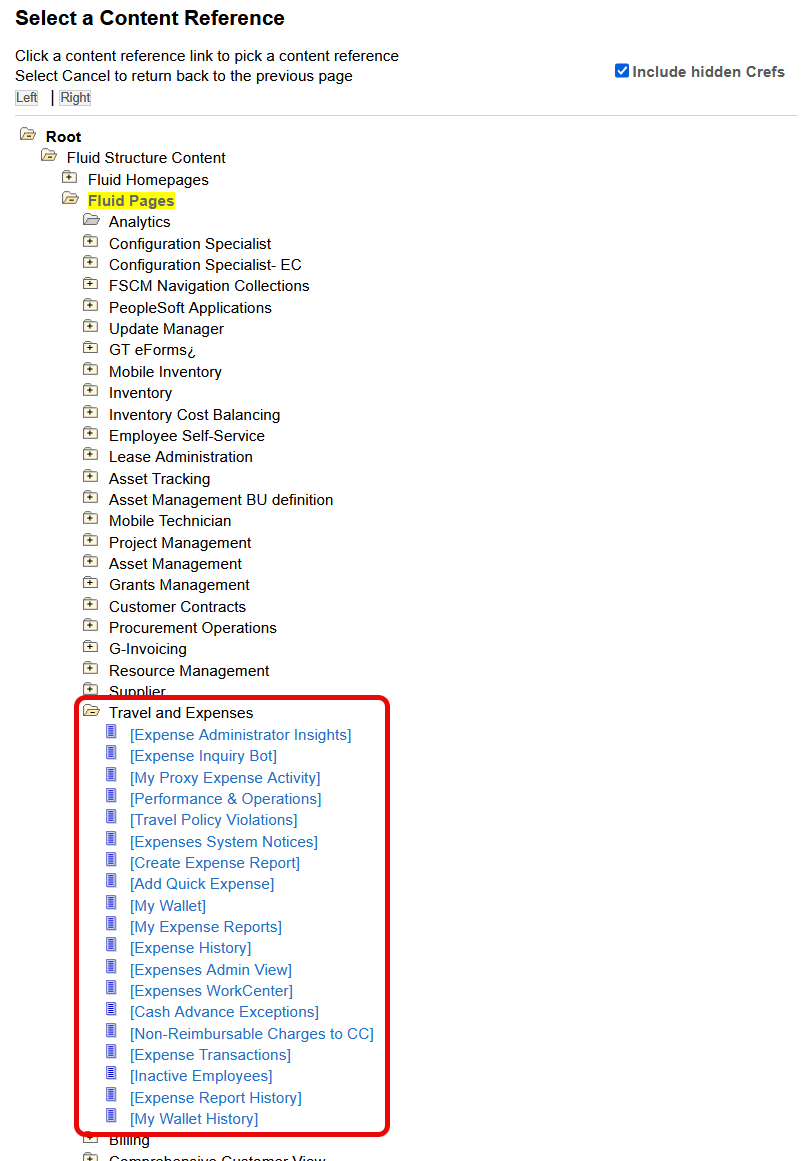
We are looking into implementing the fluid expenses workcenter. When trying to add a new link to the Links tab on the Configure Pagelet page using the Link Type of Menu Item, under the fluid pages path through the Travel and Expenses folder I do not see any links available for the fluid travel authorization. I think there should be a link to the fluid TA search page and fluid TA create page. It doesn't make sense to be able to add links for some pages and not all pages.
1.) Navigation: FSCM > Enterprise Components > WorkCenter/Dashboards > Configure Pagelets
2.) Search for Configuration ID "EX", then select the Links tab.
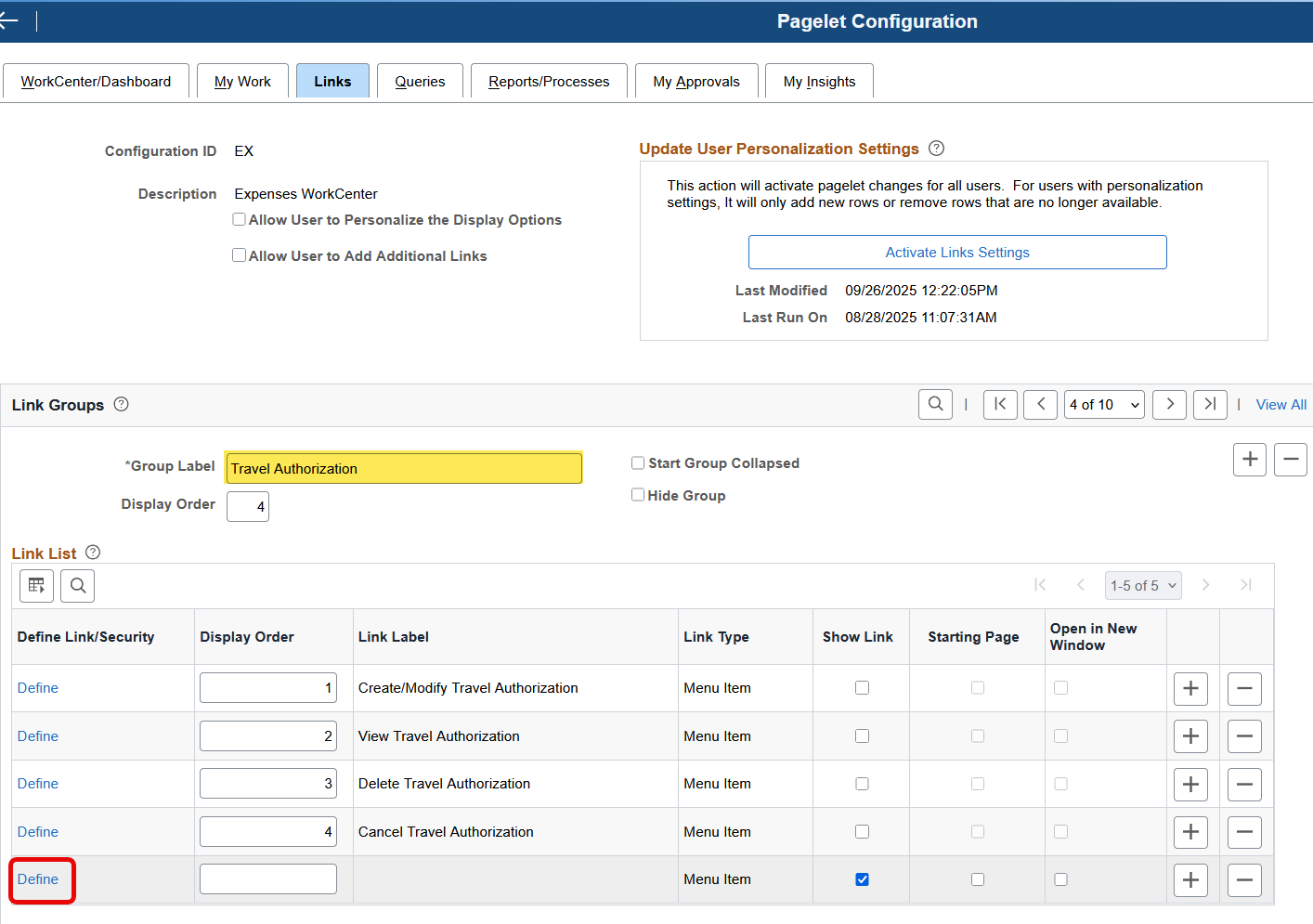
3.) Under the Group Label "Travel Authorization", add a new row and then click the Define link.
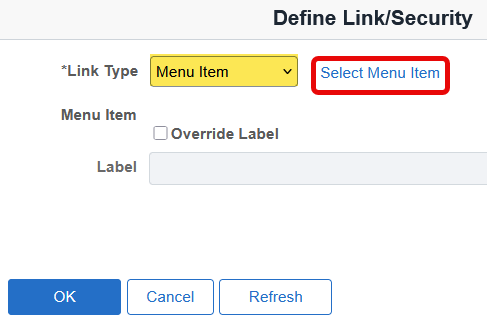
4.) Select a Link Type of Menu Item and then click on the Select Menu Item blue link.
5.) Fluid travel authorization pages are not listed under the fluid structure content.
Re: XML kernel doesn't enable debug level log
I don't know, might require capturing logging.

Re: For OEM 24ai - Installing the Enterprise Manager using non-SYS user
Thanks for the SR Craig. My colleague will assist to resolve the issue.

Re: Customer Master Conversion
Hi,
You may check similar thread:
Thanks and regards,
Anca
Re: Why does a transaction drop out of rcv_supply when it is transferred but not delivered?
Please check this document for more details on mtl_supply and rcv_supply
How is the MTL_SUPPLY Table Utilized Throughout the Procurement Lifecycle Within Purchasing? (Doc ID 2527521.1)
Regards,
Sirisha
Re: XML kernel doesn't enable debug level log
Hello Community User,
David here in support. There could be some factors here like what tools release is this, did something recently change, are other kernels not producing debug logs, etc.
This issue may require a SR as more logging and troubleshooting is probably needed.
Reference knowledge,
E1: SVM: Unable to Enable Debug Logging for Enterprise Server With Tools Releases 9.2.3.1, 9.2.3.2, and 9.2.3.3 (Doc ID 2487137.1) and see workaround if you need the debug logs sooner than later.
Thank you,
David
Re: Unable to open new year: Error triggering The following combination is erroneous and does not exist
Hi @Gene C ,
You can check the following note: General Ledger FAQ for Retained Earnings (REA) (Doc ID 136510.1) :
Section 9. Unable to Open the first period in the next fiscal year because GLOOAP - Open Period fails with SHRD0180 :
During the Open/Close program, the "gloire" process will verify that there is a valid, enabled retained earnings account for each balancing segment value which had any activity during the prior years. The process needs this retained earnings account even if all the transactions for a balancing segment value net to an ending balance of zero.
See Note:1966123.1 for more information.
GLOOAP: Opening First Period of the Year finishes in error SHRD0180: gloire - Performing Action >> Ret CCID which failed Validation, does not exist (Doc ID 363583.1) :
Open Period creates the retained earnings balances for each balancing segment. In the previous year some of the companies (balancing segments) had transactions, but in the new year their segment values were disabled. Because of this Open Period request errors while trying to create balances for retained earnings(RE). The error can be also generated due to Cross Validation Rules preventing the Open Period program to create retained earnings accounts.
The code combination needs to be enabled because there are transactions for these segment values from the RE combination (even in the past). Even reversing the transactions does not resolve the issue since the balances (gl_balances table) will no longer be null values, but zero values (which is not the same and RE will still be needed).
The following sample script can help to identify the problematic code combination id; adjust this one to match your structure, please.
SELECT code_combination_id,
account_type,
start_date_active,
end_date_active,
enabled_flag,
detail_posting_allowed_flag
FROM gl_code_combinations
WHERE segment1 = &segment1
AND segment2 = &segment2
AND segment3 = &segment3
AND segment4 = &segment4
AND segment5 = &segment5
AND segment6 = &segment6
AND segment7 = &segment7;
Follow these steps:
- You need to consult the log file and check for which values and code combinations the Open Period request is failing
- General Ledger Responsibility > Setup > Financials > Flexfields > Key > Values > Query for your structure > Enable the required segment values (see the RE account defined in the Ledger/Set of Books and balancing segment values)
- Check the Cross Validation Rules and Security Rules that may prevent the code combinations from being created
- Verify Dynamic Insertion is allowed for the chart of accounts (General Ledger Responsibility > Setup > Financials > Flexfields > Key > Segments > Query for your structure and verify the check box for the purpose; else you may pre-create the accounts as needed, manually
- Run the Open Period program again
- Should it complete fine this time, verify the balance for the Retained Earnings accounts/code combinations
- You may disable back the segment values enabled in step2 if needed;you may enable back any Cross Validation Rules and Security Rules that were disabled in step3; you may remove the Dynamic Insertion option if enabled for step4
Thanks and regards,
Anca
In the Fluid Expenses Workcenter Can You Filter the My Work "Open Trans for Inactive Empl" by BU?
Version: 9.2 Image 54, Peopletools: 8.60.10
We are looking into implementing the Fluid Expenses Workcenter and found on the delivered My Work option for "Open Transactions for Inactive Employee", the user does not have the option to edit the filter by BU and there is no column for BU in the results returned after selecting that my work option. In our organization each business unit would manage their own transactions. Is there a way to add BU to the filter as an option but not make it required? As delivered it uses Filter ID EX_EMP_FLT.
1.) Navigation: NavBar > Fluid Home > ESS > Expenses tile > Expenses Workcenter tile
2.) Click the Settings tool icon, then select "Edit Filters".
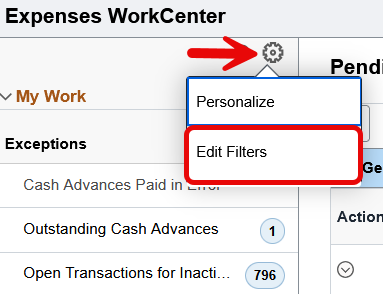
3.) Click on the Exception Link Label "Open Transactions for Inactive Employee".
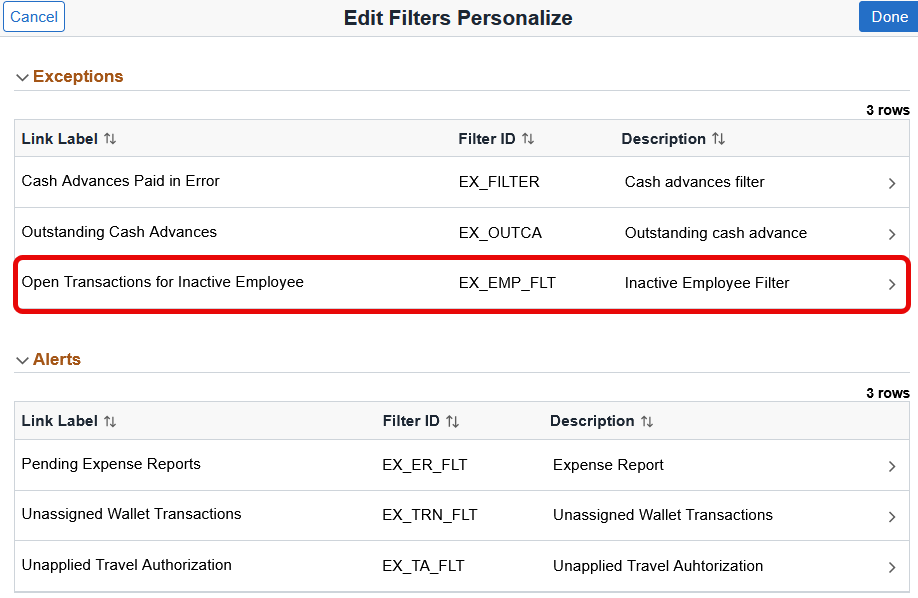
4.) There is no option to filter by BU.
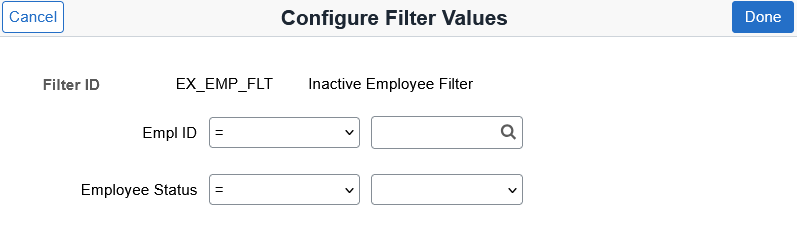
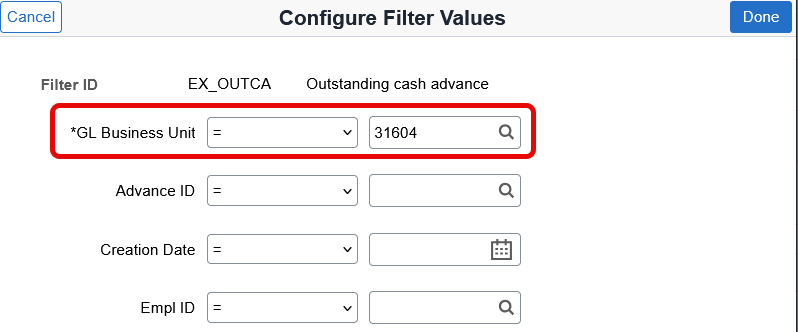
Some of the other exception links do have the BU as an option like on the "Outstanding Cash Advance".