
Best Of
Re: ATP using ASCP Setups
ATP Data Collections can only be used for customers who are:
a. Centralized Installation
b. Only using ATP for Order Management and NOT using ANY other Value Chain Planning Applications
c. If you run ATP Data Collections in Mode - Complete Refresh when you are using Value Chain Planning Applications, you will corrupt the data in the MSC tables. You will have to run Standard Data Collections with a Complete Refresh to recover from this mistake.
The ATP Data Collections section in the Note 179522.1 XLS attachment includes information on how to run Standard Data Collections to mimic ATP Data Collections.
Re: ATP using ASCP Setups
The results that ATP giving when I order an item in OM is looking absurd. When I enter 10 as quantity it is giving one date. When I enter one more line of same item with 1e5 Qty, it is still showing the same date. I have setup ASCP -ECC plan for ATP.
Can you tell me the setup step which I might have missed? Share any good metalink note which has details of using ASCP for ATP if possible.
Regards,
VN
 655919
Re: ATP using ASCP Setups
You need to have an ATP rule to be able to use ATP.
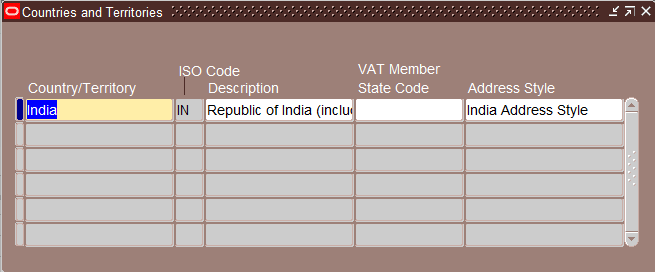
Re: Unable to See the Newly Created Address Style
Hi John,
I have performed the step mentioned in the Note 1073918.1 i.e. Update of Look Up Code, now it's showing. Thanks for the quick support.
 Uday Y
Re: experiencing issues with Oracle forms builder not starting up after latest Edge updates? (on win11)
So if I were to guess, you are probably dealing with a known issue that has been corrected. If you are using Forms 12.2.1.4, apply the latest/last Quarterly Patch (36808865) then set the following in the Registry for Forms:
TK2_DELAY_WIDTH_CALC = 1

Details about Forms Quarterly Patch Release can be found here:
https://forums.oracle.com/ords/apexds/post/oracle-forms-quarterly-patch-availability-news-2966

Re: Converting file to text
Hi Nik
As Cezar has said, a CSV file is a text file. If all you want to do is rename it so that instead of being called "myfile.csv" it becomes "myfile.txt" then a simple Groovy script should do the trick:
import com.oracle.e1.common.OrchestrationAttributes;
import java.text.SimpleDateFormat;
// Non-standard imports...
import java.io.File;
HashMap<String, Object> main(OrchestrationAttributes orchAttr, HashMap inputMap)
{
HashMap<String, Object> returnMap = new HashMap<String, Object>();
// Define input parameters...

String csvPath = (String) inputMap.get("CSV File Path");      // e.g. "path/to/your/file.csv"

String txtPath = (String) inputMap.get("TXT File Path");      // e.g. "path/to/your/file.txt"


// Define File objects for both files...

File csvFile = new File(csvPath);

File txtFile = new File(txtPath);


// Rename the file...

boolean success = csvFile.renameTo(txtFile);

returnMap.put("Rename Successful", success.toString());


return returnMap;
}

Hope it helps
Jonathan
MasonJo
How to Clear Metadata in BI Publisher Standalone

The mbase.bin stores the metadata for reports and data models. When response is slow, if using the File System as the Catalog, Folder/Directories/Reports are traversed to the catalog using the file system. This document explains the steps to clear metadata (mbase.bin) in standalone BI Publisher to improve performance. Doc ID 3025277.1.
#EBS #BIPublisher

“Max Fetch Size” Setting for the PSAPPSRV and PSQRYSRV Processes on the Application Server

This new document explains the "Max Fetch Size" settings for the PSAPPSRV and PSQRYSRV processes on the Application Server.