
Best Of
AR Trx Dist BETC GDF single-row subquery error, when fund_value exists in multiple ledgers
Hi All,
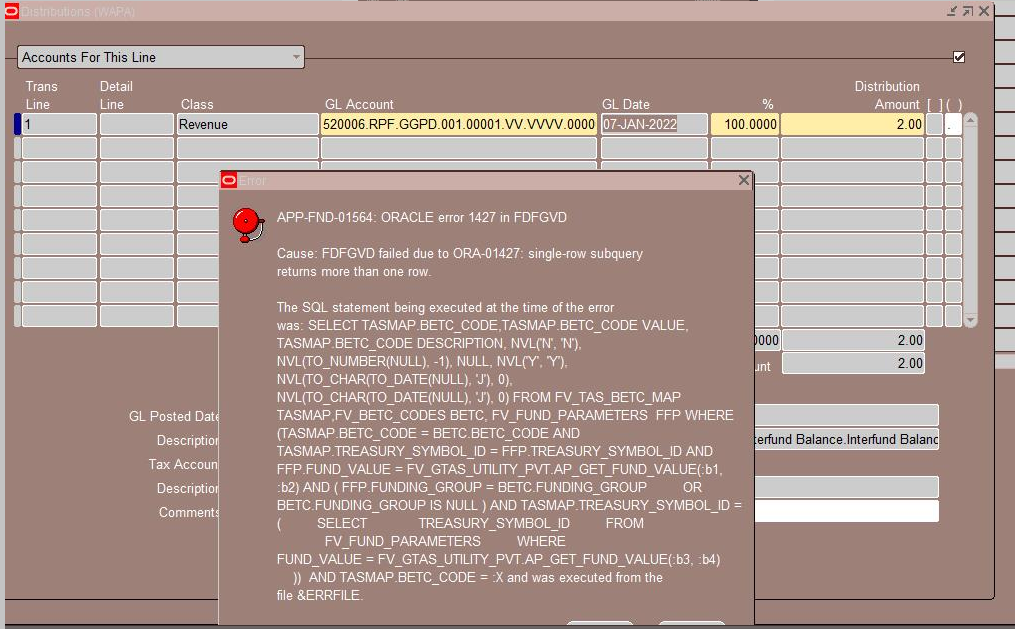
For any agencies/installs who happen to have the same fund values used across multiple ledgers, there's a bug in the new FV_AR_BETC_GDF_FG value-set which could be encountered. This value-set is used for the Agency BETC GDF (JG_AR_DISTRIBUTIONS DFF/attribute1) on AR Transaction Distributions, and results in ORA-01427 single-row subquery error when an AR Trx Distribution uses a Fund that exists in fv_fund_parameters for multiple ledgers. This value-set was recently introduced with the new FV Funding Group changes (primarily to help drive DISGF vs DISNGF BETC differently on the disbursement side). We've included the latest FV Funding Group functionality updates as part of our G-Invoicing patching, so we're running into it as part of our G-Invoicing testing.
Example error:
There are a variety of ways it could be fixed, but we fixed by updating the FV_AR_BETC_GDF_FG value-set to add the following condition:
AND set_of_books_id=FV_GTAS_UTILITY_PVT.GET_LEDGER_ID
Updated definition:
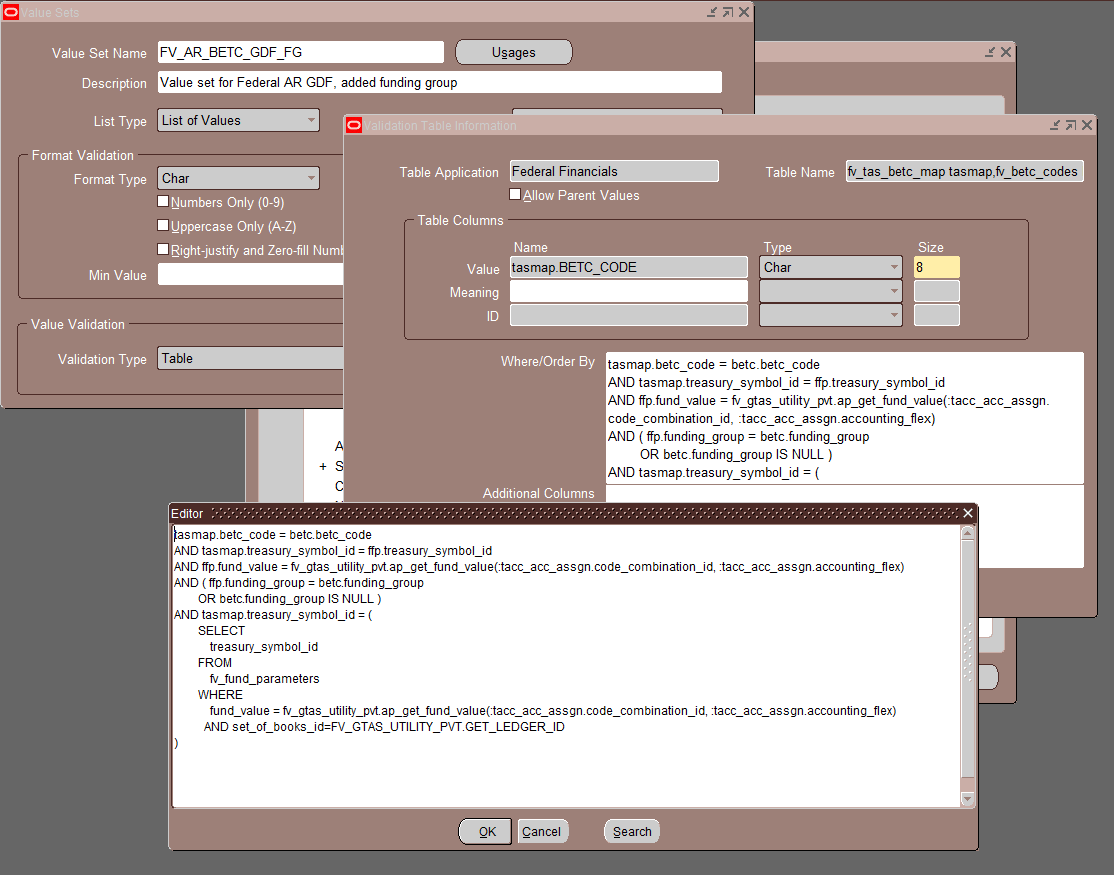
This fix mirrors how the issue is handled in the FV_AR_BETC_GDF value-set, which was used for the BETC GDF previous to the funding group enhancement.
I did an SR to ask Development to fix in a later release, but was told "Unfortunately, development will not be providing an update regarding the value-set definition. However, they are aware of the issue." So, just thought I'd share here.
Good Luck!
Larry

Re: R31410 and Work Order Dates
Hello Jason,
This typically is the work order start date.
Per KM Solution E1: 31: What date on the work order header determines Item Effective Dates when parts list and routing are attached (P48013) Enter Change Order (Doc ID 2822368.1), by default, these dates are checked against the Start Date of the work order (F4801 STRT). However, when running the Work Order Processing program (R31410), processing option #1 on the Defaults tab controls which date is used for this purpose. The help text reads, "Use this processing option to specify the default work order date for effectivity checking. If you leave this field blank, the system uses the work order start date." If this option is set to 1, the Work Order Date (F4801 TRDJ, the date that an order was entered into the system) will be used instead.
Regards,
Jeff

Re: Unifier Cost Sheet - locking budget distribution for many projects at once
Hi Karen, There is no bulk lock/unlock through the UI, but we did add a REST API in 24.10 to update the cost sheet lock status
Re: Is it possible to update the "Type of Hire" on the Hire tab within the Manage Application page?
I know many customers have them in job data (hire - 08/13/2025) and insert a term row (8/13/2025) with the action reason of termination - no show. They want to track if this person applies again for a job that they never showed up.
-Julie

Re: How to change phone number on oracle support ID?
Hi @User_QQ244 ,
If you are asking about the two-factor authentication number that you use to log into the support portal:
- Your default factor is set during initial MFA registration. To add an additional phone number, modify, or change your default verification method, go to My Login Profile page., and use the Action menu under Authentication Factors.
Please refer to the FAQ:
Regards,
Jennifer B
My Oracle Support Community Administrator

Re: ATP using ASCP Setups
The ATP/CTP based planning ouput option is chosen if you are running a collection program in the ASCP module and a plan based on the collected data pulled ealier.In this case you have to define a plan and check ATP flag and define options and then run the plan.Then the option ATP/CTP based planning oputput will give you the output based on the above plan.Without that it is as same as the ATP based on collection data(as in OM).
Re: ATP using ASCP Setups
ATP Data Collections can only be used for customers who are:
a. Centralized Installation
b. Only using ATP for Order Management and NOT using ANY other Value Chain Planning Applications
c. If you run ATP Data Collections in Mode - Complete Refresh when you are using Value Chain Planning Applications, you will corrupt the data in the MSC tables. You will have to run Standard Data Collections with a Complete Refresh to recover from this mistake.
The ATP Data Collections section in the Note 179522.1 XLS attachment includes information on how to run Standard Data Collections to mimic ATP Data Collections.