
Best Of
Re: BSSV database operation
Hello,
I am not sure about data recovery, but your developer may use the samples from the document I provided earlier.
Thank you!
Best regards,
Cezar

Re: BSSV database operation
Hello,
From your description is not clear what you want to test, but I believe you want to directly connect from BSSV to the database.
There is a table I/O sample in the "E1: BSSV: DB Operation - Closing the Database Connections for Internal and Published BSSVs (Doc ID 1485967.1)" document.
Thank you!
Best regards,
Cezar
Re: Archiving Media Object files from FTP location
Hi Omkar
Column GDTXKY (Object Key) on the Media Objects table, F00165, contains the document number associated with the attachment and coupled with GDOBNM (Object Name) and GDMOSEQN (Seq No) provides a unique key.
GDOBNM identifies the form the attachment is available on, e.g. "GT4311" for purchase orders
GDTXKY is a concatenation of the company, document type, document number and suffix, e.g. "00010|OP|1234|001"
GDMOSEQN is just a numeric value, e.g. 1, 2, 3, etc
You can use SQL to split out the GDTXKY value into it's separate parts. For example the following works over an Oracle 19c database:
select gdobnm as Object_Name
, gdtxky as Object_Key
, substr(gdtxky, 1, 5) as company
, substr(gdtxky, 7, 2) as Doc_Type
, to_number(substr(gdtxky, 10, instr(gdtxky, '|', 10)-10), '99999999') as Doc_No
, substr(gdtxky, instr(gdtxky, '|', 10)+1, 3) as Suffix
, gdmoseqn as Sequence
, case gdgtmotype
when 0 then '0 (Text)'
when 1 then '1 (Image)'
when 2 then '2 (OLE)'
when 3 then '3 (Shortcut)'
when 4 then '4 (Vendor)'
when 5 then '5 (URL)'
else to_char(gdgtmotype)
end as Media_Type
, gdgtitnm as Description
, gdgtfilenm as File_Name_or_Link
, gduser as User_ID
, to_char(to_date(to_char(gdupmj+1900000), 'YYYYDDD'), 'DD/MM/YYYY') as Date_Added
, gdtday as Time_Added
from proddta.f00165
where (gdtxky like '%86456%' or gdtxky like '%107849%' or gdtxky like '%86546%')
and gdgtmotype <> '0';

Hope it helps
Jonathan
 MasonJo
Re: PS to CS STN in alerting phase
Thank you Dave.
We advanced few step ahead, so the question is not relevant in particular, but the general problem of SRVCC failure in alerting phase still remains.
Actually SBC shall not send XML MIME body to SCC AS. The content of INVITE is described in A.17.3 of 3GPP TS 24.237 (ETSI TS124 237), V18.0.0. In our case SRVCC procedure fails on step #19: SBC terminates PS leg before MSC brings the CS leg into deliver state. An SR is opened, but support team hasn't been progressing in analysis for 14 days.
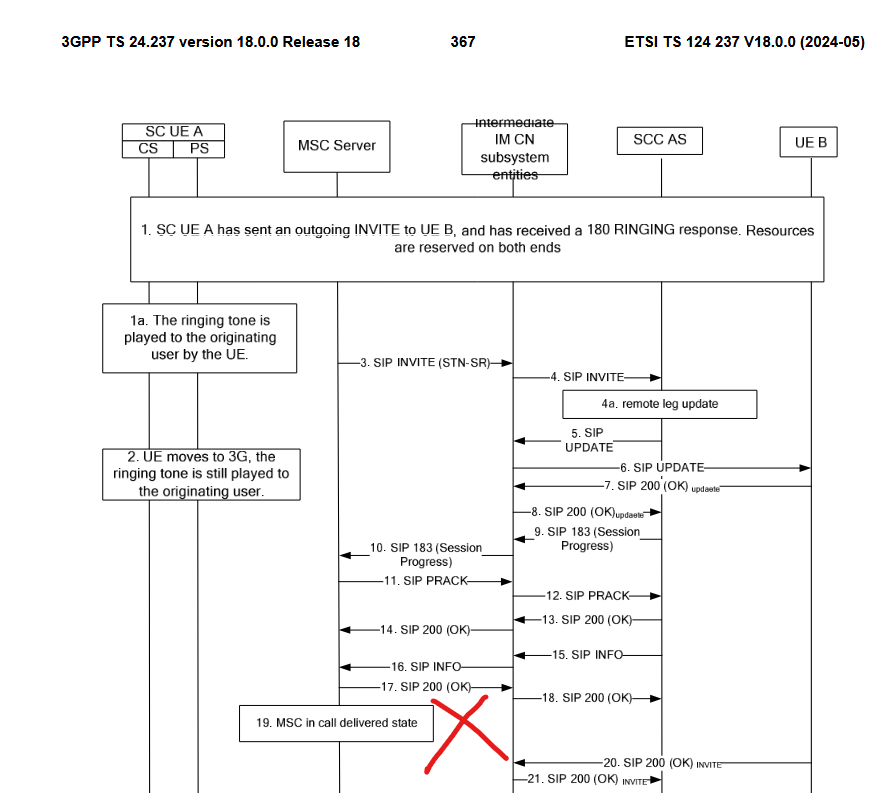
We see that SBC terminates PS leg because of ASR with abort-reason "PS_TO_CS_HANDOVER" received from PCRF for the Rx session created for PS call leg and here we have doubts:
- In case if the reason of the problem is on SBC, then shall SBC ignore the ASR, does not terminal PS leg and wait for SCC AS to send 200OK as a proof that the call has moved to CS ?
OR
- In case if the reason of the problem is on radio, then probably MME or SGW releases the bearer for PS leg too early. So, step 17 happens somewhere between steps 10 and 11 (scheme in 6.2.2.2 of 3GPP TS 23.216)
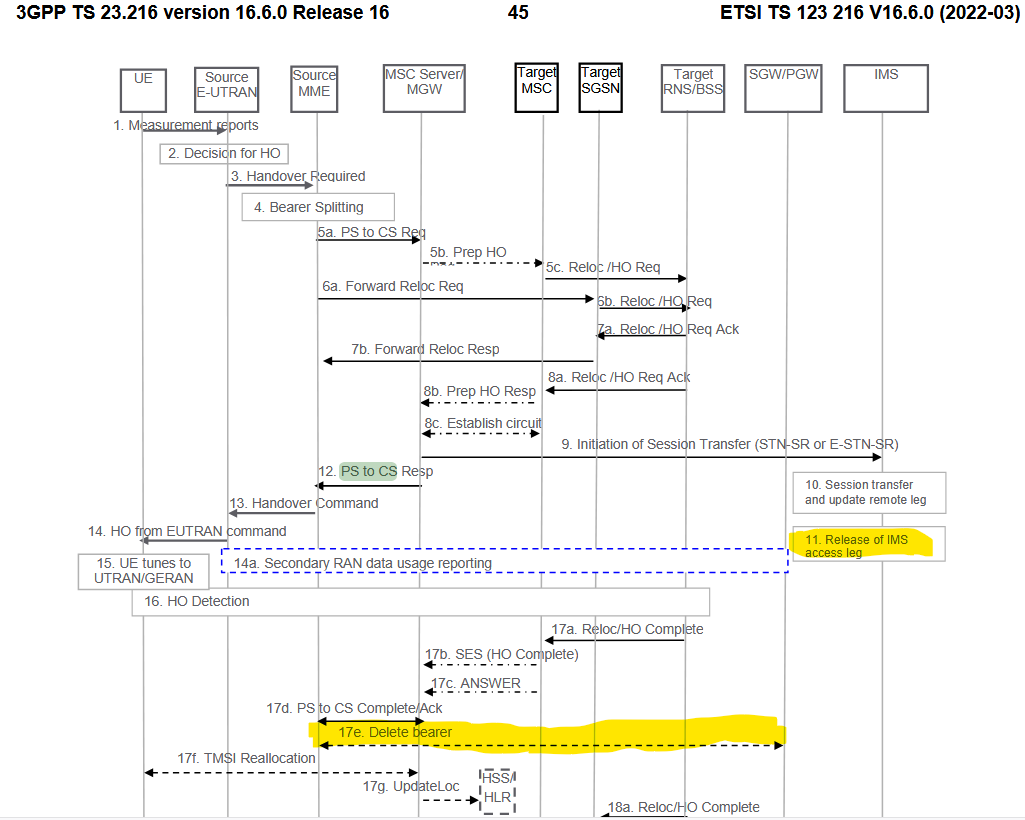
When this story ends, I will publish a complete scheme of interactions on Rx, Gx, Gm, Mw, Ma during the SRVCC in alerting phase for the explorers in the future.
Regards,
Daureen
Re: Clarification on Oracle SOA 11g to 14c Migration Roadmap
Hello Anjaneya,
Direct migration from SOA 11g to SOA 14c is not possible/supported
SOA Suite and Business Process Management 12c (12.2.1.4.0) is the only starting point in upgrading to SOA 14c version
Then, the upgrade process should be carried out incrementally to 12.2.1.4.0, if you are running SOA 11g (11.1.1.7) or earlier. You must first upgrade to 11.1.1.9 before you can upgrade to 12.2.1.4.0
So upgrade process will be
11.1.1.7.0(or earlier) → 11.1.1.9.0 → 12.2.1.4 → 14c
You can refer to these sets of documentation
11.1.17.0 → 11.1.1.9.0
https://docs.oracle.com/middleware/11119/core/FUPSS/toc.htm#FUPSS
11.1.1.9.0 → 12.2.1.4
https://docs.oracle.com/en/middleware/fusion-middleware/12.2.1.4/fupss/introduction-oracle-soa-suite-and-business-process-management-upgrade.html#GUID-616676BB-82B0-4DE6-99A1-5AFD3C65AB62
12.2.1.4 → 14c
https://docs.oracle.com/en/middleware/fusion-middleware/14.1.2/fupss/introduction-oracle-soa-suite-and-business-process-management-upgrade.html#GUID-92A61938-3AC1-417C-B990-A834AF90E8B3
Thank you,
Cristian
Re: API or Interface table to Update Min Max Quantity at Organization Level
If the response on this thread was helpful, please close this thread by choosing the "YES" on that comment for "Did this answer the question?". This helps identify effective monitor threads and encourages community users to assist others by providing potential solutions.

Re: GMF BATCH QUANTITY - IN THE REPORT BATCH INGREDIENTS QUANTITY TOTALLY DIFFERENCE
Hello -
The formula will be scaled to the standard quantity on the recipe validity rule.
Thank you.

Re: SINGLE BATCH SCALLING ISSUE
Hi,
The only way to stop a product or ingredient from scaling is to set the Scale Type on the product or ingredient line to Fixed.
Regards,
Glenn
Re: I am experiencing a critical internal 11.2.0.1 ORA-06512+ORA-00600+ORA-07445+ORA-00602
Hi,
According to the trace, you might be hitting ORA-00600 [13011] when delete from MGMT_SYSTEM_PERFORMANCE_LOG table (Doc ID 2227027.1)
Re ORA-00600: internal error code, arguments: [kgscCacheHit] - there are multiple bugs that might be related, but to narrow it down you need to file an SR.
Please note that 11.2.0.1 version is extremely old. You should upgrade asap.
AFAIK, your version is not supported unless you have upgrade license and you are on 11.2.0.4 and applied the latest PSUs.
Refer to Release Schedule of Current Database Releases (Doc ID 742060.1)
Br,
krisz

Re: API or Interface table to Update Min Max Quantity at Organization Level
Hi
As workaround you can use INCOIN to import the changes:
See the following example:
INSERT INTO MTL_SYSTEM_ITEMS_INTERFACE
(ORGANIZATION_ID,
MAX_MINMAX_QUANTITY,
MIN_MINMAX_QUANTITY,
SEGMENT1,
PROCESS_FLAG,
TRANSACTION_TYPE,
SET_PROCESS_ID
)
VALUES
(&org_id,
&max,
&min,
'&item_code',
1,
'UPDATE', --CREATE or UPDATE
1);
commit;
Then run item import program.
For more information, please refer to below note:
Inventory Item Open Interface (IOI) Service Request Template (Doc ID 458544.1)
Hope the above helps
Thanks
Naga Kumari