Best Of
Searching the KB still is not working and many documents still contain broken links
So it's been more than 4 months since the go-live of the "improved" MOS and still everything is broken all over the place. I really can't imagine how on earth Oracle has not yet fixed the many issues that this disgraceful new portal was born with.
Most notably, searching the KB (the most important feature of a KB I would say) still produces results that nothing have to do with the search terms one has provided. Even if you search the exact document title you won't be able to find it. Give it a try and search for "Installing Oracle E-Business Suite Integrated SOA Gateway, Release 12.2", you will find NOTHING that matches.
So maybe let's search it by the old document ID - 1311068.1, again NOTHING.
But still if you open up KB483063 it contains a link to 1311068.1, you click on it and guess what? THE LINK IS BROKEN

I feel like I'm being made fun of. Why can't Oracle just admit that this portal is a complete and total failure and revert back to the old one? It would demonstrate at least a minimum of attention for its customers, but apparently Oracle doesn't care about its customers anymore (if it ever did).
 Fr4nk
Fr4nk
Re: BIGNAP01 How to default the line description and Item Id from Billing invoice to AP Voucher?
Hi Shruthi,
This is currently working as designed.
When populating data from BI to AP staging table, BI only populates all data required by AP.
For example, in the SQR file bignap01.sqr, the DESCR field is populated as blank in PS_VCHR_LINE_STG table.
You can follow below approaches:
- Raise an enhacemnt on Idea space and request item id and descripsioon to be populated in the same way as on BI.
- Customize bignap01.sqr by populating VCHR_LINE_STG.DESCR field with the BI_LINE.DESCR
Regards,
Ciprian
Re: PeopleSoft Travel and Expenses: Turn off Budget Checking for Travel Authorizations
Hi All,
I have replicate the issue in Image 56 and raise defect with development team.
Bug 39187959 - ISSUE WITH BUDGET CHECKING REQUIREMENT WHEN COPYING TAS TO EXPENSE REPORT
Regards,
Gireesh
Re: current logons
Hi,
This chart shows the mean number of successful logons (active sessions) over time. Here's how to interpret it in the context of your connection pool configuration.
Baseline behavior: The chart shows a steady baseline of approximately 120–130 concurrent sessions during off-peak hours (evenings and nights). This aligns with your jdbc.MinLimit=25 setting — the minimum connections are kept alive, along with other persistent connections such as monitoring agents, background jobs, and batch processes.
- Peak 1 (~06:00–07:30 on Apr 7): Logons spike to roughly 370, which is notably close to your jdbc.MaxLimit=350. This likely represents the morning login rush when users and application threads start competing for connections. Because the count exceeds 350, some sessions may be coming from sources outside the JDBC pool (e.g., direct DB links, admin tools, or scheduled jobs). If users experienced slowness during this window, connection pool exhaustion is a likely cause.
- Peak 2 (~13:00–14:00): A secondary spike to around 270, probably corresponding to post-lunch activity. This is well within your pool limits and should not cause issues.
Evening decline: After 18:00, sessions gradually return to baseline. Your InactivityTimeout=1200 (20 minutes) is working correctly — idle connections are being released back to the pool and eventually closed.
When this chart is useful:
You should monitor this chart for capacity planning (if peaks consistently approach 350, consider raising MaxLimit and the database PROCESSES/SESSIONS parameters), performance troubleshooting (correlate slow response times with logon spikes to identify pool exhaustion), and leak detection (if the count climbs steadily without dropping, it may indicate application code that fails to close connections properly).
Recommendation: Check your application server logs for connection wait timeouts during the morning peak. If they exist, increasing MaxLimit or optimizing connection usage in your application would be advisable.
Regards,
 asahide
Transforming the PeopleSoft Experience: New PeopleSoft Landing Page
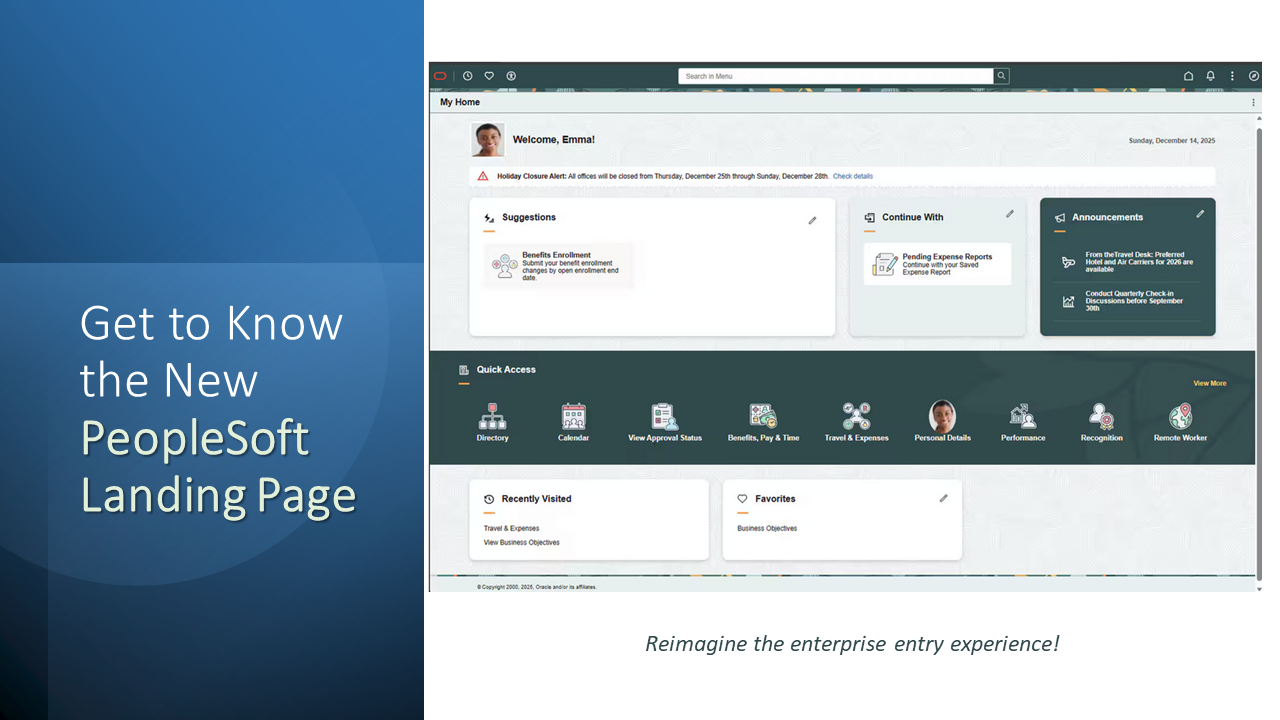
For years PeopleSoft users have navigated a maze of role specific tiles, juggling multiple homepages, and notifications. The result?
Friction, missed approvals, and a fragmented user experience. The PeopleSoft Landing Page rewrites that story, delivering a single, fluid, role aware homepage that puts the most critical actions and information right at the user’s fingertips.
In this post we explore why this change matters, how it works, and the tangible business value it unlocks. Get details here! https://bit.ly/41zVEEX
Re: Flashback a PDB in a data guard environment
Hello,
After flashing back the PDB on the primary and opening it with RESETLOGS, your standby MRP will terminate with ORA-39874. If your standby is open in read-only mode (Active Data Guard), you must fully shut it down and restart it in MOUNT mode (SHUTDOWN IMMEDIATE; STARTUP MOUNT;) before restarting MRP, this is the mandatory precondition for automatic PDB flashback to succeed on the standby, because MRP cannot execute the internal automatic PDB flashback while the CDB is open. Once mounted, issue ALTER DATABASE RECOVER MANAGED STANDBY DATABASE DISCONNECT; and monitor the alert log for the confirmation message . If automatic flashback fails at that point (insufficient flashback logs or flashback not enabled on standby), your fallback is to manually execute FLASHBACK PLUGGABLE DATABASE <name> TO RESTORE POINT <rp_name>; on the standby via RMAN, or restore the PDB datafiles directly from the primary using RESTORE PLUGGABLE DATABASE <name> FROM SERVICE <primary_tns_alias>; before restarting MRP."
Cheers
Arsalan

Re: Flashback a PDB in a data guard environment
Hi,
To my understanding, Oracle 19c supports this scenario.
Here is a step-by-step outline:
(1) Ensure flashback is enabled on both primary and standby, and _standby_auto_flashback is TRUE.
(2) On the primary, close the target PDB and flashback it to the restore point.
(3) Open the PDB with RESETLOGS.
(4) On the standby, the MRP will terminate with ORA-39874.
(5) Place the standby in mount mode and restart MRP — it should automatically flashback the PDB and resume recovery.
If automatic flashback fails, manually restore that PDB's datafiles on the standby from a backup taken before the flashback SCN, then restart MRP.
Note that I have not tested this myself, so please verify in your own environment first.
Regards,
asahide
Re: Requisition Order Sheets in Fluid - Image 39
Hi Evelyn,
Are you referring the order sheets in eProcurement ?
The order sheets in eProcurement → requisition is displayed based on the Requisition page Navigation (eProcurement > Administrative Tasks > Requisition Page Navigation )
Thanks,
Raj M
Re: Looking to get total numbers of inbound calls monthly
Thank you Daureen, I really appreciate it.