Best Of
Re: Datasource conflicts
Hello,
Yes, it should work when dealing with business data.
Please keep in mind not to override OCMs for system tables and map them to specific roles/users, especially when using Virtual Batch Queues and output is stored in database.
Here are some articles describing possible issues:
KB594032 - E1: UBE: OCM Unable To Redirect UBE Batches To Correct Enterprise Server When Using VBQ
KB301847 - E1: UBE: UBE Submitted Through RUNUBE With Batch Mode or Through RUNUBEXML, Ends in Error When It Is Submitted by a Specific User
KB398494 - E1: UBE: After Setting up the UBE Output to Be Stored in Database From Work With Default Output Locations (P98617), the Output of the Newly Submitted UBE Cannot Be Fetched Although the UBE Status in Work With Submitted Jobs Is Done (D)
Thank you!
Best regards,
Cezar

Re: Datasource conflicts
Hello,
The database data sources cannot be activated/deactivated. Only OCMs can be.
From your description you want to have the OCM active for QA env and inactive for PD environment, or the other way around.
These OCMs (active and inactive) will point to the same schema.
If my undertsnading is correct, then yes, you can have this configuration, but each server map has to be stored in separate schema. You will have to manually switch the server maps in JDE.INI
Thank you!
Best regards,
Cezar
Re: WLS patch
Hello Team,
The way to check if the following Patch 38452573 - WLS STACK PATCH BUNDLE 12.2.1.4.250919
has already been applied to your environment is to run the "OPatch lsinventory" command, such as :
In Linux/Unix:
$ cd <DOMAIN_HOME>/bin
$ . ./setDomainEnv.sh ( please, notice the space between the 2 dots)
$ cd $MW_HOME/OPatch
$ ./opatch lsinventory > lsinventory.txt
In MS Windows:
cmd> cd <DOMAIN_HOME>\bin
cmd> setDomainEnv.cmd
cmd> cd %MW_HOME%\OPatch
cmd> opatch lsinventory > lsinventory.txt
Then, open lsinventory.txt in a text editor such a VI (on Linux) or Notepad (on Windows) and search for 38452573.
If 38452573 is found, then this Patch 38452573 - WLS STACK PATCH BUNDLE 12.2.1.4.250919 is applied to your WebLogic Server installation.
This information will help you too.
Best regards,
Stephan
Re: WHERE IS THE JDE UPDATE CENTER???
I have to clear browsing history and cookies. Then I can get past the 400 error.
Re: WHERE IS THE JDE UPDATE CENTER???
Update Center is still where it was -
So the links should still be okay…but as @Rochelle S. already said, there's something wrong with the combination of a modern browser and the page over the last few months. Only works on chromium-based browsers for me or on Incognito Firefox 🤷

How to download multiple patches at once
In the old MOS it was possibile to select mutiple patches and a "download" button would popup, allowing you download a list of patches by simply clicking on each patch name.
With this new MOS I can still select mutiple patches, but there's no download button:
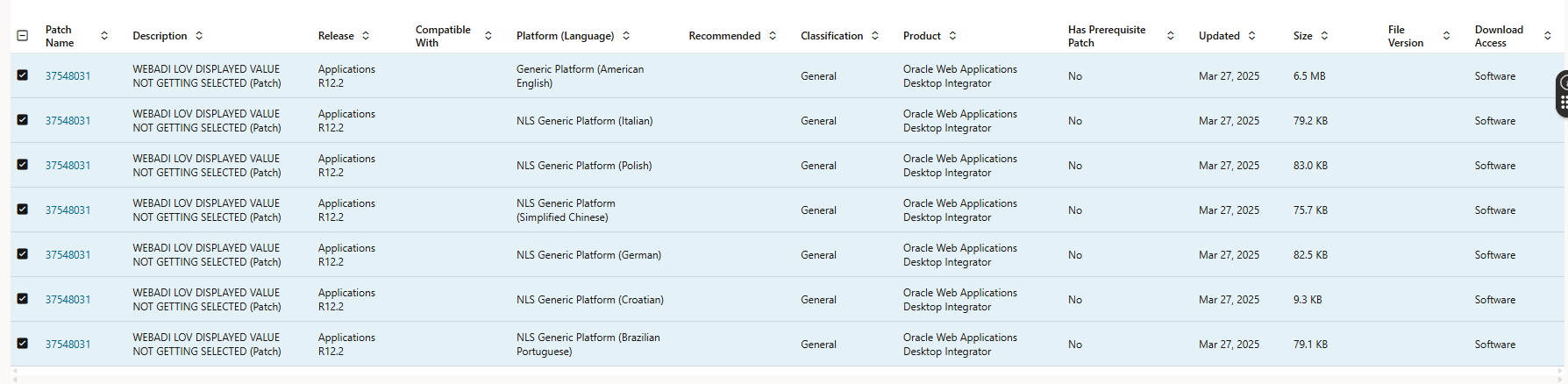
What's the purpose of the check box on the left side if then I still have to open each patch to finally reach the download button?
This new support portal is the worst I've seen in ages.
 Fr4nk
Fr4nk
Re: Error: Update of this column is not allowed because Printed, Posted, or Applied Transaction(s) exist
This is solution for your issue
Responsibility: Receivables Manager
Navigation: Setup > System > System Options
Select the Trans and Customers tab
Enable the checkbox "Allow Change to Printed Transactions"
Save the change.
Best Regards.
Moustafa Fadel.
Re: E1 31 How to know which components are pending to issue
Hello,
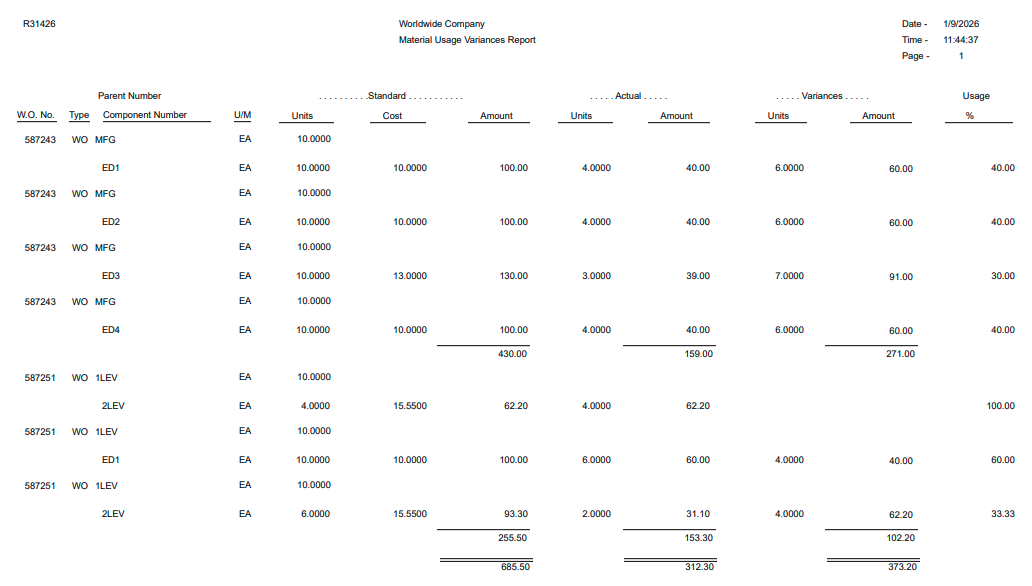
The closest report that I found that provides the information you're looking for is the Material Usage Variance Report (R31426). Perhaps you could use this batch program with a filter on open Work Order statuses (e.g., SRST greater than 40, and SRST less than 95). This report shows the usage percent for both units and cost:
Another option could be to use the V3111JC business view (table join on F3111, F4801 and F4801T), and in databrowser, create a query using the Work Order Status and a comparison between the Transaction Quantity and the Quantity Ordered.
Many thanks,
Eric
Re: How to prevent SBC from using RURI host of a received REGISTER as a next-hop?
Tim,
I have applied a HMR that replaces RURI host with the local IP of the ingress sip-interface. With 30000 registrations on the sip-interface it does not affect the sipd load, although to me it seems bit odd - to manually fix the default behavior of SBC. I have checked also non-IMS deployment, and it behaves in the same manner, so this is not IMS specifics.
Regards.
Daureen