
Best Of
Re: What are the fluid equivalents of these pages?
Hi,
The fluid manager view of the timesheet would be the fluid Enter Time page. Navigation is Manager Self Service fluid homepage > Team Time tile > Enter Time.
Regards,
Ben
Re: Enterprise Manager 24ai Release 1 Update 06 (RU 06) is now Available
Thank you @User_TDLGX. That has worked using an Incognito session.
I also double checked using my normal browser session to check that it had not been fixed and I still get the error. So it appears that Incognito is required for the moment until they sort out their 'enhanced' system.
Re: Enterprise Manager 24ai Release 1 Update 06 (RU 06) is now Available
Hi @Peter Barker ,
Even we faced this and raised SR. What I found myself is opening in incognito window will resolve this.
Re: Enterprise Manager 24ai Release 1 Update 06 (RU 06) is now Available
I have eventually found EM24ai Release 1 Update 06 (RU 06) at the following link:
https://support.oracle.com/support/?page=sptemplate&sptemplate=cp-patches-updates-view-more&cp-patches-updates-view-more=cp-patches-details
The download link then shows the following:
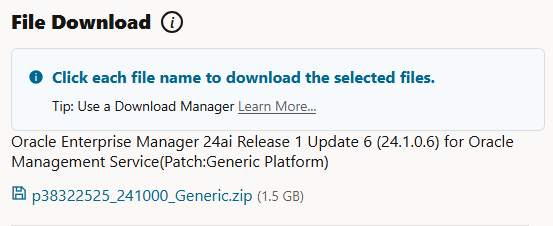
However clicking on the p38322525_241000_Generic.zip link returns a '400 Bad Request' error.
Please would you advise on how to download this patch.
Re: How to create an agent to assign order release to a shipment in OTM
Hi,
You want an agent that, after a Ground Schedule Shipment is created, automatically assigns selected Order Releases to that shipment. This is a common requirement for maximizing equipment utilization and automating repetitive decisions.
2. Typical Steps Involved
A. Define the Agent Event & Type
- Agent Type: Shipment
- Event: Shipment - Created (possibly filter further for Ground Schedule Shipments).
B. Agent Restrictions/Filters
- Add a filter (SQL Predicate or Saved Query) to select only Ground Schedule shipments if required (e.g.,
SHIPMENT.GROUND_SCHEDULE_GID is not null).
C. Actions
- Use the "Assign Order Release" action.
- This can be set to assign:
- Orders not yet assigned.
- Orders that match a certain criteria (e.g., delivery window, destination, order size).
- This can be set to assign:
- For complex logic, a custom agent action, Stored Procedure, or Integration may be needed.
3. Example: Agent Configuration Steps
Step 1: Agent Header
- Navigate to Business Process Automation > Automation Agent > Automation Agent Manager
- Create a new agent:
- Agent Type: Shipment
- Event: Created
Step 2: Agent Restrictions
- Add a Restriction to only process shipments created from Ground Schedules
Step 3: Agent Actions
- Add Action: Assign Order Release
- Select "Unassigned Orders" as the target.
- Optionally, define an Order Release Saved Query (e.g., unassigned, within source/destination parameters, compatible schedule time, etc.).
- Action Parameter: “Assign All Matches” or similar, depending on your OTM version.
- Optional: You may need to configure constraints to avoid over-assigning orders and exceeding equipment capacity.
Step 4: Activate and Test
- Activate the agent.
- Thoroughly test with sample Ground Schedule Shipments and unassigned Order Releases.
Regards.,
Monika

Re: How to deactivate an existing country code in PeopleSoft HCM?
Thanks Bhuvana for your response.
Couple of options what I thought of is
- Delete this country code from all master set up panels - As there are very minimal transaction record with this country code
- Change the prompt for country field to exclude this country code.
But in real scenarios, there could be cases where existing country codes may not be valid any more. Hence wanted to know how such situations are handled in the organizations.
Thanks
Ramky
Re: How to restrict user to enter duplicate item in Requsition
Hi Altaf Shaikh -
Thanks for using Oracle Community !
Understand you may need to personalize on restricting same items in a requisition
- Event : Requisitions form (POXRQRQ) on the WHEN-VALIDATE-RECORD trigger.
- Use a SQL query to check if the ITEM_ID exists more than once for the current REQUISITION_HEADER_ID.
- Display a custom error message: "This item is already added to the requisition."
You can also use the DB table trigger to restrict user to enter duplicate item.
- Create a BEFORE INSERT OR UPDATE trigger on the PO_REQUISITION_LINES_ALL table
- The trigger can check if the ITEM_ID already exists for the REQUISITION_HEADER_ID
regards.
Ananth

Re: How to deactivate an existing country code in PeopleSoft HCM?
Hello User_7EISC,
It does not happen often where a country doesn't exist anymore like Yugoslavia but it does happen. Probably two years ago I proposed to make an enhancement to the country table by adding effective date and active/inactive status. The analysis was it would be a significant table structure change to add two 2 key fields, and the development effort couldn't be justified given this is rare and we have higher priorities…so my enhancement request was denied. So we are aware of this issue…but at this time we are not planning to make a change to the country table.
-Julie

Re: Multiple users (or sessions) connecting via VNC to the same server
It's been some time, a problem with that is that they all 30 end up as the same account, and they can kill each other's session if they know how to and if they know the port numbers associated. And they can also change any VNC session's password, if they know how to.
The next thing to prevent that, is to create 30 OS users, with their own OS password, their own VNC server, and then each of them can SUDO as oracle.
 Mr. C
Mr. C
Re: What is fluid equivalent of following classic PeopleSoft HCM page MULTIPLE_JOBS?
Hi Sobek77,
We don't have the fluid version of those pages, we are not just converting classic pages to fluid but also "modernizing" the pages by adding new features like attachments. At this time we don't plan to modernize the Multiple Jobs page. We do have a fluid version of the Job Summary pages - we have made enhancements to the Job Actions summary page - ability to view attachments, see the before/after of what was changed on that job row, who entered the transaction, view of the warning messages, plus more.
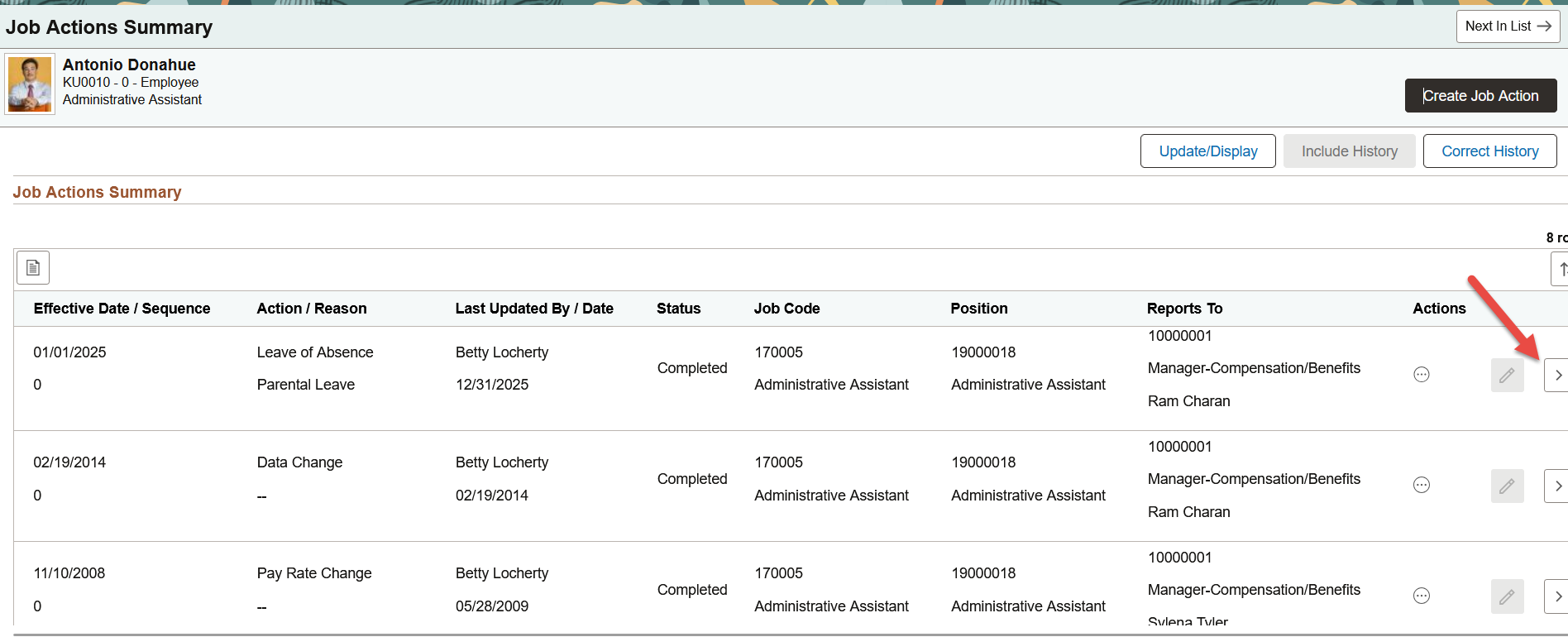
I personally use this summary page - it shows all the key important job data for employees (and those with multiple empl rcds).
KB6T\/image.png","name":"image.png","type":"image\/png","size":104409,"width":1915,"height":763,"displaySize":"large","float":"none","downloadUrl":"https:\/\/community.oracle.com\/mosc\/api\/v2\/media\/download-by-url?url=https%3A%2F%2Fus.v-cdn.net%2F6032256%2Fuploads%2FMMR2QOLEKB6T%2Fimage.png","active":true,"mediaID":2651168,"dateInserted":"2026-01-05T20:43:00+00:00","insertUserID":1978946,"foreignType":"embed","foreignID":"1978946","embedType":"image","embedStyle":"rich_embed_card"}"> KB6T/image.png" rel="nofollow noopener ugc" target="_blank"> KB6T/image.png" alt="image.png" height="763" width="1915" loading="lazy" data-display-size="large" data-float="none" data-type="image/png" data-embed-type="image" srcset="https://us.v-cdn.net/cdn-cgi/image/quality=80,format=auto,fit=scale-down,height=300,width=300/6032256/uploads/MMR2QOLEKB6T/image.png 300w, https://us.v-cdn.net/cdn-cgi/image/quality=80,format=auto,fit=scale-down,height=600,width=600/6032256/uploads/MMR2QOLEKB6T/image.png 600w, https://us.v-cdn.net/cdn-cgi/image/quality=80,format=auto,fit=scale-down,height=800,width=800/6032256/uploads/MMR2QOLEKB6T/image.png 800w, https://us.v-cdn.net/cdn-cgi/image/quality=80,format=auto,fit=scale-down,height=1200,width=1200/6032256/uploads/MMR2QOLEKB6T/image.png 1200w, https://us.v-cdn.net/cdn-cgi/image/quality=80,format=auto,fit=scale-down,height=1600,width=1600/6032256/uploads/MMR2QOLEKB6T/image.png 1600w, https://us.v-cdn.net/cdn-cgi/image/quality=80,format=auto,fit=scale-down,height=2000,width=2000/6032256/uploads/MMR2QOLEKB6T/image.png 2000w, https://us.v-cdn.net/6032256/uploads/MMR2QOLEKB6T/image.png" sizes="100vw">