Best Of
Re: Error in P4210 failed to open cursor due to reach the max #cursors (100)
Hello,
You logged this post with the Manufacturing Communities for the Sales Order Entry Application. The P4210 should really fall under the Distribution communities.
Nevertheless, this problem seem to be a memory leak. Which Release are you on? Do you know if you are current in Code for for all Business functions related to the P4210? What are the steps and the process you are taking to cause this failure? The first thing I would suggest making sure you are current in code.
Once you confirmed you are current in code, It would probably be best for you to open a Service Request with Oracle Support.
Thank you,
Re: Expense Report: Enhanced the Automobile Mileage feature to provide address auto-complete options
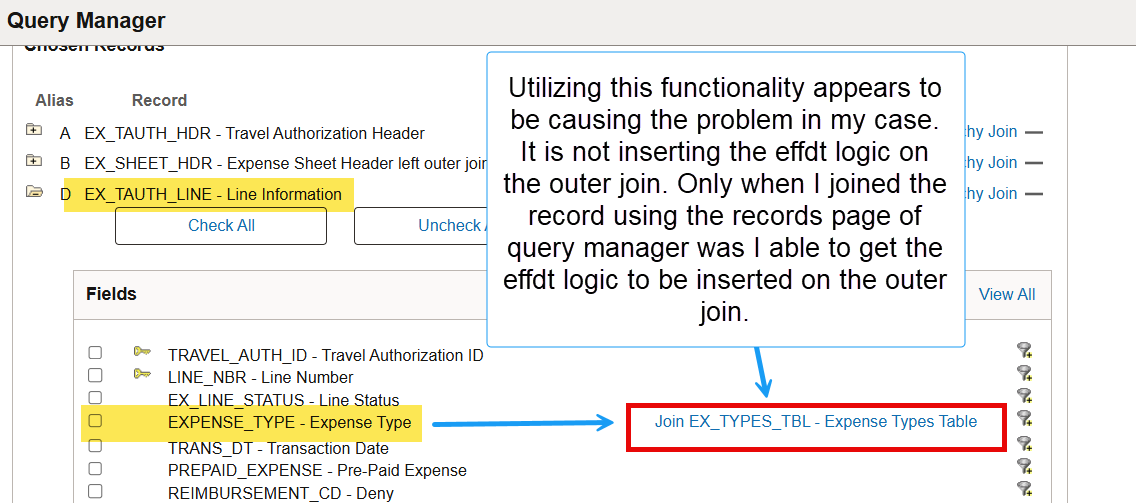
I have now successfully implemented the autofill functionality.
What we found was that a delivered object with Bug 35149380 was not moved into our testing/qa/production environments when we implemented PUM 48.URL Definition: EX_ELOC_APPID was missing. Once this was moved into the environment, the autofill functionality worked, and we are now calculating correctly.Thanks for your response to this, Pere! Greatly appreciated.Re: Mandatory Enrollment Notification for managers
Hi User_J8J9Q,
Yes, it is possible to send a notification email to the managers when a direct report is enrolled into a mandatory learning.
Please find below the explanation from PeopleBooks:
Notification Emails
When the Mandatory Enrollment process (LM_ML_ENROLL) runs, it stages data in the notification records which are then used to notify learners/managers/both about their enrollments. All learners, by default, are notified when they enroll into a class. Email notifications are also sent to alert them about the approaching due dates and when classes are overdue. Depending on the rules set, the process also sends out email notifications to managers about the enrollment of team members. All managers receive one email notification for every event (i.e. enrollment, approaching due date or overdue) during the enrollment period with an attachment of the consolidated list detailing the enrollment status of team members.
The LM_NOTIFY process can be run to send out notifications to both learners and managers about the enrollments in a Mandatory learning.
Note: The LM_NOTIFY process sends out notification emails to all enrolled learners, even when no ‘Enrollment’ notification is set in the Mandatory Learning Setup page.
The LM_ML_NOTIF process can be run to notify learners/managers/both about the approaching due dates and overdue enrollments.
The following delivered notification templates are used to define the content of the notifications that the system sends:
- LM_MAND_ENRL_CONF_ILT – Template used to send notification when learner is enrolled into a mandatory learning.
- LM_MAND_ENRL_CONF_MGR – Template used to send notification to manger when a direct report is enrolled into a mandatory learning.
- LM_ML_LRNR_APRCH_DUE_DT – Template used to send notification to learner when learner reaches approaching due date given in the mandatory learning setup.
- LM_MAND_ENRL_APRDUE_MGR – Template used to send notification to manger when learner reaches approaching due date given in the mandatory learning setup.
- LM_ML_LRNR_OVERDUE_DAYS – Template used to send notification to learner when learner has a mandatory learning which is overdue in days.
- LM_MAND_ENRL_OVRDUE_MGR – Template used to send notification to manager when learner has mandatory learning which is overdue in days.
source: https://docs.oracle.com/cd/F45080_01/elm92pbr22/eng/elm/aelm/DefiningClassDetails.html
In order to run the Mandatory Enrollment process, you need to navigate to the following page: Enterprise Learning > Learner Tasks > Mandatory Learning > Mandatory Notifications
For the benefit of your community peers, if you find that a response has provided you an answer, please click Yes for the prompt ‘Did this answer the question? Yes No’ on the comment. This helps identify effective solutions within threads and encourages community users to assist others by providing potential solutions.
Best regards,
Virginia
Re: Need SQL query used for generating AP Check Prints
Hi @User_CIC1L ,
You can use the query
SELECT t.DOCUMENT_NUMBER,
t.PAYMENT_SERVICE_REQUEST_ID,
EXTRACTVALUE(XMLTYPE(t.PAYMENT_DOCUMENT), '//InvoiceNumber') AS invoice_number
FROM IBY_TRXN_DOCUMENTS t
WHERE INSTR(t.PAYMENT_DOCUMENT, '>0.00<') > 0;
Hope this helps to design your report.
Regards,
Sadeesh
Re: How to develop PO PDF document for change requests?
Hi @Arika Johnson,
Query the required data (use PO_REVISIONS, PO_LINES_ALL, etc. to capture changes).
Option 1: Customize the standard “Purchase Order” report to display modifications.
Option 2: Build a new concurrent program/report in XML Publisher (BI Publisher).
Regards,
Sadeesh
Re: Any command to export and import OA Framework Model Personalization ?
Hi @User_T4UH1,
You can review
How To Export/Import Personalization in E-Business Suite (Doc ID 2451954.1)
Regards,
Sadeesh
Re: Error in P4210 failed to open cursor due to reach the max #cursors (100)
Hello,
Please open a service request with Distribution application support. It seems that the application (P4210) for some reason is not releasing the cache cursors. Is the application which manages the cache.
Thank you!
Best regards,
Cezar
Re: What Determines if Travel Authorization Details Link Appears in Fluid TA Approvals?
Hello @Amontiel ,
I hope all is well with you over there ;o)
Thanks for your newest post into the PeopleSoft ESA Community!!
For an Expenses Approver to be able to modify a submitted Travel Authorization that workflow has routed their way, this would be determined by the Approver Profile configuration, on the Travel Authorization row under Approver Attributes: Change All check-box, or Privilege Template.
However, note that when the User clicks on the 'Travel Authorization Details' link, the system will temporarily go out of the Fluid Approvals mode (Menu Name EOAWMA_MAIN_FL, Component Name EOAWMA_MAIN_FL, and Page Name EOAWMA_TXNHDTL_FL), and into the Fluid Travel Authorization entry mode (Menu Name ADMINISTER_EXPENSE_FUNCTIONS, Component Name EX_TAUTH_FL, and Page Name EX_TAUTH_FL).
As such, both Users should have access to the two pages: Fluid Approvals, and Fluid Travel Authorization entry components. Make sure that is the case.
I would also ensure that both Approvers have the right to approve the submitted transaction through the routing chartfield configuration (Approver Assignment set up page).
If that did not yet address the different behavior, I would then suggest to gather an online SQL (127) and PeopleCode (3788) trace file from both Users, and then compare, to see what the difference may be. Feel free to raise a new Service Request for the FIN Expenses support team for further assistance on this analysis of traces.
I hope that the information provided has clarified all your doubts. Should you have additional related questions, do not hesitate letting us know. On the contrary, if all your queries, and doubts have been successfully addressed, please make sure to mark 'YES' on the 'Did this answer the question? Yes-No' link. This will enable other Community Users to quickly identify the solution suggested, and see that this post has been successfully
answered.
Have an excellent day!
Pere Taulé
Re: Sales Order Cancellation with Approval Process
Hi Heng,
This functionality is not currently available and has been reported under Enhancement Request 10879037: ORDER LINE CANCELLATION AND AD. The enhancement has been requested for a future release.
If you're a member of the Quest Oracle Community, you can help increase its visibility by referring to the Enhancement Requests via Quest Oracle Community tab in the following document:
JD Edwards Bug Monitoring (Doc ID 1446784.2)
As a workaround, you can restrict updates or cancellations to sales orders after a certain status by configuring the Sales Order Entry (P4210) Processing Option #1 on the Process tab — "Status Code Limit for Changes". Setting this to a specific status will prevent users from cancelling or modifying the order beyond that point.
For further details, refer to:
E1: 42: Best Practices for Preventing Sales Orders from Being Created or Restrict Updates and Creations (Doc ID 1494904.1)
Hope this helps!
Regards,
Mahesh
Re: Sales Order Cancellation with Approval Process
Hi Heng,
Thanks for the update. We’re happy to help you, feel free to reach out anytime.
Regards,
Mahesh