Best Of
Re: WHERE IS THE JDE UPDATE CENTER???
I have to clear browsing history and cookies. Then I can get past the 400 error.
Re: WHERE IS THE JDE UPDATE CENTER???
Update Center is still where it was -
So the links should still be okay…but as @Rochelle S. already said, there's something wrong with the combination of a modern browser and the page over the last few months. Only works on chromium-based browsers for me or on Incognito Firefox 🤷

How to download multiple patches at once
In the old MOS it was possibile to select mutiple patches and a "download" button would popup, allowing you download a list of patches by simply clicking on each patch name.
With this new MOS I can still select mutiple patches, but there's no download button:
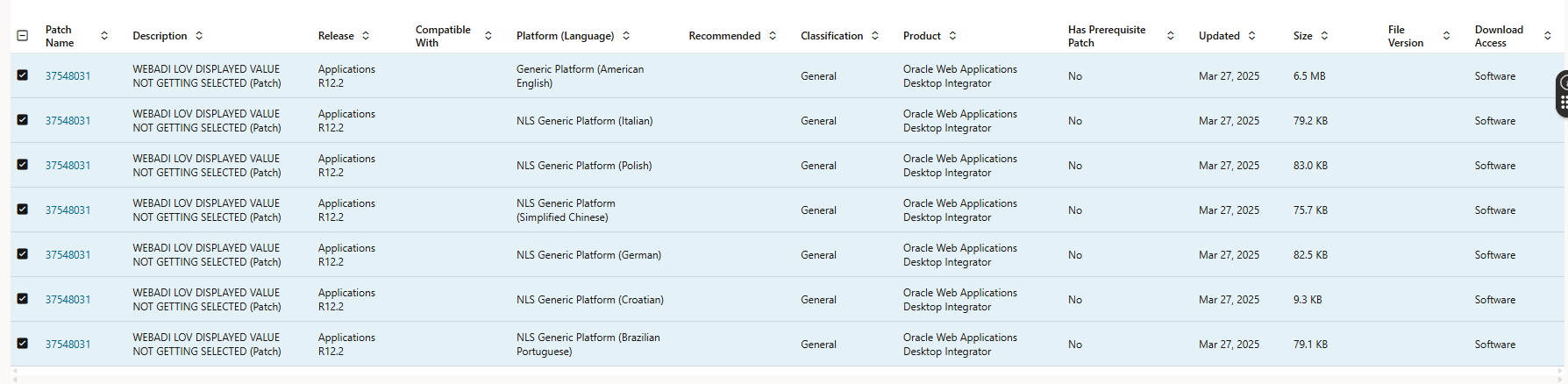
What's the purpose of the check box on the left side if then I still have to open each patch to finally reach the download button?
This new support portal is the worst I've seen in ages.
 Fr4nk
Fr4nk
Re: Error: Update of this column is not allowed because Printed, Posted, or Applied Transaction(s) exist
This is solution for your issue
Responsibility: Receivables Manager
Navigation: Setup > System > System Options
Select the Trans and Customers tab
Enable the checkbox "Allow Change to Printed Transactions"
Save the change.
Best Regards.
Moustafa Fadel.
Re: E1 31 How to know which components are pending to issue
Hello,
The closest report that I found that provides the information you're looking for is the Material Usage Variance Report (R31426). Perhaps you could use this batch program with a filter on open Work Order statuses (e.g., SRST greater than 40, and SRST less than 95). This report shows the usage percent for both units and cost:
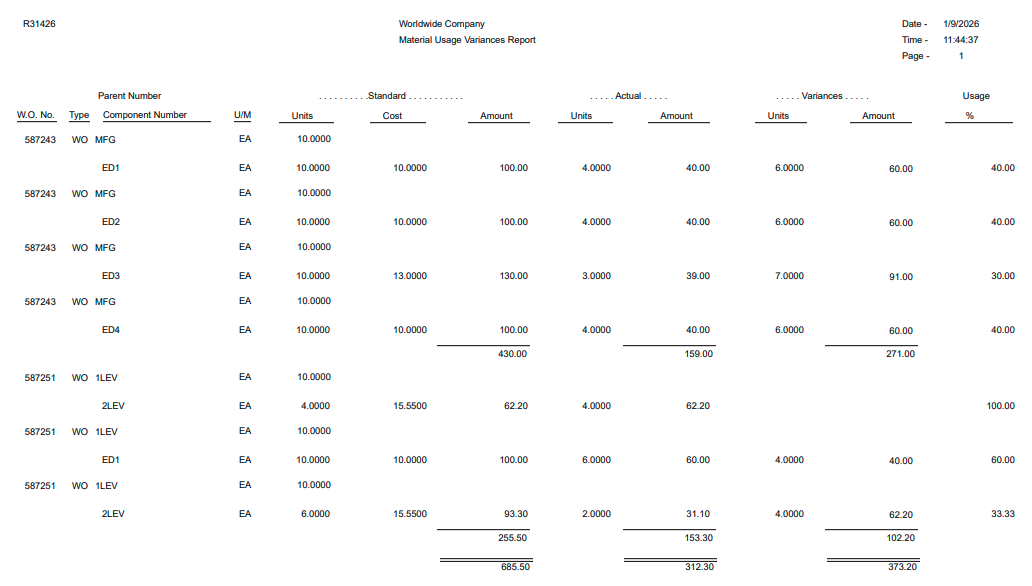
Another option could be to use the V3111JC business view (table join on F3111, F4801 and F4801T), and in databrowser, create a query using the Work Order Status and a comparison between the Transaction Quantity and the Quantity Ordered.
Many thanks,
Eric
Re: How to prevent SBC from using RURI host of a received REGISTER as a next-hop?
Tim,
I have applied a HMR that replaces RURI host with the local IP of the ingress sip-interface. With 30000 registrations on the sip-interface it does not affect the sipd load, although to me it seems bit odd - to manually fix the default behavior of SBC. I have checked also non-IMS deployment, and it behaves in the same manner, so this is not IMS specifics.
Regards.
Daureen

Re: Who Creates Item Catalog Entries in Your Organization and How?
Sorry Wendy I wasn't clear enough! I meant item master (define item).
For suppliers that you don't have punchout for, and don't get an item catalog, what's the business process for defining items (to prevent your users from just buying any item randomly from any supplier).
Re: Who Creates Item Catalog Entries in Your Organization and How?
No worries at all.
One caveat- we are still using the non-fluid ePro Requisition, vs the Fluid Requisition.
Our organization has a group that manages the creation of items in define item only. We have rules around when an item ID is necessary or if it's a onetime special request that does not have an item ID.
Procurement users are then responsible for adding and maintaining purchasing attributes- price, lead time, suppliers, auto sourcing and the like.
Most of our requests for items are driven by replenishment or external sources, which looks at the items purchasing attributes set up. For the one manually created requisitions, the priority 1 supplier populates on the requisition. Since most of our items are set to auto source, even if the requester enters a different supplier, it's still sourcing to the priority 1 supplier in purchasing attributes. I believe this is just part of the delivered sourcing processes.
We have these processes scheduled to run several times a day.
I do know if someone manually sources the requisition (expedite requisitions), it takes the supplier provided though. In those cases, no one would know any better.
As far as how, we actually do item creation and maintenance in an external system. The item definition and some pieces of purchasing attributes are integrated into PS. For new items, the group that creates and maintains the item master can send a supplier and the lead time as part of the data. They cannot send the supplier or lead time if they are making an update to the item master.
We have category managers that maintains large groups of items, typically based on contracts with specific suppliers so pricing is updated via a CI on a regular basis. Outside of that users in Procurement are responsible for maintaining the item's purchasing attributes.
For supplier changes, pricing updates and such, our admin team (me and others) can run an excel to CI to update large volumes for Procurement and do on a regular basis. Anything under 30-40 items, they would manually maintain.
Holler if you have questions, glad to help
Wendy🐞

Re: Accrual Load in R12
So, once the records are RRSL, you need to run create accounting program to get the data in XLA and "Transfer to GL".
Following points outlines the steps that needs to be followed.
Steps that need to be followed so that accrual entry will be considered by the Accrual Reconciliation Report
1. Ensure that all the accrual accounts defined under the operating unit which are used in Purchase Orders set to accrue at receipt are defined in 'Select Accrual Accounts' form. If user defined Account Derivation Rules are used for deriving the accrual account, then this derived accrual code combination should also be defined in this form.Navigation: Purchasing > Accounting > Accrual write offs > Select Accrual account
2. Once the PO receipt is done and the accounting entries get generated in receiving subledger, submit the program 'Create Accounting-Receiving' in Final mode with end date which includes the transaction date of PO receipt and with the parameter 'Transfer to GL' as YES. Or Transfer to GL can be done as a separate process by submitting the program 'Transfer Journal entries to GL-Receiving' after doing the create accounting process.
3. Once the accounting entries are transferred to GL, run the Accrual Load Run program with date ranges that include the transaction date of PO receipt.
4. Once the invoice is matched to the PO or receipt, perform invoice validation and create accounting in Final mode and ensure that the accounting entries get transferred to GL.
5. Once the accounting entries are transferred to GL, run the Accrual Load Run program with date ranges that include the transaction date of invoice.
6. If accrual account is derived using custom Account Derivation Rules(ADR), then ensure to derive it for both Receipt Accrual and Invoice Accrual by having one ADR attached to 'Receipt into Receiving Inspection' event class in Cost Management and another ADR attached to 'Invoices' event class in Payables.
Feel free to post further questions.