In OBIEE you can select to repeat the value of the row instead merge it. This is useful when you are exporting a pivot and you need to repeat the value to allow the user to sort for example.
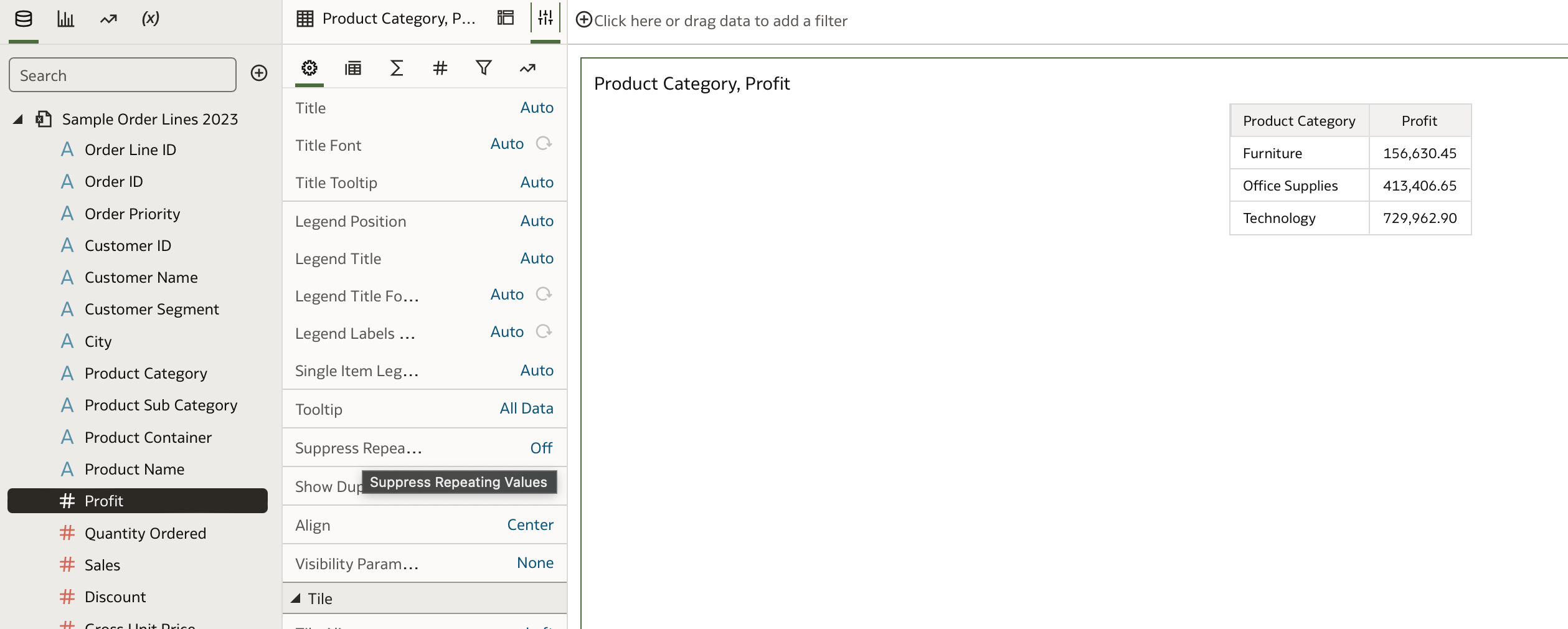
You also have the 'Suppress Repeating Values' in the vizualization properties The documentation is here, but it is does not comprehensively document every visualization property. They get enhanced with new additions fairly regularly. Adjust Visualization Properties
Hi,
Is there a question or you are just sharing your opinion?
Or are you requested a new feature to have the option to not suppress values in a DV pivot?
Because in OAC/OAS a "classic" pivot behave exactly like it did for the past 10+ years in OBIEE, you have the option to decide if you want to suppress values or not.
If you are requesting that feature in DV, look in https://community.oracle.com/products/oracleanalytics/categories/idealab-oracle-analytics-cloud-server if an idea already exist. If not, feel free to post it there. If it gets a number of votes, product managers will consider adding it to the product.
how you suppress the values in OAC? I know in OBIEE how to do it. I added screenshots for this one too.
@Ursula Ortiz -Oracle
For your workbook you can check the setting, "Repeat Rows on Excel Exports for Tables and Pivots," in the "Other" section of System Settings.
this seems to be at admin level, is there an option at workbook level? this is a choice that each user has to make based on their use case. In particular in this environment I do not have access to the settings
I am enabling this setting in FDI, but still my pivot tables are being exported with suppressed/merged rows… Anything that needs to be done for this to work, besides perhaps logging out and back in again (as I have done multiple times now? 😅
As far as I understand this feature, when enabled it should give you all the lines with repeated labels:
So this pivot table:
Transation#
CustomerName
Amount
xyz
customerA
1.000,00
customerB
2.500,00
should become this:
On exporting to excel… But for some reason it's not working for me? Any ideas? 😊
Dear Oracle Support Team, I need assistance uninstalling Oracle AI Database 26ai Free from my Windows 11 Home laptop. System configuration Operating System: Windows 11 Home Processor: Intel Core i5 RAM: 8 GB Oracle Product: Oracle AI Database 26ai Free Product Version: 23.0.0.0 Installer:…
Hello Oracle Analytics Community, We are investigating a dashboard compatibility issue between Oracle Analytics Server (OAS) 7.6 and OAS 7.0. Some dashboards originally created in Oracle BI 12c can be opened in OAS 7.6 but fail to open after being archived and imported into OAS 7.0. During our investigation, we found the…
Hi all, We’re running into an issue with an on-premises Oracle Analytics Server 2026 integrated with Active Directory and hoping someone has seen this or knows if a patch is available. Environment: Oracle Analytics Server 2026 (on-premises) WebLogic 14.1.2.0.0, JDK 21, Oracle Linux DB-backed catalog (Oracle DB, BIPLATFORM…
We have a requirement Creating a Bar graph using Cost Center Tree hierarchy as prompt/filter. Created a Bar Graph using Cost Center Tree Hierarchy as a prompt. When I'm selecting values through selection steps from Cost Center Tree Hierarchy, the Bar Graph not refreshing as the selected values are not passing to Graph…
I have 2 tabs on the workbook that use the same dataset. I would rather not use 2 different datasets. Can I code an expression filter or something to remove those records?