Best Of
In this edition of: DID YOU KNOW YOU COULD DO THIS IN C1?
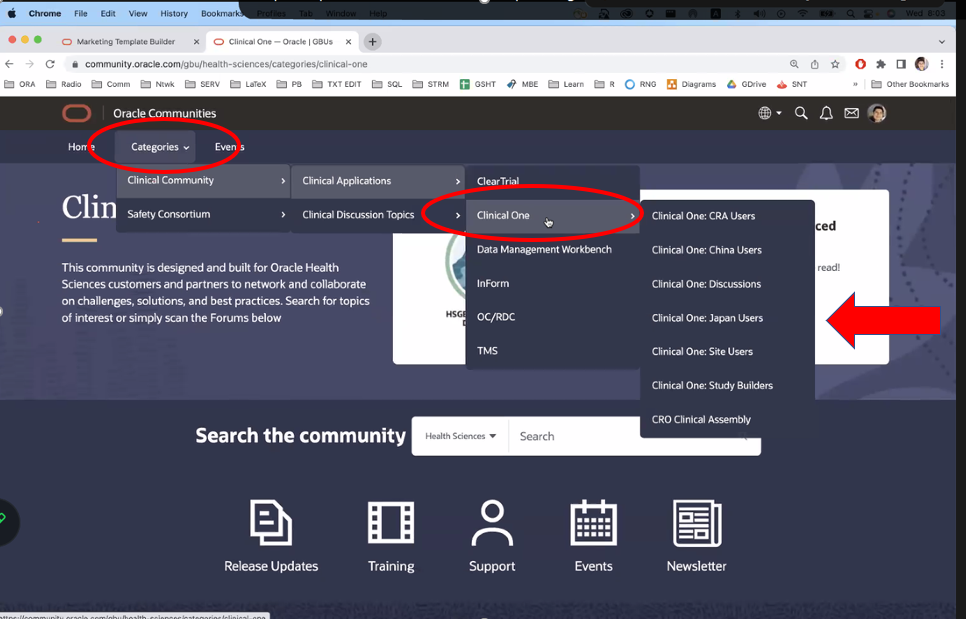
The Clinical One Communities page has had an update to make finding Clinical One resources that much easier!
From the Clinical One Communities homepage, click on the Categories drop-down, then click Clinical One Community and Clinical Applications.
From Clinical Applications, click on the Clinical One option and choose any of the categories listed for Clinical One! All of the information has been organized by users and discussions!

Problems activating your site? – Support FAQs Series

In today's Support FAQs Series, we address an issue reported recently by a Clinical One user.
A user reported that even though he had a site approved for initial shipment when he went into Sites and Labs to activate the site, he got an error message saying he needed to specify the first subject number in Subject Settings. Then, when he navigated to Study Settings, the Subject Number field was blank and he couldn't change it.

There are a few things to keep in mind:
- After the most recent system update, the default value for First Subject Number is now blank. Previously it had a value of 4000.
- In addition to this, we now have to specify the first subject number for the mode that the site is in to be able to activate the site (for example, for testing mode we have to specify the first subject number before activating a testing site).
For this reason, in this case, the user who reported the error will have to contact the study team that designed the Study Settings and they will have to specify a value for the First Subject number.

You can find more information about this here.