
Best Of
Re: Orch log
Hi 2011
Database Connectors can connect to any database, you just need to have a connection defined. Orchestrator provides the Data Service Request for accessing JDE tables and Business Views, but there are limitations. For example you can't mix "and" and "or" when filtering data.
With the Database Connector it's purely SQL so as long as you can connect to the database you can run the SQL over it. Custom SQL gives more control over the query and allows more powerful joins, grouping, etc, but has the caveat that it doesn't understand JDE paths.
What this means is that if, like us, you have your security runs across all environments then your System Schema (SY920) likely resides on your production database server (for us ORCLPROD). If we want to run SQL in the DV environment using a Database Connector it won't see SY920 on ORCLPROD, only the version on ORCLTEST which isn't maintained and is out of date. There are ways around this, but it's something to keep in mind.
Cheers
Jonathan
 MasonJo
Re: Create Swiss QR Barcode for Swiss Invoice
We have utilized CF Transform by Bottomline to produce the Swiss QR code.
tgatif
How to forecast common sub-assemblies used across multiple parent items?
I am in a situation where our client is a manufacturing company which produces machines. Each parent machine is unique in nature. So, always the new item master/branch record is created for the parent machines.
But most of the sub-assemblies and few purchase parts are common across all the parent machines.
The requirement is, how can we calculate the forecast for these common subassemblies/purchase parts?
I was thinking of using forecast generation for parent machines and try to blow down the demand for components/subassemblies, but for that we need sales order history. As we always create new item number for all parent machines because of its uniqueness, we will never have sales order history in JDE.
In this case how can we forecast and plan the supply for common subassemblies/purchase parts?
Please help!
Re: How to forecast common sub-assemblies used across multiple parent items?
Hello,
Are you capturing transaction history, F4115?
My understanding is you can use R3425 to populate safety stock values based on product history, such as F4115 data. This might be a valid approach, to meet this requirement, by having a safety stock value that matches historical usage.
Automated Calculation of Safety Stock: This 2-minute video provides you with an overview of the ability of the JD Edwards system to dynamically calculate and populate safety stock values, driving optimal inventory levels to reduce stock-outs and excess inventory:
https://apexapps.oracle.com/pls/apex/f?p=44785:24:0:::24:P24_CONTENT_ID,P24_PREV_PAGE:33171,1
Alternately, you may consider using planning bills to define a pseudo top level item with a consistent forecast projection. Per KM Solution E1: 34: Definition and use of MRP Planning Codes (Doc ID 654214.1), The purpose for planning bills is to generate forecasts for saleable end items. Planning bills are commonly used in a manufacturing environment where the saleable end items have a large number of features and/or options. The forecasts for these saleable end items are based on percentages of the features and options offered that you expect to sell.
Planning bills consist of groups of pseudo items that reflect how an item is sold. They are entered into the system in a Bill of Material format, and represent the variety of possible options and features that might be included as a saleable end item.
Example: The Planning Bill identifies the percentages of each type of product expected to sell. The system can calculate the total requirements for each type of bike by exploding the Planning Bill.
Lastly, another option is to extract sales history and summarize the data up into a F3400 summary AA forecast records for an Item Cat Code (for example) that is shared by the various parent configurations. A forecast based on the cat code AA records may be more predictable than the forecast at the item level. This summary forecast can then be used to calculate the lower level item forecasts in a copy and paste fashion.
Per KM Solution E1: 36: R3465 Extract Sales Order History (Refresh Actuals, Extract Sales Actuals) (Doc ID 1401693.1), the R3465 can consolidate sales orders into the Forecast Summary File (F3400).
Please feel free to enter a service request to discuss particulars in more detail.
Regards,
Jeff
Re: Please clarify which Patch 38264329 release need to be applied to resolve CVE-2026-21992
The patch for OIG bug 38264329 was included in 12.2.1.4.250926, so you won't have to worry about that one in later BPs.
For OWSM bug 39023318, it has not yet been included in a BP, although we suspect it will make it into 12.2.1.4.2604xx. You will have to apply a one off patch to get that fix. I checked the list of available one off patches and I see that one is available for 12.2.1.4.251230. The easiest way to see this is to type 'Patches' in the search field at the top of the MOS page (after you log, where you see your current SRs), and then put the bug number in the search panel to the right. It should present a list of patches, each for a specific OWSM version. Should you upgrade to a new or different version, I would suggest you log a SR to the OWSM team directly, as we are unable to process one off requests for OWSM security bugs — no point in having us (OIG) in the middle.
Be sure to follow the post patch instructions in the security alert KB878741 after you apply 39023318.
— Mike
Re: Orch log
Hi 2011
The script below is an example of using SQL to retrieve data from the E1 database. In our case we use an Oracle Database. We have a standard template setup with "helpers" to make coding easier anda standard set of inputs and outputs. We pass in the various database schemas for the appropriate environment, e.g. TESTDTA, TESTCTL, etc:
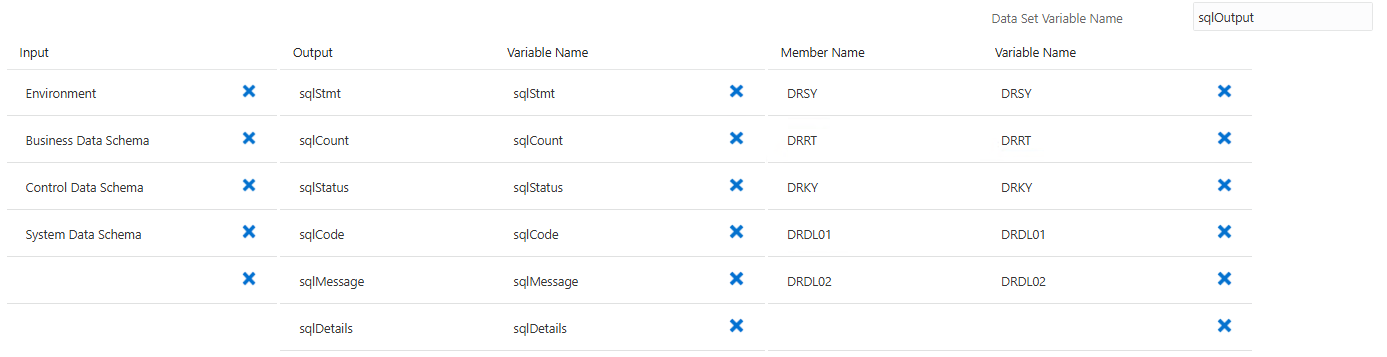
We tend to write entries to the debug log as that's where we check most of the messages while developing. To write to the E1ROOT log we would just change the calls to "log" to "warn".
Hope it helps
Jonathan
// Standard imports
import groovy.transform.CompileStatic;
import com.oracle.e1.common.OrchestrationAttributes;
import java.sql.*;
import java.util.*;
import groovy.json.JsonOutput;
HashMap<String, Object> main(OrchestrationAttributes orchAttr, Connection sqlConnection, HashMap inputMap)
{
HashMap<String, Object> returnMap = new HashMap<String, Object>();
// Read Inputs...

// ---------------------------------------------------------------------

def env = inputMap.get("Environment");

def dta = inputMap.get("Business Data Schema");

def ctl = inputMap.get("Control Data Schema");

def sys = inputMap.get("System Data Schema");


// Build SQL

def sql ="select drsy, drrt, drky, drdl01, drdl02 from ${ctl}.f0005 where drsy = '00' and drrt = 'DT'";


// Write the SQL statement to the debug logs...

log(orchAttr, "SQL: ${sql}");


// Run the SQL...

def rows = fetchRows(sqlConnection, sql);


// Check SQL was successful...

if (rows.size() == 0) {

    returnMap.putAll(fail("SQL0404", "SQL returned no records"));

    returnMap.put("sqlCount", 0);

    log(orchAttr, "SQL: SQL returned no records");

    return returnMap;


// Data found so process it...

} else {


    // Write result set to output array...

    returnMap.put("sqlOutput", rows)

    returnMap.putAll(ok([:]));

    returnMap.put("sqlCount", rows.size());


    // Read through result set...

    for (dataRow in rows) {

        def sy = dataRow.DRSY;

        def rt = dataRow.DRRT;

        def ky = dataRow.DRKY;

        def dl01 = dataRow.DRDL01?.trim();

        def dl02 = dataRow.DRDL02?.trim();

        log(orchAttr, "UDC: ${sy} /${rt} / ${ky} - dl01=${dl01}, dl02=${dl02}");

    }

}


// Exit the script...

return returnMap;
}
// ********************************************************************
// ** S T A N D A R D H E L P E R M E T H O D S **
// ********************************************************************
// -----------------------------
// nowIso - Return ISO Timestamp
// -----------------------------
private static String nowIso() {
def fmt = new java.text.SimpleDateFormat("yyyy-MM-dd'T'HH:mm:ss.SSSXXX");
return fmt.format(new java.util.Date());
}
// -----------------------------------
// log - Write Entry to AIS Debug Logs
// -----------------------------------
private static void log(OrchestrationAttributes orchAttr, String msg) {
orchAttr.writeDebug("[DB-CONN] " + msg);
}
// ------------------------------------
// warn - Write Entry to AIS E1Root Log
// ------------------------------------
private static void warn(OrchestrationAttributes orchAttr, String msg) {
orchAttr.writeWarn("[DB-CONN] " + msg);
}
// -----------------------------------------------------------
// ok - Populate Standard Return Parameters for Successful SQL
// -----------------------------------------------------------
private static Map ok(Map payload) {
Map m = new LinkedHashMap();
m.put("sqlStatus", "OK");
m.put("sqlCode", "OK");
m.put("sqlMessage", "Success");
Map det = new LinkedHashMap();
det.put("timestamp", nowIso());
m.put("sqlDetails", det);
m.put("sqlData", (payload != null && !payload.isEmpty()) ? JsonOutput.toJson(payload) : "");
return m;
}
// ---------------------------------------------------------
// fail - Populate Standard Return Parameters for Failed SQL
// ---------------------------------------------------------
private static Map fail(String code, String message, Object details) {
Map m = new LinkedHashMap();
m.put("sqlStatus", "ERROR");
m.put("sqlCode", (code != null && code.length() > 0) ? code : "EXC0500");
m.put("sqlMessage", (message != null && message.length() > 0) ? message : "Unhandled error");
if (details == null || details instanceof String) {
m.put("sqlDetails", details);
} else {
m.put("sqlDetails", JsonOutput.toJson(details));
}
m.put("sqlData", "");
return m;
}
// --------------------------------------------
// fetchRows - Retrieve Multiple Rows Using SQL
// --------------------------------------------
private static List<Map> fetchRows(Connection conn, String sql, Object... params) {
PreparedStatement ps = conn.prepareStatement(sql);
for (int i = 0; i < params.length; i++) {
Object p = params[i];
if (p instanceof Number) {
ps.setLong(i + 1, ((Number) p).longValue());
} else {
ps.setString(i + 1, (p == null) ? null : p.toString());
}
}
ResultSet rs = ps.executeQuery();
List<Map> rows = new ArrayList<Map>();
ResultSetMetaData md = rs.getMetaData();
int cols = md.getColumnCount();
while (rs.next()) {
Map row = new LinkedHashMap();
for (int c = 1; c <= cols; c++) {
String label = md.getColumnLabel(c);
if (label == null || label.length() == 0) label = md.getColumnName(c);
String value = rs.getString(c);
row.put(label.toUpperCase(), value == null ? "" : value.trim());
}
rows.add(row);
}
rs.close();
ps.close();
return rows;
}
MasonJo