Hi again, Back with another issue i can't seem to wrap my head around it.
We have a Report created with the Report Builder. In the screenshot below you can see the settings of the different columns.
The last column uses a formula which multiplies the Partner Percentage with the Gross amount.

The result page is as expected.
6.80% * 4.487,52 = €305,15

When exporting this to Excel (by using the Excel button at the bottom of the result page) i suddenly get a different endresult. This now is €314,13
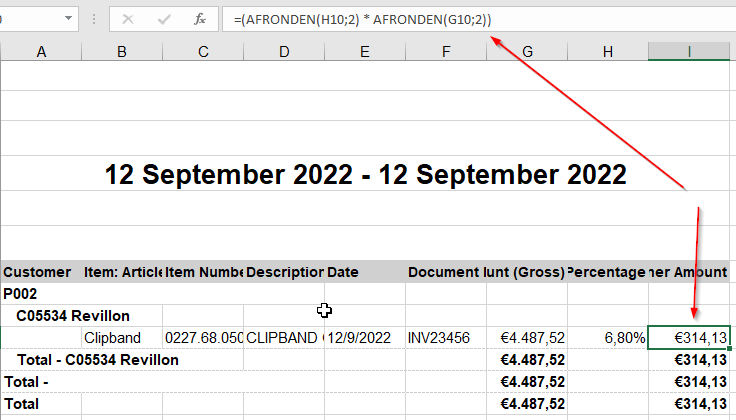
I found out that the problem occurs because of the ROUNDING of the Gross Amount. If I delete the ROUND (AFRONDEN) or change it to 3 decimals, then the correct result is displayed again.

Is there a way to change the behaviour of the Formula from within NetSuite so it doesn't ROUND the Gross Amount for this report only? (or maybe another way to fix this?)
