
Custom forms in NetSuite allow users to tailor the layout, fields, and behavior of standard transaction forms such as Sales Orders, Purchase Orders, Invoices, and more. By customizing forms, businesses can streamline data entry, capture relevant information, and ensure compliance with internal processes.
Users can navigate to Customization > Forms from the main menu.

Here, you'll find a list of standard forms and the option to create a new custom form.
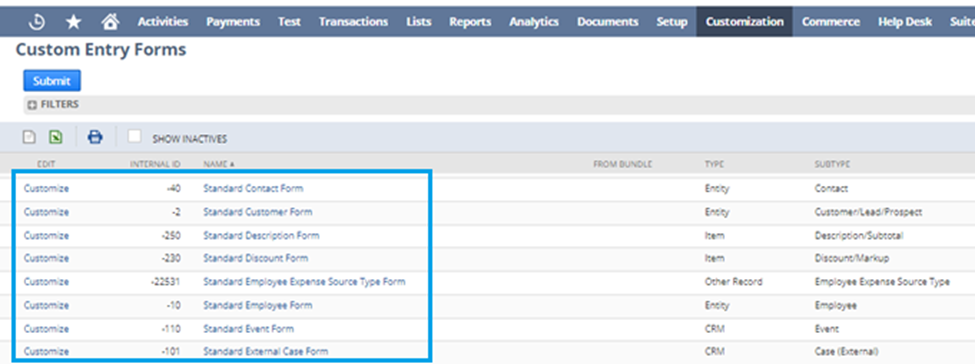
Once you've selected a form to customize, you'll be presented with an intuitive interface where you can add, remove, and rearrange fields to design the form layout.

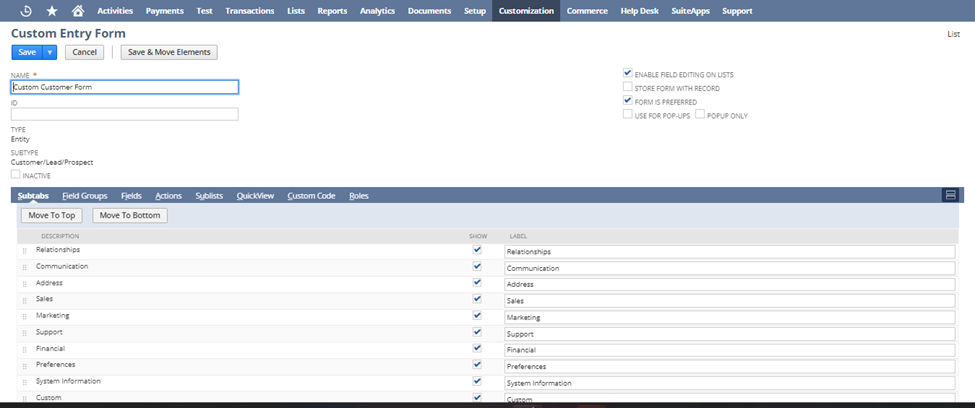
Key Components of Custom Forms:
1. Fields: Custom forms comprise fields for capturing various types of data such as text, numbers, dates, and checkboxes. Users can add, remove, or rearrange fields to match their workflow requirements.

2. Subtabs: Subtabs group related fields together, making it easier to navigate and organize data. Users can create multiple subtabs within a custom form to categorize information logically.

3. Sublists: Sublists display line items or related records within the custom form. They allow users to input multiple entries such as products in a sales order or expenses in an expense report.

Once you've customized your form to your satisfaction, save it and deploy it to the relevant roles within your NetSuite account. Regularly review and update your custom form as your business needs evolve.

In conclusion, NetSuite custom forms offer a powerful way for businesses to tailor transaction forms to their specific needs. By understanding how to navigate and customize these forms, users can optimize their NetSuite experience and improve efficiency in data entry and processing. Experiment with custom forms to find the layout and configuration that works best for your organization.
Stay informed and keep your NetSuite knowledge fresh by staying tuned for the latest updates! Be sure to follow New to NetSuite > SuiteBuilder & SuiteBundler to stay up to date whenever a new article is posted. Don't miss out on valuable insights and tips that can help you maximize the potential of NetSuite for your business.
