Are you looking to keep your Sales Reps informed and up-to-date on the status of fulfilled orders? With a simple automation solution, you can ensure that they receive timely email notifications whenever Sales Orders are packed and ready for delivery. Here's how to set it up in just a few easy steps:
- Navigate to Customization > Workflow > Workflows

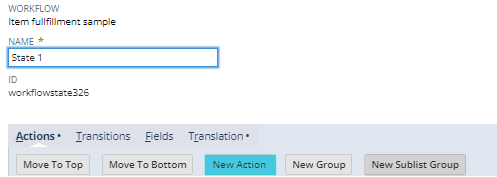
2. Edit the workflow you want to put the notification: (Example:
Locate and open the workflow responsible for sending notifications related to item fulfillments.

3. Create a Send Email Action:
- Trigger On: After Record Submit

- Condition: Created From: Ship via = Select the shipping method (eg.,Airborne, UPS) and Shipping Status = Packed


- Recipient: Created From: Sales Rep

- Include View Record Link: Enter Checkmark


By implementing this automated workflow, your Sales Reps will now receive email notifications whenever Sales Orders are packed and ready for further action.
I hope this helps! 😁
Want to learn more about Customization? Visit New to NetSuite: SuiteBuilder & SuiteBundler
Do you have any feedback? Let us know in the comments!
