
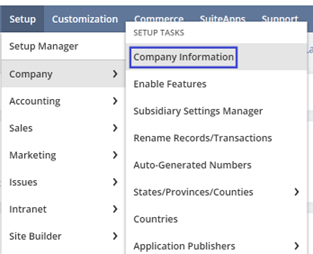
Setting up company information in NetSuite is an essential initial step in configuring the system for your business needs. This setup includes defining fundamental details about your company that NetSuite will use across various modules and features. To provide main company information and preferences, follow the navigation path: Setup>Company>Company information.
This section includes Company Information (name, logo, currency, and other general data), Address Information, and Company URLs.
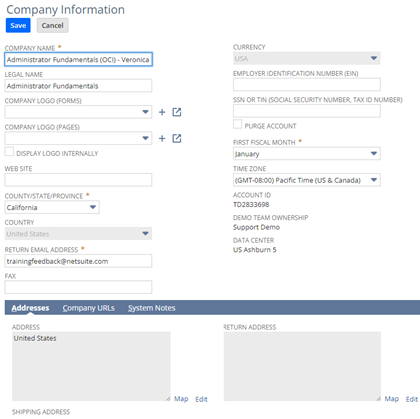
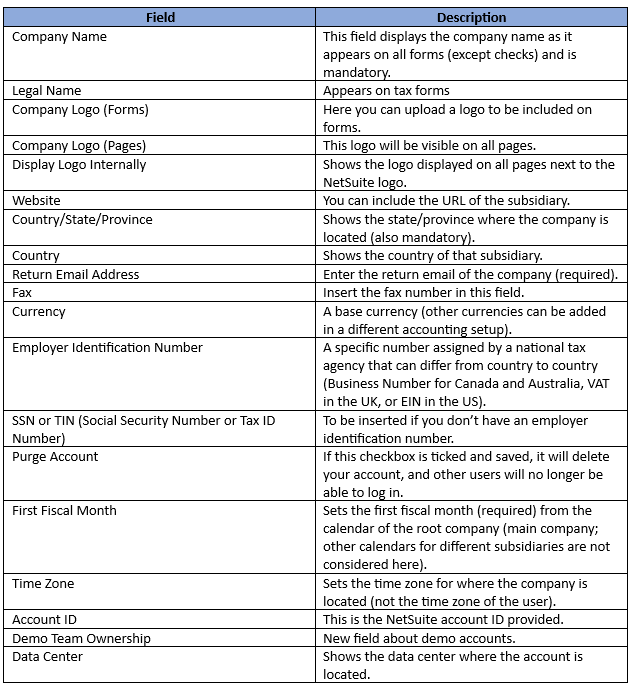
The last three fields are prefilled by NetSuite and are not to be changed.
When filling in the address details in the Address subtab, there are three different ones: address that appears on all forms except checks, return address, and shipping address. They have an Edit link that opens a field to be edited.
Important URLs about this account are prefilled for any account by NetSuite as follows:
Customer Center Login – This is provided by NetSuite for your company to access the Customer Center Login.
NetSuite UI (User Interface) – The link where you can log in to NetSuite.
SuiteTalk (SOAP and REST Web Services) – URL for SuiteTalk displayed here.
RESTlets – Link to RESTlets.
External Forms – URL provided to access external forms.
Stay tuned for upcoming articles covering General preferences and other setup options. Make sure to follow the New to NetSuite > Account Administration & CSV imports category to be notified when new articles are posted.
