ref must be one of: categoryID, siteSectionID, category, category/categoryID, category/name, category/description, category/url, category/allowedDiscussionTypes, locale, siteSection, siteSection/basePath, siteSection/contentLocale, siteSection/sectionGroup, siteSection/sectionID, siteSection/name, siteSection/description, siteSection/apps, siteSection/attributes, layoutViewType, discussionID, commentID, page, latest, sort, sortType, lookupSort, discussion, discussion/name, tags, breadcrumbs, discussionApiParams, serverDraftID, serverDraft.
In NetSuite QuickStart Edition, you can easily manage your inventory by making adjustments. If there's a mismatch in stock levels, you can quickly fix it by increasing or decreasing the amount of a product at a specific location.
This is a handy feature to keep your inventory records up to date. Additionally, after an inventory count, the system can automatically adjust product quantities, making your inventory management more efficient and accurate.
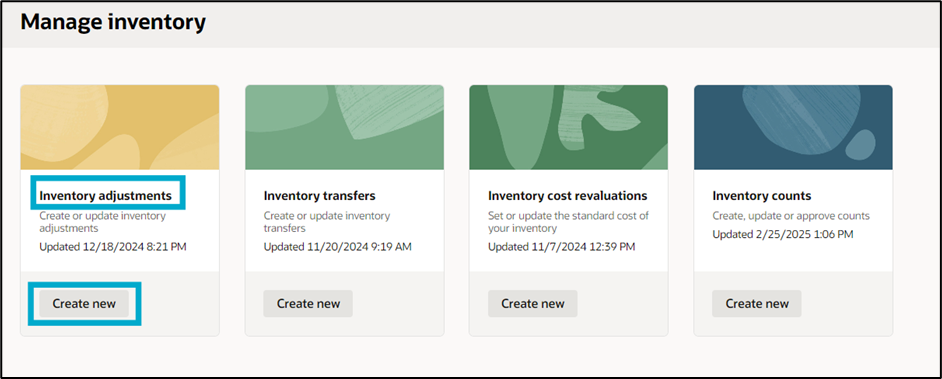
Here is a simplified steps to create an inventory adjustment: 1. Access the Ask Oracle menu > Inventory > Manage inventory > Inventory adjustments > Create New.
2. On the New inventory adjustment page, fill in the required details:
3. Add items to the adjustment:
4. In the Accounting section, ensure the Posting period includes the adjustment date.
5. Click Submit to finalize the inventory adjustment. NetSuite QuickStart Edition will calculate the total adjustment value.
You are not allowed to view comments.
Big ideas. No travel required. SuiteWorld On Air brings the best of SuiteWorld directly to you. Stream keynotes live, access exclusive virtual content, and connect with the NetSuite community from wherever you are. Explore what's next for NetSuite, see AI innovation in action, and discover practical insights designed to…
Drive better outcomes with AI built into NetSuite Next Capital Hilton,1001 16th St NW, Washington, DC 20036 Join NetSuite experts for a free half-day event where you'll get a tour of NetSuite Next, explore AI-powered capabilities built into the platform, and learn practical ways to optimize NetSuite for your business. At…
Take NetSuite Next for a hands-on test drive Capital Hilton, 1001 16th St NW, Washington, DC 20036 What to expect: Inside the Suite is designed for companies exploring modern ERP solutions. This event gives you the opportunity to experience NetSuite Next - the next evolution of NetSuite that brings AI directly into how…
WEBINAR What's Next for Product Companies with NetSuite See how NetSuite Next uses AI to improve accuracy and protect margins Ask. Understand. Act. Use Ask Oracle to search, navigate, analyze business data, surface insights, get guidance, and take action using natural language—all through a single conversational…