Best Of
Re: Excess Payment refunded from vendor
Hi @Nissam CP
OK, I'm going to give you the best Practice on using Vendor Prepayments to prevent this from happening again first:
- Only Create Vendor Prepayments Directly From Purchase Orders.
- This way, when the PO's are received and then billed, the prepayments automatically apply to the vendor bills.
- All prepayments are assigned to specific Purchase Orders.
- (Go To Setup>Accounting>Accounting Preferences and make sure you enable these:
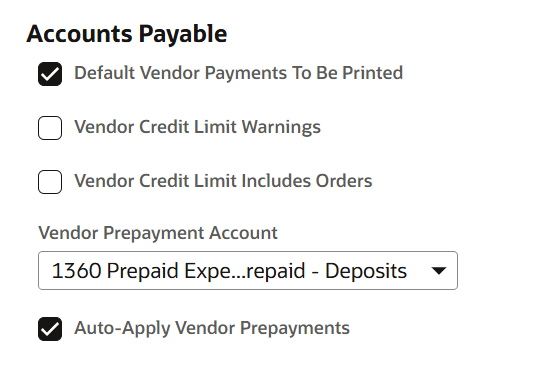
If you follow that policy above, this won't happen again.
Now on for the corrections. If I have this straight, the bill was for 3,520 and you prepaid 35200, so now you have a balance of 31,680 in prepaid remaining.
Vendor Put the $31,680 into your account to clear the overpayment.
After testing (forgive me for using interco entities in a demo account), here's what worked:
Create Deposit record. Under other deposits, I created a brand new Clearing account for this process,
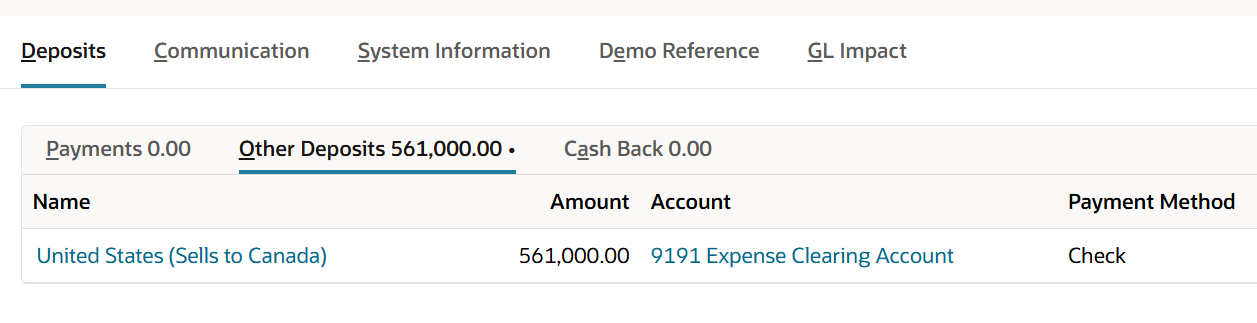
That takes care of the refund into your bank.
Next, create a new vendor bill. Use the expense line to add the clearing account (let's get the clearing account balance to zero)
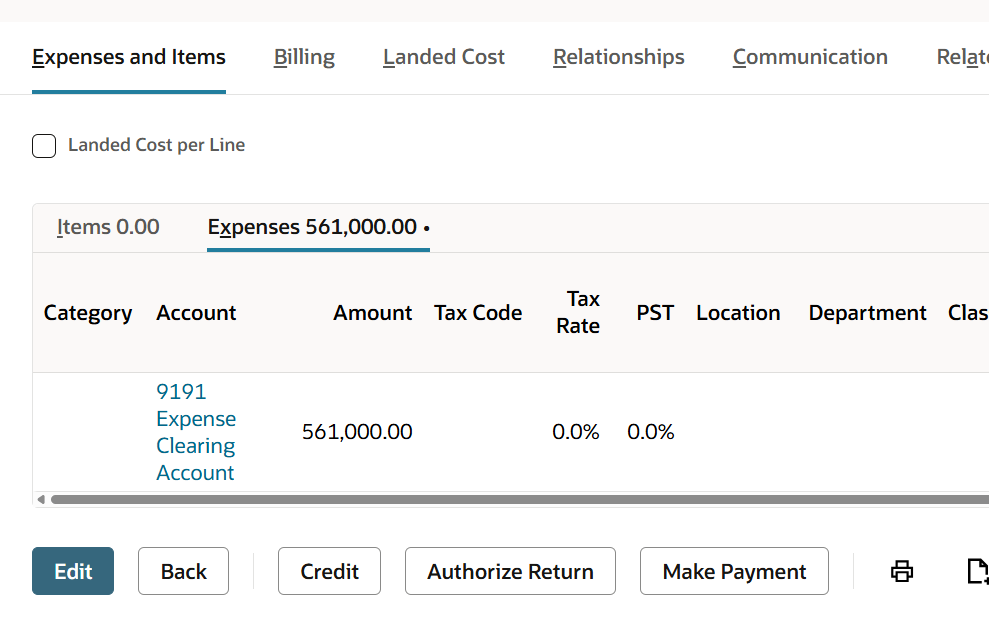
Save the bill.
Go to the prepayment and click 'apply' - Choose the bill you just created and now you apply the remaining of the prepayment to the bill you just made, clearing out the prepayment.
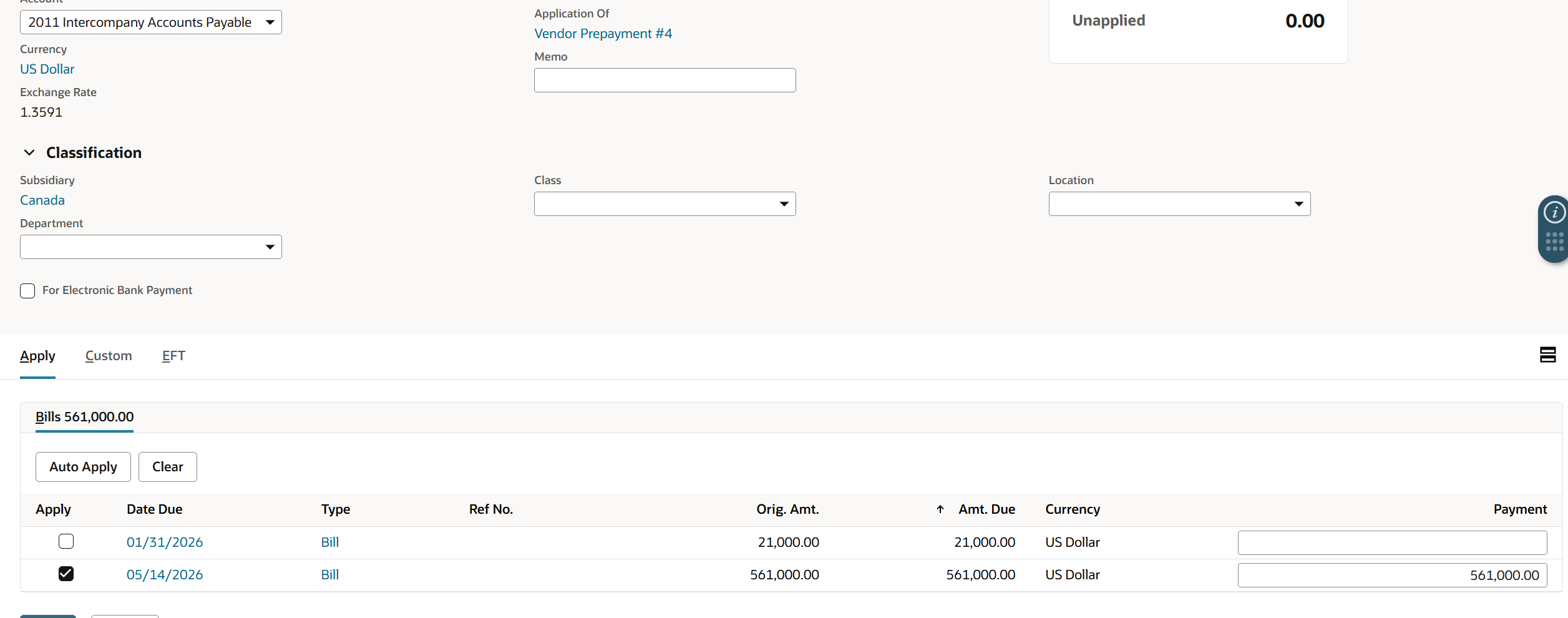
Save the prepayment, and Voila! The prepayment balance for this vendor is now back to zero.
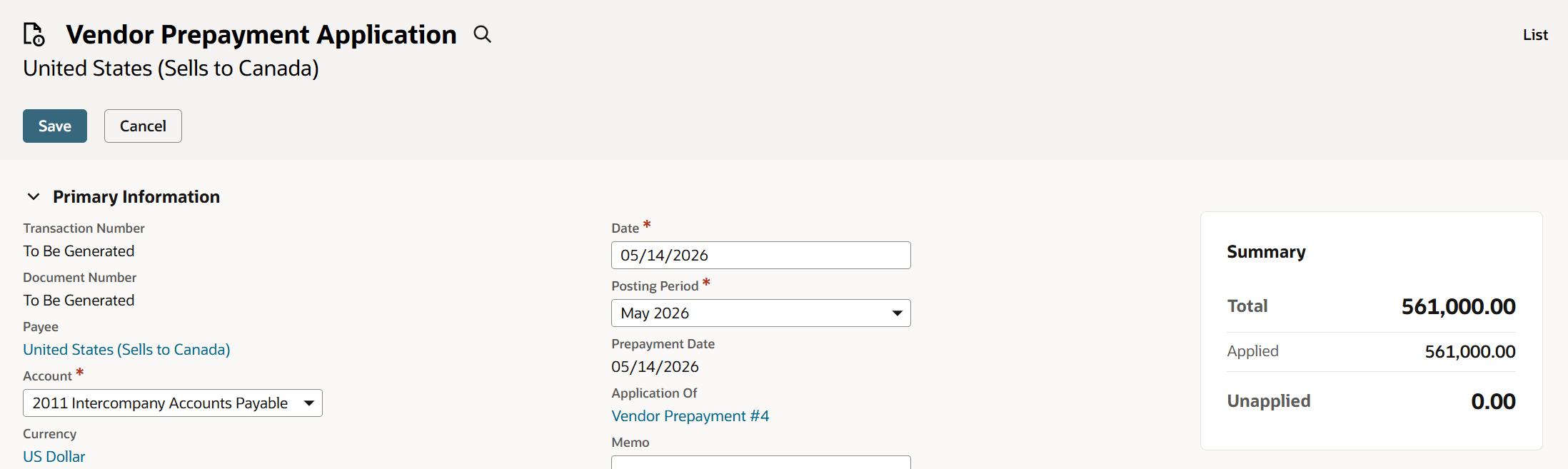
Make sense? I'm using a clearing account to move the money from the deposit to the bill, but this should work.
Let me know?

Re: SuiteTax Issues: Mass Updating Tax Item Type + Louisiana Economic Development Zones
Thanks for tagging us @Angela Bayliss.
Hi @User_V2BVB, As per checking, a support rep is already assigned to the case. I suggest responding to the email from the ticket so the support team can further check and investigate the issue immediately.

Re: How do you stop processing a Scheduled Script?
Thanks Jervin.
Just gotta be extra careful then. 😅
 Dext3r
Re: Is anyone having issues with Braintree today?
It was caused by a new transaction body field. I don't know why it caused an error.. but it did. I removed it.

WEBINAR REPLAY | Protect Your Margins With Production Costs You Can Trust
Outdated bill of materials (BOMs) costing and incomplete production data leads to inaccurate cost of goods, and ultimately erodes profitability.
In this virtual event, you’ll see how to build accurate production costs so you can catch margin erosion early, explain variances quickly, and close with confidence.
You’ll learn how to:
- Build a strong cost foundation by structuring BOMs to reflect how products actually move through production.
- Identify cost overruns early by tracking actual costs while jobs are still in progress.
- Get clear answers faster with reporting that pinpoints where actual costs diverge from estimates.

Re: Managing Multiple Routings on WO
The 'Light Manufacturing' can't do that natively.
In the NetSuite Advanced Manufacturing module, you can define concurrency to allow work order operations to run simultaneously over multiple assets. That's essentially a feature that allows for 'split orders'. Some of that is covered in this video:
https://docs.oracle.com/en/cloud/saas/netsuite/ns-online-help/bridgehead_1508338278.html

Re: NetSuite Admin Tips: Tracking the Construction in Progress (CIP) in Fixed Asset Management
if company is CIP constructing to sell/deliver to customer, why they will use FAM?
i come across this document while searching the CIP and CIP capitalization process on FAM.
this process is very basic and standard in the Fixed Asset world` where in several individual assets with different asset types/Life are combined to gather and is capitalized upon completion in one shot.
if you know something like this exists or any workaround please share.
 AhmedM
Re: Switzerland Payment File Format for UBS CHF Accounts in NetSuite
Hi,
Many thanks for the detailed clarification.
That makes sense and confirms my understanding of the limitations when Multi-Currency is enabled together with Electronic Bank Payments.
From your explanation, it seems the safest and most scalable approach would probably be to create a custom payment file template rather than modifying the native standard template directly, especially considering the different banking and localization requirements across entities and currencies.
We will review internally which specific payment formats and bank requirements are needed and then evaluate whether a copied template or a fully custom FreeMarker/XML solution is the better option.
Thanks again for the helpful explanation.
Kind regards,
Mary