Best Of
Re: Ability to use closing rate for the revaluation purpose different from the rate of the last day
Hi @User_1QJQ2! I hope you are doing well.
I have performed investigation on our test environment and I have noted that by default, the rates that the system uses for currency revaluation are sourced from the Currency Exchange Rates which can be found via Lists > Accounting > Currency Exchange Rates.
This is also documented as per SuiteAnswers ID: 14965 | Generating Revaluations: Revaluations apply Currency Exchange Rates as of the last day of the accounting period if currency exchange rate is available at the end of the period. However, if you generate revaluations from Transactions > Financial > Revalue Open Currency Balances prior to the end of the period, the exchange rate for the current date is used as mentioned on SuiteAnswers ID: 14972 | Revaluation of Open Currency Balances.
Upon further checking my resources, unfortunately, it's currently not possible to specify a different rate or a different date where the rate will be sourced from as it is outside the standard behavior of the system.
Hope the above information helped and clarified your concern. Thank you.
======================
If you find this reply to your question as helpful, others with the same question might find it helpful as well. By marking “Yes” on the “Did this answer your question?”, you’ll be able to help other community members who might have the same concern find the answer easier and you will also get closer to earning your next Answer Accepter badge.

Re: Depreciation method Asset Usage, no depreciation
Hello @OrlyG ,
I was able to find the solution. Don't really know exactly the reason why the Script is not running when we are updating the Depreciation Active field via CSV but below, you can find the solution:
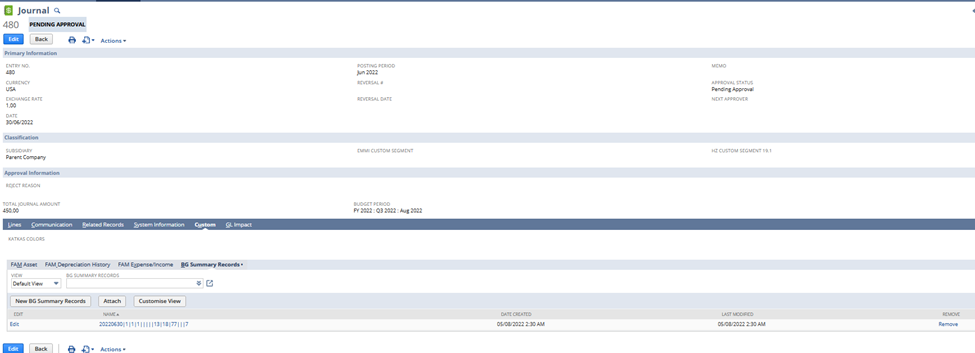
- Firstly, please check the Depreciation Journal entry #JRNUS00000680 if is associated with other assets as well. In my case, the Depreciation Journal which was created for the Assets, where I missed the Asset Lifetime Usage is associated as well with other Asset and is correct so I don't needed to delete the journal as well.
- Next step is related to the Asset itself:
- Delete Fixed Asset's Depreciation History Records in Bulk:
- Navigate to Lists -> Search -> Saved Searches
- Select FAM Depreciation History Search to Delete
- Click Edit this Search button
- Under Criteria tab, set the Filters as follows:
- Transaction Type = Depreciation
- Asset is Name of the Asset
- Name does not contain DHR
- Click Save & Run
- Turn On Edit Function
- Click the First Name then press Ctrl Key then click last Name
- Hover mouse to person icon (green) then Click Delete Record
- There will be a prompt: All selected records will be deleted. Are you sure you want to continue.
- Click Ok
- Delete Fixed Asset's Depreciation History Records in Bulk:
Set the following fields back on the Asset record as were before Depreciation run via CSV import:
- Asset Status: New
- Last Depreciation Period: 0
- Last Depreciation Date: 01/01/1980
Set the following field on the Asset Values record via CSV import:
- Prepare the CSV file with the fields Internal ID* and Last Forecast Date: 01/01/1980
- Import file via Import Assistant:
- Import Type: Custom Records
- Record Type: FAM Asset Values
- Select file (set Internal ID and Last Forecast Date)
- Click Next
- Import Options: Update
- Advanced Options: make sure, that the “Run Server Suitescript and Trigger Workflows” is checked
- Click Next
- Check the mapping and click Next
- Click Run
- Next step is to Run Depreciation
*Where to find the Internal ID of Asset Values, please, write in to the Global Search: “Asset Values” and select page FAM Asset Values

On this page you will be able to see the system generated records and their associated Internal ID, set the ones corresponding with the Asset record you would like to correct.

Please, test this firstly with one asset in your Sandbox account before you perform this update in to your production. Let me know if all is working.
“Kindly click "Yes" on "Did this answer the question?" if you find the reply on your thread helpful. This will aid the others with the same question to easily find the correct answer. Thank you!

Re: Duplicate Wizard Error
Just an update Michelle Jabanes! Our NetSuite partners found the solution! Come to find out, I needed to uncheck the last person on the list, as the other duplicates were not showing on the same page. So, if I mark all as dup and uncheck the bottom person, it works! This is resolved now.
Thank you!

Re: Freemarker Email Template-if logic
Checkboxes in Suitescript take values of 'T' (=Yes) and 'F' (=No), so you will need but in Freemarker it seems they are parsed to true and false. Please use:
<#if transaction.item.custitem_discontinued == true>
For comparisons you should use double equals ==
 Matrim
NetSuite Admin Tips: How to Show Subsidiary Base Currency Amount in a Transaction Saved Search

When creating a Saved Search in OneWorld, the amount column from non-parent is automatically converted to the base currency of the Parent Subsidiary. Did you know that you can view these amounts in the base currency of their respective subsidiary and view the original amounts in transactions (for example: Foreign Amounts entered in an Invoice) Here how:
1.) Navigate to List > Search > Saved Searches > New
2.) Select Transaction
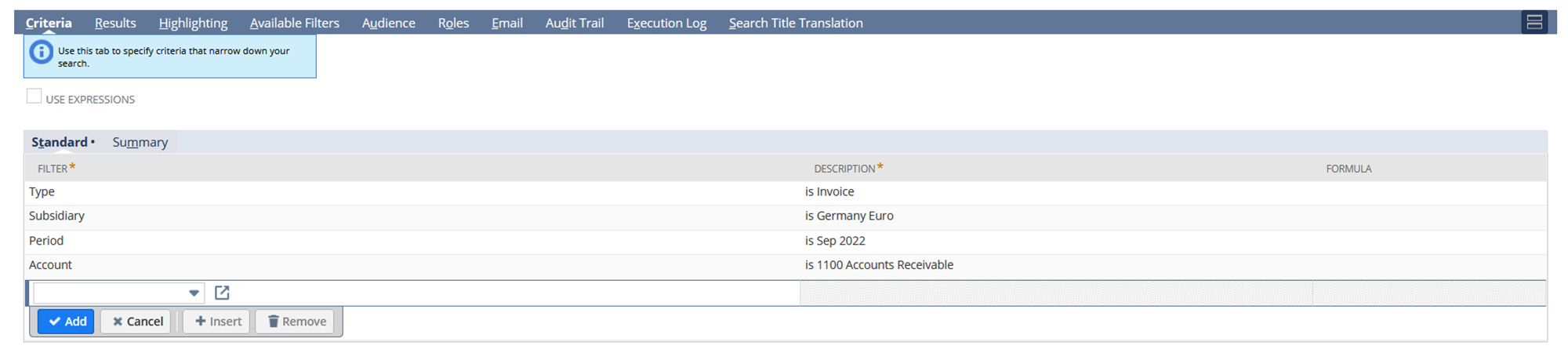
3.) Add a Criteria
Type (Optional) – For your Transaction Type
Subsidiary (Optional) – Select Subsidiary
Period (Optional) – Select an Accounting Period
Account (Optional) - If you wish to view balances of a particular account
4.) Under Results tab set the Consolidated Exchange Rate = None
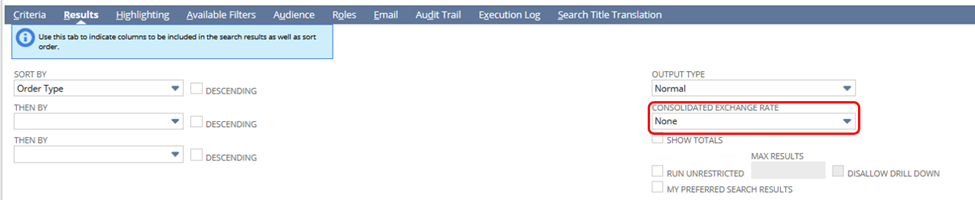
When this is set to None, the Consolidated Exchange Rate is not applied to the Amount, this will make the amount column results to per Subsidiary.
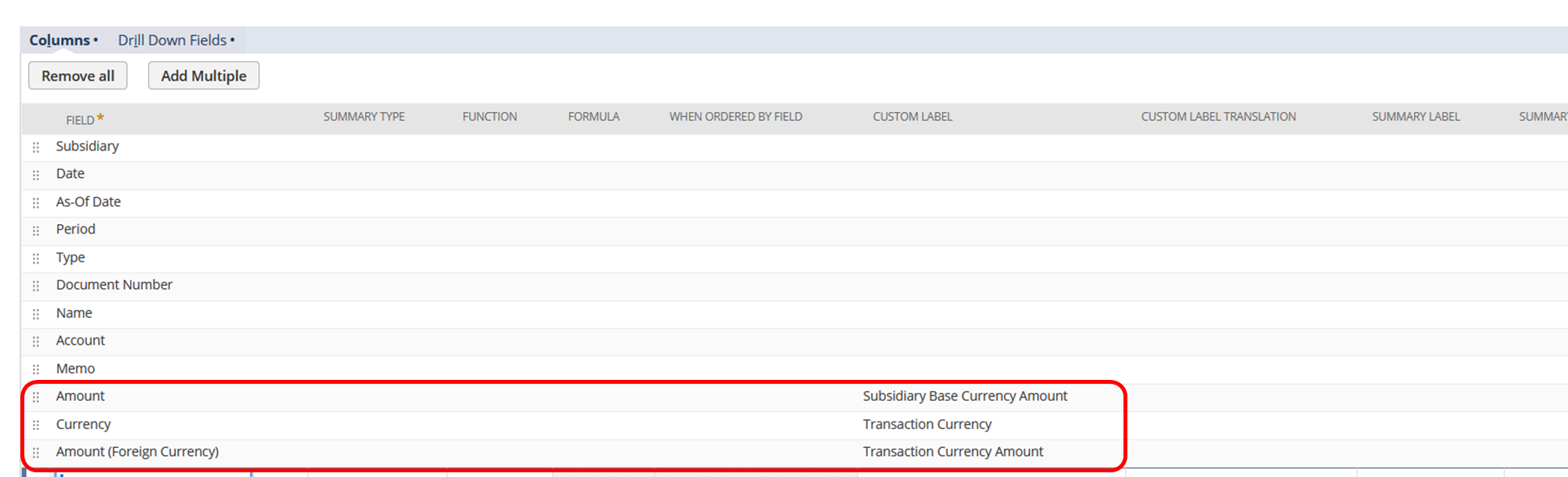
5.) In the Results tab column, make sure that you add these important fields:
Amount – This will be the amount posted in the G/L of the transaction subsidiary. You can rename this to Subsidiary Base Currency Amount
Currency – This the Transaction Currency
Amount (Foreign Currency) – This is the transaction currency, please take note that even if the transaction is posted in the same currency of the subsidiary, this will still column will still have values. You can rename this to Transaction Currency Amount
6.) Rename Saved Search
7.) Save and Run the Report
Results:
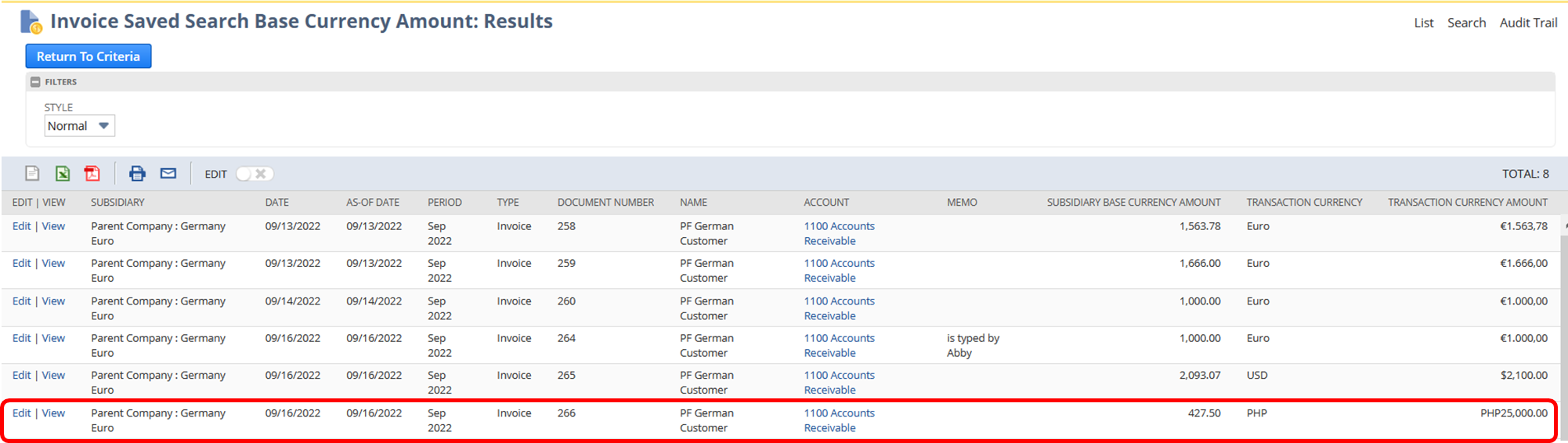
In this example, Invoice # 266 is recorded using Philippine Peso, but it is posted in a German subsidiary with a base currency of Euro. Here is the original transaction:
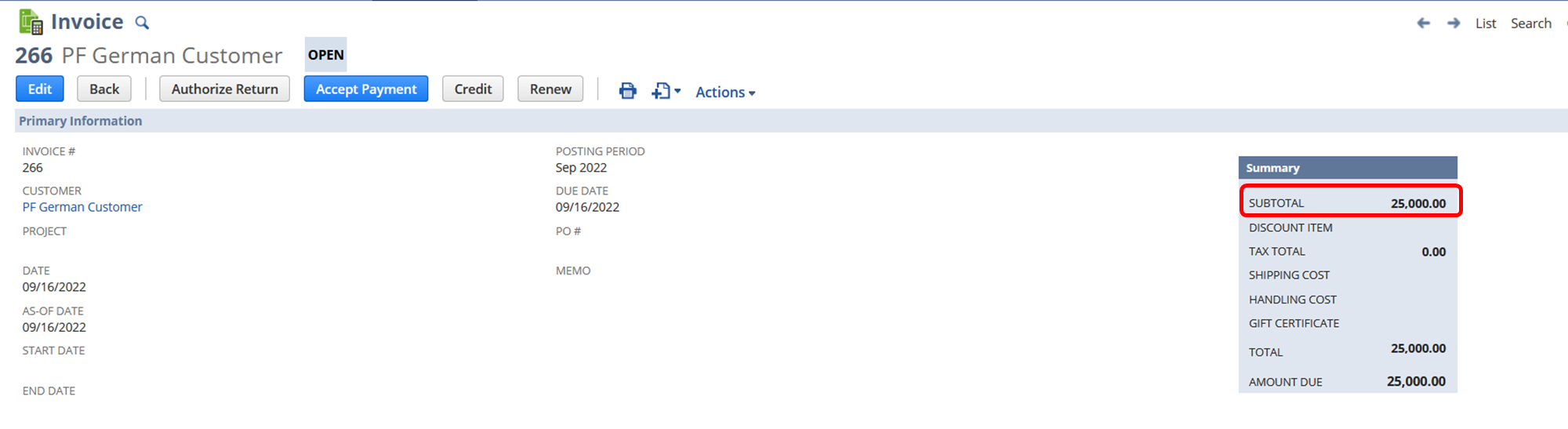
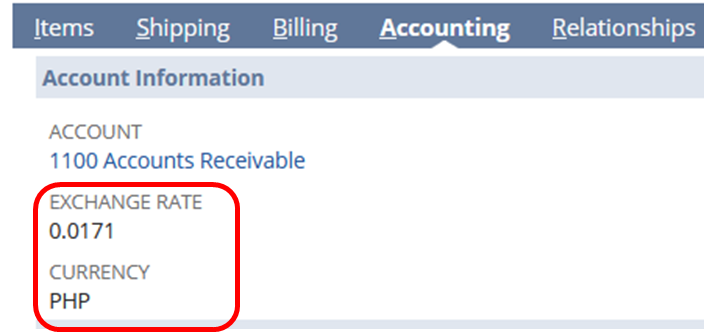
Subsidiary Base Currency Amount is equal to Exchange Rate X Transaction Currency Amount, in this scenario PHP 25,000 X 0.0171 or €427.50 in the G/L Impact
Have you tried this Saved Search? Feel free to share your tips!
I hope this helps 😃

Re: Freemarker Email Template-if logic
I guess best practice would be to make two check boxes as custom body fields on your transaction ("Contains back ordered items", "Contains discontinued items") and have them filled by a script or workflow depending on the contents of the transaction when it is saved.
That is because in Freemarker you can only build up the document from top to bottom in sequence, you can't add something to the top later depending on the contents below.
However, you could use a trick in your template to achieve what you are asking for without adding such body fields. It is probably not good style, though.
To do this, you can use the <#assign> directive:
Declare two variables with an <#assign> at the top of your template. Add one more <#list transaction.item as itemlist> directly below the <#assign>, but don't make it print anything. Instead, inside the <#list> add two <#if> statements that use <#assign> to set the value of your variables if the respective condition is met.
When that "dummy" list is processed at the top, you can use an <#if> around each of your other two <#list> blocks that check for the variable from your previous <#assign>.
Matrim
Re: Bill Payment file multiple reference numbers
Hello @Dirk Nieuwkamp ,
I would like to clarify this concern. You are referring to the Bill Payments page and creation of the Payments there?
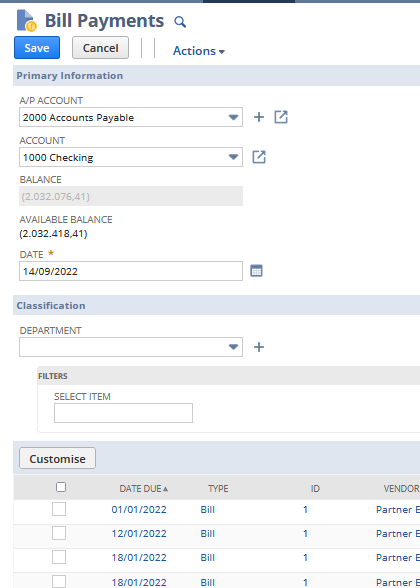
When the system recognize, that the Bill is matching with the Bill Credit, then the system link these transactions and you might see this information under the "Related Records" of the Bill transaction or under the "Apply" tab under the Credit Memo transaction.
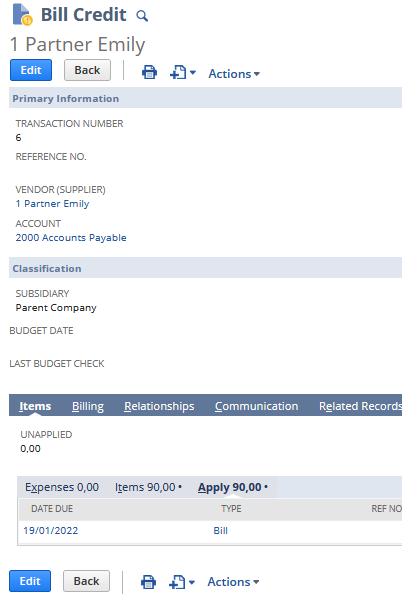
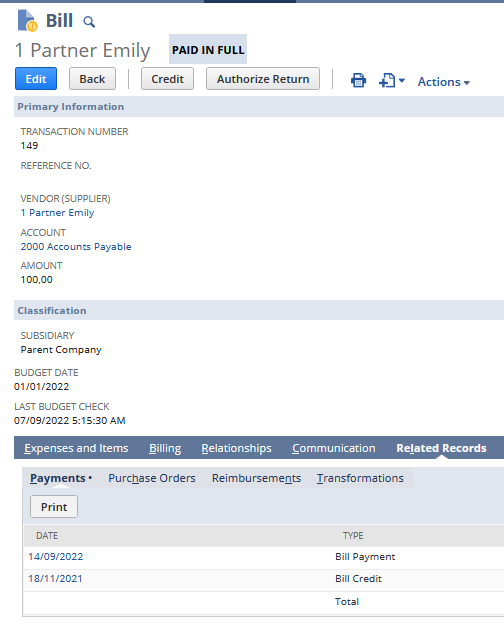
Please, let me know if your concern is about this behavior of the system.
Thank you very much.
Re: Restrict the administrative notifications to specific Admin Users
Hi @Hormese Paul,
By default, it is mandatory to include all admins in Administrative Notifications. I checked for an available enhancement request related to this and found none. I suggest submitting this as a new enhancement at SuiteIdeas.

Re: About the Departmental Transition Chart
How many sales outlet are you looking at. If they are more than 100s, you can leverage custom segment feature as well.

Re: Need to total the sum of all vendor bill(s) amount for a PO
Hi @Preethi Kondur ,
I followed a different approach to get the results. Please see below :
Criteria :
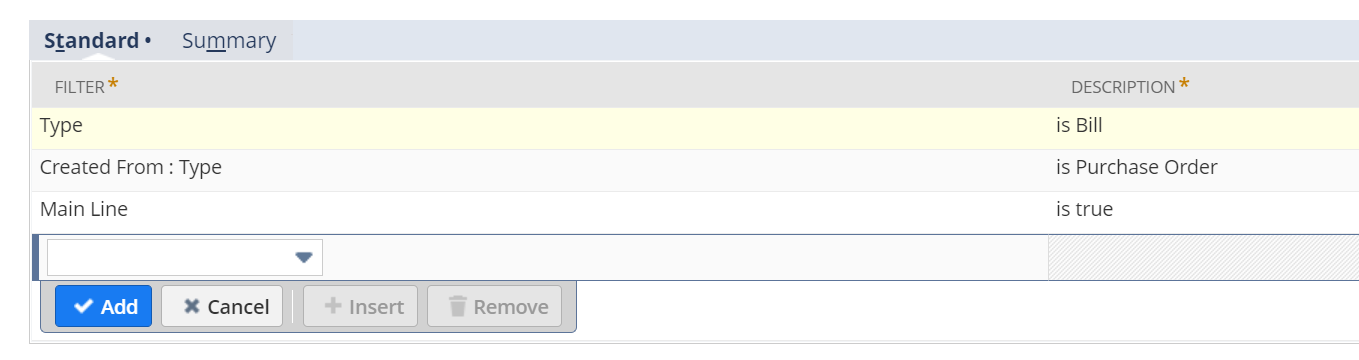
Result Tab:

you can add an additional formula column to get the amount difference.