Best Of
Re: Empty Sales Rep Field value in quote record
It looks like you have the wrong workflow Trigger Type set for the action that sets the Sales Rep to null. You might need the "After Field Sourcing" trigger as this happens after Before Record Load and Before Field Edit
What trigger are you using?

Re: Purchase Order using last rate used when item has no purchase price
Hello @Curtis Beene
It's the standard behavior of NS. For Service Sales or resale items you have the option to define the user rate but not for Purchase type. However whenever you create the new Service for purchase item enter "zero" as the last purchase price and then do the normal transactions. It should not take the last purchase price for the next PO or bill.

Re: Access Token in Sandbox
I figured it out. Incase anyone else is having this issue. Celigo created a role celigo integrator.io admin. I guess the sandbox creates its own celigo integrator.io admin 2. I assigned this role to myself and now I show up. I had just assigned celigo integrator.io admin. Needed the role with the 2 behind it.
 Okami
Okami
Re: Auto Populate Project Info on Invoice - Location, Class and Department
Never mind. I was able to find a SuiteAnswer article (Answer ID: 96843) that answered the question. I switched the sublist for the main body.
https://suiteanswers.custhelp.com/app/answers/detail/a_id/96843/loc/en_US
Re: Sales Tax Issue
Hi @User_GE47I,
Thank you for your reply!
It is possible that the Tax Code are generated from the Use Sales Tax Table:
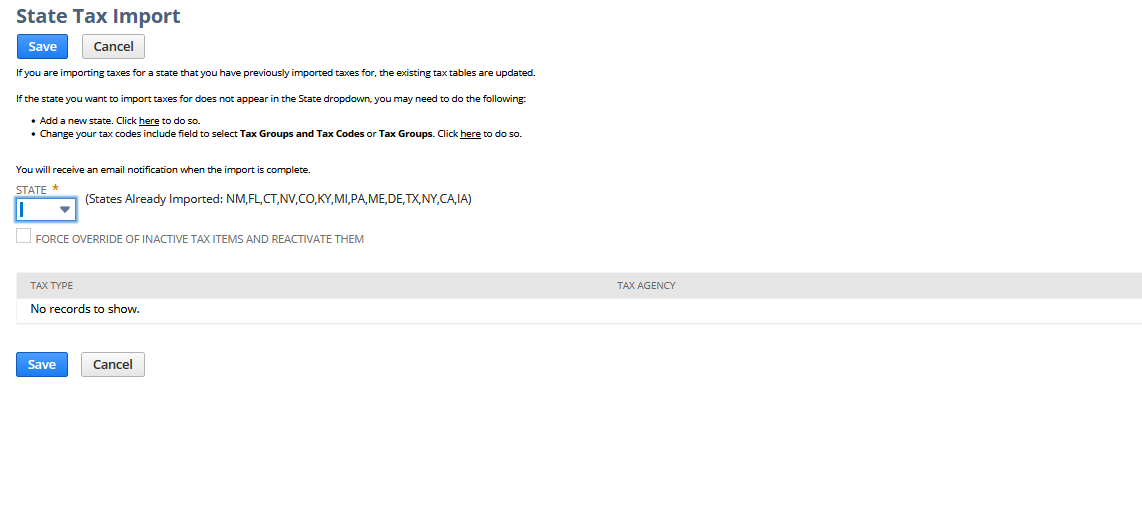
In this page, users can import tax code for different states. You can check SuiteAnswers Id: 8045 | Importing the State Sales Tax Table
There is an enhancement under 155025 Be able to add Tax Code Description to easily identify whether tax item is county/state/city/transit, that request the tax code to be more descriptive
------
For the Tax Due in your report, could you double check again the period set in the filter of the Sales Tax Liability by Tax Item? Can you try to make it to the your most current period?
Normally, the Tax Due is updated upon the Payment of Sales Tax's posting period. Here is an example:
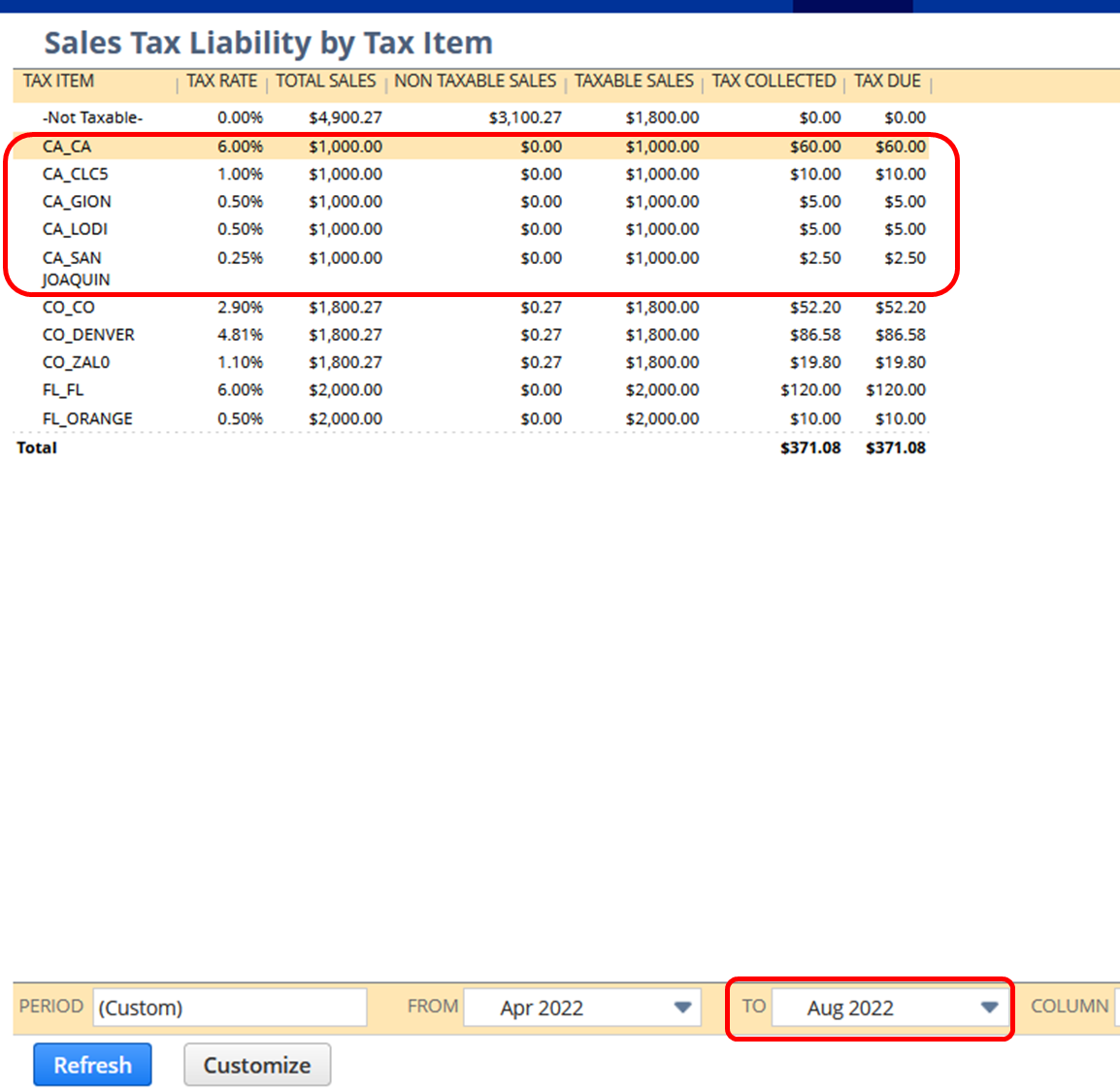
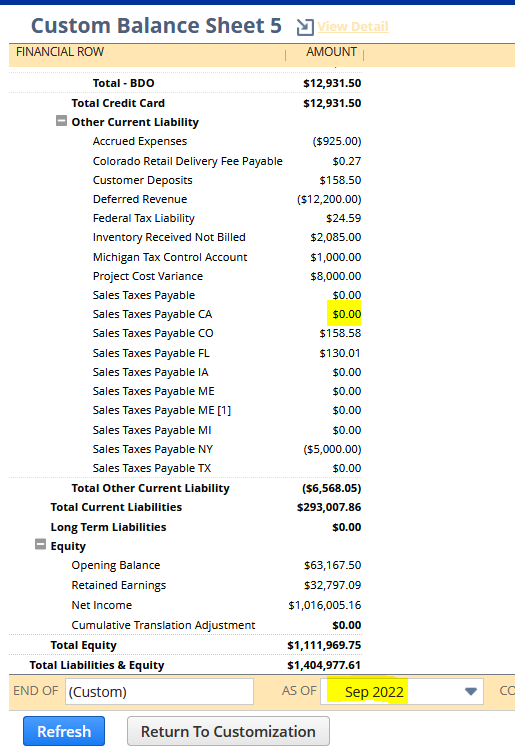
As of August 2022, I have this Tax Due for California. Which is also the same with my Balance Sheet
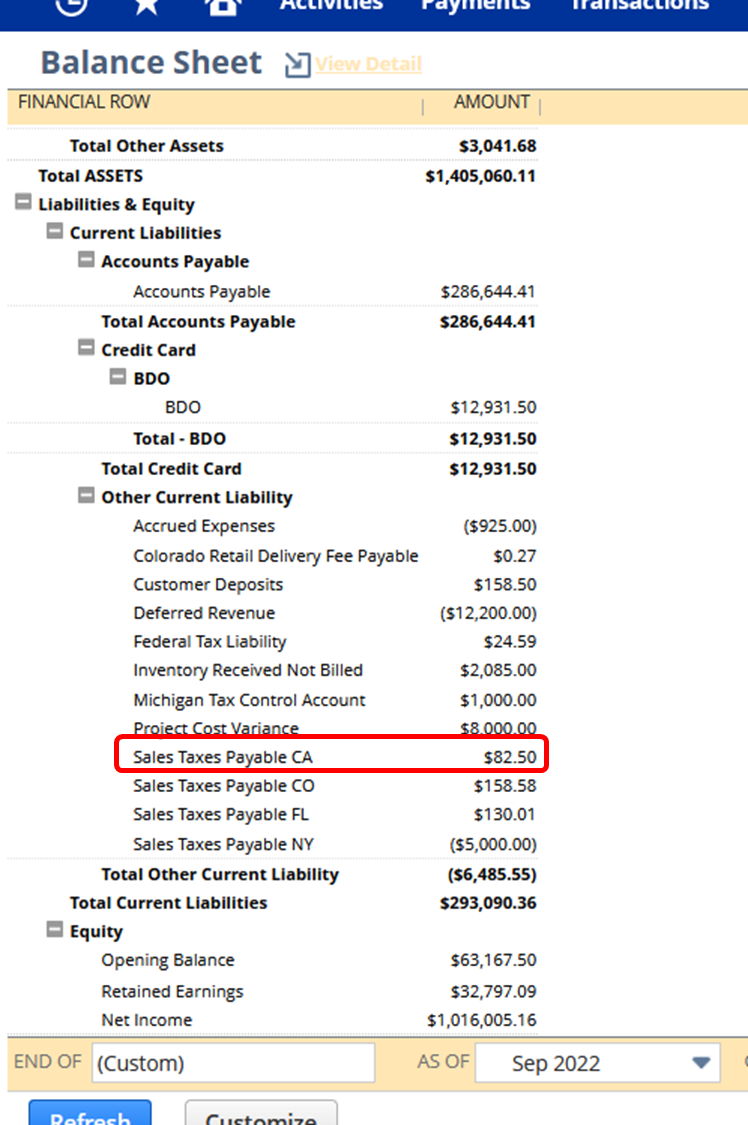
Which is also the same with my Balance Sheet
Then in September 2022, I made a Tax Payment:
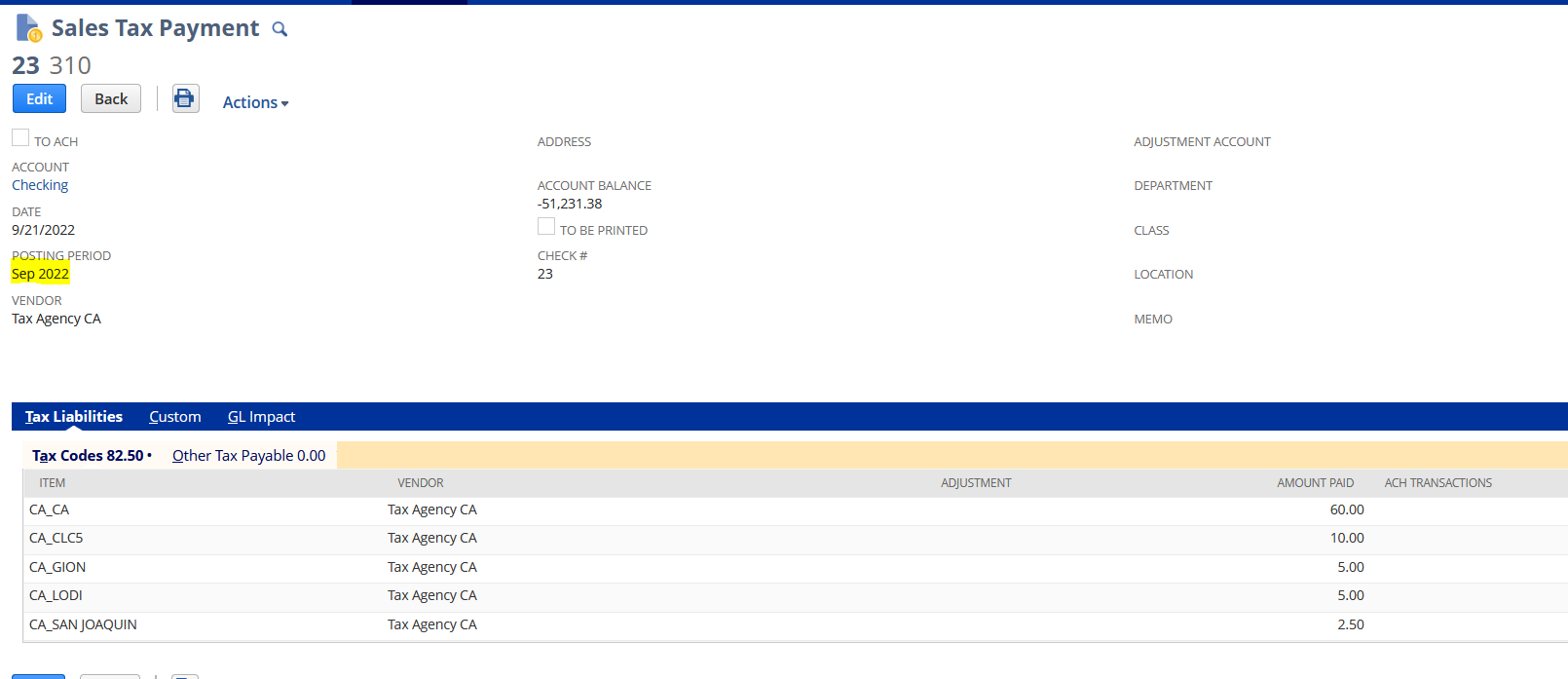
So when I set the Sales Tax Liability by Sep 2022, the Tax Due is zero since I have already paid it:
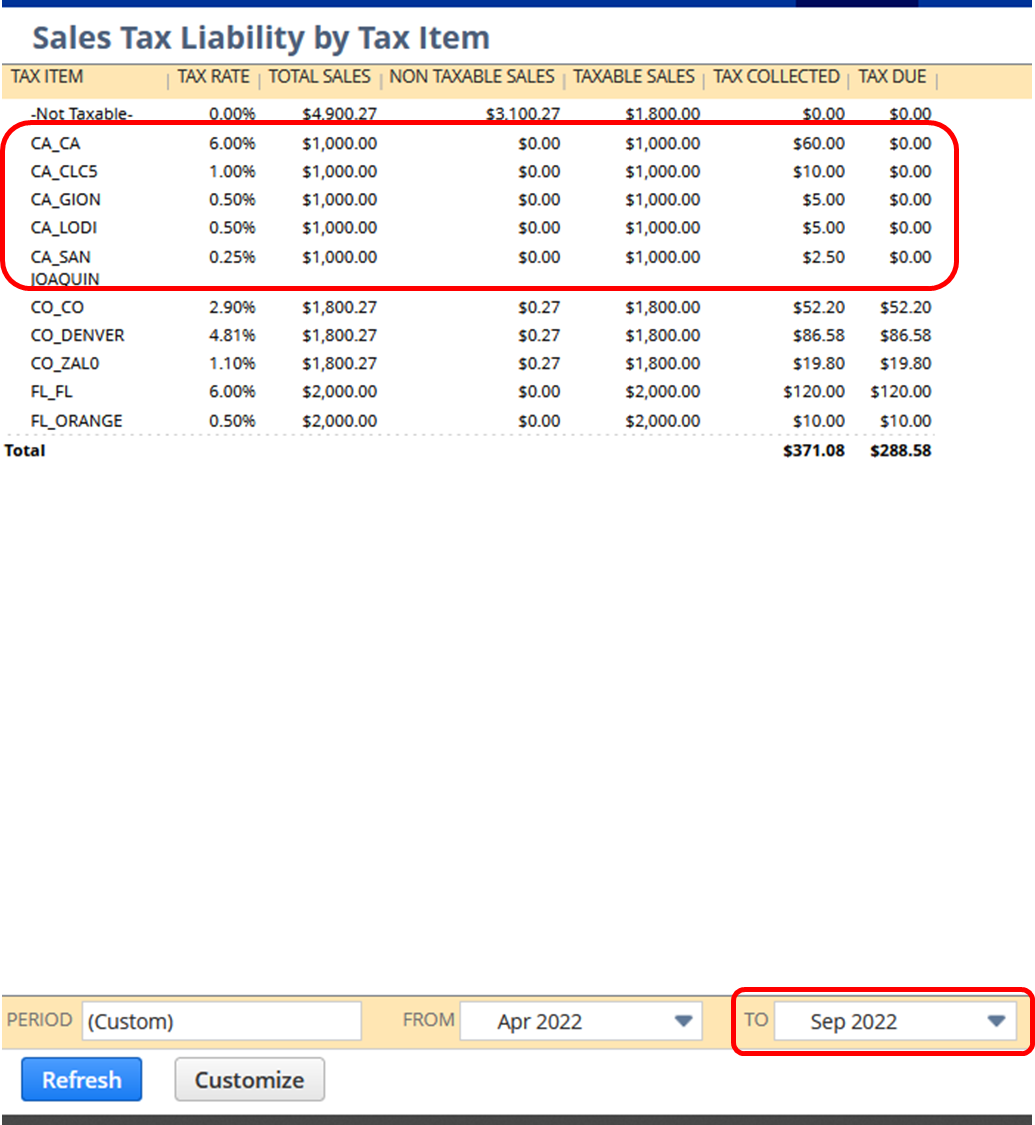
Thus also in my Balance Sheet as of Sep 2022, the Sales Tax payable for California is empty
To view your Tax Payments made, you can go to Transactions>Bank>Pay Sales Tax>List
You can also check SuiteAnswers Id: 40998 | Reconcile Sales Tax Liability By Tax Agency Report Tax Due Amount with the Amounts Pending Payment Available on the Sales Tax Payment Page
I hope this helps 😀
=========
If you find this reply to your question as helpful, others with the same question might find it helpful as well. By marking “Yes” on the “Did this answer your question?”, you’ll be able to aid the community to find the solution much easier and faster without the need to read through all the replies
Re: AskAGuruLive with Dominica about Procure to Pay (September 21, 2022)
Tip #1: Other Relationships of Vendors
There might be an instance that you offer something to your customers but you have to bill it to a Vendor, say for example this Vendor is your manufacturer. What you can do is to make use of Other Relationships under Relationships tab of the Vendor, then, add Customer.
You can create a Sales Order for a specific customer, when you bill this Sales Order, on the Customer field of the Invoice, select the Vendor/Manufacturer that you set up above. This Invoice will still be connected to the Sales Order and can be seen under its Related Records tab.
Also, when you go to the Vendor record > Financial tab > Transactions subtab, you should be able to see the sales transactions in the sublist view provided that the appropriate type is selected.

Re: Intercompany Netting
Hello @User_FZNHI,
Per my understanding, you wanted to use the Intercompany Netting feature in NetSuite but unable to see the feature. Please be informed that in order to use this feature, the Intecompany Framework and Automated Intercompany Management features should be enabled.


Note: I would kindly suggest for you to test the Intercompany Netting Feature in your Sandbox Account because once you enabled the Intercompany Framework Feature, it can no longer be DISABLED.
To give you a quick background about the Intercompany Framework Feature and Intercompany Netting Feature, you may check the following SuiteAnswers Articles.
- SAID: 94866 | Intercompany Framework
- SAID: 95315 | Requirements for the Intercompany Framework Feature
- SAID: 95314 | Best Practices for Using the Intercompany Framework Feature
- SAID: 94878 | Intercompany Netting
- SAID: 95049 | Best Practices for Using Intercompany Netting
Hope the information above addressed your concern 😊
Thank you!
===============
If you find this reply to your question as helpful, others with the same question might find it helpful as well. By marking “Yes” on the “Did this answer your question?”, you’ll be able to help other community members who might have the same concern find the answer easier and you will also get closer to earning your next Answer Accepter badge.

Re: Ability to use closing rate for the revaluation purpose different from the rate of the last day
Hi @User_1QJQ2! I hope you are doing well.
I have performed investigation on our test environment and I have noted that by default, the rates that the system uses for currency revaluation are sourced from the Currency Exchange Rates which can be found via Lists > Accounting > Currency Exchange Rates.
This is also documented as per SuiteAnswers ID: 14965 | Generating Revaluations: Revaluations apply Currency Exchange Rates as of the last day of the accounting period if currency exchange rate is available at the end of the period. However, if you generate revaluations from Transactions > Financial > Revalue Open Currency Balances prior to the end of the period, the exchange rate for the current date is used as mentioned on SuiteAnswers ID: 14972 | Revaluation of Open Currency Balances.
Upon further checking my resources, unfortunately, it's currently not possible to specify a different rate or a different date where the rate will be sourced from as it is outside the standard behavior of the system.
Hope the above information helped and clarified your concern. Thank you.
======================
If you find this reply to your question as helpful, others with the same question might find it helpful as well. By marking “Yes” on the “Did this answer your question?”, you’ll be able to help other community members who might have the same concern find the answer easier and you will also get closer to earning your next Answer Accepter badge.
Re: Depreciation method Asset Usage, no depreciation
Hello @OrlyG ,
I was able to find the solution. Don't really know exactly the reason why the Script is not running when we are updating the Depreciation Active field via CSV but below, you can find the solution:
- Firstly, please check the Depreciation Journal entry #JRNUS00000680 if is associated with other assets as well. In my case, the Depreciation Journal which was created for the Assets, where I missed the Asset Lifetime Usage is associated as well with other Asset and is correct so I don't needed to delete the journal as well.
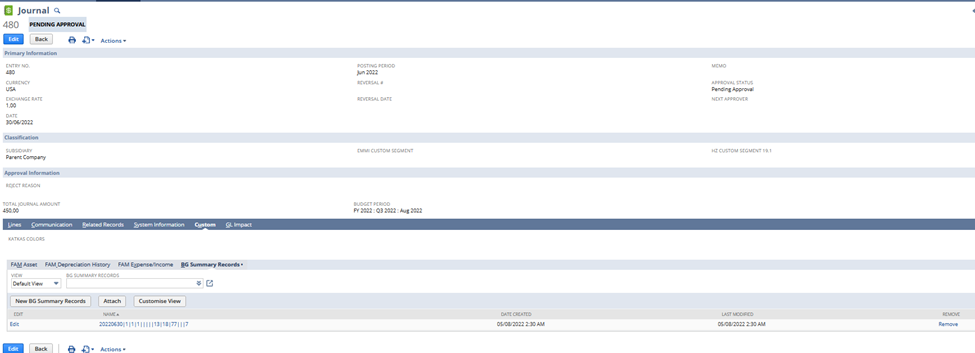
- Next step is related to the Asset itself:
- Delete Fixed Asset's Depreciation History Records in Bulk:
- Navigate to Lists -> Search -> Saved Searches
- Select FAM Depreciation History Search to Delete
- Click Edit this Search button
- Under Criteria tab, set the Filters as follows:
- Transaction Type = Depreciation
- Asset is Name of the Asset
- Name does not contain DHR
- Click Save & Run
- Turn On Edit Function
- Click the First Name then press Ctrl Key then click last Name
- Hover mouse to person icon (green) then Click Delete Record
- There will be a prompt: All selected records will be deleted. Are you sure you want to continue.
- Click Ok
- Delete Fixed Asset's Depreciation History Records in Bulk:
Set the following fields back on the Asset record as were before Depreciation run via CSV import:
- Asset Status: New
- Last Depreciation Period: 0
- Last Depreciation Date: 01/01/1980
Set the following field on the Asset Values record via CSV import:
- Prepare the CSV file with the fields Internal ID* and Last Forecast Date: 01/01/1980
- Import file via Import Assistant:
- Import Type: Custom Records
- Record Type: FAM Asset Values
- Select file (set Internal ID and Last Forecast Date)
- Click Next
- Import Options: Update
- Advanced Options: make sure, that the “Run Server Suitescript and Trigger Workflows” is checked
- Click Next
- Check the mapping and click Next
- Click Run
- Next step is to Run Depreciation
*Where to find the Internal ID of Asset Values, please, write in to the Global Search: “Asset Values” and select page FAM Asset Values

On this page you will be able to see the system generated records and their associated Internal ID, set the ones corresponding with the Asset record you would like to correct.

Please, test this firstly with one asset in your Sandbox account before you perform this update in to your production. Let me know if all is working.
“Kindly click "Yes" on "Did this answer the question?" if you find the reply on your thread helpful. This will aid the others with the same question to easily find the correct answer. Thank you!

Re: Duplicate Wizard Error
Just an update Michelle Jabanes! Our NetSuite partners found the solution! Come to find out, I needed to uncheck the last person on the list, as the other duplicates were not showing on the same page. So, if I mark all as dup and uncheck the bottom person, it works! This is resolved now.
Thank you!
