Best Of
Re: Permission to Access the Manage Integration Page
Thank you so much for your guides.
No question as for now. will post here if any questions.
Once again, thank you.
Best Regards, Bee Yook.
 Bee Yook
Re: Saved Search formula to lookup a Project ID and return the Project Manager
Sorry for the delayed reply. I wanted to give the process a few days and see how it was working for us. So far, so good. Our PM fields are populating nicely.
Please allow me to go back to the above directions to clarify a few things for non-experts like me:
- Jervin writes "Create a Custom Field". but he does not specifically say which type of Custom Field to use. SuiteAnswer 10092 https://suiteanswers.custhelp.com/app/answers/detail/a_id/10092/loc/en_US does not do a great job of helping a person to make a selection. I took a guess and chose a CUSTOM TRANSACTION LINE FIELD because the timesheet entries appear as separate line items in a Timesheet Record. It would be great if when suggesting that a custom field be created, to call out which field to choose per NetSuite best practices.
- The In the Create the Workflow section of Jervin's directions, please add that you must SAVE after completing the first set of steps. I fumbled around for a while before figuring out that CREATE THE WORKFLOW and CREATE THE WORKFLOW ACTION was a two-step process.
- Jervin writes "… every time a user CREATES or EDITS a timesheet, the custom field will be populated…". That did not seem to work well for us. When CREATING a timesheet, the PM field populates perfectly every time. However, when EDITING a timesheet, it seemed to be more hit or miss. What I found was that, when EDITING a timesheet, I typically had to go to each row and add a SPACE character to the end of the MEMO field. Then, when I clicked SAVE, the PM fields would populate.
Otherwise, this solution is terrific. Thank you BOTH, very much.
 esabis
Re: Replacement Files in File Cabinet
Hi @User_KWDL4 ,
A replacement of a file in File cabinet can be done if you save it with the same name and you confirm the replacement. You can make changes to a file, save it with a different name and upload it again in the file cabinet. The original file will keep the name and the new file saved will be tracked under the new name.
Do you mean that other users might replace your original file when they perform changes? You can just rename your file and upload it again to have it stored in your folders, somewhere you prefer.
About replacement, we have an enhancement request for updates: #99828 File Tab on Custom Records - Ability to access the File Cabinet Document record itself to allow update/replacement of the uploaded document directly from the custom record
If this would be a feature you would like to be implemented, I hope you spare some time to vote for the enhancement in SuiteIdeas so we can raise the number of votes it has. Best regards,

Re: AskAGuruLive with Ely about Order to Cash (June 19, 2024)
We are now closing today’s session. We hope to see you in the next #AskAGuruLive session.
I hope the tips I provided will be helpful for you. 😊
Be sure to follow the tag AskAGuruLive for updates.
To help us improve this program, feel free to provide feedback or suggestions.
Have a great day, everyone! 😊

AskAGuruLive with Ely about Order to Cash (June 19, 2024)
Hello, Everyone! Hope you are having a good day. 😊
This is Ely, NetSuite Support Community Guru for Order to Cash, and I will be LIVE for an hour starting from 1 PM to 2 PM EST to answer your questions.
But before we start, let me remind you of some house rules:
- Post your questions by commenting below. 1 comment = 1 question.
- Some questions may be complex so I would appreciate your patience as I look into it.
- Let me know if the solution works for you or not. That way, I can check again.
You can also ask some non-NetSuite-related questions about me such as my hobbies and interests and I'll be happy to answer them.
Stay tuned as I will be sharing tips and tricks as well. 😊
I would also like to greet the following members who have RSVP'd for today's session:
@Robert Nedelkow-Oracle, @Richard James Uri-Oracle and @Cesarhr95!
New to NetSuite | Understanding the Preferences related to Fixed Asset Permissions and Creation

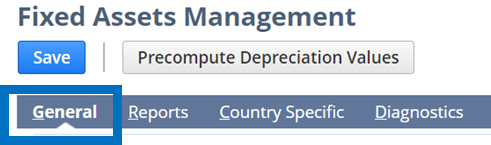
In this article, we’ll discuss the different General preferences related to Permissions available in the Fixed Asset Management bundle and the effects of enabling them.
How to access the FAM General Preferences:
Navigate to Fixed Assets > Setup > System Setup
The General Preferences Related to Accounting Period
1. Enabling the Post to Next Open Period if AP/AR is locked
When the Accounting Period is locked and a FAM transaction was processed, it will be posted on the last day of the next open period.
2. Disabling the Post to Next Open Period if AP/AR is locked
When the Accounting Period is locked and a FAM transaction was processed, it will be posted on the last day of the period when the transaction was processed.
Here’s a table to help you understand:
Transaction: Depreciation

The General Preferences Related to Asset Creation and Update
1. Enabling the Run Server Scripts on CSV Import
The user needs to enable this to make sure that the FAM scripts will run when creating and updating assets through CSV import.
Aside from enabling this preference, user also need to enable Run Server SuiteScript and Trigger Workflows (Navigate to Setup > Import/Export > CSV Import Preferences) when importing CSV.
2. Enabling the Allow Asset Value Editing
If this is enabled, Administrators, by default, will have full permission in editing the values in the asset record. However, additional roles can be added by selecting them on User Roles box. (Navigate to Fixed Asset > Setup > System Setup > General > Asset > User Roles)
3. Allow Negative Asset Cost
If this is enabled, users who has permission in editing Asset Values will be able to enter negative values for Original Cost, Current Cost, and Residual value fields on the Asset Record
If you are new to the Fixed Asset Management module, check out these related articles as well:
1. New to NetSuite | Account Set up for Fixed Asset Management SuiteApp
2. New to NetSuite | Permissions Needed for a Custom Role to have Full Access to the FAM Module
--
Stay tuned for upcoming articles where we will explore Fixed Assets Management under Basic Accounting Product Area. Follow the New to NetSuite > Basic Accounting to be notified whenever a new article is posted.

Re: NetSuite Connector - Customer Terms
Hello @Amanda Edwards, it seems that you would like to use Terms on the respective customer record as an order filter. However, this is not supported in the system as only order data coming from the storefront/marketplace can be used as order filters, and therefore Terms pre-set on the customer record in NetSuite cannot be used as an order filter. Hoping that this answers your inquiry. Let us know otherwise. Thanks!

Re: How to adjust the decimal places of bill of materials revision quantity
Hi @User_A8ZG8
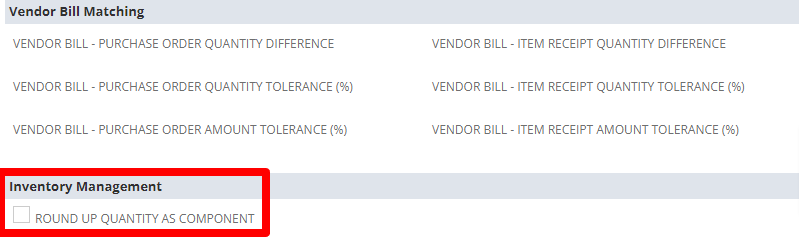
- Use the steps below
- 1. Go to Items.
- 2. Locate the item record for the component you want to manage rounding for.
- 3. Click on the Purchasing/Inventory subtab.
- 4. In the Inventory Management section, look for the setting called Round Up Quantity as Component
- Make sure the box is not checked.
 K Mukesh
Re: NSAW Data Augmentation stuck
OK - after testing a few things the issue turned out to be the username
As we support several NetSuite customer we create an admin username e.g. "netsuitelogin+ABC@ourcompany.com " this way we can then have one email account but several users across many companies.
Data Augmentation does NOT like ' +' - I created another user without the '+' in the name and was able to delete the incorrect augmentation

Re: Seeking Resources for Building Visualizations in NSAW
@Patrick Fresnosa-Oracle Thank you very much for the information!