Best Of
Re: NetSuite Admin Tip | Best practice to inactivate a resigned employee
Maybe this process could be helpful to others.
The process is simple, when a user's employment is terminated, we set a termination date and revoke their login access. This triggers a scheduled script to take action. The script automatically sends an email notification to the supervisor, informing them of the termination and providing details of all open transactions and activities associated with the terminated user. This empowers the supervisor to decide on the necessary course of action.
Furthermore, after a 30-day period, a reminder email is automatically sent, clearly stating that the account will now be closed. The reminder also includes a list of any remaining open transactions. Following this, the account is completely inactivated.
This process streamlines the termination procedure, ensuring smooth transitions while maintaining data integrity and security.

Re: CSV Import
Thanks for your lines @K Mukesh
As I did:
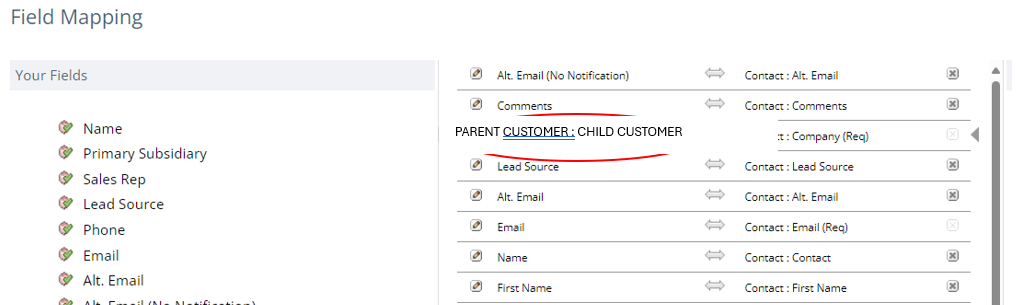
In the csv file I was using the Company column and filled it with the Name of the Child/Customer, and there I got an error….
How did I solve it?
I deleted the Company column and in the Field Mapping (Image 2) I wrote it manually, this time including father and son separated by: the colon….
BINGO!

I wonder:
Will it work the same for other records?

Re: Customer setup for a multi-branch manufacturing
Hey @MHS Crane,
The best practice is to set up one customer with multiple Ship To Addresses.
To facilitate reporting, you can create a custom "Branch" field and tag Ship To addresses and Contacts.


Re: Custom field on entity not available as filter on a transaction saved search
Hi @Dolev ,
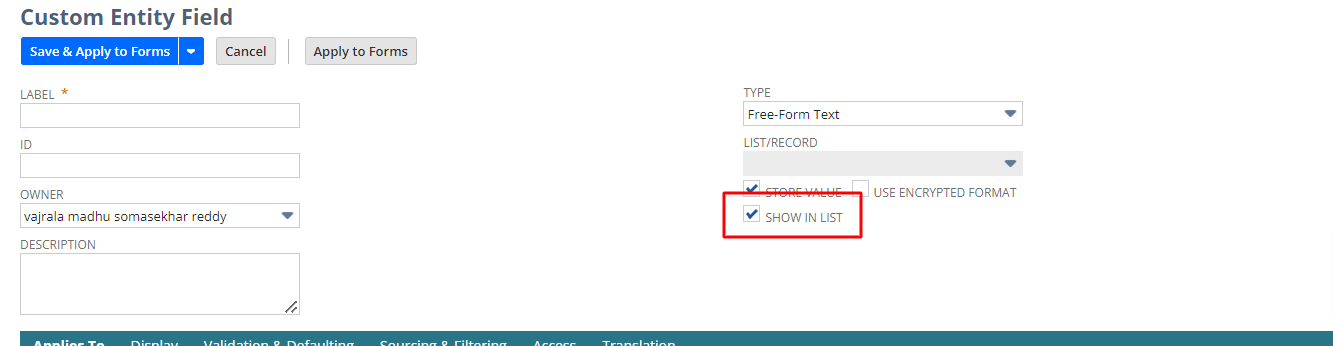
Open the custom field in customizations and check the check box as show in list and the save the field now please check in saved search

Re: Custom field on entity not available as filter on a transaction saved search
perfect! it works this way!

Re: Unable to inactivate SiteBuilder
Dear @Leslie Macahia-Oracle ,
Thanks a lot! This worked :)

Re: Unable to inactivate SiteBuilder
Can you try doing the following:
- Go to Setup > Company > Enable Features
- Under Web Presence
- Enable the Website
- Go to Commerce > Website > Website List
- Edit the Site
- Changed the Web Site Scope field to Information and Catalog
- Enable the SuiteTax feature
Thank you.
Regards,
Leslie
If you find this reply to your question useful, others might be as well. By clicking the “Yes” button for “Did this answer the question?” below, you’ll be able to help the community members who might have a similar concern find the answer easier and you will also get closer to earning your next Answer Accepter Badge.
Re: what is Revenue Recognition Events?
Hi @Vajrala Madhu Reddy,
You have to refer couple of reports to see the revenue details based on SO, RA and Rev Rec journals.
1. Revenue recognition forecast summary - run by monthly/accounting periods - you can see customer and RA wise, revenue recognized, planned, and forecast.
2. Billing and Revenue summary - you can see SO and RA-wise total value, billed, planned, recognized, and deferred.

Re: Permission to Access the Manage Integration Page
Thank you so much for your guides.
No question as for now. will post here if any questions.
Once again, thank you.
Best Regards, Bee Yook.
 Bee Yook