Best Of
Re: How to resolve incorrect Item Receipt To Location from Transfer Order?
Ran into the same issue and this thread was the first search that comes up. I managed to make a scripting solution for it. It will update the To Location field correctly.
The issue appears to be that NetSuite has labeled the fields wrong on implementation. Ideally, you should aim to fix the labels of these fields first but for me I already had a number of workflows and scripts that treat the fields as NetSuite has labeled them (incorrectly). So this script is perhaps an easier fix for some.
Deployment:
Applies to: Item Receipt
Event Type: Create
 Dext3r
Re: How can I execute a NetSuite Technical Assessment of Environments?
Thank you, Jeremy. This helps a lot. I believe we will use Salto to NetSuite in order to review comparisons of NetSuite environments. And the APM tool for business performance. 🤓

Re: How can I execute a NetSuite Technical Assessment of Environments?
Hello, @Intelligere1.0. Good day.
After consulting internally, we have determined that the APM Tool is the only performance tool available for assessing NetSuite performance. You can also double-click the Oracle-NetSuite logo to view the time spent on the most recent action you performed.
We don’t have specific tables to compare how long records should take to load, as this can vary widely depending on several factors, including:
- The level of customization (e.g., scripts, workflows, custom fields, and forms).
- The user's computer and network speed.
For instance, a standard loading time could be 5 seconds for one customer account with minimal customization, while another account with extensive customization could experience loading times of 50 seconds or more. Due to these variables, comparing performance across different accounts is not feasible.
If you believe your NetSuite performance is suboptimal, you can open a support case, and our support team will investigate. Additionally, if you have an ACS (Advanced Customer Support) license, you can request a detailed performance analysis of your account.
I hope this clarifies.
Thanks!

Re: SuiteAnalytics Connect not showing Transactions
Hello @Aaron McCausland,
Thank you for letting us know.
Upon checking, it appears that the Departments permission has something to do with restricting users from creating transactions/transaction lines that are not of the same department.
I do not see documentation linking the department permission from the transaction table though.
Usually, you can check the REST API Browser to see what features and permissions are required to view a table. In this case, only Find Transaction is written.
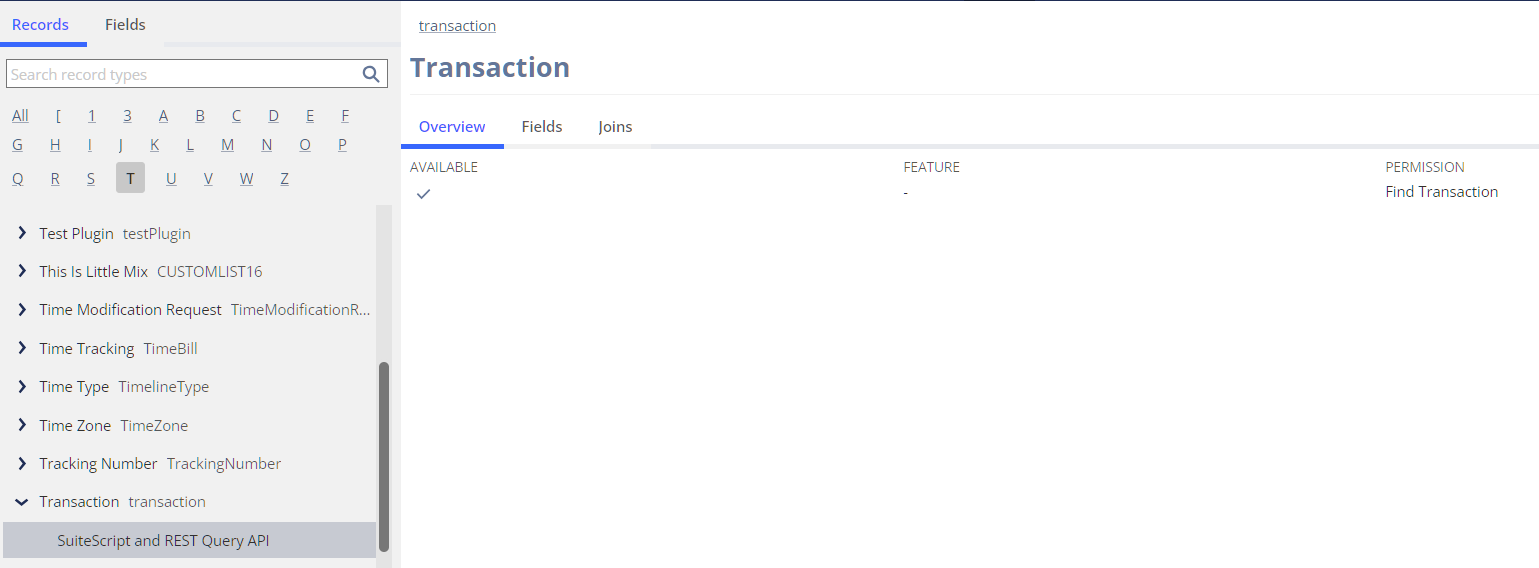
Meanwhile, I checked the 2024.1 Permission Usage file and these are the things the Departments permission is responsible for:
- Allows usage of the Department search.
- Allows usage of the Departments task.
- Allows usage of the New Departments task.
- Allows usage of the Search Department task.
- Allows viewing and editing of the Department record.

Re: Sales order line level Billing schedule with different start date
Hi @Pallavi1903 ,
I hope you are doing well and good.
Regarding this requirement, we changed the arrangement internally and with the customer to accommodate this limitation.
We didn't go for any customization aspects.

Re: Adding a custom field via workflow from a saved search formula
thank you, it was not showing up in the search drop down. In the meantime we have moved forward and will not need this at this time.
Thanks,
Re: FAM Alternate Depreciation - Set Inactive
Hi Micah,
Thanks for your suggestion.
I haven't tried it yet, but I think if we uncheck that option ("Include in reports"), the asset will be excluded in ALL reports (including ones for accounting method)
I only want it to be excluded from Tax register, but it should still be present in accounting method.
Regards,
Phu


Re: How do I condition based on value when using multiple currencies?
Hi @Dext3r
My suggestion is to set the approval matrix tier based on subsidiary base currency instead of per transaction currency.
1. Create a custom trans body field apply to purchase transaction :
"Total (Base Curr)" with store value set to No, Set the default value formula = {total}*{exchangerate}
2. In your workflow just refer to this "Total (Base Curr)" field instead of the Total field which is in transaction currency for your approval routing per subsidiary.
Regards,
Wee Ming
 Wee Ming
