Best Of
Re: Ageing report working with transaction date rather due date
You can enable the preference to show Aging Reports based on the Transaction Date instead of the Due Date.
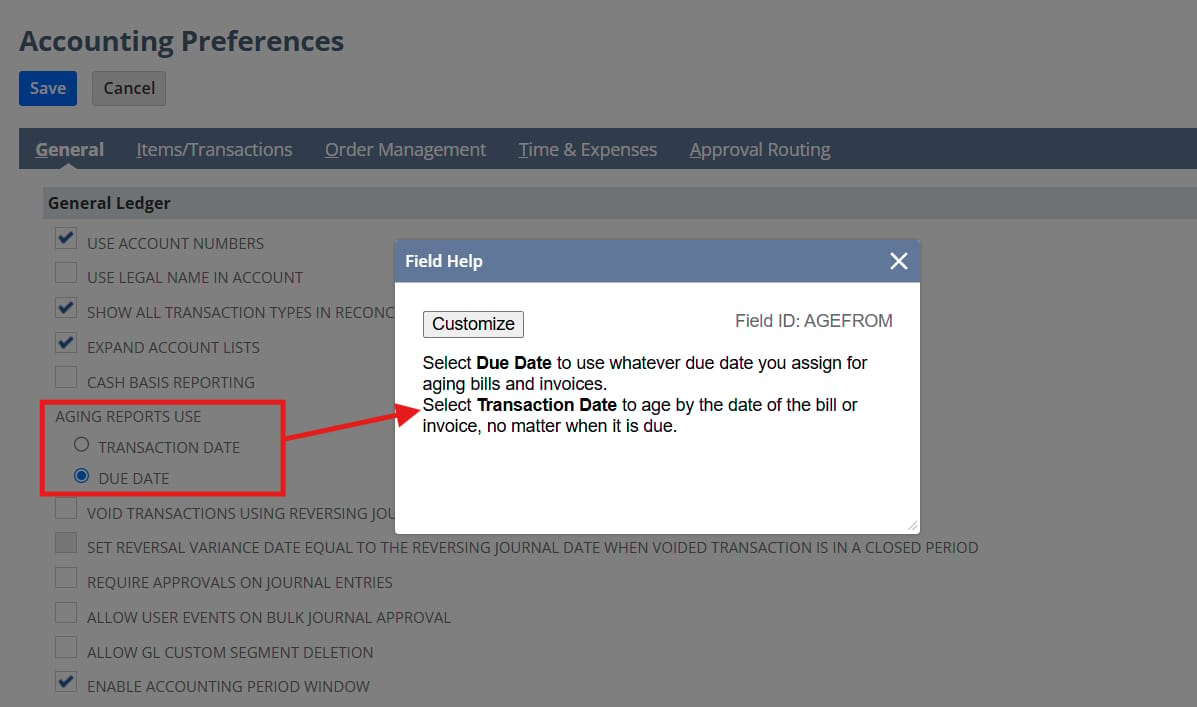
Navigate to Setup > Accounting > Accounting Preferences > General tab, then under General Ledger, set Aging Reports Use to Transaction Date. This will display Aging Reports based on the transaction date instead of the due date.
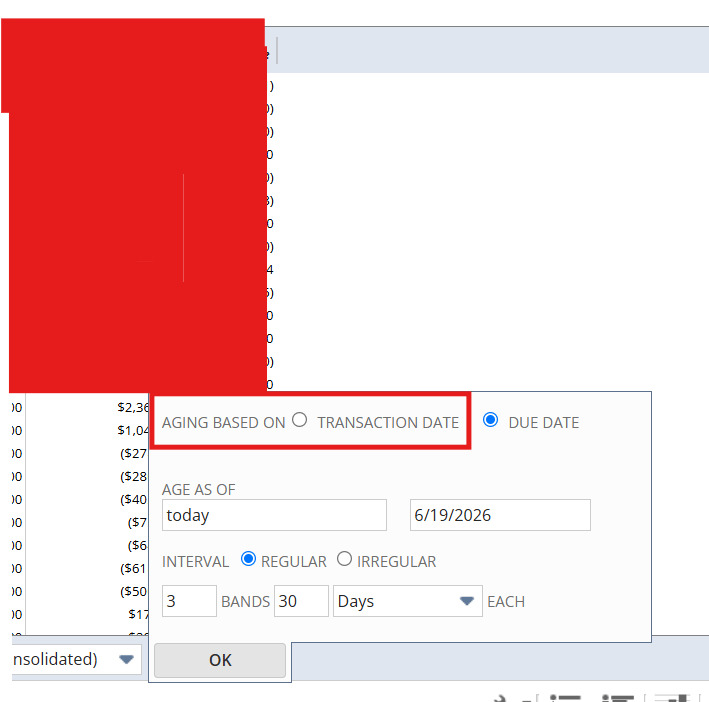
If you do not want to enable this preference globally for all Aging Reports, you can configure an individual Aging Report to age transactions based on the Transaction Date instead of the Due Date.
When viewing the Aging Report, use the Aging Options dropdown and select Transaction Date as the aging basis. This allows you to generate a report using transaction dates without affecting other aging reports in the account.
Hope this helps!

Re: Create a message, add attachment and attach to supportcase
Thank you @Richard James Uri-Oracle . We hope to find someone! :) Also, because everything is possible. You can insert a message sent by a customer into a support case by filling in the incomingmessage field in the support case, or you can create complete messages with attachments, but linking them isn't possible!
Thanks again!

Re: If customer currency is EUR and supplie currency is USD, how we are adjusting a amount in Invoice ?
@User_JLBXV , are you using the Other Relationship option, which allows you to have the same "entity" represented as a customer or a supplier - the record will have the same internal ID but alternating perspectives?
On the financial tab, you'll need to add the currencies that you transact with the entity. There will be a primary currency, which is just the default when transactions are created. On the transaction, it will show the other currencies you've added to the list.

Re: Customer Access
Hi @User_ZPOBI ,
Native NetSuite permissions don't allow you to separate "Create" from "Edit" on customer records, as both require the Lists → Customers (Edit) permission level.
The cleanest way to enforce this restriction is using a User Event Script on Before Load Function. The script can detect if the user is attempting to create a new record and block the action for that specific role, while still allowing them to edit existing ones.
Feel free to message me privately if you need a hand creating and deploying the script!
I’m just looking to give back to the community, no catch, no promotion. I just enjoy helping the community solve these kinds of platform roadblocks.

Re: VersaPay Charge to Customer
@Zeen You're welcome!
I understand that clients ask for things, but sometimes, they ask and expect things without properly thinking them through.
I suspect that VersaPay withholds their fees from payments - as most others do. However, you can't just magically pass those fees onto customers without communicating and agreeing with your customer that they will pay them.
IE- a line added to my $100,000 invoice for an item related to credit card fees could bring my invoice total to $102,900.00. Now, as a client, I can pay that invoice.
The negligent amount of the fees to cover the cost of me paying the fees has to be eaten by your client.
The simple way to put this is that you cannot collect money from customers that isn't owed by customers. For a customer to owe, it either must hit AR or be captured on a cash sale. One or the other.

Re: costum segment list of value limit?
Hi @User_6S2Q2 , I had a look over the help text and there's nothing that jumps out to suggest a limitation. It could be worth testing.
However, I'd challenge the business requirement on having > 1000 segments to understand why.
Re: Email Deliverability Issues When Sending Quotes/Sales Orders/Invoices from NetSuite
Hello @User_F5QAS
There are a few things you should do.
First - review your undelivered emails. Lists>Mailing>Undelivered emails
Next review your bounced emails. Lists>relationships>Bounced emails.
If an email is undelivered, NetSuite captures that and won't send new emails to that address unless their bounced email is cleared and the reason for the bounce is resolved. Often emails bounce because senders don't fill out their profile at Home>Set Preferences. Without having a sender, many hosts reject the emails.
Give it a try and let us know?
Re: How to build custom Searches
Hi @User_00DQF
I agree with Francesca's response that the LCS is a great place to learn how to build saved searches. If your company find's that the LCS pass is out of budget then you could pay consultants for this training. If that's also out of budget, you can find some great sources on YouTube going through the basics and more advanced searches. You can also check out SuiteAnswers for some introductory information.

Re: cannot Edit Payment Template
@Kedalene , you may navigate to the license manager via Setup > License Client > License Dashboard. On this you should have an entry for "Electronic Payments" if it's active.
If it doesn't appear here, you'll need to confirm that it's part of your license. It doesn't appear on the Billing Information page.