Best Of
Re: Suiteql Search error occurred: Invalid or unsupported search
Thank you @Francesca Nicole Mendoza-Oracle. The solution proposed is not helping us. Possibly, I will give the problem statement with more detail below:
Our requirement is to fetch the values of all GRNs which have been received as transfer order. We have constructed the following query for the same:
(Select sum(X1.netamount) from transactionline X1 INNER JOIN transaction X ON X.id=X1.transaction Where X.type = 'ItemRcpt' and X1.mainline='F' and X1.item=t1.item and isinventoryaffecting='T' and X1.location=t1.location and X1.subsidiary=t1.subsidiary and X.trandate> = '" + pfromDate + "' and X.trandate< = '" + ptoDate + "' and X1.createdfrom in (Select X3.id from transactionline X2 INNER JOIN transaction X3 ON X3.id=X2.transaction Where X3.type ='TrnfrOrd' and X2.item=X1.item and X2.subsidiary=X1.subsidiary and X2.location=X1.location and X3.id=X1.createdfrom)) as transgrnvalue
For some locations we are getting the results properly. For some locations, we are getting the error:
Search error occurred: Invalid or unsupported search
Please advice us if there is any solution for the same.
Regards,
Raghu
Re: CSV import account number and name
Hey @Karen See,
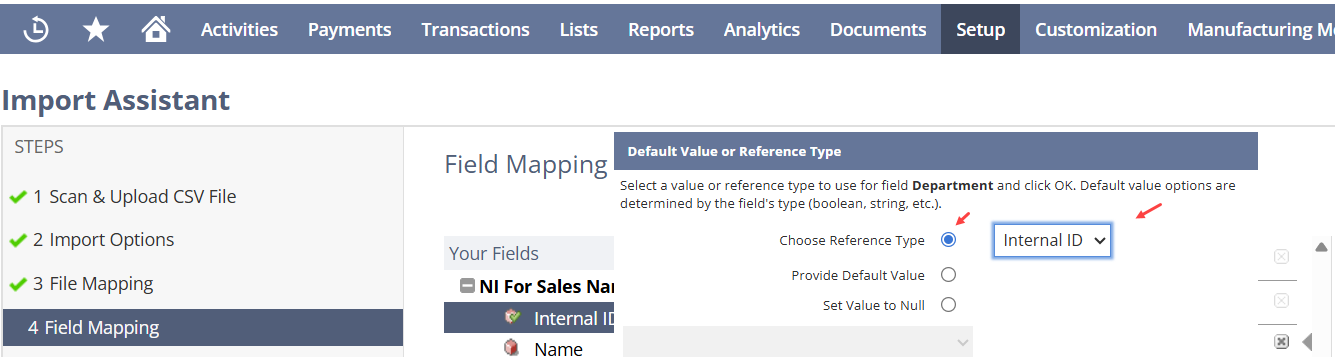
I recommend using "Internal ID" instead of the Name for most records.
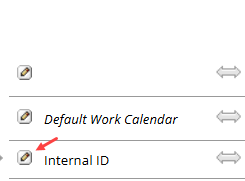
Instead of entering the "Department Name" in the CSV Import File, you have to enter "Department's Internal IDs". In the Import Mapping Screen, ensure you let NetSuite know you are using "Internal ID" instead of "Name".
Re: Understanding Financial Exception Management Results
I did open a ticket for this functionality. After several months of Oracle passing around the ticket, they gave me a non-answer. Since I opened the ticket mainly to help Oracle improve the product and they seemed uninterested, I asked them to close the ticket and turned the feature off.
Based on my experience, this is functionality for marketing AI and has nothing to do with efficiently closing. I did not see any performance degradation when it was turned on, but our environment is small so I doubt that it would.
If you want to wade through a bunch of exceptions that aren't really exceptions, this feature is for you.
Good luck.
Re: Netsuite On a Sales Order How to hide an item so it only goes to invoice and or to PO
Hi @Juli, In NetSuite, a Sales Order represents a customer billing commitment. As such, every line on a Sales Order is assumed to represent something that will eventually be invoiced to the customer. There is currently no supported configuration that allows a Sales Order line to generate a Purchase Order while never being invoiced.
The supported and auditable approach is to:
- Use Sales Orders exclusively for customer revenue
- Use Purchase Orders and Vendor Bills for vendor costs
- Link the two through projects or reporting references, not shared transaction lines
A Project is a standard NetSuite record created under a Customer record and is used to capture the costs and revenues specific to a Project.
To use the project record, you must have the Projects feature enabled at Setup > Company > Enable Features, on the Company subtab. If you plan to do advanced project tracking, you must also enable Project Management. If you don't see the Project Management box, your company must first purchase the Project Management add-on from NetSuite.
To access the project record in the UI, choose Lists > Relationships > Projects (or Jobs).
You can use project records to organize your resources and manage the time required to complete tasks for company projects.
- Use basic Projects to track projects for customers including activities, time tracking, and billing.
- Use Project Management to track projects during your sales process, define and manage project plans, assign resources, and integrate project activity into your order-to-cash process. With Project Management, you can create projects that aren't tied to customers.
Re: Customer and Vendor search display that have not orders in the last 2 years
Hi @John Nikko
Thank you for posting here in the NetSuite Support Community!
Hello everyone! One of our fellow members could use a hand. Please feel free to join this thread and share your knowledge, ideas, or tips. Your contributions are always valued and truly appreciated!
Re: Notification "An Unexpected Error has occured" when viewing CSV import status
Hi @Angela Bayliss ,
Yes, the record is imported, whereas the system notifies "unexpected error". Do you know what the root cause of this issue is?
Re: Increase highlighting opaqueness (darkenss)
Hi Niks, thank you for the information, but it is not related to my question.
Will your answer keep other Gurus from answering my question because they see it has already been answered?
Gary
Multi-Factor Authentication (MFA) for All Oracle Sites
- Why MFA?
Oracle is committed to enhancing the security of your account through the application of Multi-Factor Authentication (MFA), which adds an extra layer of protection by requiring a second verification step when signing into your account.
Who does MFA apply to?
All Oracle customers who use their Oracle account to sign into any portal are required to enroll in MFA.
If you sign in using your cloud tenancy credentials, this change will not impact you. Your cloud administrator manages authentication settings for your account.
What should I expect with MFA?
When MFA is required for your login, you will be automatically prompted to set it up during your next sign-in. Follow the onscreen instructions to set up MFA. You can choose between the Oracle Mobile Authenticator (OMA) app, phone number (SMS), or email. Please note that OMA is the recommended method.
Will this affect my products I’ve purchased from Oracle?
No. MFA enforcement for Oracle hosted applications will not have any impact to products purchased from Oracle Products and Services.
What should I do if I don't receive my one-time passcode (OTP)?
If you don't receive your OTP:
- If using email, check your spam/junk folder.
- If using SMS, ensure that your phone has network coverage.
- Click “Resend” to generate a new OTP.
- Ensure “no-reply@identity .oci.oraclecloud.com” is not blocked. Check with your local IT if the email address is on the allowed list (if using email).
- Clear your browser cache and restart from the login URL.
How do I manage or set up a backup (second) factor?
You set your default factor during initial MFA registration. To add an additional phone number, email, enroll a new Oracle Mobile Authenticator, or change your default verification method, go to My Login Profile page, and use the Action menu under Authentication Factors.
If you lose your device or the device was reset, log back in by accessing My Login Profile page and set up a new factor with same/different device.
What factors are available for MFA?
Three factor options are currently available: the Oracle Mobile Authenticator app, phone number (SMS), and email. OMA is the recommended factor.
Note: If you have previously enabled factors other than phone number or email, these factors are not currently supported. Oracle has removed these factors for you, and you will be prompted to re-enroll in MFA during the sign-in process.
How do I download the Oracle Mobile Authenticator app?
To download the Oracle Mobile Authenticator app, please go to any major app store to download.
What is the impact of using an email alias/distribution list to log in?
It is not recommended that you use an email/distribution list for your account login. If you do, the following actions are recommended:
- Verify OTP delivery. Ensure that the alias correctly forwards emails to your inbox.
- Consider using OMA for MFA. OMA is the preferred MFA method. To add your individual phone number to the authentication list, go to My Login Profile → Authentication Factors and select Add Mobile Number as your authentication factor.
How do I change the email address associated with my account?
If you need to change the email address associated with your account, please use Oracle Account Profile to make any necessary updates.
My account is locked. What do I do?
After a maximum of 10 failed attempts, your account will be locked. The lockout duration is 30 minutes. Try logging in again after 30 minutes or reach out to Oracle support.
I lost the phone that I use for MFA. How can I update these factors?
Your email is automatically enrolled by default. So you can access My Login Profile with the alternative sign-in options and choose “email” for your second factor option. You will receive a passcode via email and should be able to log into the My Login Profile portal. Once logged in, click on Actions → Add Mobile Number to add another factor. If there are no other factor options listed, please contact live chat support.
What do I do when I get this message: The requeststate provided is either invalid or expired. Please provide a valid requeststate error message in the log-in screen.
This error message is returned when the passcode or the session is expired. Start a new browser session and re-access the application to go through the authentication process.
Re: NetSuite | Oracle NetSuite Accounts Payable Specialist Exam
Hello @Shubham_Singh ,
All of us get a total of 4 coupons. If you fail one of the exams, you have used one coupon. You cannot receive extra coupons - there is a limit of 4 for each of us. If you want to take the 4 exams, you'll need to purchase one of the exams.
Sorry it's not the answer you want.
Re: Disable Asset ID in FAM Asset Form
Thanks for the support. It's still doesn't work. We have already create the workflow but the auto still not work.
Hi Angela Bayliss,
Thanks for your advise.