Best Of
Re: Different subsidiary tax applicability for same nexus
Hello @Agnel A I don't think we can charge taxes based on subsidiary. In Legacy Tax specifically if you are using Advanced Taxes feature, you can set the Tax Code to be used for each US and non-US nexuses. The Tax Schedule needs to be assigned to the Item record. Tax Lookup on transactions will then be based on your Setup Taxes page configuration but generally speaking it should depend on the Customer's Tax Item or Transaction's Shipping Address.
For U.S. editions without Advanced Taxes, instead of a tax code, the Taxable box determines whether an item should be taxed or not.

Re: Formula (Text) Field in Custom Record Saved Search
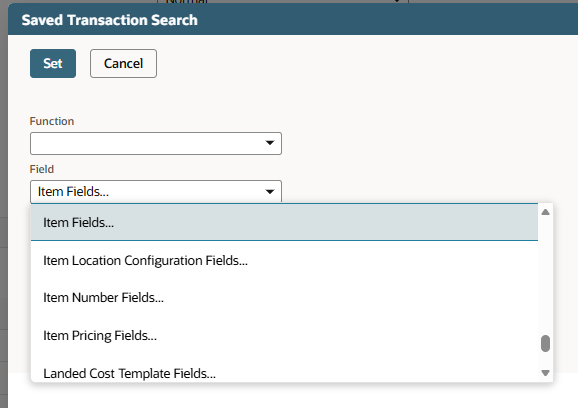
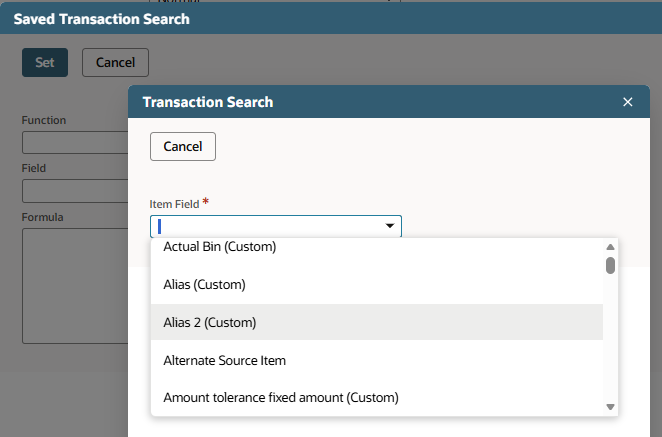
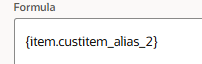
Best thing you can do is try to use the formula builder to look for the join manually.
I would guess that what you're looking for, if it's a field from an item record and you have items as a list field on your custom record, the field should be in the builder under Item Fields… Asset Type
 Dext3r
Vendor Bill / Bill Payment Matching
Hello
Curious to see how the community handles this. Our current process for recording vendor bill payments requires going into a particular bill, clicking on "Make Payment", working trough that screen with the date, account, amount, etc., and then saving. We then have to go to the Match Bank Data screen to match that payment record to a bank transaction taking the cash out of our account (for example). I cannot imagine that larger companies are truly doing this for every bill. Or perhaps they have dedicated AP departments that are doing this.
Is there a way for NetSuite to see a $200 bank transaction paying Comcast (for example) and match that to a $200 vendor bill for Comcast within the same subsidiary? In general, is there an easier way to enter bill payments than opening each individual vendor bill and working through the payment screen just to have to go to the Match Bank Data screen and match everything I just did?
Thank you!

Re: Fixed Asset Summary Report History XML Error
Hi Jeanne
Our client tried another workaround solution was to right-click and select "Save Link As".
 Kedalene
Re: Lot Number Expiration Date Calculation
Hey @ksage,
NetSuite counts the 4/6/26 as a day, too, and when we add another 547 days, we arrive at 10/5/27.

Re: ERP Only and Legacy SiteBuilder
Hi @JPrice
You should still have access to Site Categories for legacy Site Builder if you only have an ERP only.
Thank you

NetSuite Admin Tip | Create Saved Searches for Customization Reviews
Saved searches can help admins review and monitor customizations more efficiently. When an account has many custom fields, custom records, forms, workflows, or scripts, saved searches can make it easier to identify what exists, what is active, and what may need further review.
Using saved searches for customization reviews helps support cleanup, documentation, and long-term account maintenance.
Scenario
An admin needs to review existing NetSuite customizations.
Examples may include:
- custom fields
- custom records
- custom forms
- workflows
- scripts
- saved searches
- custom lists
The account may include older customizations that are still active, no longer used, duplicated, or missing documentation.
Solution
Create saved searches to help organize and review customization-related records.
Saved searches can help admins filter, group, and export information for review. This makes it easier to build a customization inventory and identify areas that may need cleanup or documentation.
Useful Saved Searches to Create
Custom Field Review Search
Use this search to review custom fields across the account.
Helpful columns may include:
- field name
- internal ID
- field type
- record type
- inactive status
- owner or description
- last modified date, if available
This can help identify unclear, duplicate, or inactive fields.
Custom Record Review Search
Use this search to review custom record types.
Helpful columns may include:
- record type name
- internal ID
- inactive status
- permissions
- owner or purpose
- related forms or fields
This helps admins understand which custom records still support active processes.
Script Review Search
Use this search to review scripts and deployments.
Helpful columns may include:
- script name
- script type
- deployment status
- deployed record type
- audience or role access
- last modified date
- owner or developer
This can help identify inactive scripts, broad deployments, or scripts that need documentation.
Workflow Review Search
Use this search to review workflows.
Helpful columns may include:
- workflow name
- record type
- release status
- trigger type
- owner
- active or inactive status
- description
This helps admins understand what automation may affect record behavior.
I don’t have access to a live NetSuite account to show an actual saved search from an account, but you can use this simple example in the article.
Example: Create a Script Review Saved Search
An admin wants to review script deployments to see which scripts are active, where they are deployed, and which ones may need cleanup or documentation.
Navigation
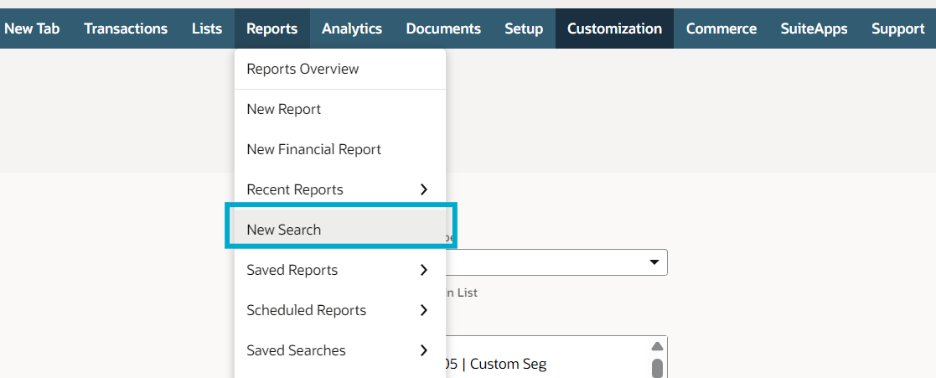
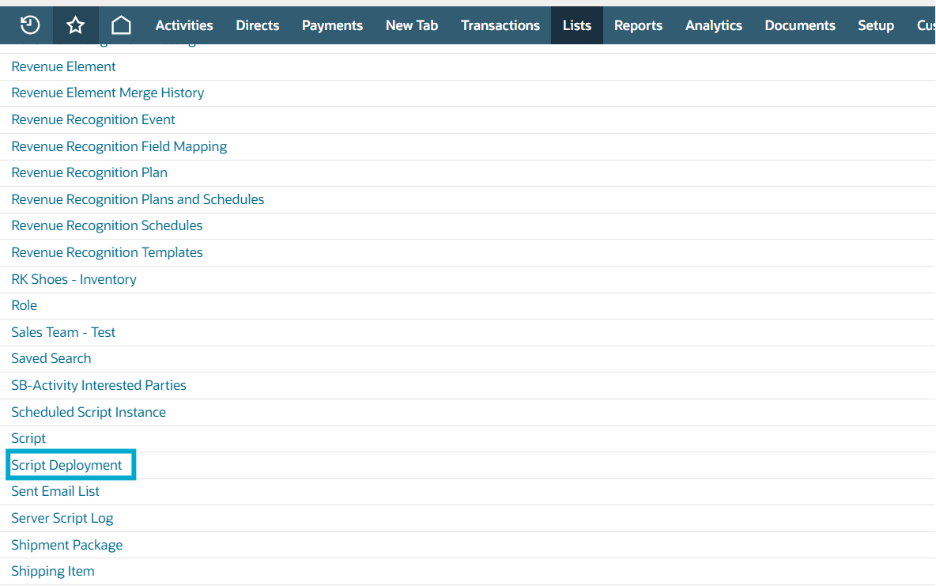
NetsSuite: Go to: Reports > New Search & Select: Script Deployment
NetSuite Next:
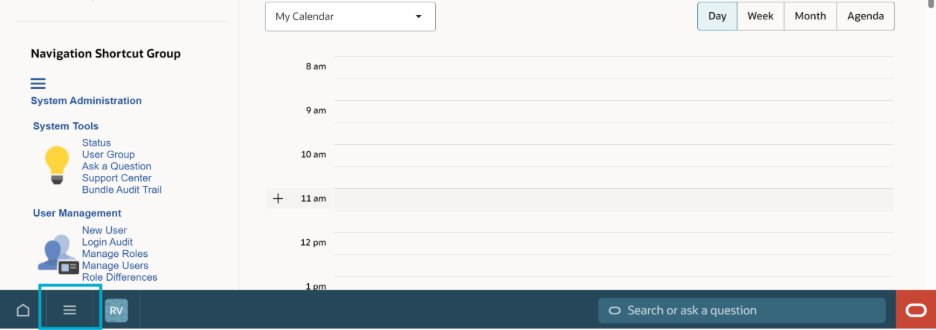
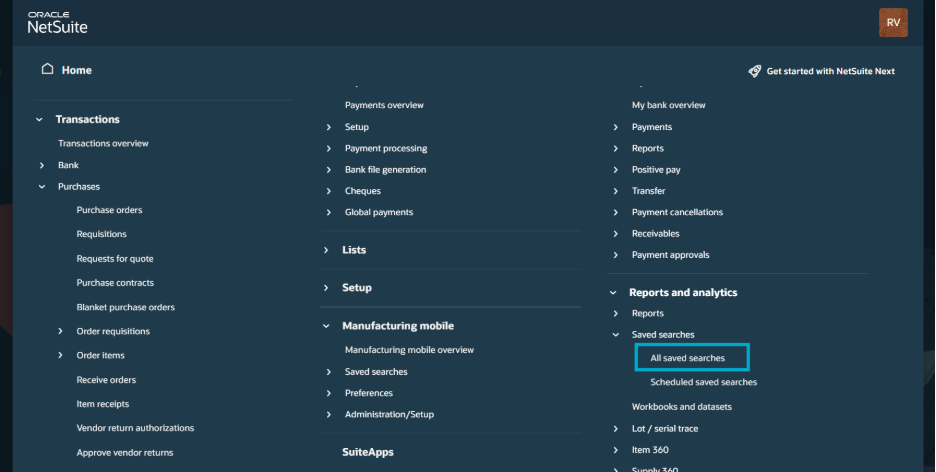
Click Explore (hamburger icon in the bottom left corner beside the home button). In the menu, go to Reports and analytics > All saved searches. Then, on the next page, click on New Saved Search. On another page select Script Deployment
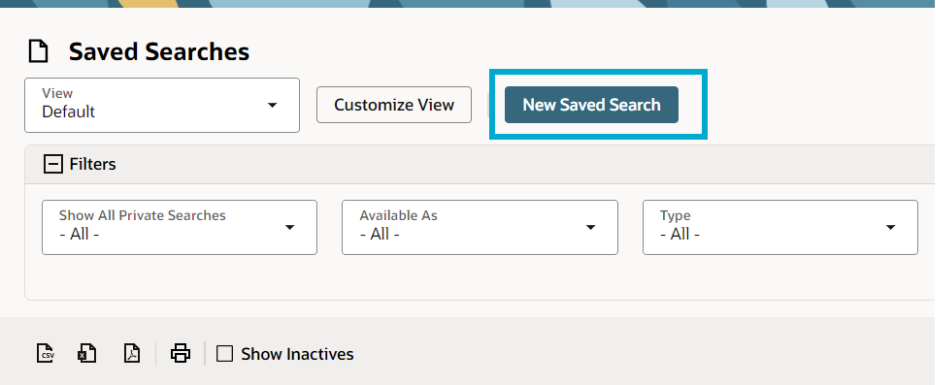
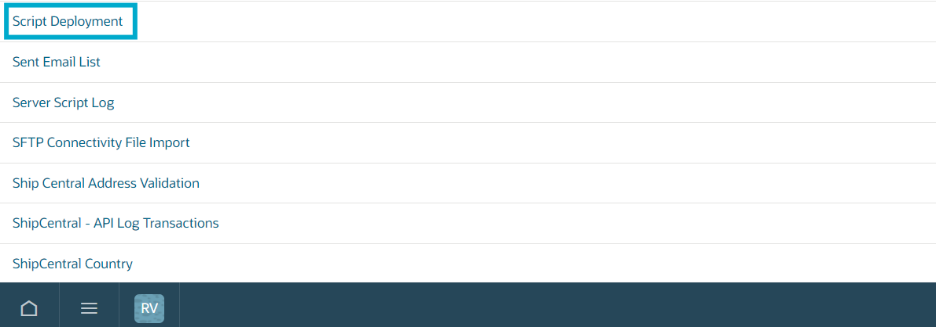
3-Step Setup
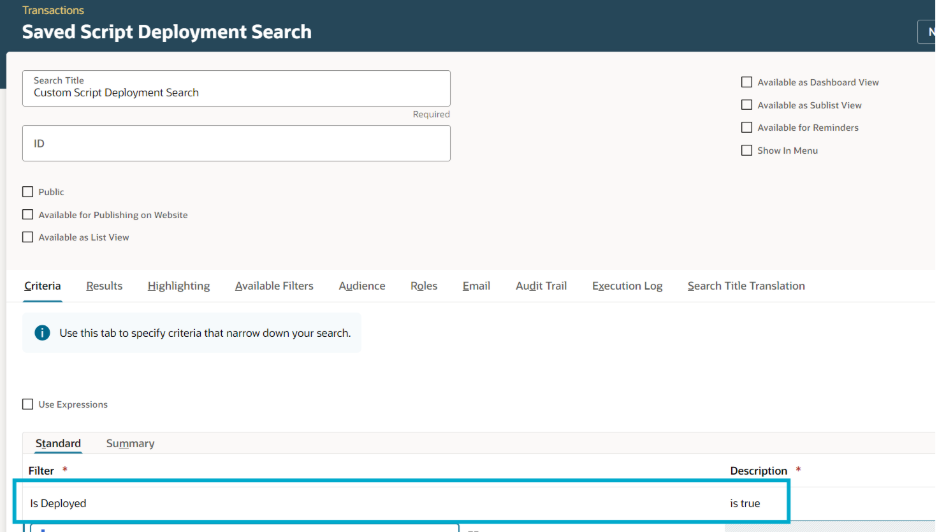
Step 1: Add Criteria
Use criteria to narrow the search.
Example:
- Is Deployed = Yes
This helps show active script deployments first.t
Step 2: Add Results Columns
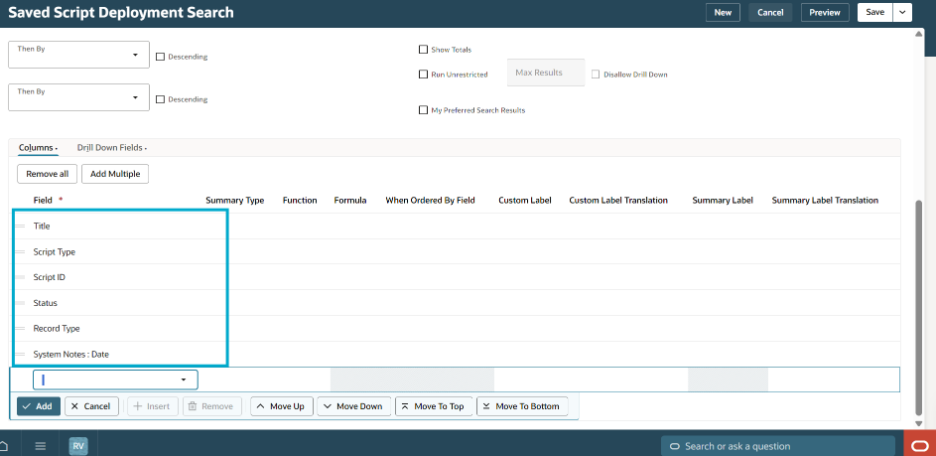
Add columns such as:
- Script Name (Title)
- Script Type
- Script ID
- Status
- Record Type
- Last Modified Date(System Notes: Date)
These columns help the admin review what each deployment is used for.
Step 3: Save and Review
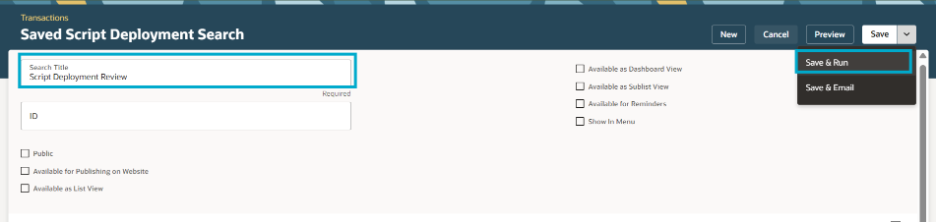
Name the search:
Script Deployment Review
Click Save & Run.
Review the results to identify active scripts, broad deployments, or scripts that need documentation.
Result
The admin now has a saved search that can be used as part of a customization review. It helps show which scripts are active, where they are deployed, and whether any deployments need cleanup or further review.
Why It Helps
Saved searches for customization reviews can help:
- build a customization inventory
- identify inactive or duplicate customizations
- support documentation cleanup
- review ownership and purpose
- prepare for admin handoffs
- reduce troubleshooting time
- support safer production changes
References
- SA: Defining a Saved Search (ID: 8474)
- SA: SuiteBuilder – Customization (ID: 1045873)
Notes
- Start with high-impact customization areas first.
- Include internal IDs in saved search results.
- Add owner or purpose information where available.
- Export results if the team needs an external review tracker.
- Review inactive items separately before cleanup.
- Confirm dependencies before deleting or disabling anything.
- Keep saved searches updated as part of admin maintenance.
Summary
Saved searches can make customization reviews easier by giving admins a structured way to review fields, records, forms, scripts, and workflows. They help identify what exists, what is active, and what may need cleanup or documentation.
A good set of review searches can improve visibility, reduce risk, and make future NetSuite administration easier.
Disclaimer: The sample code described herein is provided on an "as is" basis, without warranty of any kind, to the fullest extent permitted by law. Oracle + NetSuite Inc. does not warrant or guarantee the individual success developers may have in implementing the sample code on their development platforms or in using their own Web server configurations.
Oracle + NetSuite Inc. does not warrant, guarantee or make any representations regarding the use, results of use, accuracy, timeliness or completeness of any data or information relating to the sample code. Oracle + NetSuite Inc. disclaims all warranties, express or implied, and in particular, disclaims all warranties of merchantability, fitness for a particular purpose, and warranties related to the code, or any service or software related thereto.
Oracle + NetSuite Inc. shall not be liable for any direct, indirect or consequential damages or costs of any type arising out of any action taken by you or others related to the sample code.
Share your insights and experiences in the NetSuite Admin Corner.

Re: Physical Inventory Worksheet Report
Hi @User_ZCWF3 ,
Saved Item Search to Match the Physical Inventory Worksheet Report
- Navigate to Lists > Search > Saved Searches > New
- Click Item
- Search Title: Enter Title
- Click Criteria
- Click Standard
- Filter:
Note: For every required field use the drop-down menu to select it and once adjusted click Add if needed.- Select Inventory Location
- Description: Select Location
- Select Inventory Location
- Click Results
- Click Columns
- Field:
Note: For every required field use the drop-down menu to select it and once adjusted click Add if needed.- Select Name
- Select Description
- Select Preferred Vendor
- Select Inventory Location
- Select Location On Hand
- Click Available Filters
- Filter:
Note: For every required field use the drop-down menu to select it and once adjusted click Add if needed.- Select Inventory Location.
Note: Mark the Show In Filter Region checkbox
- Select Inventory Location.
- Click Save & Run.
Note: The search results should show the same information as the Physical Inventory Worksheet when the As Of date is set to the current date.
Hope this helps.

Re: Field name/label change not taking effect for other users.
Changing the users Language settings from English (International) to English (U.K) has solved the issue.
To apply this to all users without having them change their language settings, I have to reset the labels of my fields for one language, then change my language settings and do it again. So irritating...
Dext3r
NetSuite Admin Tip | Use Subtabs to Make Long Forms Easier to Read
Long forms can be difficult for users to work with when too many fields are shown in one place. Users may need to scroll too much, miss important fields, or spend extra time finding the information they need.
Subtabs can help organize related fields into cleaner sections, making forms easier to read and use.
Scenario
An admin reviews a custom form that has grown over time.
The form may include fields for:
- general information
- approval details
- compliance tracking
- internal notes
- audit fields
- integration references
- reporting values
Because all fields are shown together, users may find the form cluttered or confusing.
Solution
Use subtabs to group related fields into logical sections.
Instead of placing every field in one long form area, organize fields by purpose. This helps users focus on the section they need and makes the form easier to navigate.
Example Subtab Layout
A long vendor review form may use subtabs such as:
- Primary Information – Basic vendor details and key entry fields.
- Compliance – Compliance status, expiration date, reviewer, and notes.
- Approval – Approval status, approver, approval date, and approval reason.
- Internal Notes – Review comments and follow-up notes.
- System Information – Integration IDs, script flags, or admin-only fields.
This layout keeps related fields together and reduces visual clutter.
Why It Helps
Subtabs can help:
- reduce scrolling
- group related information
- make forms easier to scan
- improve user entry flow
- separate user fields from admin fields
- make review and troubleshooting easier
References
- SA: Custom Forms (Answer Id: 10117)
- SA: Setting Display Options for Custom Fields (Answer Id: 10097)
- SA: Creating Custom Subtabs (ID: 10114)
- SA: Creating a Custom List (ID: 10069)
Notes
- Group fields by business purpose.
- Put the most commonly used fields near the top or on the main area.
- Avoid creating too many subtabs.
- Use clear subtab names users will understand.
- Keep admin or system fields separate from user entry fields.
- Test the form with the roles that will use it.
- Review the layout again as new fields are added.
Summary
Subtabs can make long NetSuite forms easier to read by organizing fields into logical sections. This helps users find the information they need, reduces clutter, and improves the overall form experience.
A clean subtab layout can make forms easier to maintain and easier for users to complete accurately.
Share your insights and experiences in the NetSuite Admin Corner.