Best Of
Re: How to get item's location address fields on Advanced PDF HTML Template
Hi @Red Velasco-Oracle,
I used the script solution and it worked 😊(except I store the location internal id itself in a custom field and I was able to reference the address fields on this new location custom field on the PDF)
Thank you!

SuiteWorld 2026 | October 25–28 | Las Vegas
Be ready when passes drop. Get the green light now
Get a sneak peek of what’s in store
Why you’ll want to be there
Feel the energy, get hands-on, and connect with the people shaping what’s next. SuiteWorld delivers immersive learning, practical AI insights, and meaningful connections you simply can’t replicate from home.
Build skills that stick
Go beyond inspiration with 350+ role-based sessions, deep-dive breakouts, hands-on labs, live demos, and high-impact keynotes—designed to help you apply what you learn the moment you’re back at work.
Get hands-on training with the experts
Work directly with NetSuite product teams, SuiteGurus, and industry specialists to gain practical guidance tailored to your workflows, challenges, and goals.
Make AI work for you
See how NetSuite’s AI capabilities fit into real-world finance, operations, and IT use cases—through applied demos, customer examples, and expert-led sessions.
Connect with your community
Build lasting relationships with peers, partners, executives, and product experts through curated meetups, industry roundtables, The Hub, evening events, and unforgettable shared experiences.
Looking for events closer to home?

Re: Witholding Tax Bundle Error
Hi,
We found out that it was cache error. Nothing is changed from our side and error disappeared after a day.
Thank you all for your help!
Zeynep
Re: Multiple operators on the same work order operation
It does allow multiple operators to work in the same operation, however the run time is captured under the operator who started the run for the operation. It will not have the run time broken down by operator.
Re: How to get item's location address fields on Advanced PDF HTML Template
Hi @User_VW1KQ
This is expected behavior in Advanced PDF/HTML templates. The item line field ${item.location} can display the location value/name correctly, but it does not reliably expose the full related Location record fields, such as city/address, per line.
That is why ${item.location.city} keeps returning the same city or the first location’s city. The template is not really doing a fresh lookup of the Location record for each item line.
For this requirement, yes, a script is usually the cleaner approach.
The common solution is:
- Use a User Event script on the Sales Order.
- Loop through the item lines.
- Get each line’s location internal ID.
- Look up the Location record address fields.
- Store the needed address/city values in custom transaction line fields.
- Reference those custom line fields in the Advanced PDF template.
Example concept:
var locationId = rec.getSublistValue({

sublistId: 'item',

fieldId: 'location',

line: i

});
var locationInfo = search.lookupFields({

type: 'location',

id: locationId,

columns: ['city', 'state', 'zip']

});
Then populate custom line fields such as:
custcol_location_city

custcol_location_state

custcol_location_zip
And in the PDF:
<#list record.item as item>
  <p>${item.location}</p>
  <p>${item.custcol_location_city}</p>
</#list>
So the issue is not the loop itself. The limitation is that the template can display the line location, but it cannot reliably pull the related Location record address fields per line. Storing the values on the line first is the safest approach.
Hope this helps.

Re: For any particular LINE ID on a bill, I would like to know the corresponding Line ID of the PO
aah I found SuiteAnswer ID26791.. gonna try this
 NS_YB
NS_YB
Re: An invoice has been applied with a credit memo, does need to create a Revenue Arrangement
Hi @Mary Rivas
Tigran is correct, Invoices and Credit Memo will automatically create their own Revenue Arrangements.
If both the Invoice and Credit Memo are generated from the same Subscription and contain the same ARM-enabled item, they are typically included in a single Revenue Arrangement.
However, if the Credit Memo is created as a standalone transaction (not generated from the Subscription), it will generally create a separate Revenue Arrangement.

Re: An invoice has been applied with a credit memo, does need to create a Revenue Arrangement
Hey @Mary Rivas,
The most common configuration is for the Invoice and Credit Memo to create their own Revenue Arrangements. The Credit Memo typically has a negative amount and reverses the revenue.

Re: Vendor Payment to Bill Credit
Hi Angela
Thanks for the reply. The Vendor Bill was paid.
My colleague found a relevant workaround solution from Suite Answer 90906.
Record Deposited Refund From Vendor Credit After Bill was Already Paid In Full Kedalene
NetSuite Admin Tip | Making Specific Pages Public in a Password-Protected Web Store
There may be cases where your web store is configured as password protected, but you still want certain pages such as blogs, landing pages, or informational content to remain publicly accessible without requiring customer login.
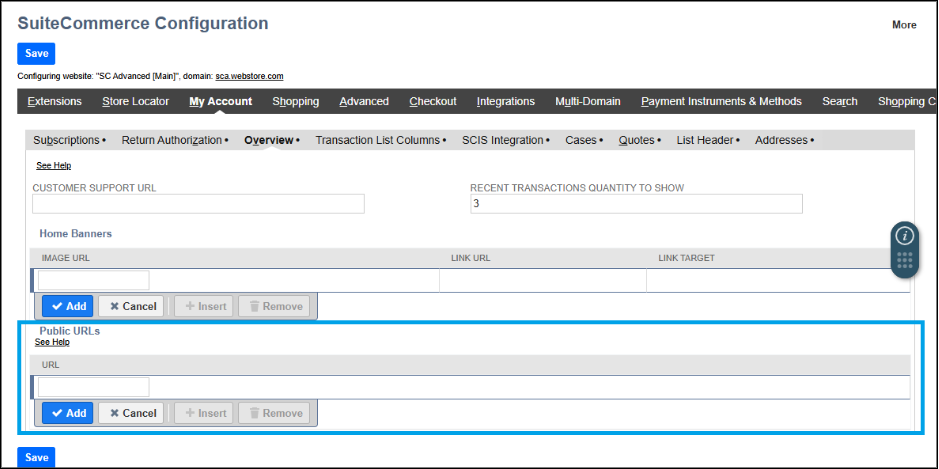
SuiteCommerce provides a Public URLs configuration that allows selected pages to bypass the login requirement.
You can configure public access by following the steps below:
- Navigate to: Commerce > Websites > Configuration
- Select the appropriate Website and Domain
- Click Configure
- Open: My Account tab > Overview subtab
- In the URL field, enter the page URL you want to make public
- Click Add
- Repeat the process for all URLs you want publicly accessible
- Click Save
Important things to consider when using Public URLs:
- Product pages cannot be made public if the Reference Product Review Records SuiteApp is installed
- Public URLs are not tied to any specific extension, meaning any URL added here becomes accessible without login regardless of installed extensions.
- If you enter only a slash (/) in the URL field, only the homepage becomes publicly accessible.
- Do not include URL parameters in the Public URLs field, as the feature is not designed to support parameterized URLs and may cause unexpected URL behavior.
This setup is useful when:
- Sharing blog pages publicly.
- Allowing access to marketing or landing pages.
- Making informational pages available without customer authentication.
- Keeping checkout and account-related pages protected while exposing selected content publicly.
We would love to hear your thoughts – please feel free to share any insights or experiences you have in the comments or post a discussion in the NetSuite Admin Corner and let's continue learning together!
