Best Of
Re: Creating a task automatically after an opportunity is made.
Thank you @User_ZCWF3!! You do have to use the company first and then you can link the opportunity.

Re: Creating a task automatically after an opportunity is made.
I believe it has to do with the order in which you add the fields…I think you have to join the customer first (could be wrong it's been awhile).
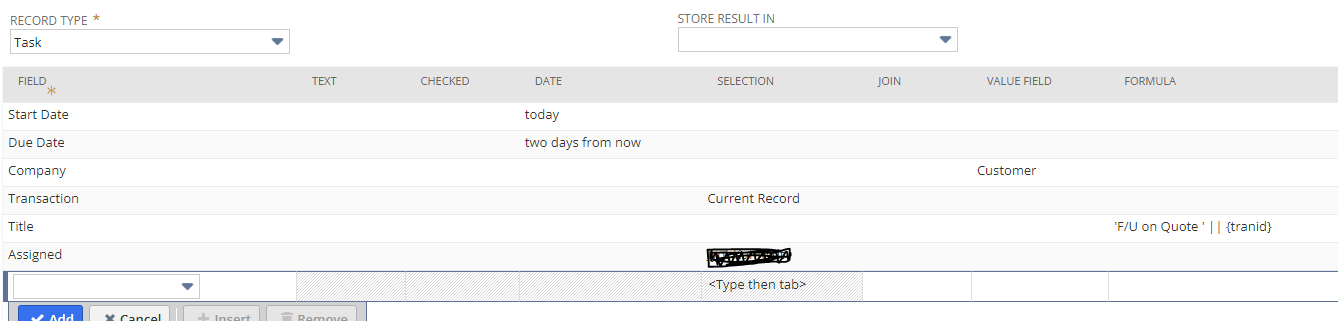
Here is how I setup a task that gets auto created when a quote is generated:

Re: Saved Search - Why can't I use average cost or last purchase price as criteria?
Hi @Dext3r
Try to use the formula NVL({fieldid},0) you will get your result.
I realised this is the case for those numeric fields that has empty value and not 0, if we don't use NVL then will not be able to get the expected result.

On side note. If your account is One World and your item can be used by multiple subsidiary with different base currency, the Last purchase price & average cost field values are always in the parent company base currency. Its converted based on the latest trans price/cost value to the parent company base currency using the consolidated exchange rate.
Regards
Wee Ming
 Wee Ming
Re: Deposit does not show when attempting to apply to a vendor credit
Stay safe. I took a direct hit from Ian a few years ago. My prayers are with you.
~angela

Re: Account Analysis subject area
Hello
Yes, I agree
Feedback I can give
- I activated Sales, Order to cash and Procure to Pay in the Data Configuraiton→NetSuite Warehouse sections
- I enabled 'Order to Cash and Procure to Pay Functional areas in the Enable Features section
- Pipeline status is active and has been running for a while
- I did a full reset and reload through pipeline settings
Above steps did not produce the desired result
John, can you please paste some screen shots and the exact steps in which things need to be done to make this magic work

Re: Global Search is not showing all items?
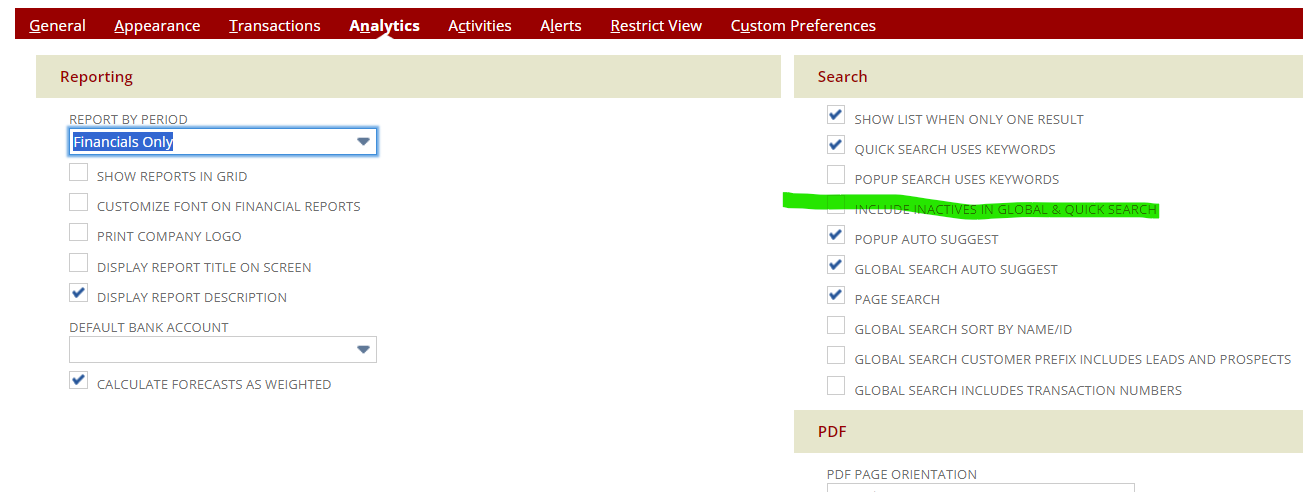
Add a + at the end to show inactive. You can also set your preferences to show inactive in the global search.
Home
Set preferences
Analytics tab

Re: Quote Gross Profit Calculation
Hi @Janakan
Gross Profit = Sales – Discount – Est. Extended Cost
You have a header discount of $1000 that applies to both line #1 & Line #2 and
also line discount of $500 which applies to line #2 item only.
The header discount $1000 is allocated based on item sales / total sales i.e
Line #1 Discount = 2000 / (2000 + 17500) X 1000 = 102.56
Line #2 Discount = 17500/ (2000 + 17500) X 1000 = 897.44
Gross Profit Calculation :-
Line #1 GP = 2000 - 102.56 - 1500 = 397.44
Line #2 GP = 17500 - 897.44 - 13500 = 3102.56
Regards,
Wee Ming
Wee Ming
Re: PO Creator on Bill when Bill multiple POs
Yes, the process update makes sense.
This is possible even for a list field; I do this regularly. If you want to update a list field value via scheduled workflow, the "source" non-stored field should contain the field's Internal ID, not the Field Name.

Re: Method for Specifying Accounts Payable when Approving Multiple Unapproved Expense Reports in Bulk
Hi User_GLL29
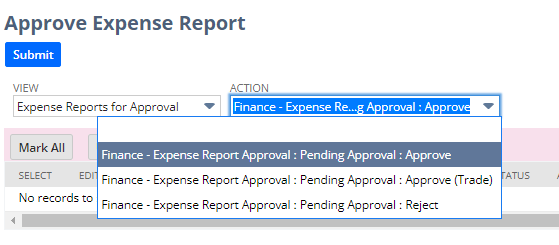
You can add multiple Approve buttons in the expense report workflow. Each of them will set the different AP account. So the approval can select the expense report that they want to assign a different AP account and select the approve action will do.
For example like below I only create 2 approve buttons. The default one will post to non-trade AP but if user select the Approve (Trade) action then the AP account will set to trade.
Regards,
Wee Ming
Wee Ming
Re: Account Analysis subject area
User_569R9 I have raised a support case from my end for the same, will keep this thread updated upon answers. Hoping to get a resolution soon.