Best Of
Re: Saved Search formula
Hello @User_FZNHI ,
Please try the following:
CASE WHEN {trandate} BETWEEN TO_DATE(TO_CHAR(ADD_MONTHS(SYSDATE, -12), 'YYYY') || '-01-01', 'YYYY-MM-DD') AND TO_DATE(TO_CHAR(ADD_MONTHS(SYSDATE, -12), 'YYYY') || '-12-31', 'YYYY-MM-DD') THEN 'LY'
WHEN {trandate} BETWEEN TO_DATE(TO_CHAR(SYSDATE, 'YYYY') || '-01-01', 'YYYY-MM-DD') AND TO_DATE(TO_CHAR(SYSDATE, 'YYYY') || '-12-31', 'YYYY-MM-DD') THEN 'Current'
WHEN {trandate} >= TO_DATE(TO_CHAR(ADD_MONTHS(SYSDATE, 12), 'YYYY') || '-01-01', 'YYYY-MM-DD') THEN 'LT' END
I tested the first two and it seems to work on my end, but I wasn't able to test the 3rd one since we don't have transactions in future periods.
Hope this helps.

Re: SFTP payments from NetSuite to Banks
Hi @PaulRipley
What country are you based in? In some places, such as Australia, the local banks have the ability to set this up such as NAB Direct.
Zone SFTP can also be used to send bank files as well as receive bank feeds.
 Vernita
Re: Posting Period vs Transaction Date
Hi, @User_MP4W2
To reduce the issue of error in posting period, First you need to filter the transaction date and posting date in the report , create a saved search for the particular transaction type for which the report is created , add the criteria , and results in which basis the details need to be displayed, filter and sort it, at last save and run.
Hope it will be useful for You.

Re: Gateway Time-out when deploying with SDF
Yes, the project was too big. I broke it up into groups of 5 forms per project, and was able to successfully deploy.

Re: Script error SSS_INVALID_SRCH_COL Item Record for location quantity available
Hello! I just figured it out —
The filter was wrong:
filters:
        [
            ['itemid','anyof',itemId],
Changed 'itemid' to 'internalid' and it works now.
Thanks for the help! Love you, NetSuite.

Re: NetSuite Admin Tip | Best practice to inactivate a resigned employee
Maybe this process could be helpful to others.
The process is simple, when a user's employment is terminated, we set a termination date and revoke their login access. This triggers a scheduled script to take action. The script automatically sends an email notification to the supervisor, informing them of the termination and providing details of all open transactions and activities associated with the terminated user. This empowers the supervisor to decide on the necessary course of action.
Furthermore, after a 30-day period, a reminder email is automatically sent, clearly stating that the account will now be closed. The reminder also includes a list of any remaining open transactions. Following this, the account is completely inactivated.
This process streamlines the termination procedure, ensuring smooth transitions while maintaining data integrity and security.

Re: CSV Import
Thanks for your lines @K Mukesh
As I did:
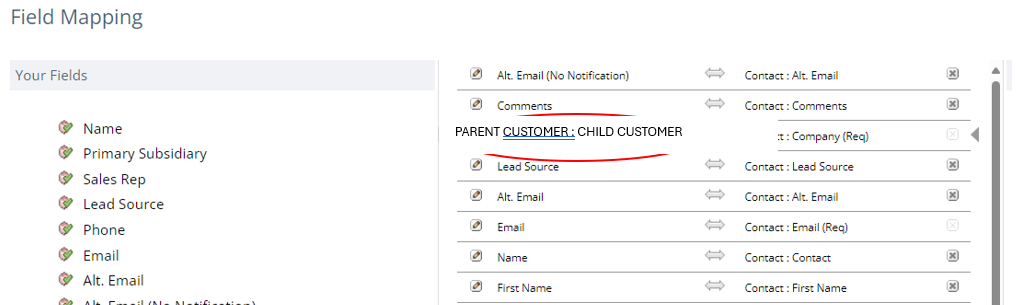
In the csv file I was using the Company column and filled it with the Name of the Child/Customer, and there I got an error….
How did I solve it?
I deleted the Company column and in the Field Mapping (Image 2) I wrote it manually, this time including father and son separated by: the colon….
BINGO!

I wonder:
Will it work the same for other records?

Re: Customer setup for a multi-branch manufacturing
Hey @MHS Crane,
The best practice is to set up one customer with multiple Ship To Addresses.
To facilitate reporting, you can create a custom "Branch" field and tag Ship To addresses and Contacts.


Re: Custom field on entity not available as filter on a transaction saved search
Hi @Dolev ,
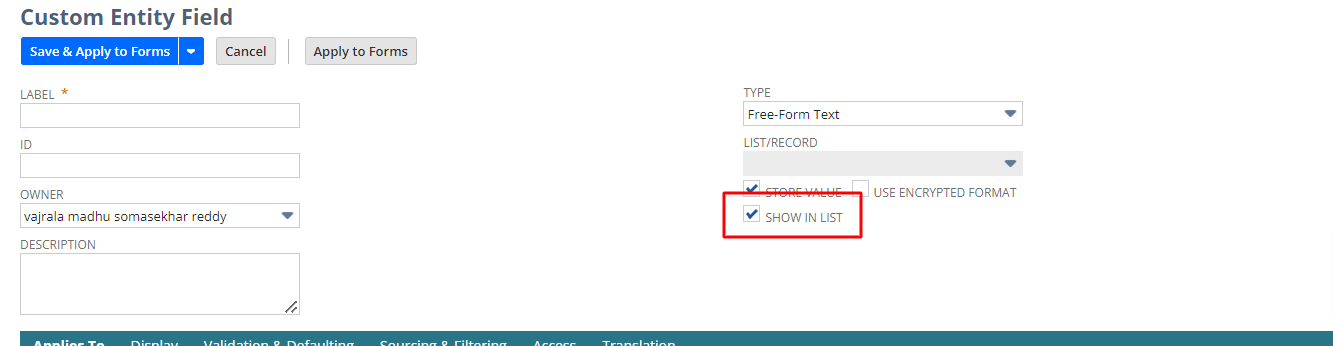
Open the custom field in customizations and check the check box as show in list and the save the field now please check in saved search