Best Of
Re: Global Search is not showing all items?
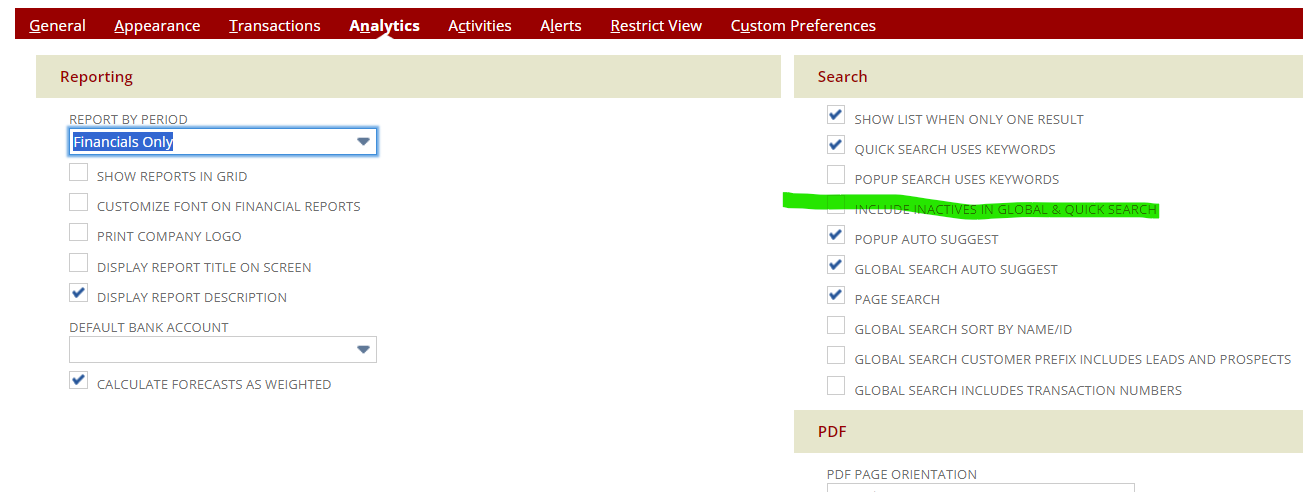
Add a + at the end to show inactive. You can also set your preferences to show inactive in the global search.
Home
Set preferences
Analytics tab

Re: Quote Gross Profit Calculation
Hi @Janakan
Gross Profit = Sales – Discount – Est. Extended Cost
You have a header discount of $1000 that applies to both line #1 & Line #2 and
also line discount of $500 which applies to line #2 item only.
The header discount $1000 is allocated based on item sales / total sales i.e
Line #1 Discount = 2000 / (2000 + 17500) X 1000 = 102.56
Line #2 Discount = 17500/ (2000 + 17500) X 1000 = 897.44
Gross Profit Calculation :-
Line #1 GP = 2000 - 102.56 - 1500 = 397.44
Line #2 GP = 17500 - 897.44 - 13500 = 3102.56
Regards,
Wee Ming
 Wee Ming
Re: PO Creator on Bill when Bill multiple POs
Yes, the process update makes sense.
This is possible even for a list field; I do this regularly. If you want to update a list field value via scheduled workflow, the "source" non-stored field should contain the field's Internal ID, not the Field Name.

Re: Method for Specifying Accounts Payable when Approving Multiple Unapproved Expense Reports in Bulk
Hi User_GLL29
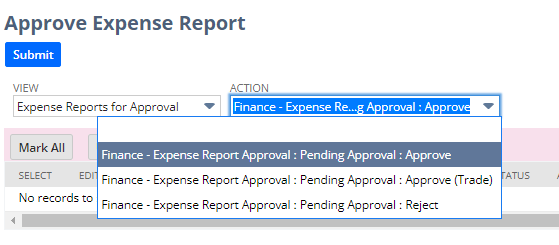
You can add multiple Approve buttons in the expense report workflow. Each of them will set the different AP account. So the approval can select the expense report that they want to assign a different AP account and select the approve action will do.
For example like below I only create 2 approve buttons. The default one will post to non-trade AP but if user select the Approve (Trade) action then the AP account will set to trade.
Regards,
Wee Ming
Wee Ming
Re: Account Analysis subject area
User_569R9 I have raised a support case from my end for the same, will keep this thread updated upon answers. Hoping to get a resolution soon.

Re: How can I make RA-Operator Password Policy available on my account?
Hi @User_DE5Y1, glad to have you with us today and thanks for posting here in the NetSuite Support Community!
Greetings, everyone! We have a fellow member who could use our assistance. Please don't hesitate to share your knowledge and insights to help them out. Your input is highly valued and appreciated!

Re: Saved Search to Project Resources when Project Status change
Hi
Thanks all for the information
I solved it by creating a Static Group and added the project resources to this group.
Downside is that if new resources are added then this group needs to be updated
Tried to create a Dynamic group but seems not to be able to retrieve the resources + email from the project.
Will try to look into this later to try to figure it out also the use of a Workflow.
Regards
Glenn
Re: Custom transaction(sales debit note) doesn't have credit note option
Hi Mauricio Solís,
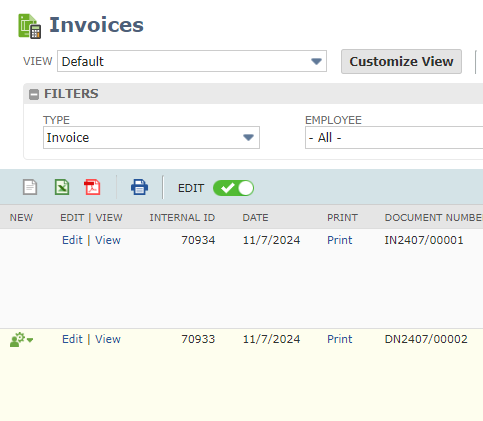
Thanks, got the solution. Able to configure the different document numbering also.
Re: Block inactivate action
Hi User_25U51,
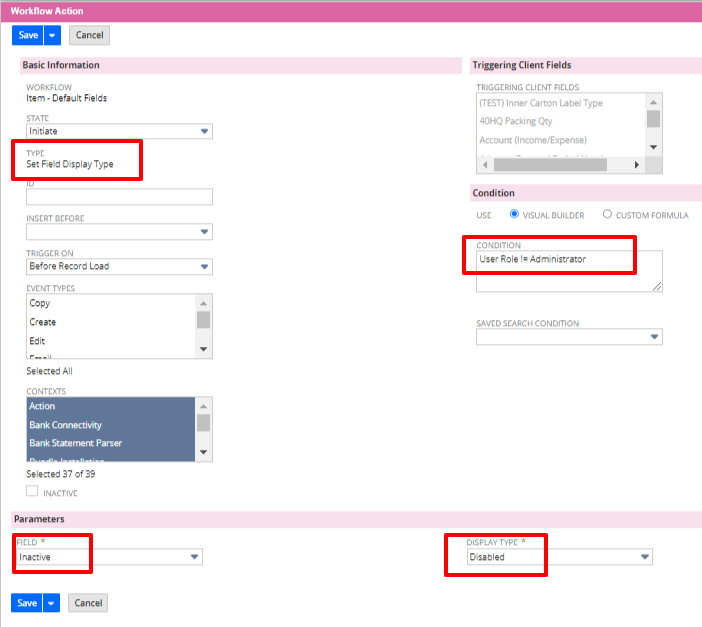
Another way if you only to allow selective users or roles who can create and update item to update the inactive field, you can create a workflow to set the inactive field display type to disable on entry except for authorised user/roles.
Here is an example of workflow action :-
Regards,
Wee Ming
Wee Ming
How to Leverage NetSuite Advanced PDF/HTML Templates Webinar | Questions and Answers
Here is the list of the questions sent out during the webinar and the answers that were provided.
Why does it not let me add a custom field to a PDF form? Also, is there a way to add a custom field that it will not allow you to add from the list?
please follow this article to see if it helps: 82199
If we are in the middle of a fresh implementation, is it best to request the templates get setup initially using the advanced templates versus basic templates?
That's right. We encourage our users to use Advanced PDF/HTML Template so that if you decide to update the layout in the future you have more customization available rather than using Basic Printing. As mentioned from the webinar, there are no more upgrades for the Basic Printing.
I had trouble adding the record owner field to this form, is that field not able to be added to the template?
All fields on the form should be available for your template. If you are trying to print a custom record type, you can try to add the fields using the source code. If you use ${record.fieldid} it should be able to pull the field.
Is there a name for the code language used here for this? It seems like far more than HTML, a mix of HTML/JS, trying to locate more resources/documentation on this
Yes, we call it freemarker code
Is it possible to modify / supply your own data model to the preview option when using the source code editor?
Currently It only uses the defaults/sample text from the Transaction Form.
Can you use css classes?
Yes, you can use css class in NetSuite Advanced Templates
The PDF shows a discount, but does the sales order? Every time this form is used would be for a discount order only?
Yes for this sample, the discount is hard coded to the template. So it will be used for Sales Order with automatic discount.
Is there a way to add a total field to the Quantity column so that the order would show the total number of units ordered?
"Enhancement # - 177768: Would like to add a line item to calculate the total amount for all columns that has a price/amount. The only available subtotal for the dropdown list is the amount of an items
Summary: Add subtotal in the line items
Alternate Solution: Create a custom Transaction Body Field to show the amount field's subtotal."
How can you add a new field to the item table?
he Item table is usually located on the table under and you will have to follow the syntax using for the field labels and for the table data
I do not have a field reference when I click in the data. How can I turn that on?
Is this when double-clicking a custom field? If yes, you can navigate to Home > Set Preferences > Defaults section and tick on Show Internal IDs
Are there any recommended literature or resources on Advanced PDF/HTML templates for saved searches?
Here are some examples: 86498 and 1013232
When will NetSuite end support for basic templates?
As of the moment there is no specific timeframe of when the support for basic template will end.
Why do the custom font files need to be marked ""Make Available Without Login""?
If you use IP restrictions, will that prevent people outside of that range from accessing files marked ""Available Without Login?""
Quantity spelt incorrectly.. would that have an impact?
It depends on your variable, if it is not the same with your variable it may cause problems
Can we pull transaction fields to shipping label -advanced pdf template?
Unfortunately, the ability to add transaction fields to Shipping Label templates is currently a system limitation. This is being addressed under Enhancement 351195: Advanced PDF/HTML Templates > Custom Shipping Label PDF/HTML Template > Ability to use of related records or custom field
What are the units on the image size?
We use pixels (px).
Where do we have the WYSIWYG under customization?
WYSIWYG can be found in Customizations > Forms > Advanced PDF/HTML Templates.
It looks like the alignment under quantity column didn't justify right when selected, but instead was centered, which was the original setting. I've experienced this using the templates.
You can try to correct the alignment using the source code by adding the alignment style attribute to the code. You can check this related article: 70371
What if we need fields from other records to show up?
If they are related records, you can either call the object (for example Sales Order and Item Fulfillment) or source the field value using a custom field first then use the custom field on the advanced template.
Is there a way to specify the size a logo uses on forms?
please see this article: 106691
Can Fields access any field that falls under Lists > Relationships (for example)?
Basically, there is a List called Leads and a Lead has some custom fields and I want to know whether the Advanced PDF/HTML templates can access those custom fields
Can we edit the fake record that is used when we preview a template? For example wanting to use a long company name to test truncation code
It could be possible to manipulate the data by hard-coding values in the template editor.
How to make sure the item table doesn’t overflow to the footer?
You can try adding page breaks to the table: 66474
If I have transaction Advanced PDF, edited in source code. But prefer a WYSIWYG, I get a warning about switching from source code to WYSIWYG modes, what typically does not work from source code when switching
As WYSIWYG has a few limitations vs. Source Code editing, some template content may not be represented correctly, may not be accessible for editing, or may not be displayed at all in WYSIWYG mode. With this, we suggest to stick to one (either WYSIWYG or Source code). If ever issues occur, please do not save the template in WYSIWYG mode, and switch back to source code mode.
Are basic pdf's being discontinued?
Yes, Basic layouts will be deprecated in a future release.
I am trying to modify the template for a Case. But it is not letting me link or choose the Advanced PDF layout. The case template does not have an option to choose PDF to print. I do not know how to customize the printout that defaults. Please advice and help if possible.
Unfortunately, the ability to use Advanced PDF/HTML templates for Case records is currently a system limitation. This is being addressed under Enhancement 70052: More control over how fields appear on case forms, better control of printing fields.
Do you think that I can also use Script to maybe create my own PDF that I can then print?
A scripted solution can be used in printing PDFs as well.
I am new to scripting PDFs and printouts do you know a good resource that can help me get it done?
Here are some SuiteAnswer Articles I have found that may help you. You may try searching for more articles on SuiteAnswer or the Help page on NetSuite. Please note that you may need to use multiple articles to achieve your requirements.
SA 85280 | SuiteScript > Print Button returns incorrect PDF Template
SA 97238 | Use Scriptable Templates to Create a Simple Suitelet Script to Print out in a PDF Format Chinese Characters Stored in a Field
SA 75307 | Vendor Bill Record > Print PDF via Script
SA 81737 | Print Custom Form using SuiteScript
Can you undo changes? if for instance you delete a field by mistake can you undo that delete?
You can use Ctrl+Z or CMD + Z for mac
Is there a way to take an item that is a discount, example -25%, that is a line item and have it populate the discount amount on the bottom of the sales order/invoice?
You can try this: You may follow the steps below to add the Discount Item in the Invoice PDF.
1. Navigate to Customization > Forms > Advanced PDF/HTML Templates.
2. Click Edit on H2O+ Invoice PDF/HTML Template.
3. In the template editor, insert a new row below the Tax Total line, by selecting the row, then right-click > Row >Insert row after.
4. On the first column insert {record.discounttotal@label}.
5. On the second column insert {record.discounttotal}.
6. Click Save.
How do/can you sort by more than 1 field?
You can check this article if you want to sort using more than 1 field or column from the item list. 65048
Can you repeat the source code for alternating colors?
Hi please refer to this line of code for the item list
${item.quantity@label}
${item.item@label}
<th colspan=""4"" align=""right"" style=""padd
What role access to do you need to be able to do this?
You can use your administrator role
Is that the only role that has access?
any role can access the customization tab if you have the permission for it. you can check this SuiteAnswers article for this: 84214
After creating a custom invoice form, how do you add it in your invoices form list for use
Here is an article that will likely help with your question: 101905
I have edited a PDF/HTM template but not able to see it anywhere but under customization/Form/Advance PDF/HTML template.
Here is the article that may help: link
How can you create an advanced HTML/PDF form for a Blanket Purchase Order Form?
Unfortunately this is a limitation and is currently filed as an enhancement. This is logged and being tracked under Enhancement 459873 Customize the Blanket Purchase Order Form > Allow use of Advanced PDF Template for printing
The alignment for Qty and rates don't show our changes
You can try to use the source code to add the alignment style attribute. Please check this related article: 70371
The box for the Total amount field, can you resize it in WYSIWYG?
yes, it can be resized in the WYSIWYG.
What would be easiest way to properly place logo and address to a desired place. The first box is always confused to position logo and address
If you want to place a logo in a specific place you can use the source code editor to include style attribute for the logo position. You can check the following related articles, 88671 and 89621
