Best Of

Re: April 22, 2024 | Pop Quiz # 1
Answer : Option B. Copy to Account
Copy to Account is an administrator tool that copies a custom object between your accounts. Use Copy to Account to select a target account, choose dependencies, select record instances to include, then preview and deploy your custom record.



Re: How to separate the item # from the item description on a PO printout
Thank you, Grace.
Sorry for the delay. I was off Friday and then looked at this yesterday. We aren't working with the implementation partner any longer, so we are managing internally.
Once I saw your question, it provided the answer. We need a custom field on the PO to pull only the item # and then use it rather than the standard NetSuite field. We have now created the field and are working on the output forms.
Thanks,
Aileen
Re: Bundle Deployment Wizard > Customer name can include 15 letters > How to mass update roles name
Thank you guys for letting me know.
William
Re: NSC Poll: What contents would you like to see in the NetSuite Support Community?
Hi @CDuf, I'll follow up with you via PM and we can sort out the details.

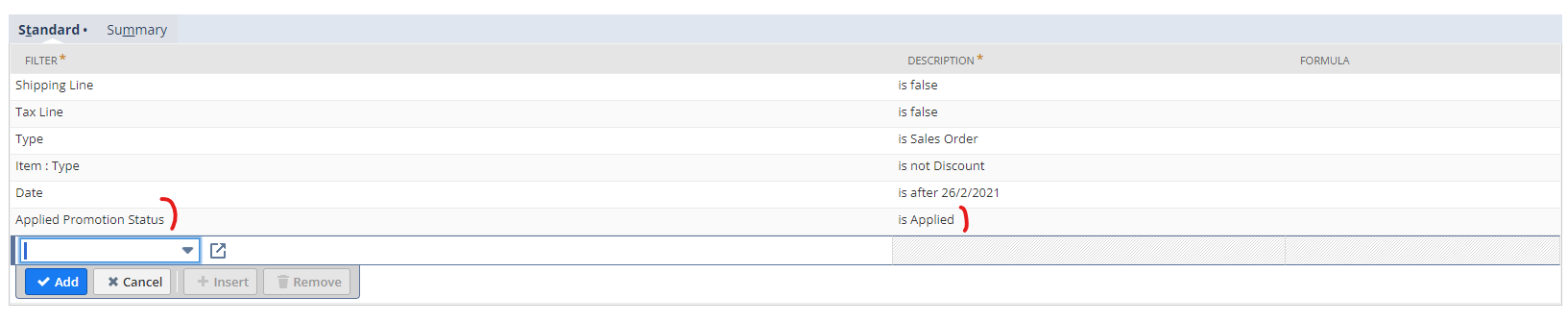
Re: How to show only applied promocodes in Transaction Saved Search
Hello Veronica,
I found the way to show only applied promocodes to the transaction using "Applied Promotion Status" = "Is Applied".
Thanks for you help!