Best Of
Re: Looking to build a report that tells me how many Sales Orders were approved on a given day.
Hello, @gbradley. Good day.
@Midhun Nath's method is a saved search. Here is a step by step process on how to create the Saved Search, and how to complete those popup windows or boxes:
1. Using Administrator or any role using classic interface, navigate to Lists > Search > Saved Searches > New
2. Locate and click Transaction
3. Enter desired Search Title
4. Click Criteria subtab
5. Click Standard list
6. Under Filter column, select the following:
a. select Type, click Sales Order, and click Set
b. select Main Line, tick NO, and click Set
c. select Formula (Numeric), and in the window that will pop-up, set the following, then click Set:
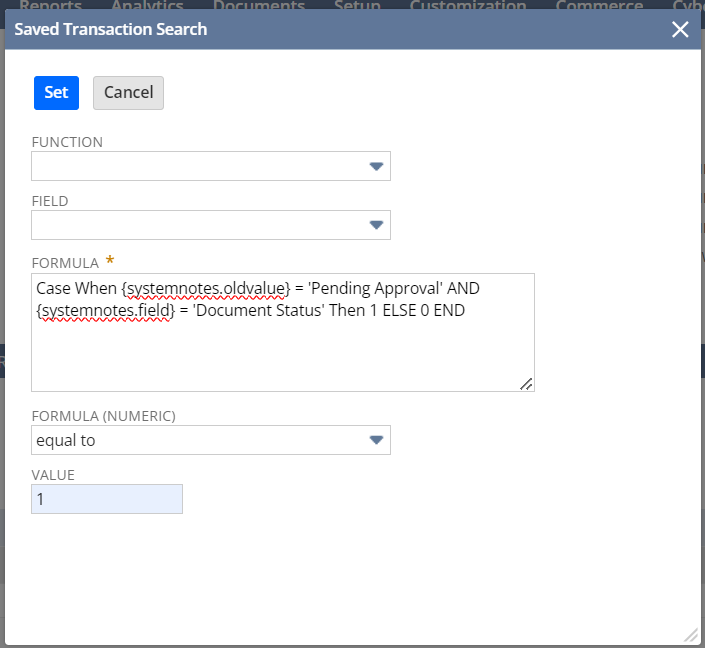
- for easier reference, you can copy and paste this formula: Case When {systemnotes.oldvalue} = 'Pending Approval' AND {systemnotes.field} = 'Document Status' Then 1 ELSE 0 END
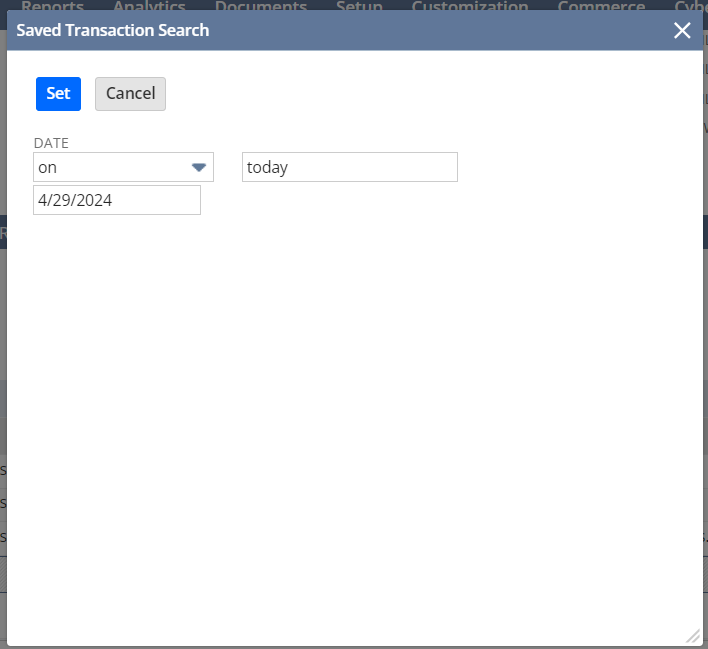
d. select System Notes Fields… then in the window that will pop up select Date, follow the below setting and click Set
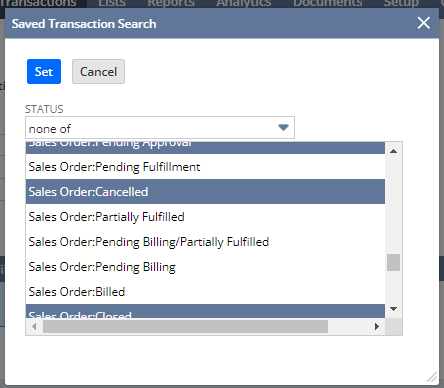
e. Select Status, select none of, and select or highlight all three: Sales Order: Pending Approval, Sales Order: Cancelled, and Sales Order: Closed, then click Set.
7. Click Results subtab
8. Click Columns list and click Remove All
9. Under Field column, select the following:
a. Select Document Number and in the Custom Label field, type Document Number then click Add.
b. Select Status and in the Custom Label field, type Document Status then click Add.
c. Select Formula (Text), in the Formula field, enter the below formula and in the Custom Label field, type Approver then click Add.
Case When {systemnotes.oldvalue} = 'Pending Approval' AND {systemnotes.newvalue} = 'Pending Fulfillment' AND {systemnotes.field} = 'Document Status' Then {systemnotes.name} End
d. Select Formula (Text), in the Formula field, enter the below formula and in the Custom Label field, type Approved Date then click Add.
Case When {systemnotes.oldvalue} = 'Pending Approval' AND {systemnotes.newvalue} = 'Pending Fulfillment' AND {systemnotes.field} = 'Document Status' Then {systemnotes.date} End
10. Click Save & Run
Let us know if you have additional questions.

Re: SuiteQL > How to make an SQL Query a stored procedure?
Thanks Nicole Mendoza-Oracle for moving this to its own thread.
I appreciate the SuiteQL link in the last thread.
I also let him know…. "I have not encountered NetSuite instances that have stored SQL procedures so far. I believe it is currently not yet within standard
NetSuite features for SuiteQL."
Hoping 🤞 anyone might have some suggestions from their experience, even if it might be confirmation, that it can't be done 😏.
Thanks all.
 CDuf
CDuf
Re: SuiteScript|Inline Text Field| Unable to get the value of it in Suite Script User Event?
Hi @Richard James Uri-Oracle
Once we get a solution from the NetSuite Support team, we'll inform you about how we accomplished it.
Best regards,
Shubham Singh.

Re: workflow to update custom record field on schedule
Hi @Mike VanBuren,
Unfortunately, this is not possible natively.
On a brighter note, if you really need this to requirement, I have thought of a workaround. However, this would be a long process.
First, you'll need to create a Transaction Saved Search that shows the Approval Status on Sales Orders. Here's a quick sample of the Saved Search:
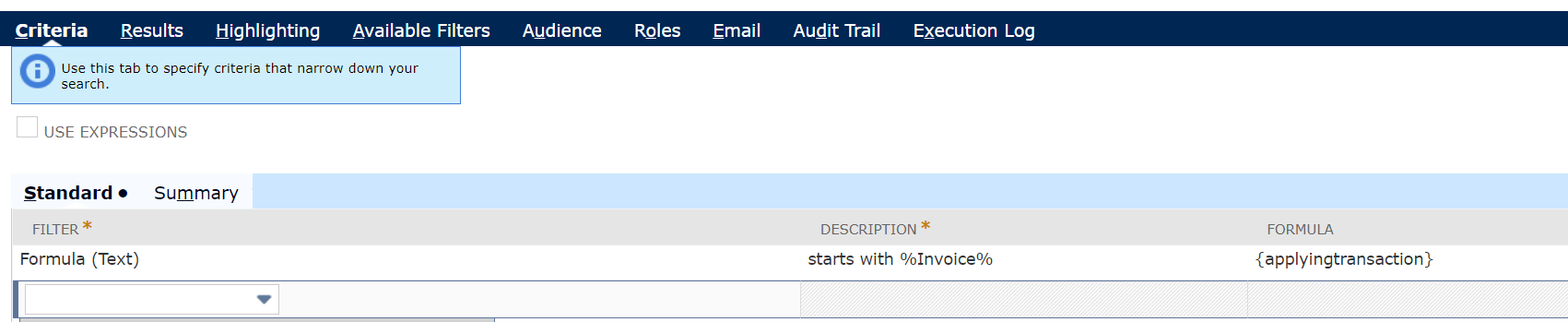
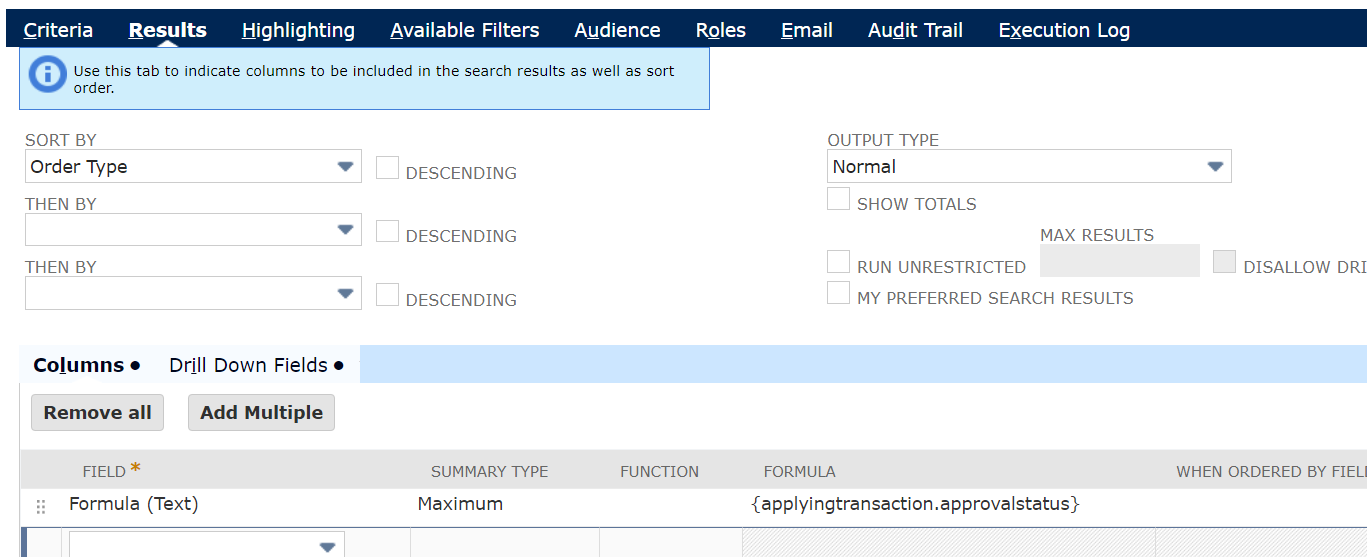
Once done, you'll need to create a Custom Field on Sales Orders that uses the Saved Search as it's source.
Since this field is sourcing from the Saved Search (therefore the Store Value is unchecked), we'll need to create another Custom Field (With Store Value checked) and create a Scheduled Workflow (On Sales Orders) that will set the Custom Field (Store Value) via the Custom Field (Sourced via Saved Search).
Once done, you should now be able to use that field as a source for the Custom Field in the Custom Record:
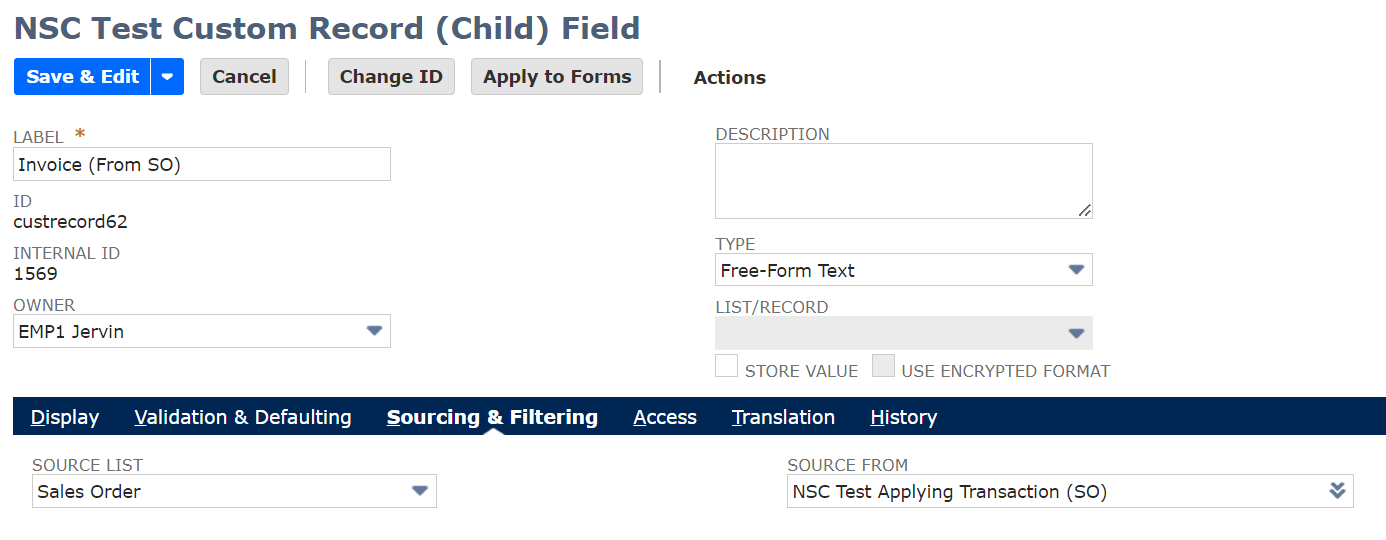
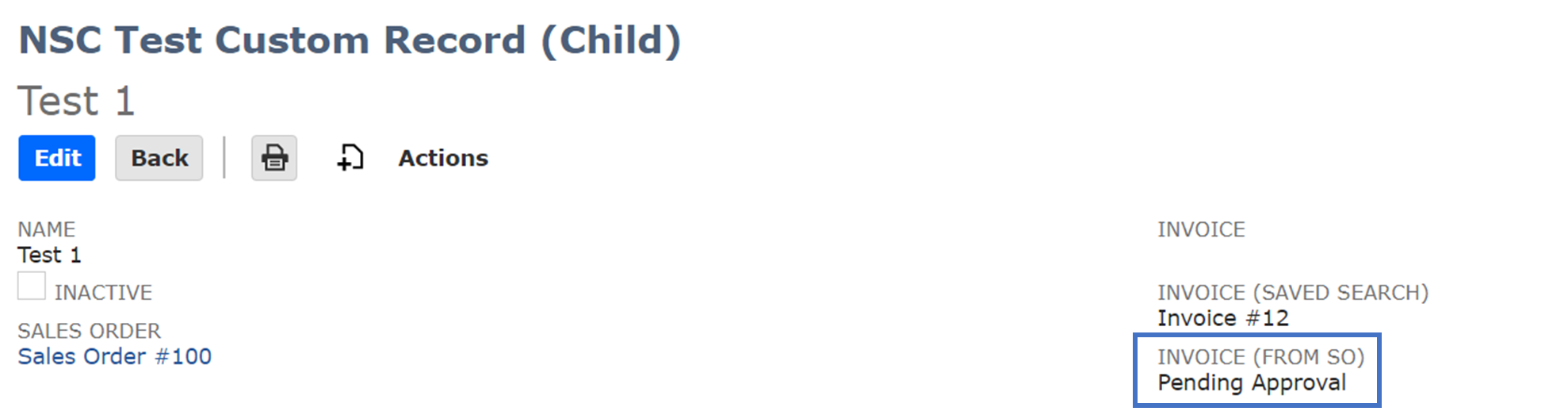
I hope this helps!
To our other members, feel free to share your ideas and suggestions on this. 😊
___
If you find this reply to your question as helpful, others with the same question might find it helpful as well. By marking “Yes” on the “Did this answer your question?”, you’ll be able to aid the community to find the solution much easier and faster without the need to read through all the replies, and you will also get closer to earning your next Answer Accepter badge.

Re: Can scripts be locked within account customization projects using SDF?
thank you @Richard James Uri-Oracle ,
I am looking for NetSuite Account customization but not suitecommerce advanced, sorry with my initial query, may be I suppose to elaborate more, could you please let me know your inputs, once again thank you so much

Can scripts be locked within account customization projects using SDF?
Can scripts be locked within account customization projects using SDF? As I see documentation its not possible, however I would like to know on the alternate solutions to lock the objects using SDF, please suggest!
Re: Is it possible to encrypt contents of a SuiteScript in NetSuite & deploy it? if yes how? if not why?
Hello @Richard James Uri-Oracle thank you so much for sharing the related info, it is helpful, but we are looking for something like we want to encrypt the whole script file and use it in NetSuite, is this possible?
Re: How to create a NS saved search with criteria to get open invoices with 30,60,90,120 past due date?
Hello @Jeremy Guimaras -Oracle thank you so much for the quick updates and follow up, very appreciated, it is helpful, with that reference, we tried with different ways, finally got the output as expected, please check on the below screenshots for reference,
Using below criteria we get the invoices with 30 days past due,

Using below criteria we get the invoices with 60 days past due,

Using below criteria we get the invoices with 90 days past due,

Using below criteria we get the invoices with 120 days past due,

In the results tab pulling below information,
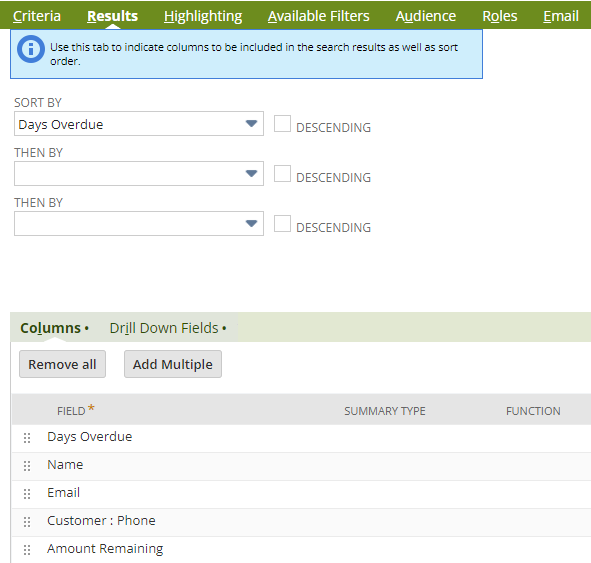
Hope it will be helpful for the ones who are looking for past 30, 60, 90 and 120 days invoices with the past due,
Actually this was queried by one of my friend, I shared him the ideas to achieve the solution with your reference, now he is fully happy with it and got what he expected, once again thank you @Jeremy Guimaras -Oracle , thanks to my friend as well who given me the screenshot to post it here so that it is helpful to others in our group,
Re: How to create a NS saved search with criteria to get open invoices with 30,60,90,120 past due date?
You are welcome, @Nayeem Rahman Shaik 🙂
I'm glad that you were able to tweak the saved search according to your business need. Thank you for sharing it as well so our members who might need the same can easily see.
Have a great day ahead!
Re: Summarizing [Deferred Revenue Waterfall Detail] report
Thanks @Patrick Fresnosa-Oracle
After reading your response, I tried grouping to summarize then found [Transaction Demension: Period Name] which is the name of month for us.
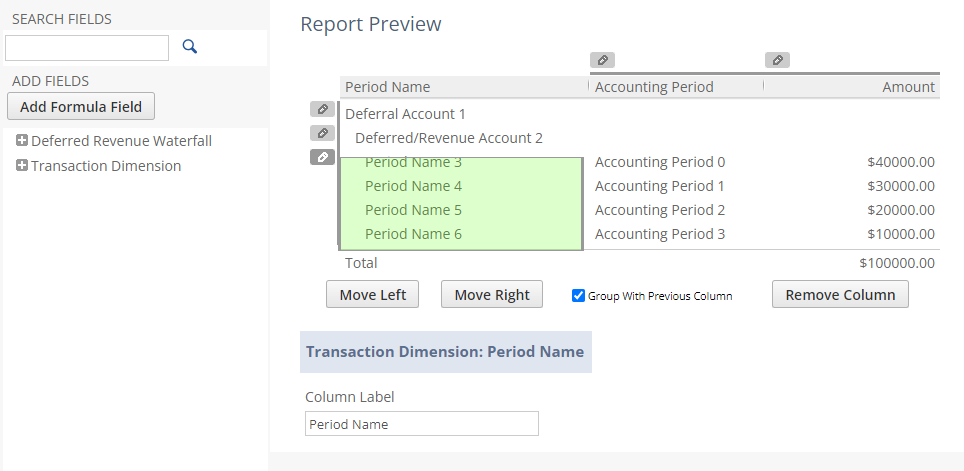
So I was able to get the view I wanted!

Now I will try to find a way to order the system to only generate at the summary level instead of generating a report and then group them to make the report faster.
If you have any insight on this please share as well.
Thanks again!
 Burton_K