Best Of
Re: Transaction - Line Level Systems Notes
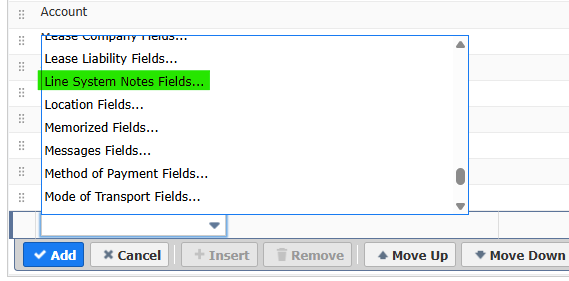
@ABDUL HANNAN , on a "Transaction" saved search, on the results columns, this is the join that gives you the line level audit trail that @Tigran Shahnazaryan is referring to.

Re: NetSuite Territory in NSAW
Hi @James Woods
Thank you for sharing the details regarding the NetSuite Territory updates and the behavior observed in NSAW.
Based on our review and validation with engineering, please find below the key points and references that explain the current behavior and recommended best practices when working with the Territory field in NSAW:
• NSAW data is not real-time and depends on scheduled data refreshes.
Changes made in NetSuite (including Territory updates) are reflected in NSAW only after the next successful data refresh or reload.
Reference: NetSuite Analytics Warehouse – Data Refresh Overview
https://docs.oracle.com/en/cloud/saas/netsuite/ns-online-help/article_0310044705.html
• Territory values stored in NSAW may reflect historical data.
For transaction-based subject areas, certain attributes (such as Territory) may be captured at the time of the transaction and may not automatically update for historical records when changes are made later in NetSuite.
Reference: NetSuite Analytics Warehouse – Data Modeling and Refresh Behavior
https://docs.oracle.com/en/cloud/saas/netsuite-analytics-warehouse/nsawa/about-oracle-netsuite-analytics-warehouse.html
• Semantic Model Extensions (SME) and CAM changes require validation and successful publishing.
If the semantic model update introduces an invalid object or dependency, it can result in errors such as invalid views (ORA-04063), which prevents queries from executing successfully.
Reference: Customizing the Semantic Model in NSAW
https://docs.oracle.com/en/cloud/saas/netsuite-analytics-warehouse/nsawa/customize-oracle-netsuite-analytics-warehouse.html
• Best practice for validation:
We recommend validating the availability and correctness of the Territory field by creating a DV workbook dataset directly against the relevant subject area. This helps confirm whether the updated values are available in the warehouse before applying additional model extensions.
If you continue to see errors after completing the validation steps, please file a NetSuite-NSAW case so we can further investigate and review the issue with engineering.
Regards!

Re: How to add Formula Date for 6 Months ago?
You can try the following formula:
Formula (Date)
ADD_MONTHS(TO_DATE({lastorderdate}), 6)
Then for the criteria = ON "today"
Basically taking the last sales order date from this customer, converting it to a date and adding 6 months to it and then comparing it to whether it equals "today" (6 months later).
If you must use your custom field and it is a "date" type, I believe you could do the same thing (without the TO_DATE wrapper).

NSC | NetSuite2.com: Show Transaction Full Status Instead of Letters

By default, the transaction table shows the status field as internal IDs in the form of letters. However, they are not descriptive, and users would constantly need to check their equivalent if used as-is. The query below shows how users can retrieve the status field of transactions that show their complete text.
SELECT id AS internal_id, status, BUILTIN.DF(transaction.status) as status_text, number, trandate, type
FROM transaction
WHERE type = 'SalesOrd';
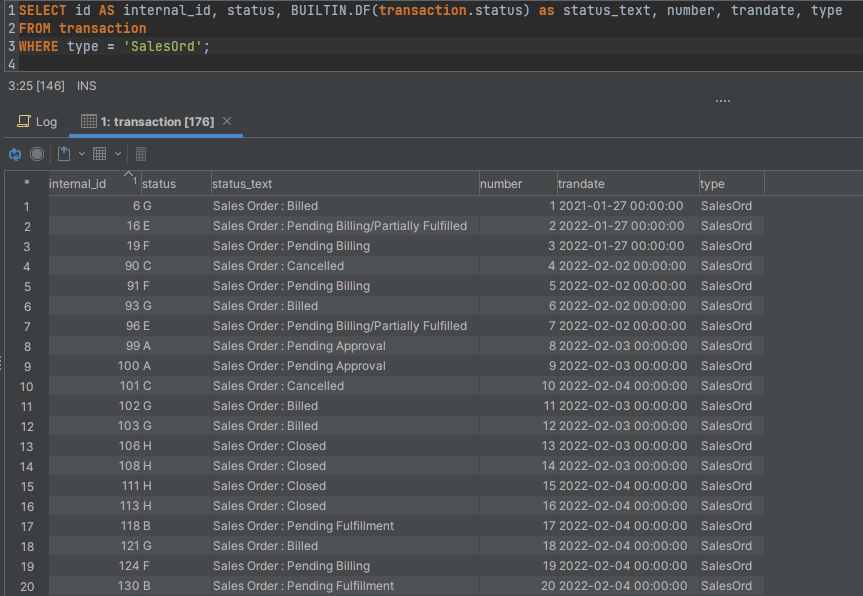
For more information on Internal IDs of the Status field, users may visit SuiteAnswers Transaction Status List of Internal IDs.
—
Got any feedback? Let us know in the comments!

NetSuite Admin Tip | Trace Sales Order Execution in SuiteScript using log.debug
When working with transaction records such as Sales Orders, understanding how your script flows behind the scenes is essential for effective troubleshooting and validation. One of the simplest yet most powerful tools available to NetSuite admins and developers is the use of log.debug.
By placing log.debug statements at key points in your script, you gain visibility into record values, script progress, and potential failures—making it significantly easier to identify issues early.
Example Use Case: Updating a Sales Order with Execution Tracing
Below is a simple example of how you can use log.debug to trace the full lifecycle of a Sales Order update within a Scheduled Script:
/**
 * @NApiVersion 2 .x
 * @NScriptType ScheduledScript
 */
 // Update Sales Order Status Example with log.debug tracing
define(['N/log', 'N/record', 'N/search'], function(log, record, search) {
    function execute(context) {
// Log the start of the script execution
log.debug({
            title: 'Script Start',
            details: 'Beginning Sales Order update process.'
        });

        var salesOrderId = 12345; // Sample Sales Order internal ID

        try {
// Log before loading the Sales Order
            log.debug({
                title: 'Loading Sales Order',
                details: 'Loading Sales Order ID: ' + salesOrderId
            });

            // Load the Sales Order record
var salesOrder = record.load({
                type: record.Type.SALES_ORDER,
                id: salesOrderId
            });

            // Log after loading, showing relevant initial values
log.debug({
                title: 'Sales Order Loaded',
// details will be stringified if it's an object
                details: { status: salesOrder.getValue('status'), entity: salesOrder.getValue('entity') }
            });

            // Update the memo field on the Sales Order
            salesOrder.setValue({
                fieldId: 'memo',
                value: 'Updated by script on ' + new Date().toISOString()
            });

            // Log after making a change, before saving the record
log.debug({
                title: 'Memo Updated',
                details: 'Memo field changed. Saving record...'
            });

            var salesOrderIdSaved = salesOrder.save(); // Save the Sales Order and log the resulting ID

            log.debug({
                title: 'Sales Order Saved',
                details: 'Sales Order successfully saved. ID: ' + salesOrderIdSaved
            });
        } catch (e) {
// Log any errors that occur during execution
            log.debug({
                title: 'Error Occurred',
                details: e.message // Log only the error message, not sensitive details
            });
        }

        // Log the end of the script execution
log.debug({
            title: 'Script End',
            details: 'Sales Order update script completed.'
        });
    }

    return { execute: execute };
});
- log.debug is your best friend when validating script behavior.
- Logging initial and updated values helps you confirm that your script is working as intended.
- Adding clear log titles and details improves readability in Execution Logs.
The sample code described herein is provided on an "as is" basis, without warranty of any kind, to the fullest extent permitted by law. Oracle + NetSuite Inc. does not warrant or guarantee the individual success developers may have in implementing the sample code on their development platforms or in using their own Web server configurations.
Oracle + NetSuite Inc. does not warrant, guarantee or make any representations regarding the use, results of use, accuracy, timeliness or completeness of any data or information relating to the sample code. Oracle + NetSuite Inc. disclaims all warranties, express or implied, and in particular, disclaims all warranties of merchantability, fitness for a particular purpose, and warranties related to the code, or any service or software related thereto.
Oracle + NetSuite Inc. shall not be liable for any direct, indirect or consequential damages or costs of any type arising out of any action taken by you or others related to the sample code.
To know more about deploying SuiteScript, check these New to NetSuite Articles.
- New To NetSuite | How to set a Script Type in SuiteScript 2.x Record?
- New To NetSuite | How to create a Script Record?
- New To NetSuite | How to Deploy a Script Record
Do you have another way on how to automate your transactions using SuiteScript? Feel free to share them here!

Re: PDF Template - Element type "a" must be followed by either attribute specifications, ">" or "/>".
Hi @Dext3r
Here are a few practical ways to debug this in Advanced PDF/HTML (Invoice):
Why this happens
- Even if your template has no
<a>tags, data coming from records can inject HTML (item description, customer comments, tracking URL, memo, custom fields). - If any field contains a malformed
<a>tag (or unclosed HTML), the PDF engine throws an error that often points to a misleading line number (like your CSS).
What to check first (most common)
- Item Description / Sales Description
- Look for pasted links or HTML (
<a,<br>,<div>, etc.).
- Look for pasted links or HTML (
- Customer fields
- Email, URL, comments, address, or custom fields.
- Tracking URL / Ship fields
- These frequently contain auto-generated links.
Quick isolation steps
- Duplicate the invoice → remove line items one by one and reprint.
- If it prints after removing a line, you’ve found the source field.
- Same approach for customer info (clear memo/comments temporarily).
Prevent HTML from breaking the template
Wrap fields with HTML escaping:
${item.description?html}${record.memo?html}${record.trackingnumbers?html}
If a field should render links, ensure it’s well-formed:
<a href="${url?html}">${url?html}</a>
Template-side debugging tips
- Temporarily comment out sections of the template (binary search) until it prints.
- Move your CSS into a minimal version and test—CSS errors can be symptoms, not causes.
- Make sure all tags are properly closed (
<table>,<tr>,<td>, etc.).
Can you see the generated code?
- NetSuite does not provide a direct “view generated PDF HTML/XML” option.
- Best workaround:
- Copy the template
- Replace dynamic fields with static text
- Reintroduce fields gradually until it fails
TL;DR
This is almost always bad HTML coming from record data, not the template itself. Item descriptions and tracking URLs are the top culprits. Escaping fields with ?html usually fixes it.
If you want, you can attach your template , and so I can check where it's breaking.

Re: what is the impact of aging reports use transaction date or due date?
Hi @Bee Yook
The AR Aging Report ages receivables based on how the Aging Reports Use preference is set. If you change the aging reports by ticking the Due Date option, the age of the invoice will be computed from the due date. This will calculate your AR Aging Report Age the same as Days Overdue.
The Days Overdue field on the customer record always ages receivables based on the transaction's Due Date while the AR Aging Report ages receivables based on how the Aging Reports Use preference is set. Therefore, the age in the A/R Aging Detail Report is higher than the one in the Days Overdue field of the customer record.
====
If you find this reply to your question as helpful, others with the same question might find it helpful as well. By marking “Yes”on the “Did this answer your question?”,you’ll be able to aid the community to find the solution much easier and faster without the need to read through all the replies, and you will also get closer to earning your next Answer Accepter badge.

Re: Long Item Description Cutoff in Print created by Advanced PDF Template
Hello @Angel mariya T. P. ,
You will need to customize the advanced pdf to have more room on the invoice and wrap the text.

Re: SDF browser-based authentication fails in SB1 after sandbox refresh.
I was able to get it working. The root cause was that the SuiteCloud Development Integration record was disabled.
 rosse
rosse
New to NetSuite | Advanced Taxes: U.S. Tax Lookup – Scenarios Part 2

After presenting sample scenarios on the highest priority in the U.S. Tax Lookup, which is the Tax Item on the Customer record in our previous discussion, we will now provide scenarios for the next in hierarchy:
If the customer has a valid shipping address:
- Tax Schedule = Taxable and Charge Out Of District Sales Taxes = True, the system will pull up the tax code of the Shipping Address.
- Tax Schedule = Taxable and Charge Out Of District Sales Taxes = False:
- The system will pull up the Home Tax Code of the nexus.
- If there are no Home Tax Codes assigned, the system will pull up the Default Tax Code under the Setup > Accounting > Set Up Taxes.
For our demonstration, we'll use two items in the transaction: one with a taxable schedule and the other with a non-taxable schedule.
The sample valid customer address is 1400 E 70TH ST, Los Angeles CA 90001-1921:

Additional details will be provided in the following scenarios below.
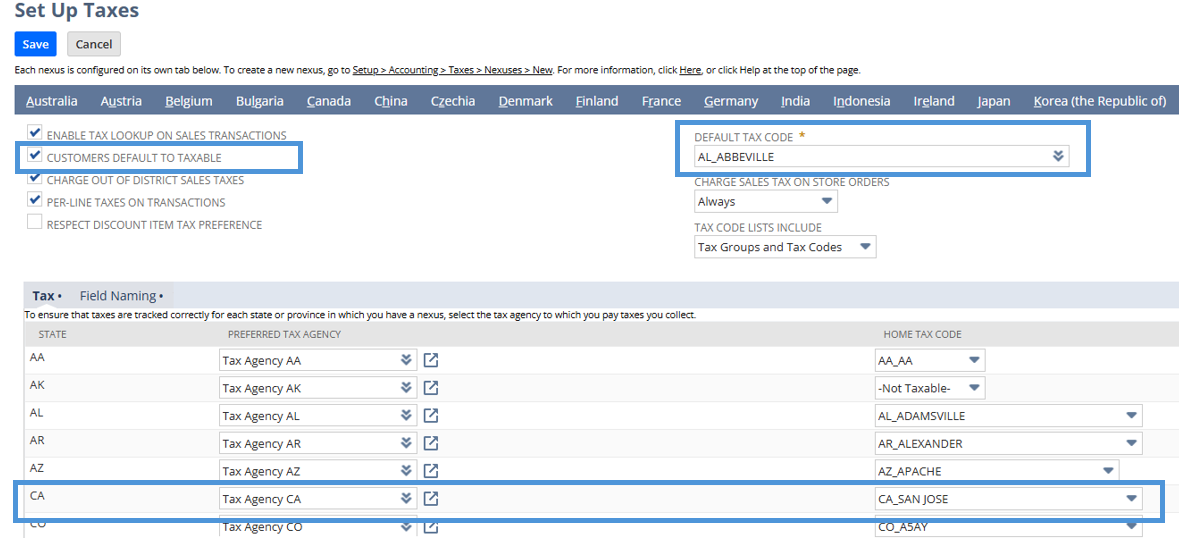
Scenario #1: Customer record > Taxable = T and Tax Item = null. On the Setup Taxes page, Charge Out Of District Sales Taxes = True; with value on Home Tax Code and Default Tax Code
- Customer with Taxable = T and Tax Item = Null

- Charge Out Of District Sales Taxes = True; with value on Home Tax Code and Default Tax Code:
- On the Invoice transaction, select customer on scenario 1 then add the two items with taxable and nontaxable schedule:
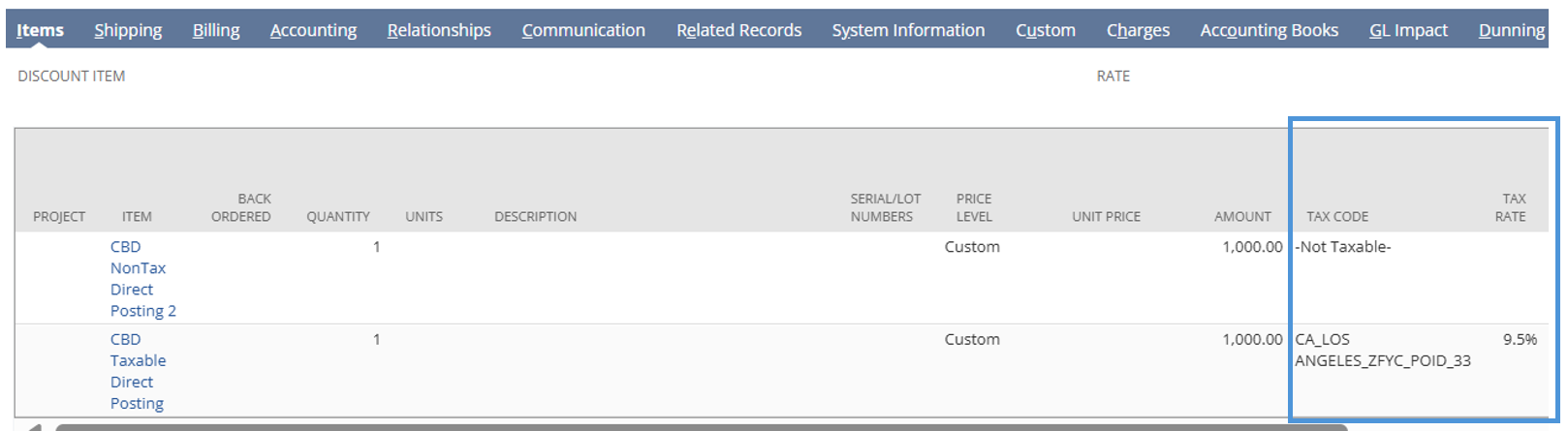
- Taxable Item = CA_LOS ANGELES_ZFYC_POID_33
- Nontaxable Item = -Not Taxable-
As you can see, the system pulled the tax code of the shipping address which is aligned with the hierarchy presented above.
Scenario #2: Customer record > Taxable = T and Tax Item = null. On the Setup Taxes page, Charge Out Of District Sales Taxes = False; with value on Home Tax Code and Default Tax Code
- Customer with Taxable = T and Tax Item = Null

- Charge Out Of District Sales Taxes = False; with value on Home Tax Code and Default Tax Code:
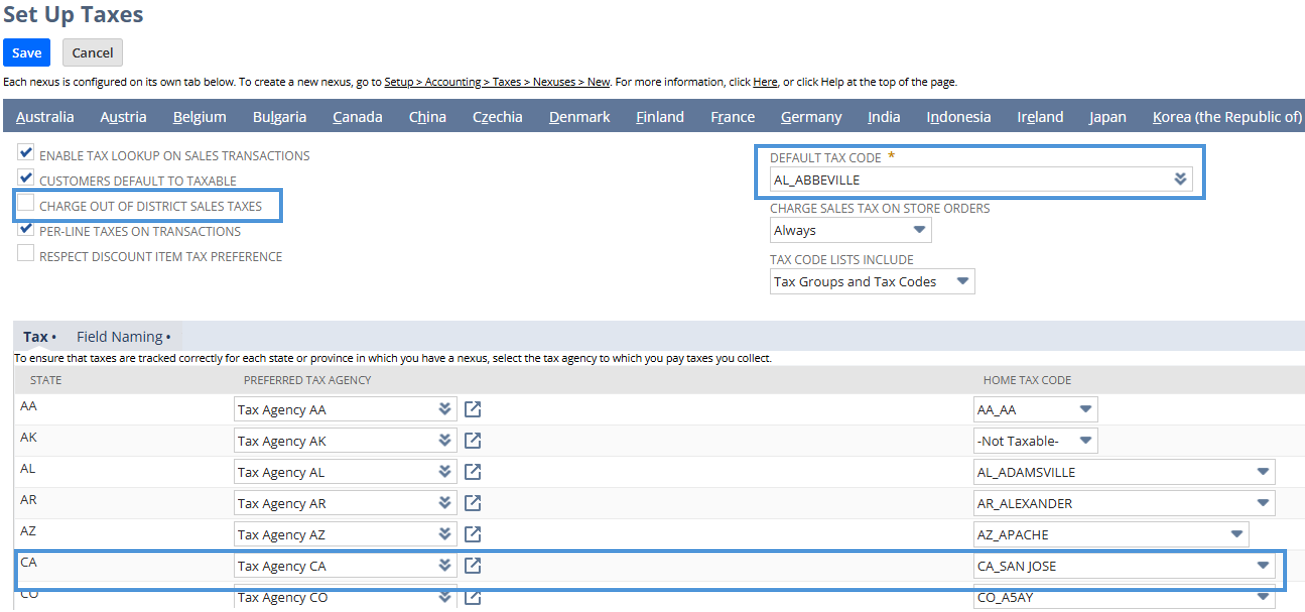
- On the Invoice transaction, select customer on scenario 2 then add the two items with taxable and nontaxable schedule:
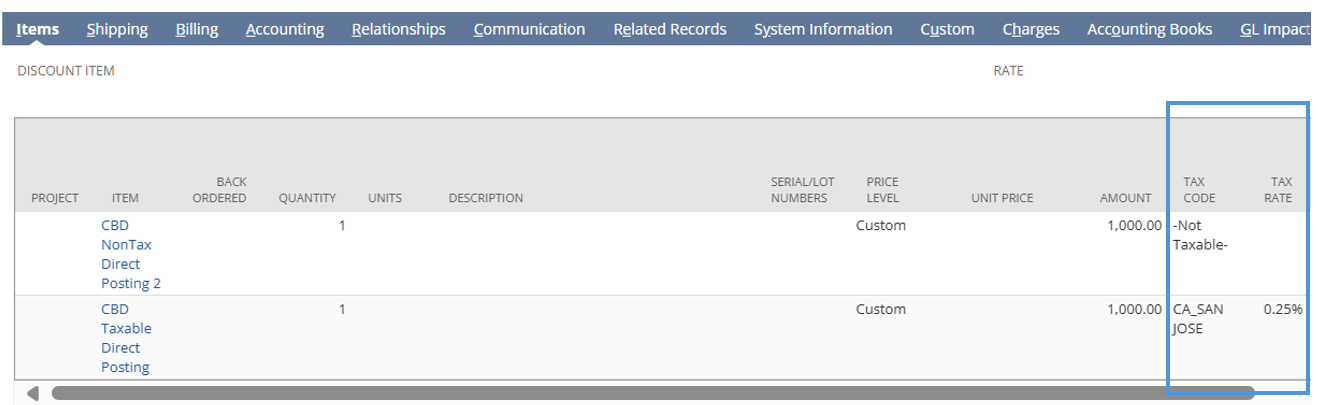
- Taxable Item = CA_SAN JOSE
- Nontaxable Item = -Not Taxable-
As seen in the scenario above, since the "Charge Out Of District Sales Taxes" is not marked as true, the system pulled the Home Tax Code associated with the CA nexus from the "Set Up Taxes" page, which is "CA_SAN JOSE."
Scenario #3: Customer record > Taxable = T and Tax Item = null. On the Setup Taxes page, Charge Out Of District Sales Taxes = False; Home Tax Code = null; Default Tax Code = with value
This scenario is identical to Scenario 2 above, with the only difference being that the Home Tax Code has no value selected:
- Charge Out Of District Sales Taxes = False; Home Tax Code = null; Default Tax Code = with value:
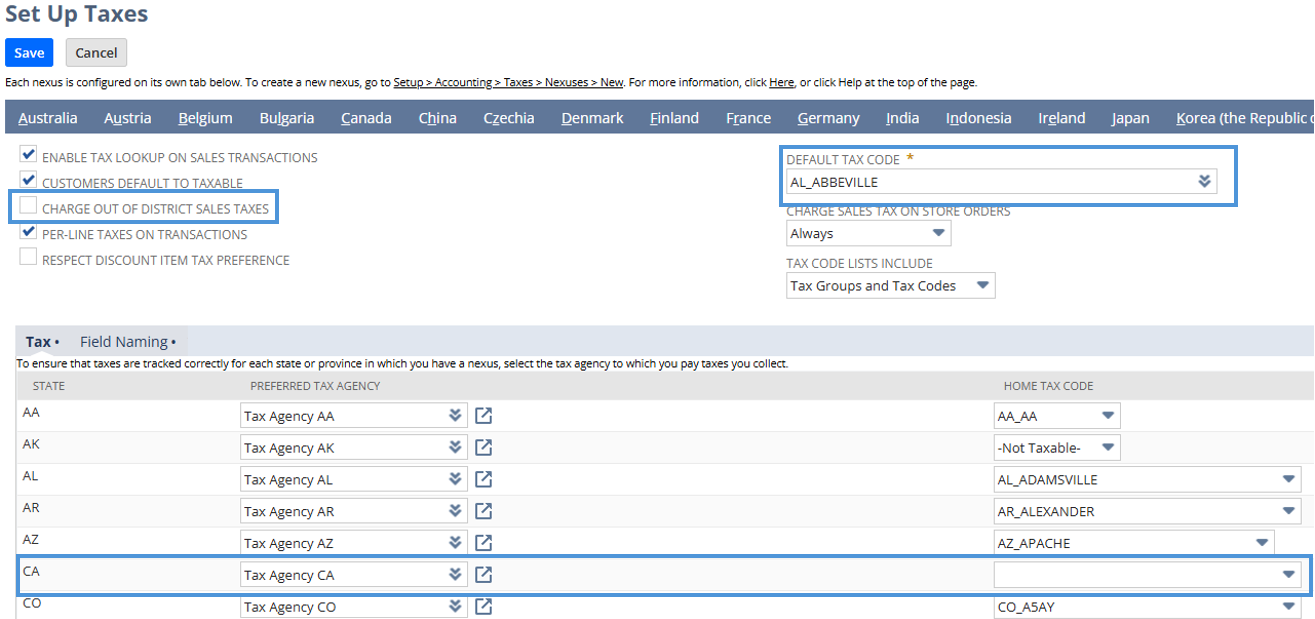
- On the Invoice transaction, select customer on scenario 3 then add the two items with taxable and nontaxable schedule:
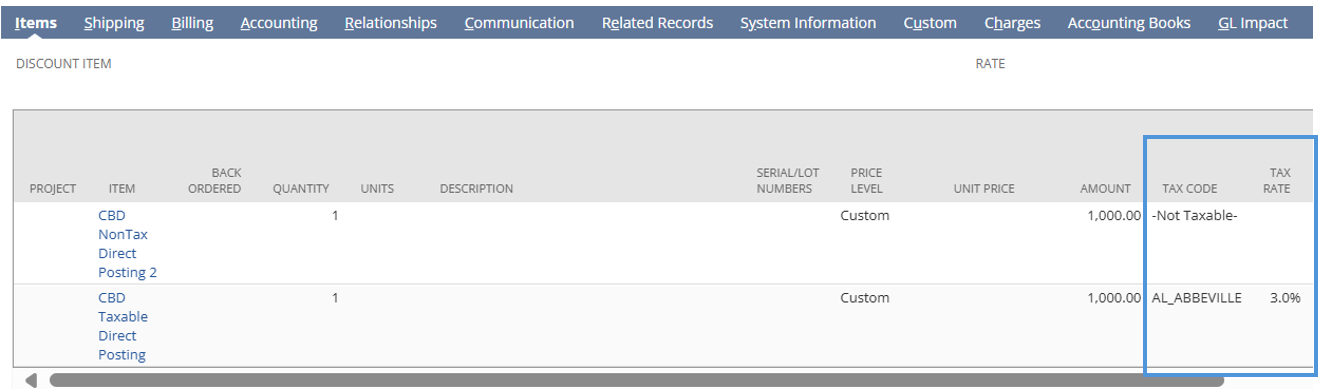
- Taxable Item = AL_ABBEVILLE
- Nontaxable Item = -Not Taxable-
As seen in the scenario above, since the "Charge Out Of District Sales Taxes" is not marked as true, and the Home Tax Code for CA nexus has no value, the system pulled the Default Tax Code under the Setup > Accounting> Set Up Taxes, which is " AL_ABBEVILLE"
___
Follow the New to NetSuite > Advanced Accounting & OneWorld category to be updated whenever new articles are released!
