Best Of
Re: Same AP Aging Report - Different Employees Get Different Results
Hi @User_XQ321,
Good day! Hope you are doing well. ?
Kindly check if the two employees are using the same A/P Aging Report Filter Date. They may have different Reporting Preferences, one's set to Report by Transaction Date and the other one is by Period.
To resolve this, here are the steps the Employees may take:
1. Navigate to Home Icon > Set Preferences.
2. On the Set Preferences page, under Analytics tab, we may set the Report by Period dropdown to All Reports, if you would like to use by Period to all Reports. If you select Financials Only, only the following financial reports are reported by period— Income Statements, Balance Sheets, Cash Flow Statement, Trial Balance Report, Income Graph, Expense Graph, and Net Worth Graph.
Please note that this is a User Preference and each of the Team should set their Preference to this so that they will be able to run and generate the Report by Period and not by Transaction Date. Hence, have the same results when generating similar Reports.
You may refer to this SuiteAnswers Article ID: 8374 | Reporting Preferences on the Set Preferences Page for more information.
I hope this helps your concern. ?
================
If you find this reply to your question as helpful, others with the same question might find it helpful as well. By marking “Yes” on the “Did this answer your question?”, you’ll be able to aid the community to find the solution much easier and faster without the need to read through all the replies, and you will also get closer to earning your next Answer Accepter badge.

Re: Gross profit per class
Hello @User_6AYBM
Yes it's possible to see the class-wise Gross profit details . Pls see the below custom income statement
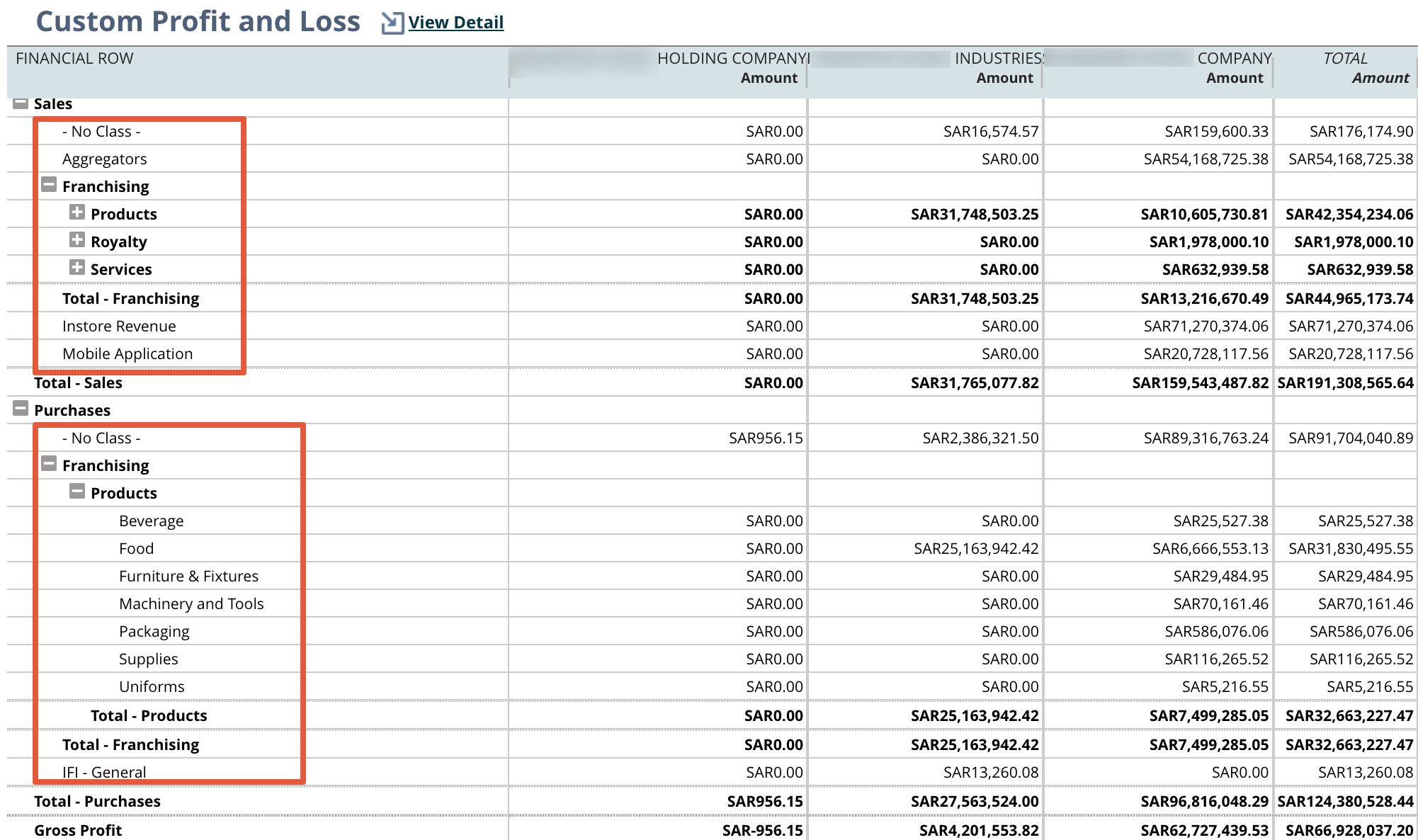
Reports - Financials - Income Statement - Click customization
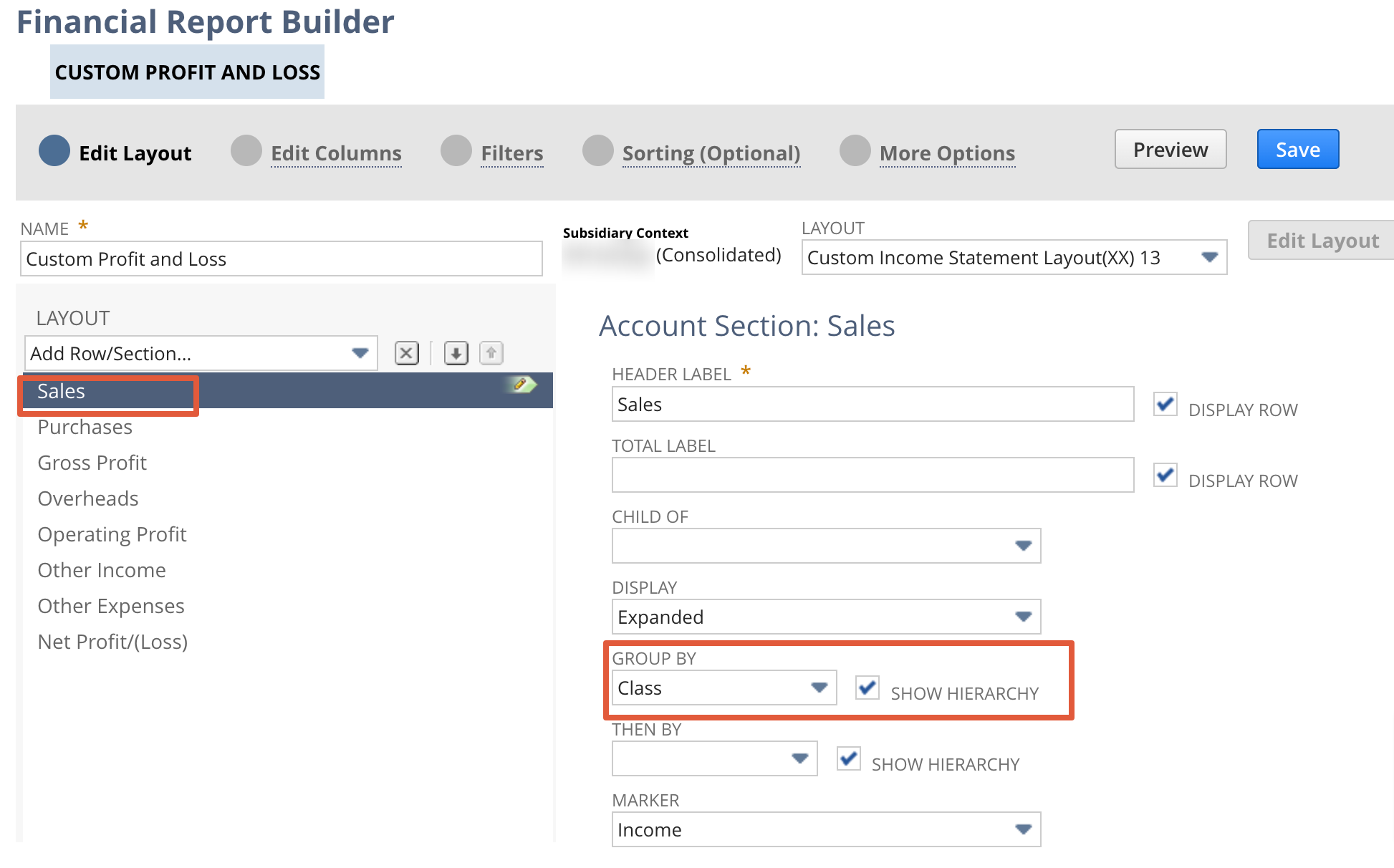
Click on Sales/Income Financial section - Select Group by Class
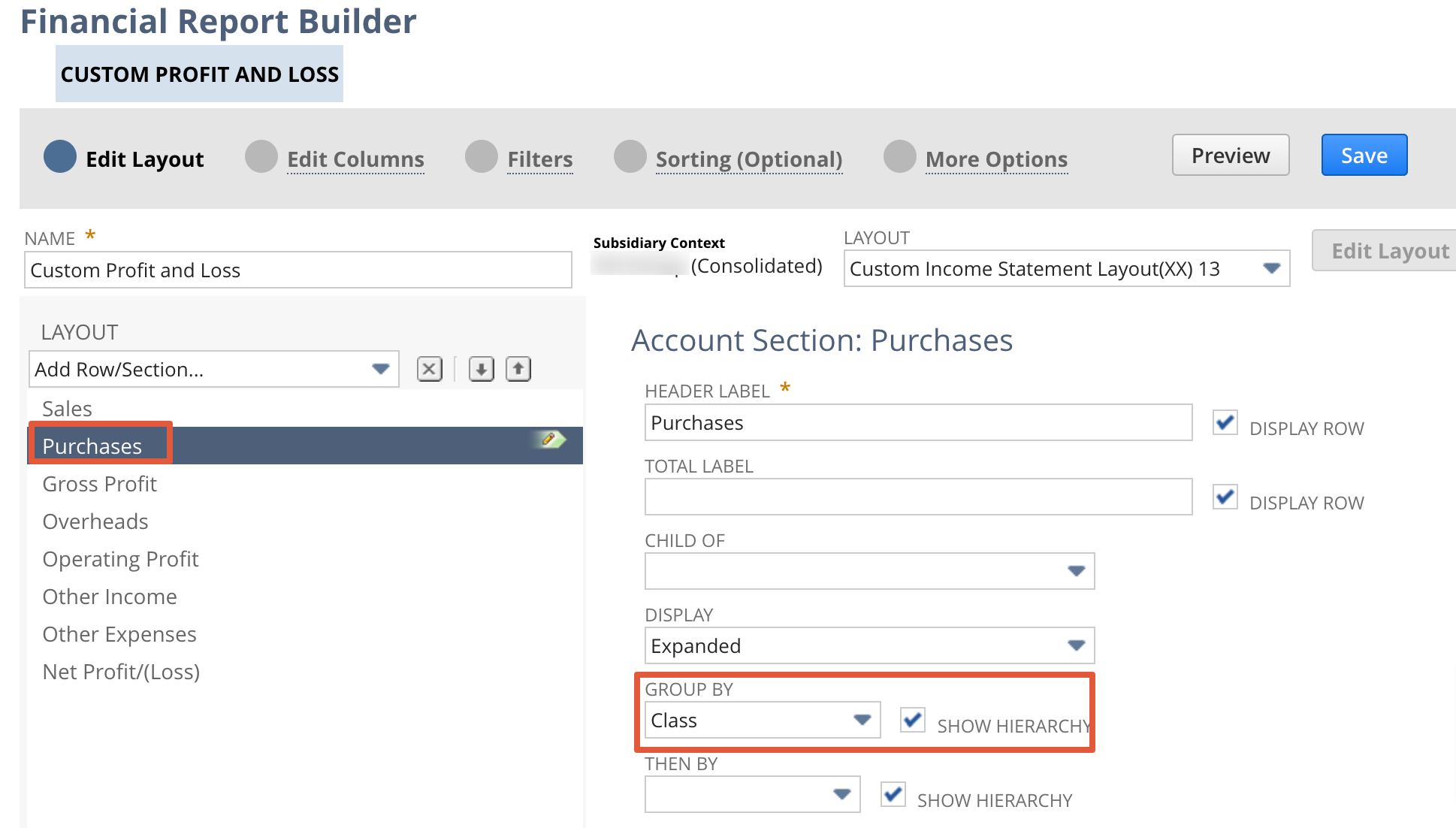
Click on Purchase Financial section - Select Group by Class

Re: Re Run amortization for Vendor bill
Hello @Sivasubramaniam
You will not be able to modify any lines UNLESS the following are enabled:
1. The accounting preference Allow Users to Modify Amortization Schedule = True
2. The role has been granted with at least Edit permission for Amortization Schedules
3. The amortization line is not yet recognized/amortized
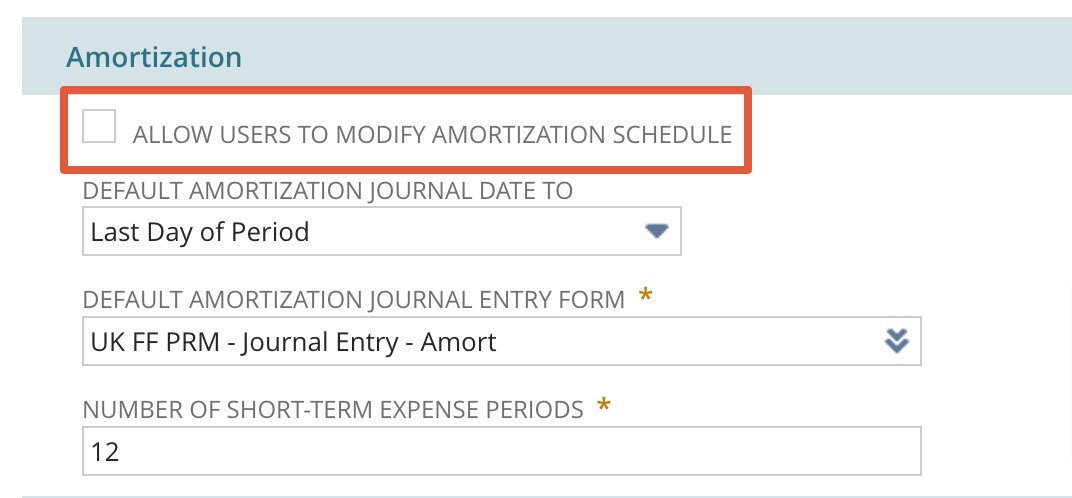
Note: Amort. Schedule/Template, Start Date, End Date on the source transaction may only be changed or removed if there is no amortization made yet.
Re: Item Source WO changes after releasing work order
Hello @Joy Noreen Magoling-Oracle!
We've resolved this Issue with our own created SuiteScript that displays a 'Release' button. When clicking on the 'Release' button the status of the WO goes straight to 'Released'. The problem with the used WorkFlow was that the status was changed from 'Planned' to 'Closed' and from 'Closed' to 'Released' which resulted in the error we experienced.

Re: Need help with workflow
Hi @Dirk Nieuwkamp,
To reiterate, the cause of the credit limit pop-up warning is the Hold preference in your customer record. It is currently set to On as shown in your screenshot below:
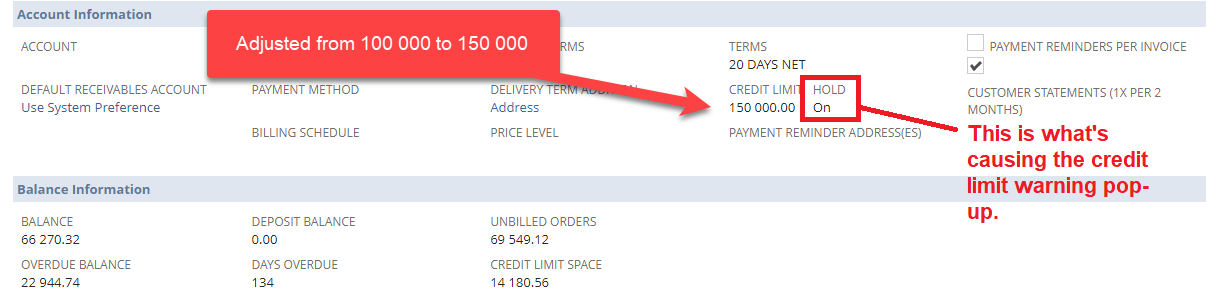
This is what SuiteAnswers Article 9627 states about the preference being set to On:

With the above said, you must set the preference to either Auto or Off to suppress the warning and be able to create orders for the customer.
Hopefully this clarifies things.
If you find this reply to your question useful, others might be as well. By clicking “Yes” on “Did this answer the question?”, you’ll be able to help the community members who might have a similar concern find the answer easier and you will also get closer to earning your next Answer Accepter badge.
-Jack

Re: Advanced Bin managment to use it for Bin managment by location
Hello @Amjad Kasem
You have to do two more steps to manage the bins on transaction levels.
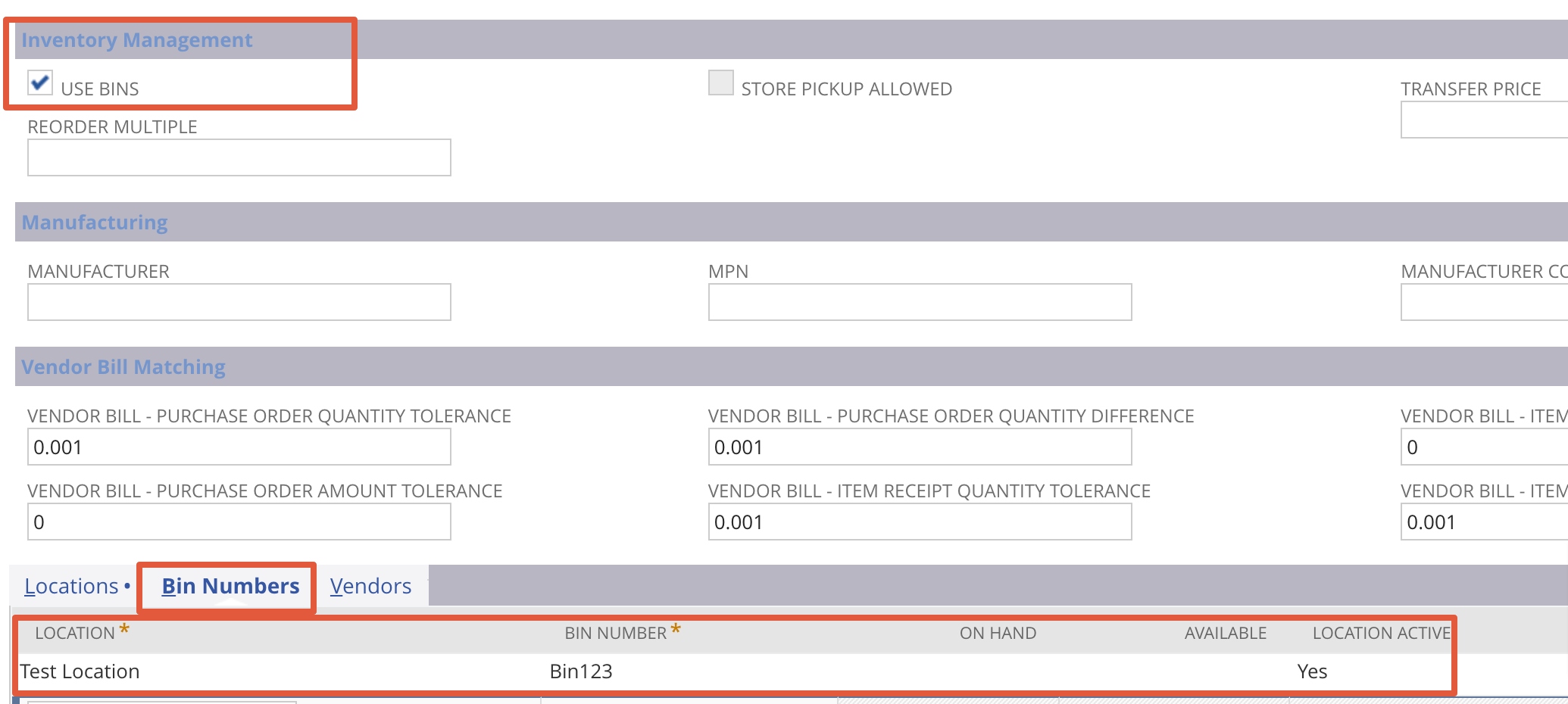
- In the item Master enable the Bin check box under inventory management
- Create new Bin for each locations Goto - Lists - Supply chain - Bin New
- Map the bin numbers in item master under Bin numbers
Once you are done with the above setups you can see the bin number on item receipt inventory configuration window
In addition to that, Generally, Bins requires on transactions where an item quantity is reduced, such as on cash sales, item fulfillments, or negative inventory adjustments.
Bins are not required on transactions where an item quantity is increased, such as purchases and positive inventory adjustments.
If you want to skip the bin nos on item receipt, there is one more accounting preference under Items/Transactions - under the Inventory subtab, you can enable the require bins on all transactions except item receipt
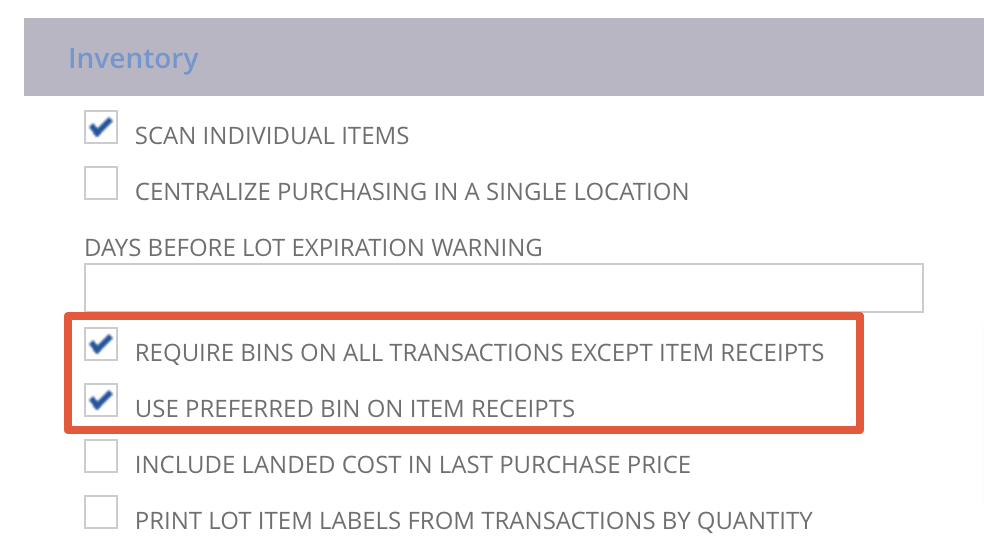
When you enable this preference, the Bin field on item receipts defaults to the preferred bin instead of leaving the field blank.
Re: Adding standard NS fields to custom forms
Hi,
Unfortunately, there is no Standard Field Birth Date for the Customer record.
For an alternative Solution, we can create a Custom Body Field for this.
1. Navigate to Customization > Lists, Records, & Fields > Entity Fields > New
2. Label: Enter Birth Date
3. Type: Select Date
4. Store Value: Enter Checkmark
5. Click Applies To : Customer: Enter Checkmark
7. Click Display
8. Subtab: Select subtab you want it to show
9. Click Save
Let me know about your thoughts,
Joahnna
=========================
If you find this reply to your question as helpful, others with the same question might find it helpful as well. By marking “Yes” on the “Did this answer your question?”, you’ll be able to aid the community to find the solution much easier and faster without the need to read through all the replies.

Re: SuiteCommerce MyAccount
Hi @Neo_Suite,
Do not be confused about SuiteCommerce and SuiteCommerce My Account website types. SuiteCommerce offers website functionality including the Shopping Pages, Checkout, and My Account. While SuiteCommerce My Account only includes functionality for My Account. The licenses for the two website types are also different. Only your Account Manager could provide the cost of the license.
Based from your description of allowing users to pay Invoice, I believe using SuiteCommerce My Account a good approach.
With regards to the alternative, you may try to use Customer Center. Kindly refer to SuiteAnswers: Giving Customers Access to Invoices | Answer Id: 9188.
Kindly let us know if this is helpful for you.
-Charles

Re: Dunning Letters Module - Can A Customer Be Assigned More Than 1 Procedure?
Ely, just for more information on this, in case others want need it:
It seems that a much better approach is invoice-level dunning, if the company wants to use different procedures for its different subsidiaries. That way, the same customer's invoice will be evaluated differently by different subs, which is impossible when customer-level dunning is used.
Thanks.
 Vusi
Vusi
WARNING Manual Update Required to Electronic Bank Payments SuiteApp 2022.1
Hi all,
Be careful and watch out for this update which needs to be done manually, we encountered a couple of little nasties that might get you:
1) the current EFT role is copied and all customisations removed - easy to resolve just reinstate the customisations using the changes history and set-up a new custom role, assign to relevant users
2) the Electronic Banking aggregations by default are removed - this little nasty means if you are paying a vendor for 50 bills rather than one payment there will receive 50 separate payments! Make sure you re-check these Aggregate By Payee boxes x 2.
You have been warned! Oracle please add to SuiteAnswers and relevant comms.
Haydn