Best Of
NetSuite Admin Tip | Chart of Accounts > Guide in Merging Accounts

1. Accounts should both be Active
Scenario:
Merge 001 ABC Bank - Checking (Active) to 002 ABC Bank - Savings (Inactive).
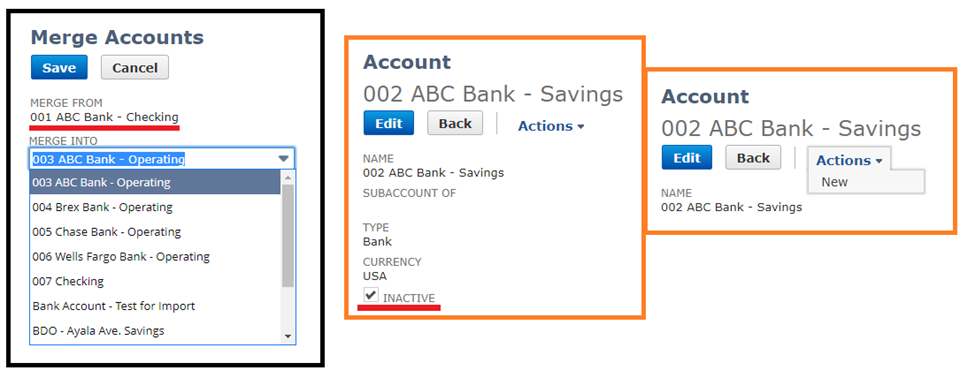
As you can see, on the Merge Accounts page, the inactive account is not on the Merge Into dropdown list.
If you view the Account Record for the inactive account record, you also will not be able to see the Merge button under Actions.
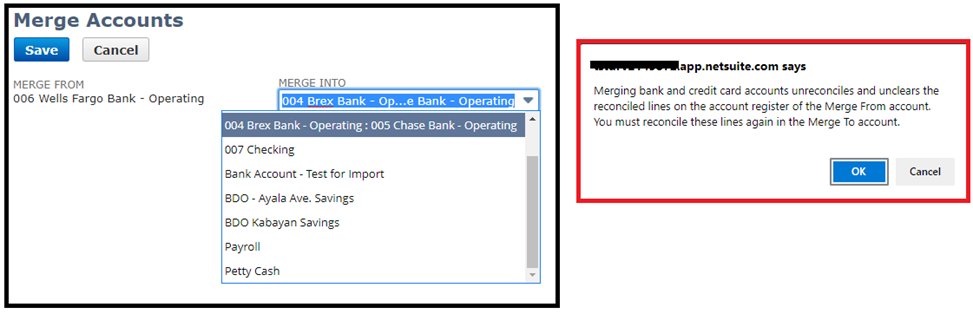
2. An account with sub-account/s can be merged with another. However, if it is a bank/credit account make sure you take note of the warning message before proceeding
Scenario:
Merge 003 ABC Bank – Operating to 004 Brex Bank - Operating with sub-account 005 Chase Bank - Operating
3. An account cannot be merge to a summary account
Scenario:
Merge 001 ABC Bank – Checking to 007 Checking (Summary Account)
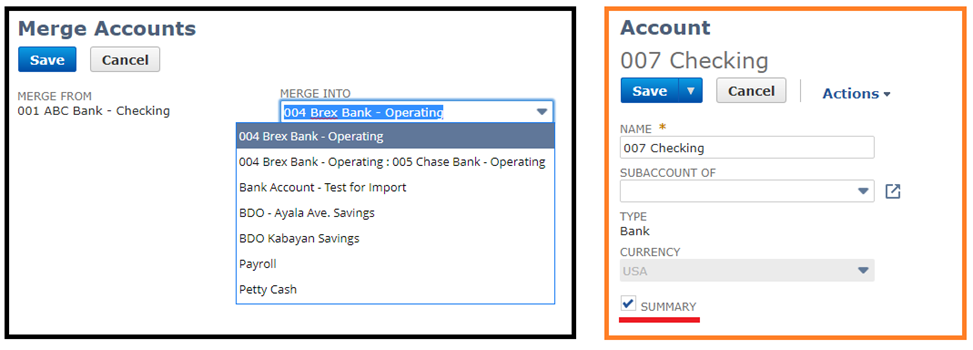
As you can see, 007 Checking account – a summary account, will also not be available on the Merge Into dropdown
4. Accounts to be merge should have the same Account Type, Currency and Subsidiary
Scenario:
Merge Z-001 Account and Z-002 Account with different subsidiaries
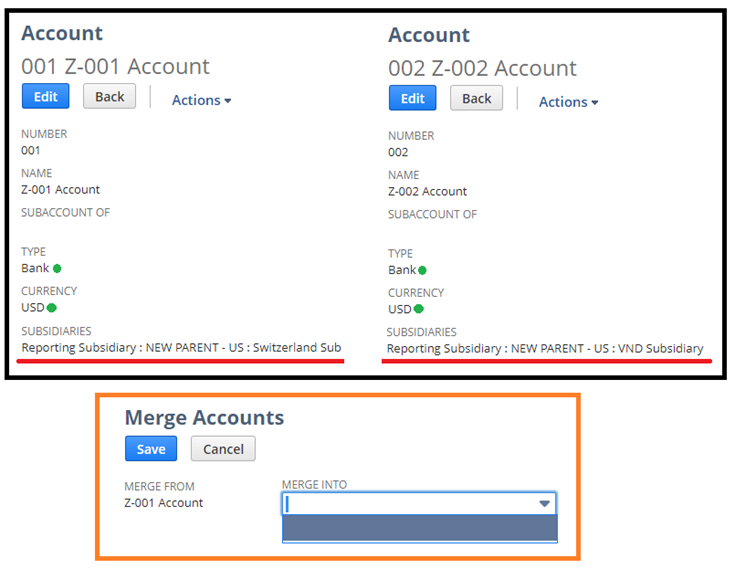
The criteria has to be met. This is why the account cannot be seen on the Merge Into dropdown list although the accounts has the same Account type and currency.
5. These accounts cannot be merged:
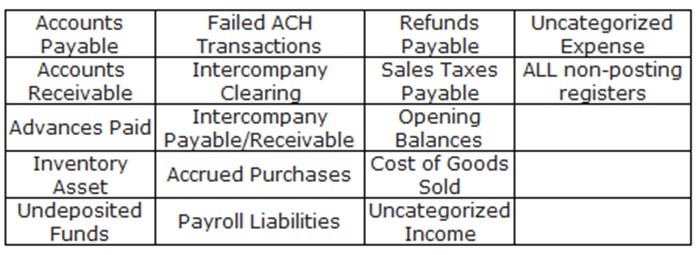
Hope this helped!
Are there any other tips about account merging that you would like to share? Comment on the thread and let our members know.

Re: Assembly Build - Lot Number field not showing as a list
Hi @John Griffin, thanks for sharing your insights on this! ?
----
Hi @KNason76,
I found a related enhancement request for this one which you can vote for in the SuiteIdeas page:
- Enhancement # 168834: Transactions > Manufacturing > Build Assemblies > Components: to have a pop up list to show the lot number/serial numbers that the item have
I have confirmed that you can only get a list of Lot Numbers in the Inventory Detail popup. Using Bins is not mandatory for this, but Advanced Bin/Numbered Inventory Management feature should be enabled for the Inventory Detail to be available.
-Ivy
=========================
If you find this reply to your question as helpful, others with the same question might find it helpful as well. By marking “Yes” on the “Did this answer your question?”, you’ll be able to help other community members who might have the same concern find the answer easier and you will also get closer to earning your next Answer Accepter badge.

Re: Bad Connection: Tableau could not connect to the data source.
Totally understand. And agreed - As I mentioned above... I can test connect successfully from every other ODBC based query tool. IE: ODBC via PowerBI, Excel, Microsoft Access, etc. etc.
However, when one pays for a Tableau license, which is advertised to include an integrated connector for Oracle NetSuite... I'd expect it to work without having to setup my own connection via the ODBC setup. Seeing as I'm after high speed meta, real time access and enhanced SQL-92 based meta discovery. (We transact north of $X Billion, so I'm sure you can imagine the data I need to dive into and trying to do it via SuiteTalk or ODBC)
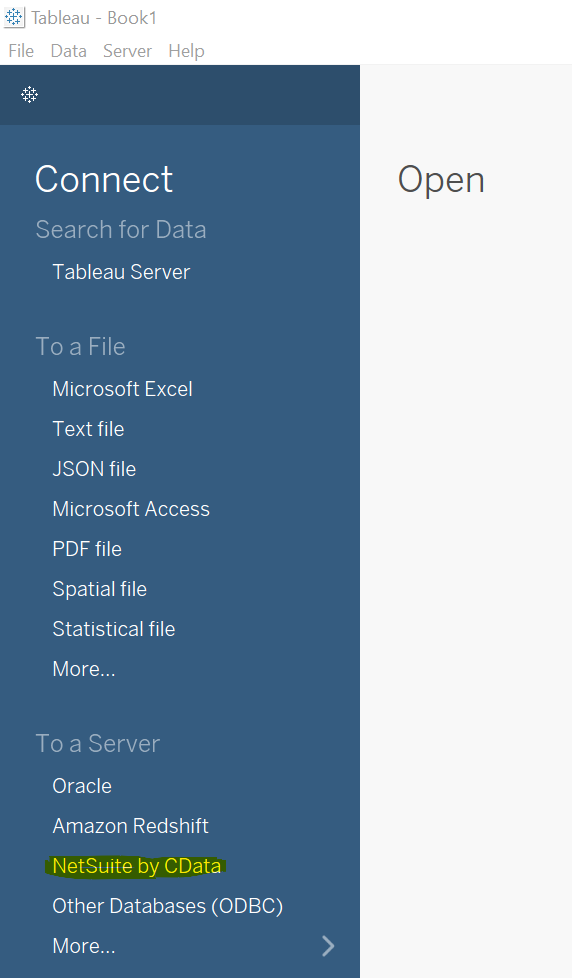
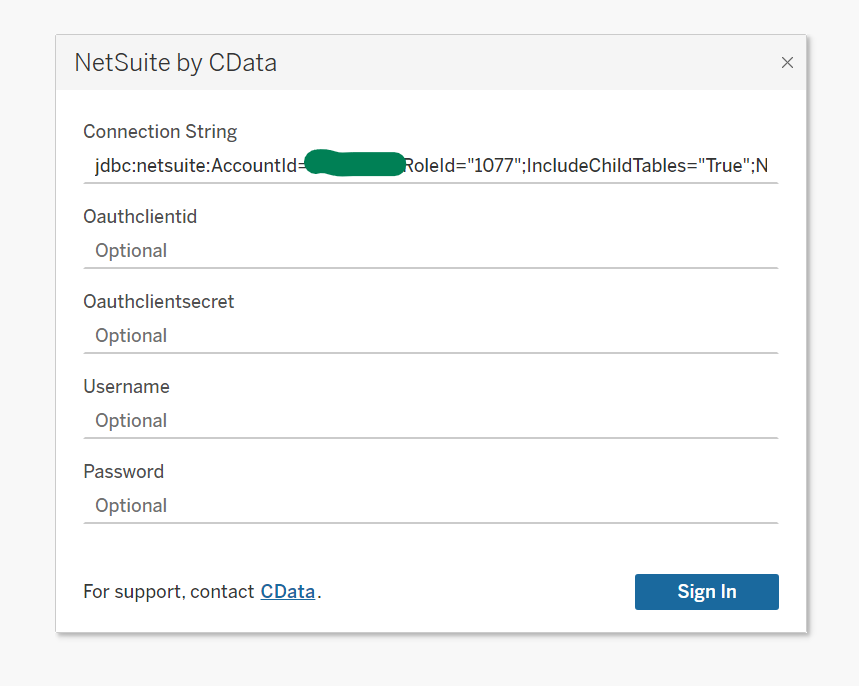
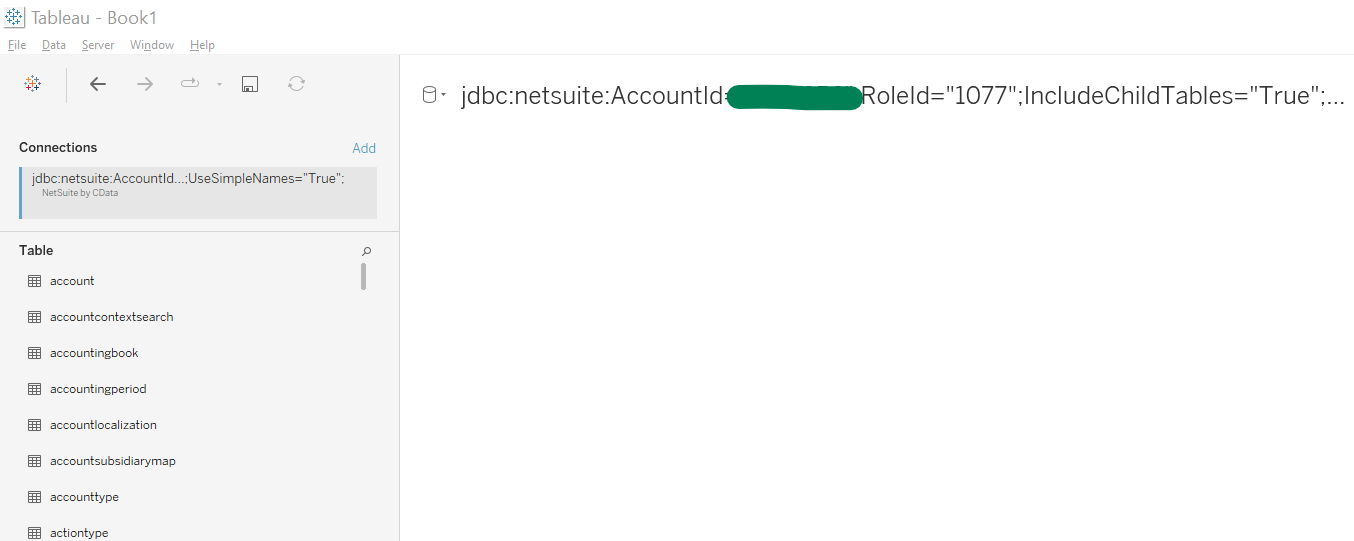
As you can see here and here:
It should be as simple as "click and go"; which isn't quite the case.
However, I have figured out a definitive solution. For anyone having issues connecting, please feel free to reach out.
 MathewB
Re: Non-inventory Item for Resale doesn't appear on the Packing slip.
Hi @Roman S,
I am not sure if you are not able to see the item on the item fulfillment or if it is just not showing up on the packing slip, but is Can Be Fulfilled/Received enabled for the item?
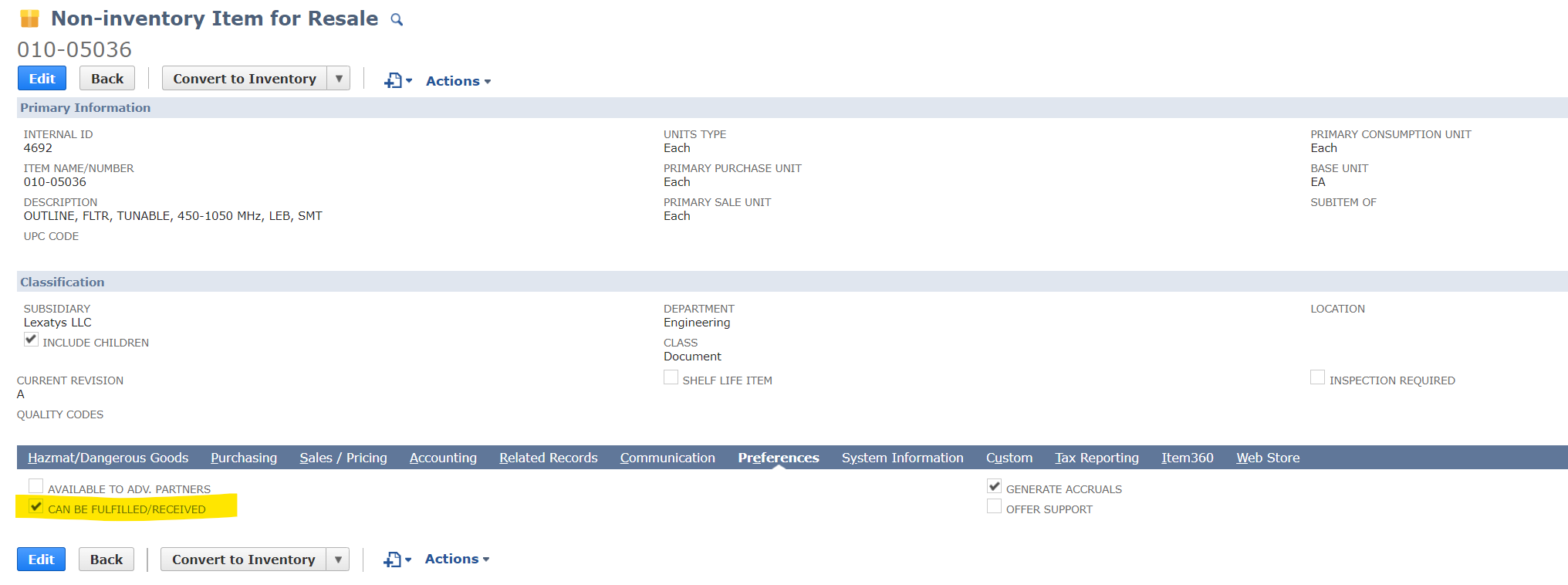
John

Re: Non-inventory Item for Resale doesn't appear on the Packing slip.
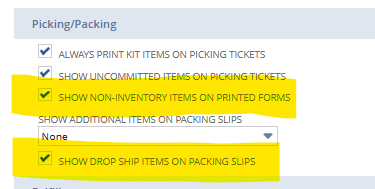
Under the Accounting Preferences, Order Management
Under the Picking/Packing subheading there are 2 options that might be affecting this.

Re: Same AP Aging Report - Different Employees Get Different Results
You're welcome, @User_XQ321! ?
Please be advised that there could be transactions that are included at the end of the month's transaction date but actually have a different posting period.
For example, a payment is dated 06/17/2022, however, it is posted in May 2022 posting period. The transaction will reflect on your Aging Report based on your Reporting preference.
Edit: You may have to make sure that there are no transactions that are posted to different periods against their transaction dates to be able to conclude that at the end of the month, the filter should not matter to the A/P Aging results.

NSC | Show Entity (Customers/Vendors) from a Journal Entry in an Income Statement Detail

Scenario:
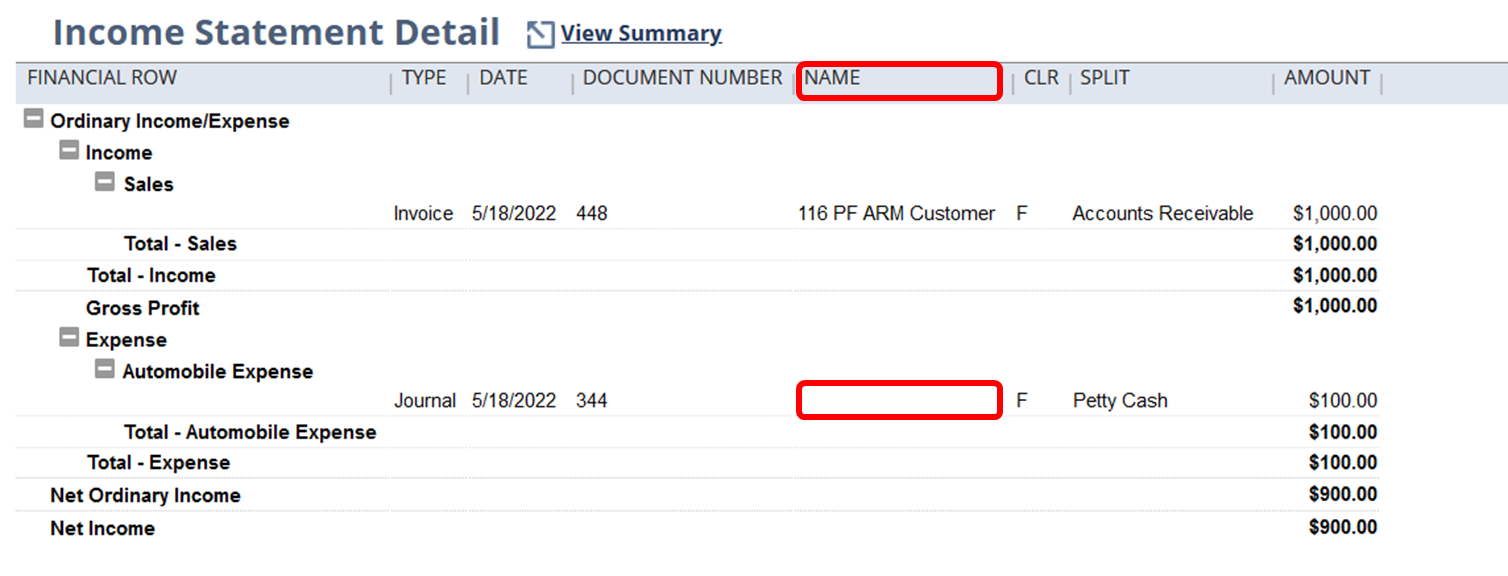
By default, the Name column found in the Income Statement detail refers to the Entity (Vendor/Customer) found in the header of the document itself such as Invoices, Vendor bills etc., not the actual G/L line so that is why, the name column is empty for journal entries with a customer or vendor:
Solution:
To be able to show the Vendor lines of a Journal Entry in an Income Statement details, users needs to follow the steps below:
1.) Navigate to Reports > Financial > Income Statement > Detail
2.) Click Customize
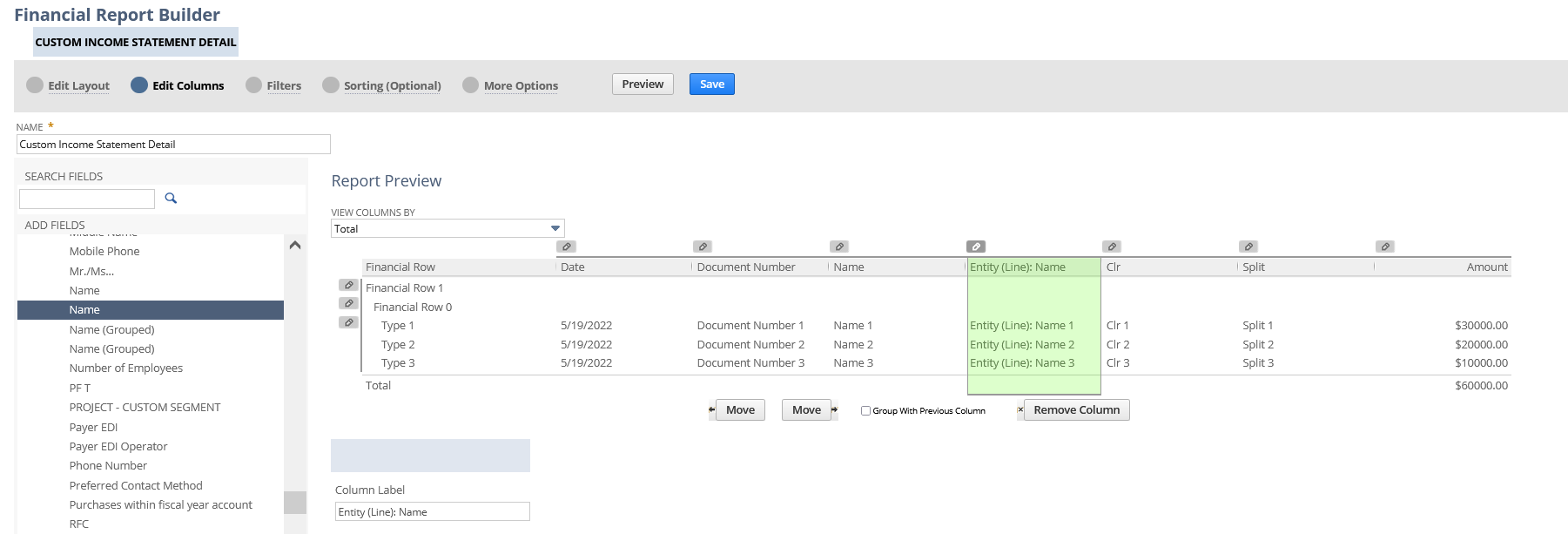
3.) Go to Edit Columns
4.) Open Financial folder > Entity (line) subfolder > select Name
5.) Save and run the report
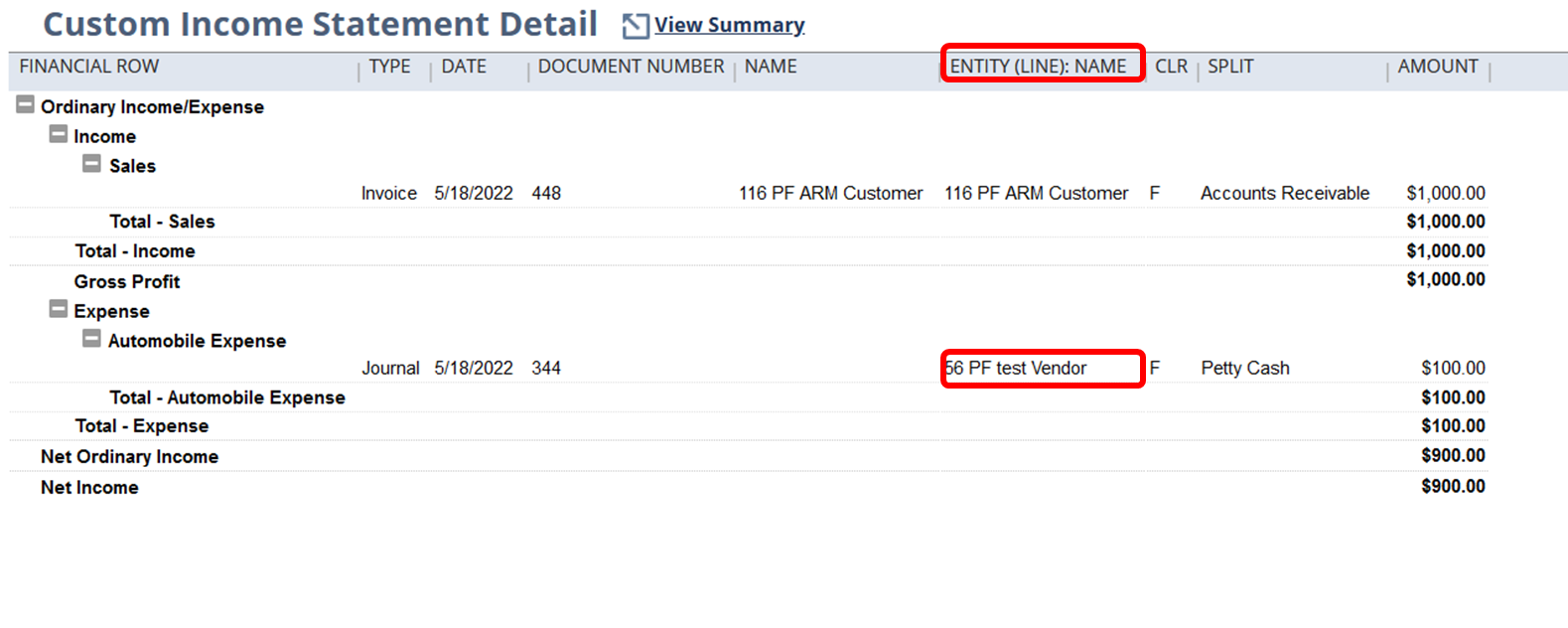
Have you tried this one?
Hope this helps
Re: Same AP Aging Report - Different Employees Get Different Results
Hi @User_XQ321,
Good day! Hope you are doing well. ?
Kindly check if the two employees are using the same A/P Aging Report Filter Date. They may have different Reporting Preferences, one's set to Report by Transaction Date and the other one is by Period.
To resolve this, here are the steps the Employees may take:
1. Navigate to Home Icon > Set Preferences.
2. On the Set Preferences page, under Analytics tab, we may set the Report by Period dropdown to All Reports, if you would like to use by Period to all Reports. If you select Financials Only, only the following financial reports are reported by period— Income Statements, Balance Sheets, Cash Flow Statement, Trial Balance Report, Income Graph, Expense Graph, and Net Worth Graph.
Please note that this is a User Preference and each of the Team should set their Preference to this so that they will be able to run and generate the Report by Period and not by Transaction Date. Hence, have the same results when generating similar Reports.
You may refer to this SuiteAnswers Article ID: 8374 | Reporting Preferences on the Set Preferences Page for more information.
I hope this helps your concern. ?
================
If you find this reply to your question as helpful, others with the same question might find it helpful as well. By marking “Yes” on the “Did this answer your question?”, you’ll be able to aid the community to find the solution much easier and faster without the need to read through all the replies, and you will also get closer to earning your next Answer Accepter badge.
Re: Gross profit per class
Hello @User_6AYBM
Yes it's possible to see the class-wise Gross profit details . Pls see the below custom income statement
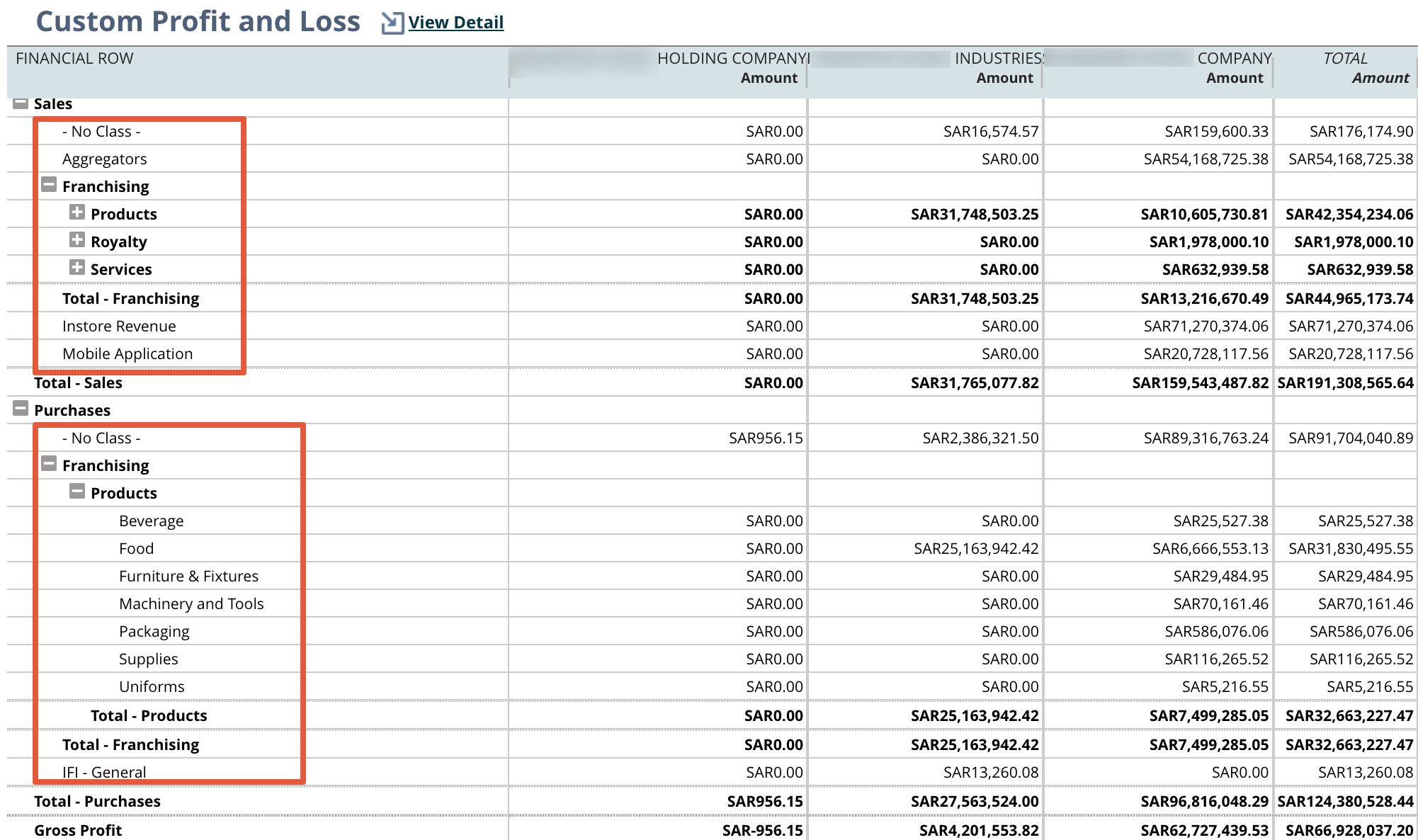
Reports - Financials - Income Statement - Click customization
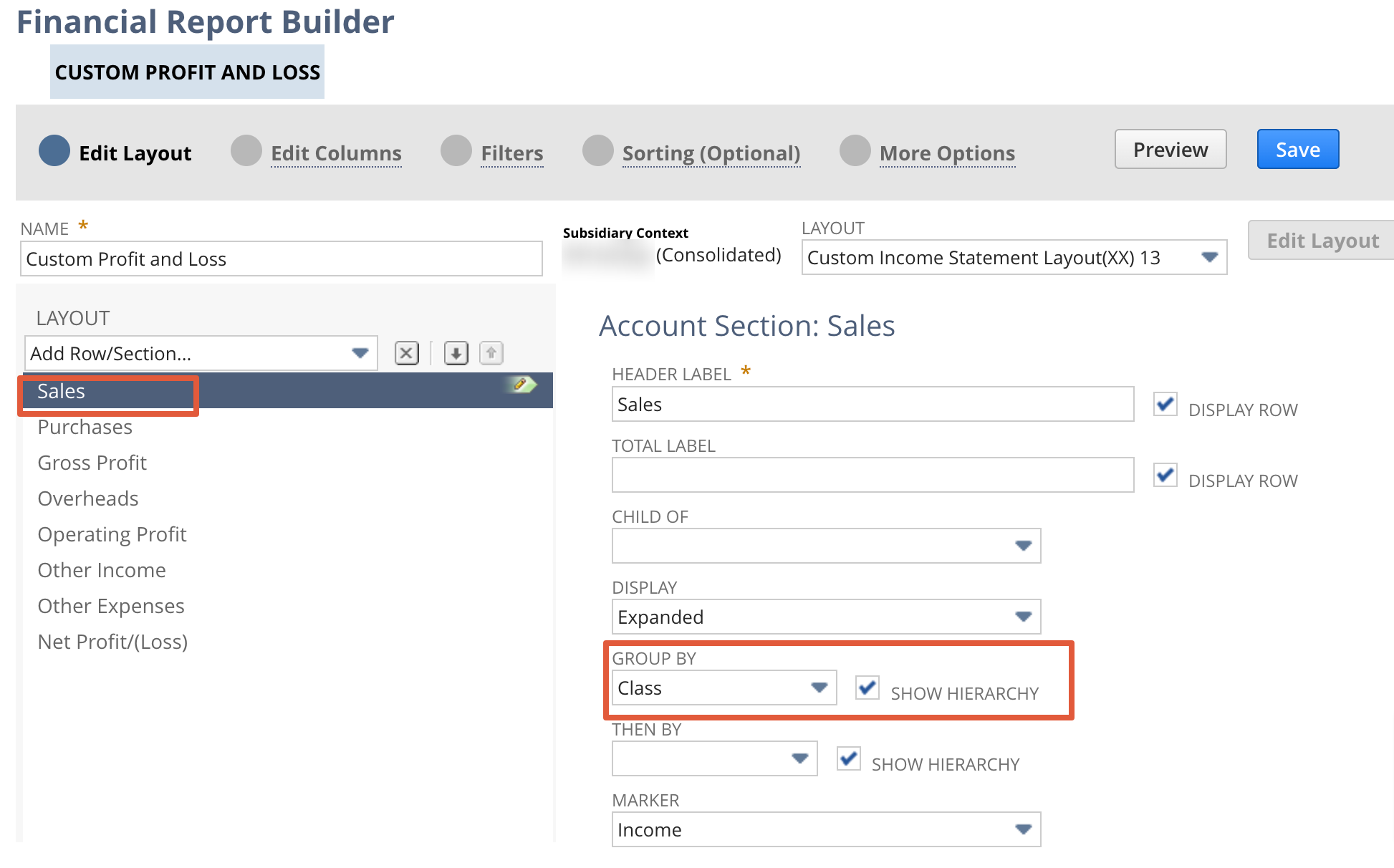
Click on Sales/Income Financial section - Select Group by Class
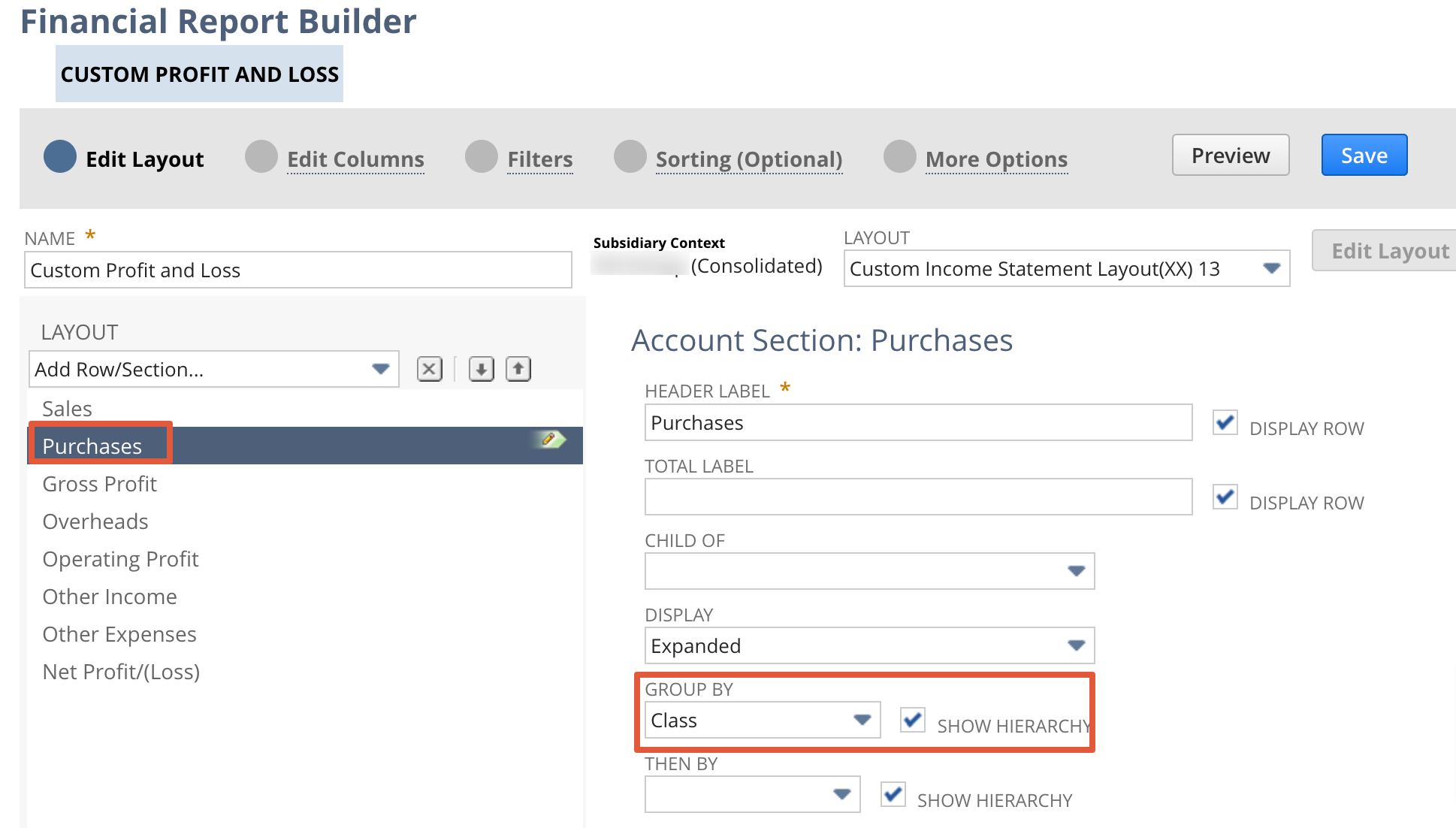
Click on Purchase Financial section - Select Group by Class

Re: Re Run amortization for Vendor bill
Hello @Sivasubramaniam
You will not be able to modify any lines UNLESS the following are enabled:
1. The accounting preference Allow Users to Modify Amortization Schedule = True
2. The role has been granted with at least Edit permission for Amortization Schedules
3. The amortization line is not yet recognized/amortized
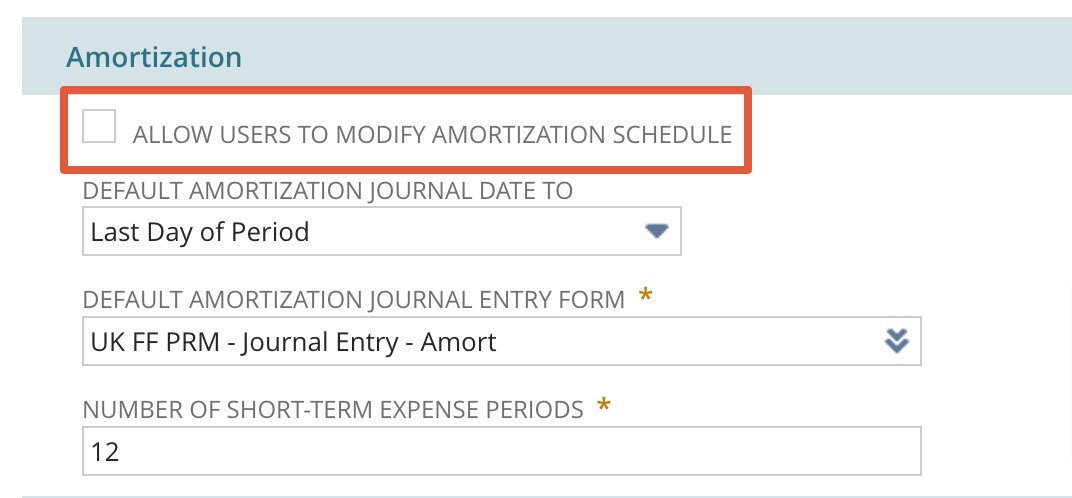
Note: Amort. Schedule/Template, Start Date, End Date on the source transaction may only be changed or removed if there is no amortization made yet.