Best Of
Re: Global search auto suggested text
Hello @User_PXHI4,
Unfortunately, editing the Auto-Suggest for the Global Search is still a limitation filed under Enhancement # 318281 Global Search>Autosuggest> Customize and prioritize the results based on the customer needs. All the customization that we can do for the Global Search can be found in Home > Set Preferences > Search section.
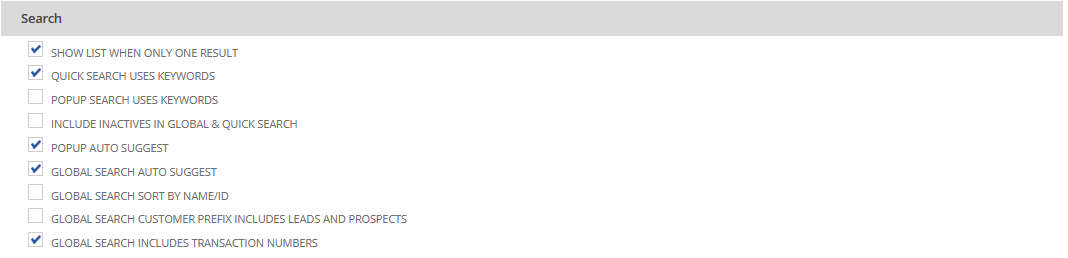
For additional reference, kindly check the following SuiteAnswers article below:
Global Search Overview ID#99220
Global Search by Document Number ID#84038
Let me know if you have any additional concern. ?

Re: can not open accounting period
I activate the inactive subsidiaries, then reopen accounting period and it is fine now

Re: can not open accounting period
Hi @Amjad Kasem
Interesting, Can you pls share full screenshot for FY 20202 - 12months.
try to re-open from Admin access.
The user must have the Override Period Restrictions permission to reopen a period.

NetSuite Admin Tips: Customize General Ledger and make Custom Segment as a filter

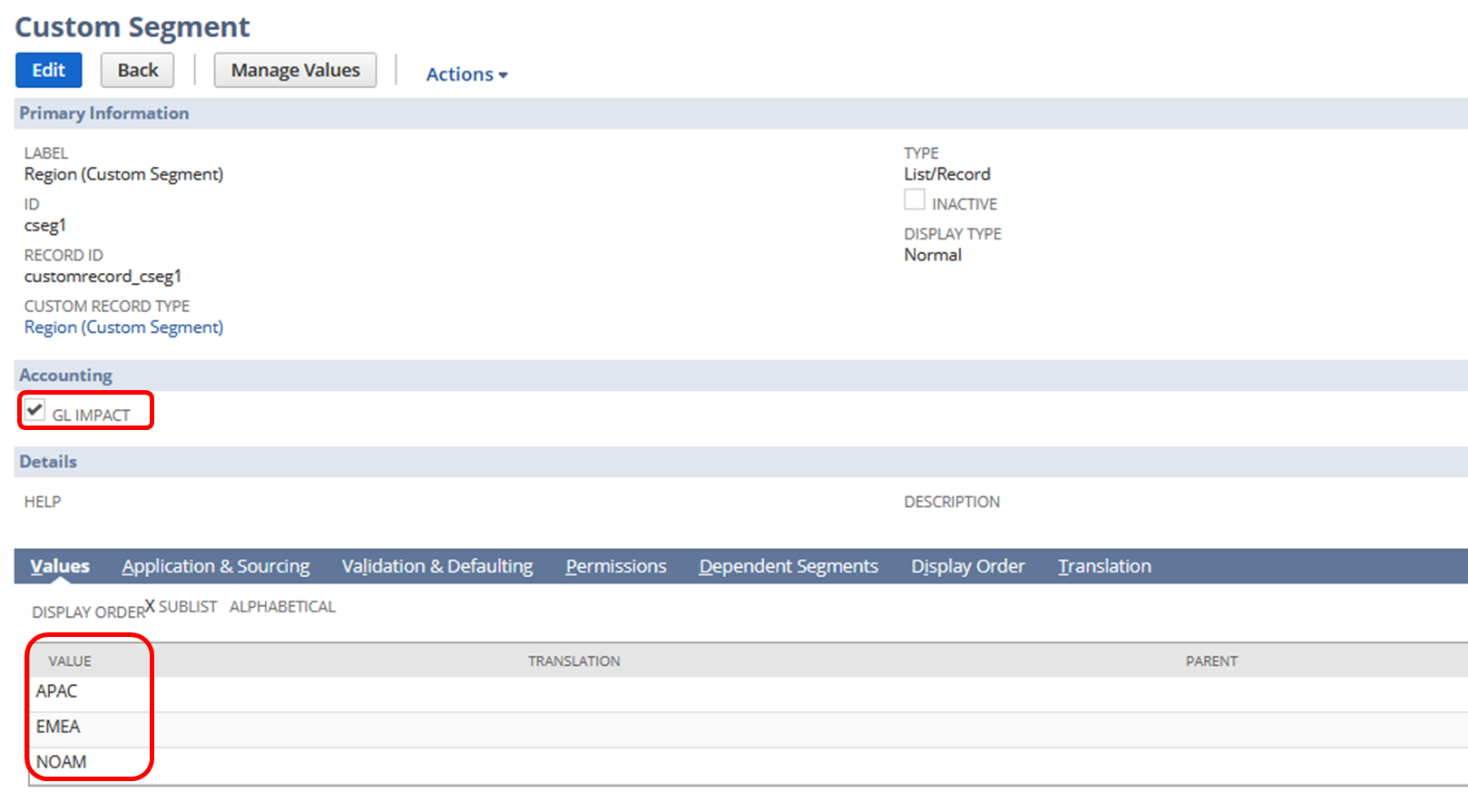
Custom Segments are utilized by NetSuite users to serve as an additional identifier in their transactions. Most of these custom segments are G/L impacting and are needed in analyzing reports such as General Ledger. When running the report, it is helpful to users to show the transactions and balances for a particular segment only, thus filtering the report with ease is necessary.
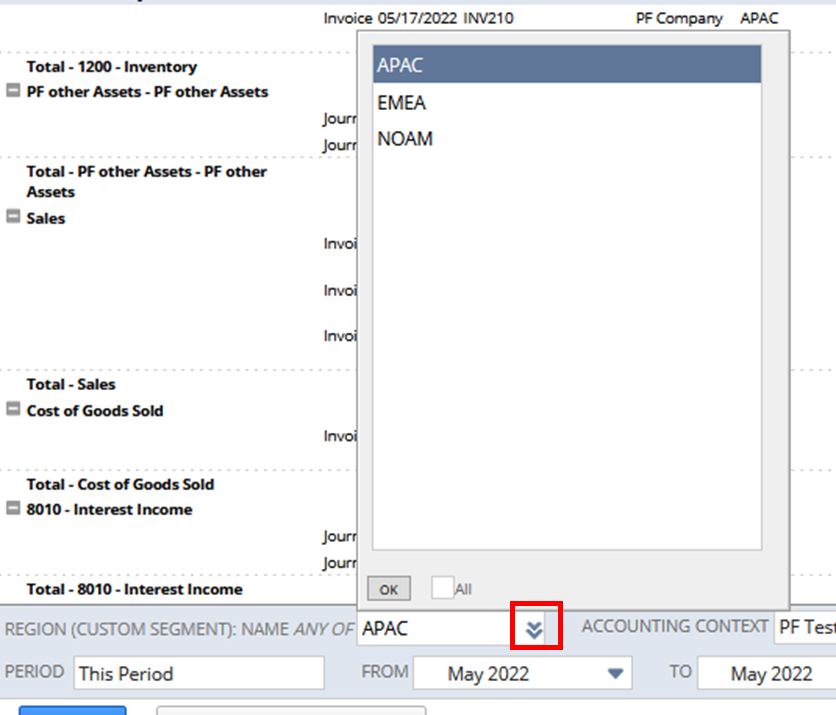
For example, a user created a custom segment to identify the region of their transactions:
Here's how you can do it:
1.) Navigate to Reports > Financial > General Ledger
2.) Click Customize
3.) Go to Filters section
4.) Add Fields
Expand Financial folder > Custom Segment subfolder > Click Name (You can also add the column using the same steps in the Edit Columns section)
5.) Initially select a segment
6.) Click Show in filter region
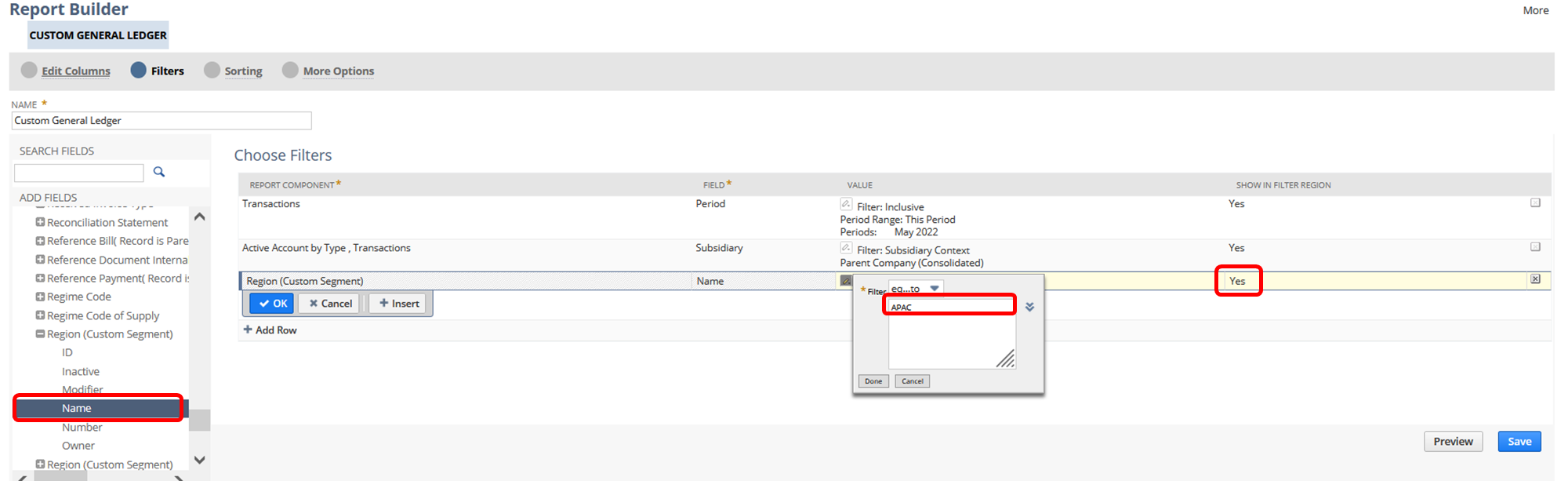
7.) Save and run the report
Result:
Users can now filter the transactions by custom segment
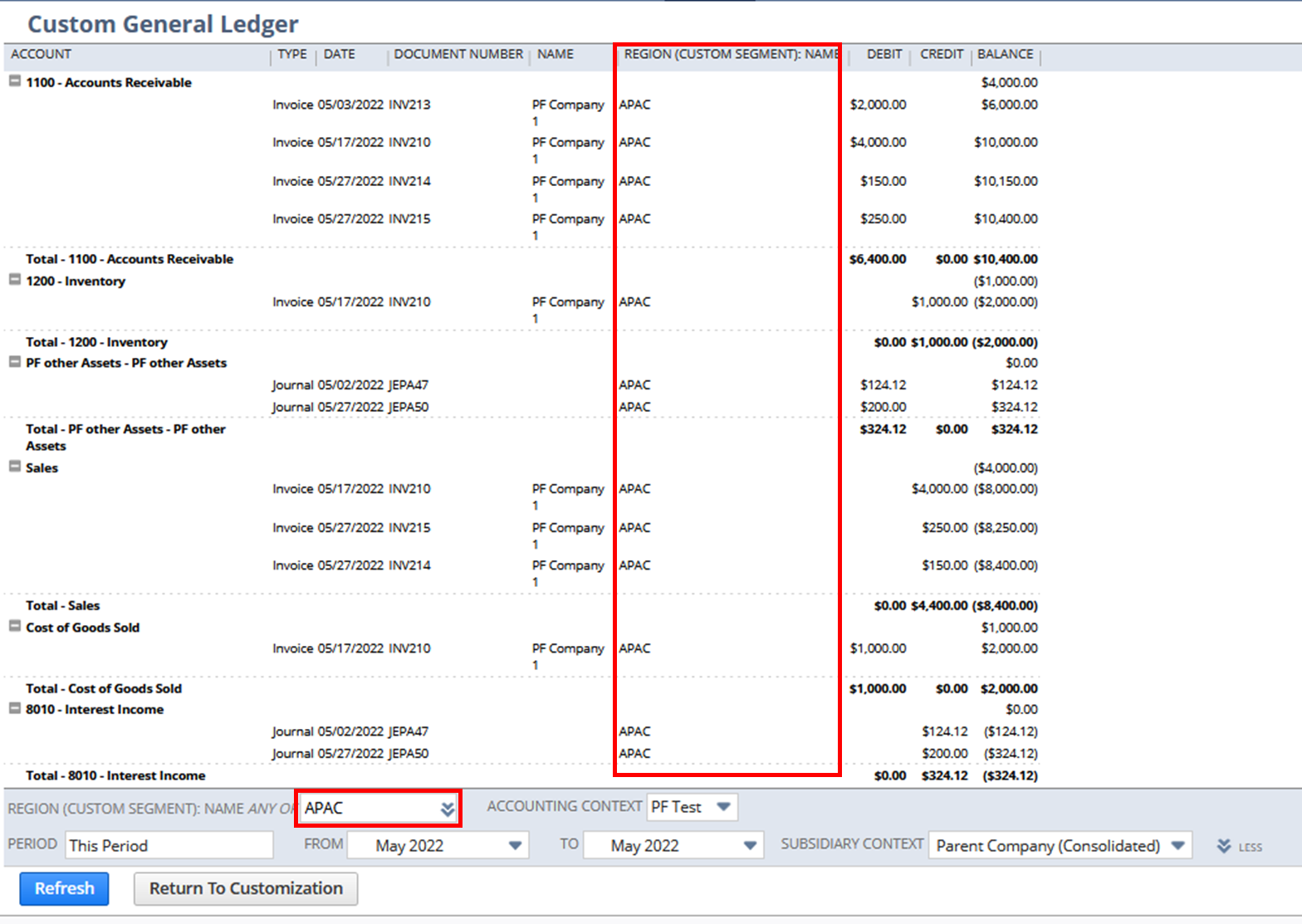
Users can also select the sections easily by clicking the double chevron in the custom segment filter:
Have you tried this report customization? Feel free to share your tips!
Hope this helps

Re: How do I add Tax Code to Deposit form?
Hello @User_L1AA7
Currently, the Tax setup doesn't support the Make Bank deposit transactions. An alternative solution is to Pass the Journals and add required tax codes on line level.
NSC | Show Item Fulfillment Internal ID on Packing Slip printout

Some Customers/Users want to add the Internal ID of the Item Fulfillment to the Packing Slip PDF prints outs. This is achievable through customization.
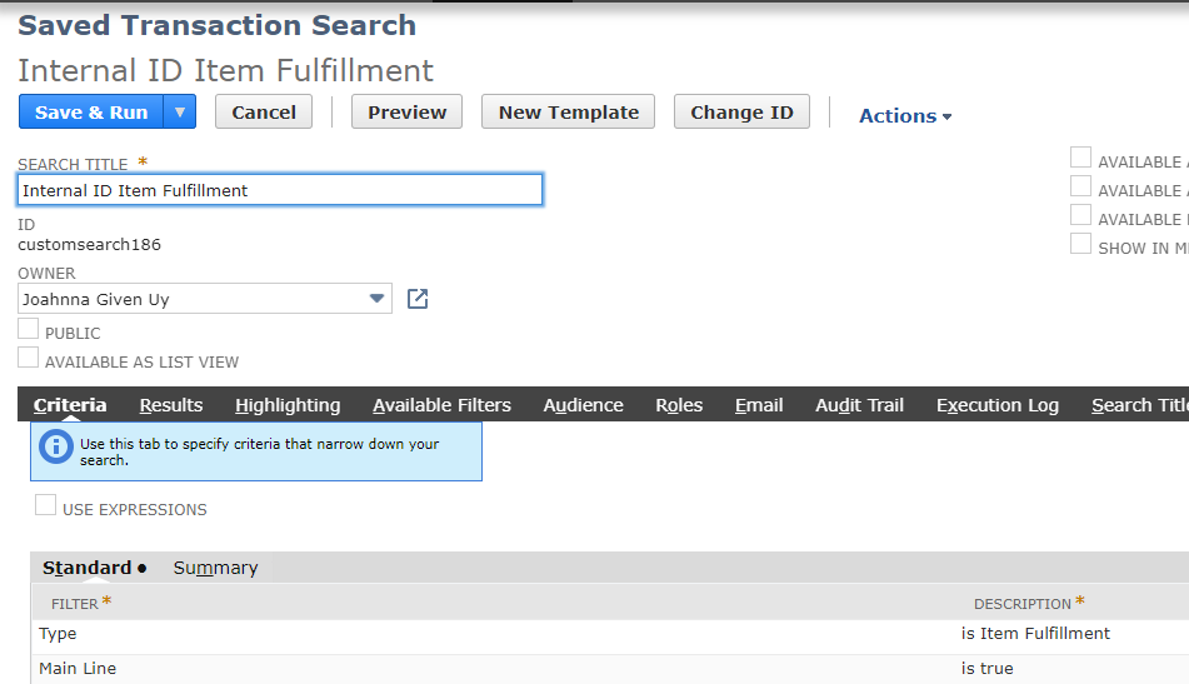
1. Create a Saved Search
1. Navigate to Lists > Search > Saved Searches > New
2. Click on Transaction
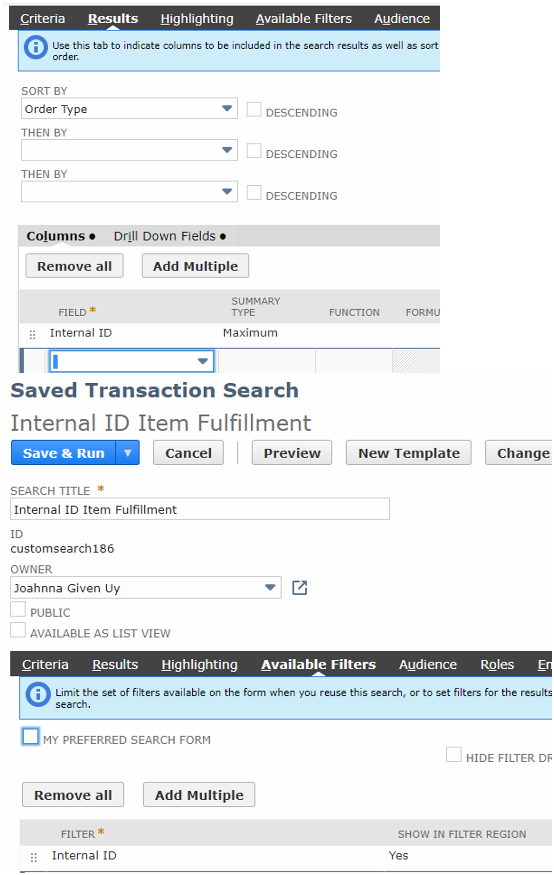
3. Set the following setup:
2. Create a Custom Body Field
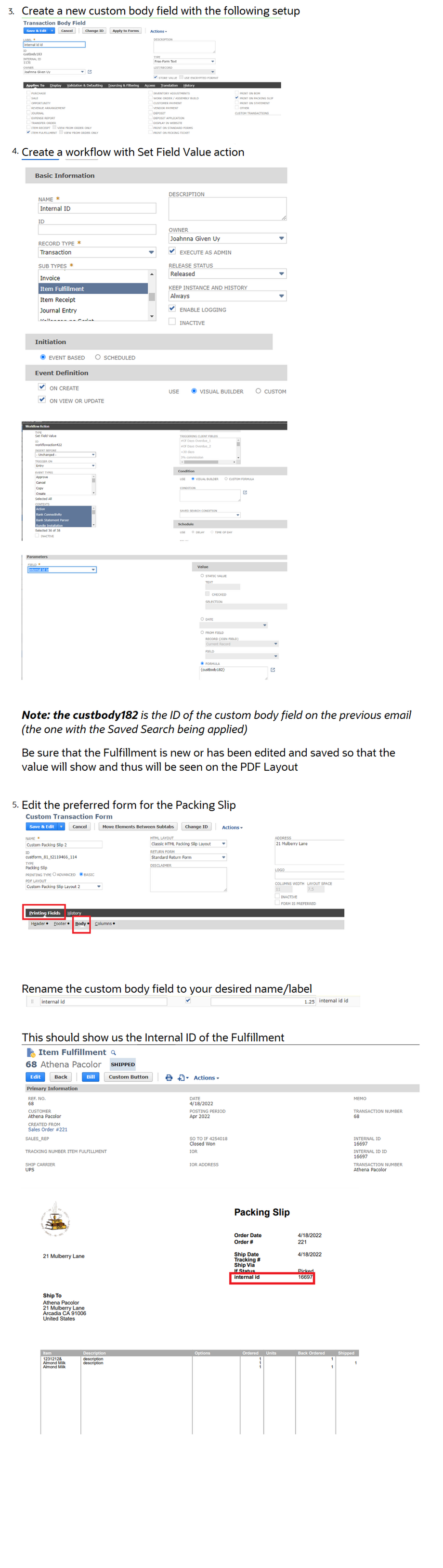
1. Navigate to Customization > Lists, Records, & Fields > Transaction Body Field > New
2. Enter Label
3. Type: Free-Form Text
4. Store Value: Uncheck
5. Applies To: Item Fulfillment
6. Click on Validation & Defaulting
7. Search: Select the Saved Search created above
8. Click Save
Feel free to share us about your thoughts and tips 😊

Re: WARNING Manual Update Required to Electronic Bank Payments SuiteApp 2022.1
Hi all,
A final update from me is that Oracle have advised the text below and so the good news is that it is only likely to affect a limited number of users.
Haydn
The problem was that in the past you have installed an incorrect Electronic Bank Payments (EBP) bundle. This could have been done by just searching for Name and missing out the bundle ID and description mentioned in SuiteAnswers documentation. It was a version 2020.2 QA (bundle ID 315896) which purpose was purely for testing and it cannot be used in production accounts. The solution was to perform a manual bundle update to get the correct newest production version of the EBP bundle. This is not happening normally, so other customers were not affected. When using the correct EBP bundle in production, it is being automatically managed (updated) and no changes are done by the update. For Sandboxes though, a manual update is required every time with the upgrade to newer Netsuite version.
Re: Question regarding Dashboard Tiles
Are you referring to the Dashboard Tiles "Bundle" # 185219? I know it is called a SuiteAp but it is found in the Bundles.
If so you might start with SuiteAnswer ID:65560. There are several links at the bottom of that Answer you may want to read through.

There is also information in the Help Center
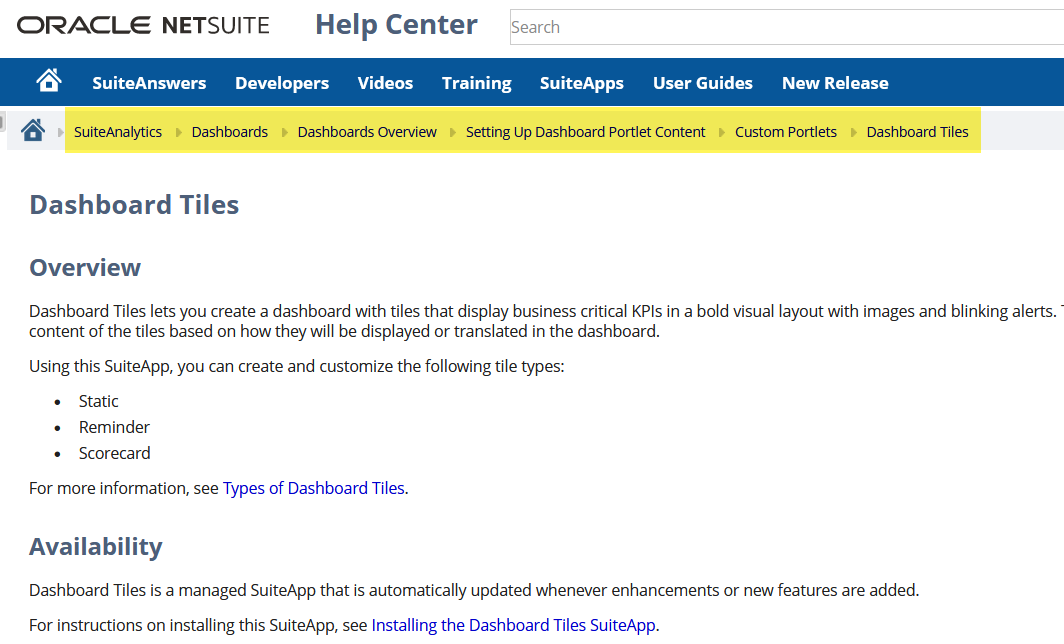
Bottom line is I think you need to design what you want, first.
 CDuf
CDuf
Re: Question regarding Dashboard Tiles
Hi @Karanjot Singh,
From your home screen you should be able to select Personalize Dashboard from the lower left. From there the tile should be visible, for selection, on the SuiteApps tab.
John

Re: Display the customer name once enter customer id and vise versa
Hello @Amjad Kasem,
To do this, we need to edit the two Custom Fields in the Custom Record. The setup that we will do is the one where the user will select the Customer then the Customer ID will be sourced to the second Custom Field.
Kindly follow the steps below:
- Edit the Custom Field that will contain the Customer Name
- Copy the ID
- Type: Select List/Record
- List/Record: Select Customer
- Click Save
After this, edit the second Custom Field:
- Edit the Custom Field that will contain the Customer ID
- Store Value: Remove checkmark (please do note that removing the checkmark will delete all the past values in the custom field)
- Click Validation & Defaulting
- Default Value: Enter {<ID>.entityid} (replace <ID> with the copied ID from the first Custom Field)
- Formula: Enter checkmark
- Click Save
Let me know if you have questions.