Best Of
NSC | SuiteFlow (Workflow Mgr) Tip:Access Workflow Fields under the same Server Trigger they are set

It is a best practice to access the value of workflow custom fields on the same server trigger where it was set. Otherwise, a loss of value may occur.
For instance, a workflow field set on the Before Record Load trigger must be accessed on Before Record Load as well to get the value that was set on that field.
Accessing the workflow field on a different server trigger will return a null value.
Let us know what you think about this topic feature by leaving a comment or using the reaction buttons below.
-Jack

Re: AE: Highlight one column in a saved search
Hello, Just wanted to add I was able to get similar results by using a <p> tag in a formula (Text) search results. The below allowed me to highlight one column only.
'<p style="background-color:#ded418;">'||{isdeployed}

AskAGuruLive with Micah about Basic Accounting (June 2, 2022)
Hope everyone is doing great!
I'm Micah, and I'm the Basic Accounting Guru for the NetSuite Support Community. This link will take you to my brief introduction. I will be LIVE for an hour starting from 1PM-2PM ET to answer your questions.
Before we start, here are a few house rules:
- Post your questions by commenting below. 1 comment = 1 question.
- Some questions may be complex so I would appreciate your patience as I look into it.
- Let me know if the solution works for you or not. That way, I can check again.
You can also ask questions that are not work related or are about me. You can throw in anything under the sun and I'd be happy to answer them.
Oh! And stay tuned cause I will be sharing tips and tricks as well. CHEERS!

Re: Details to Integrate the ODBC user for TM1 System
Hi Matan,
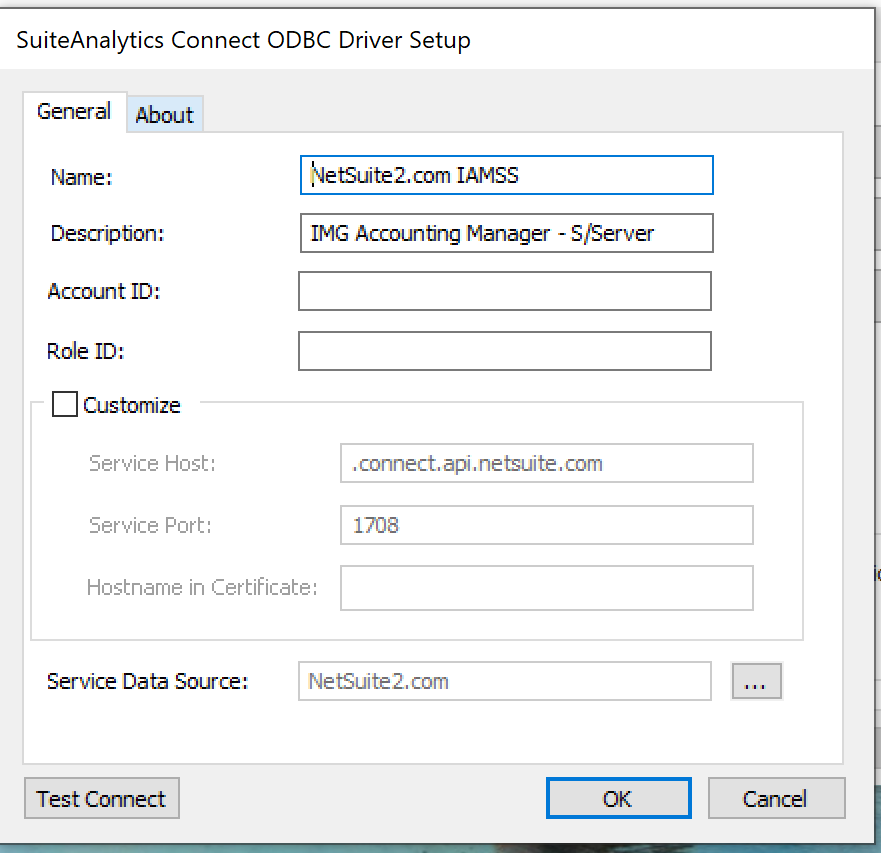
I find this a little puzzling because the explanation says "direct cloud-to-cloud ODBC" whereas 'DSN' and 'Description' sound like settings you would have locally (either user or system DSN). So for example, the screenshot below shows an ODBC connection I have on my laptop where you see the DSN (Name: below) and description (of course the account ID and role ID would have your details in). This allows me to extract data from NetSuite to Excel.
In other word for cloud-to-cloud connectivity I would have thought the settings you have found would be sufficient.
Hope this might help you some.
Kind regards,
Steve Barrett
Re: Global search auto suggested text
Hello @User_PXHI4,
Unfortunately, editing the Auto-Suggest for the Global Search is still a limitation filed under Enhancement # 318281 Global Search>Autosuggest> Customize and prioritize the results based on the customer needs. All the customization that we can do for the Global Search can be found in Home > Set Preferences > Search section.
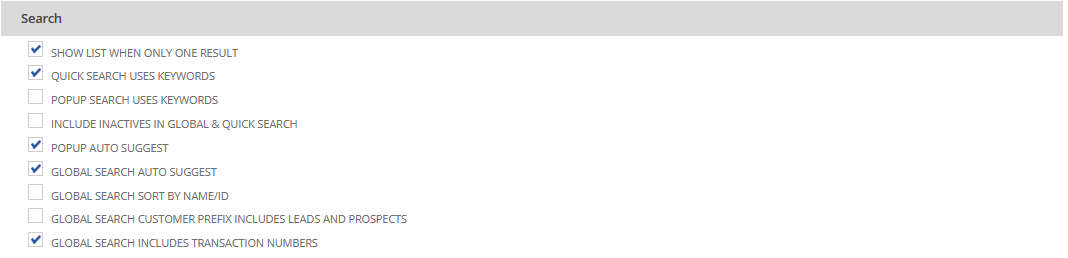
For additional reference, kindly check the following SuiteAnswers article below:
Global Search Overview ID#99220
Global Search by Document Number ID#84038
Let me know if you have any additional concern. ?

Re: can not open accounting period
I activate the inactive subsidiaries, then reopen accounting period and it is fine now

Re: can not open accounting period
Hi @Amjad Kasem
Interesting, Can you pls share full screenshot for FY 20202 - 12months.
try to re-open from Admin access.
The user must have the Override Period Restrictions permission to reopen a period.

NetSuite Admin Tips: Customize General Ledger and make Custom Segment as a filter

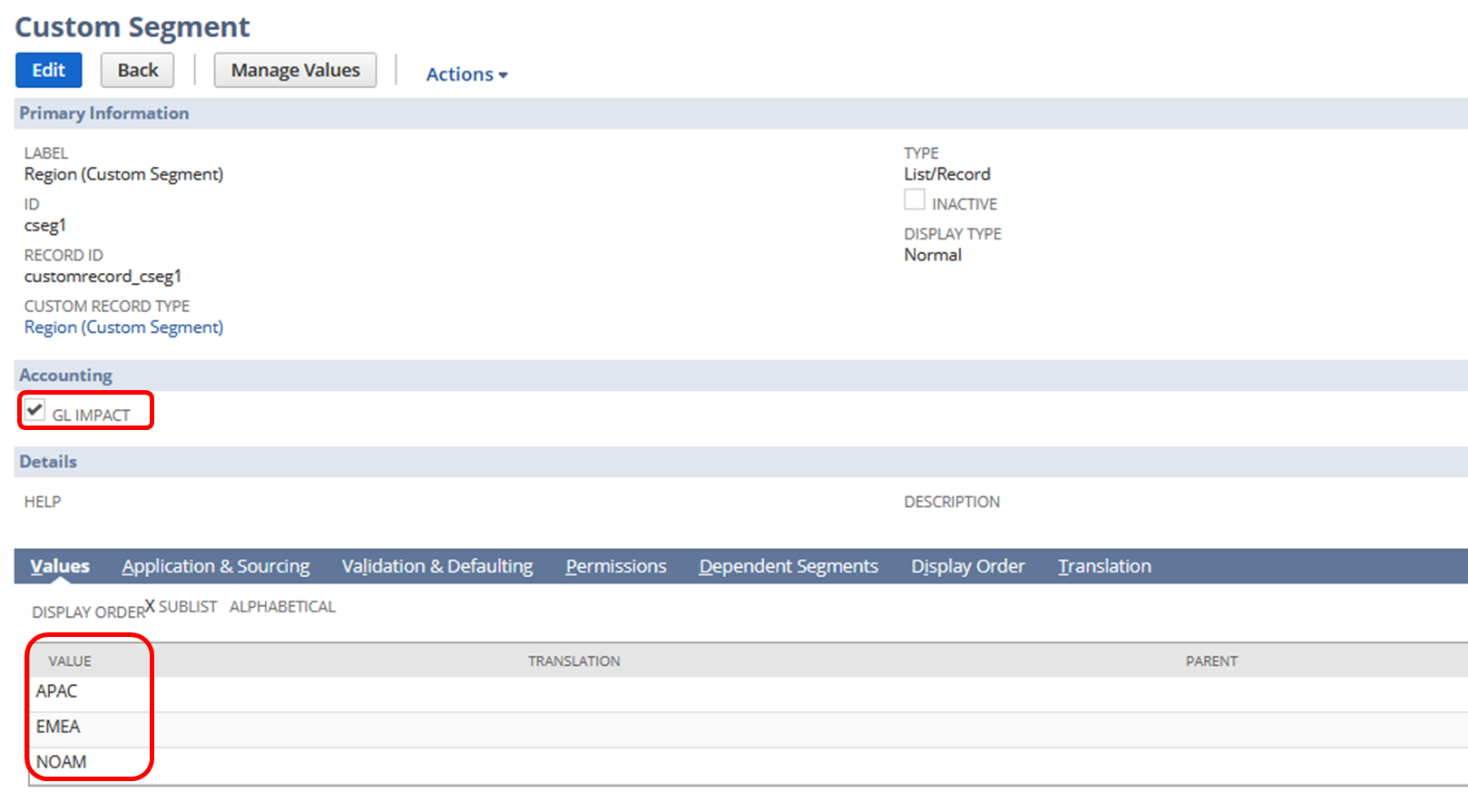
Custom Segments are utilized by NetSuite users to serve as an additional identifier in their transactions. Most of these custom segments are G/L impacting and are needed in analyzing reports such as General Ledger. When running the report, it is helpful to users to show the transactions and balances for a particular segment only, thus filtering the report with ease is necessary.
For example, a user created a custom segment to identify the region of their transactions:
Here's how you can do it:
1.) Navigate to Reports > Financial > General Ledger
2.) Click Customize
3.) Go to Filters section
4.) Add Fields
Expand Financial folder > Custom Segment subfolder > Click Name (You can also add the column using the same steps in the Edit Columns section)
5.) Initially select a segment
6.) Click Show in filter region
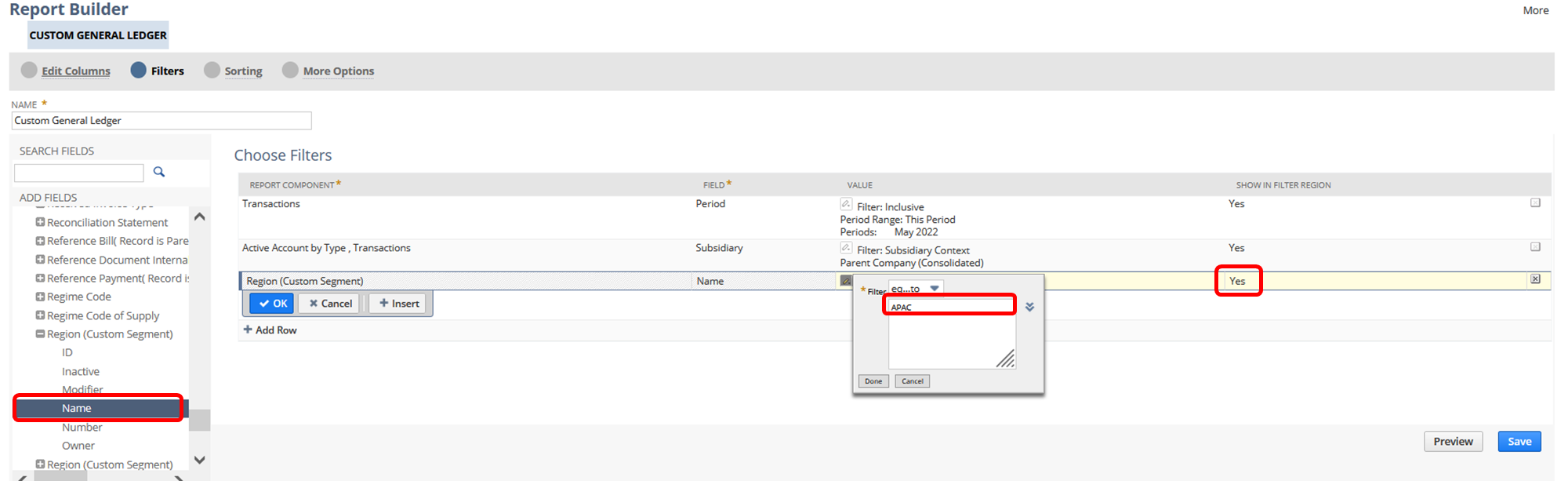
7.) Save and run the report
Result:
Users can now filter the transactions by custom segment
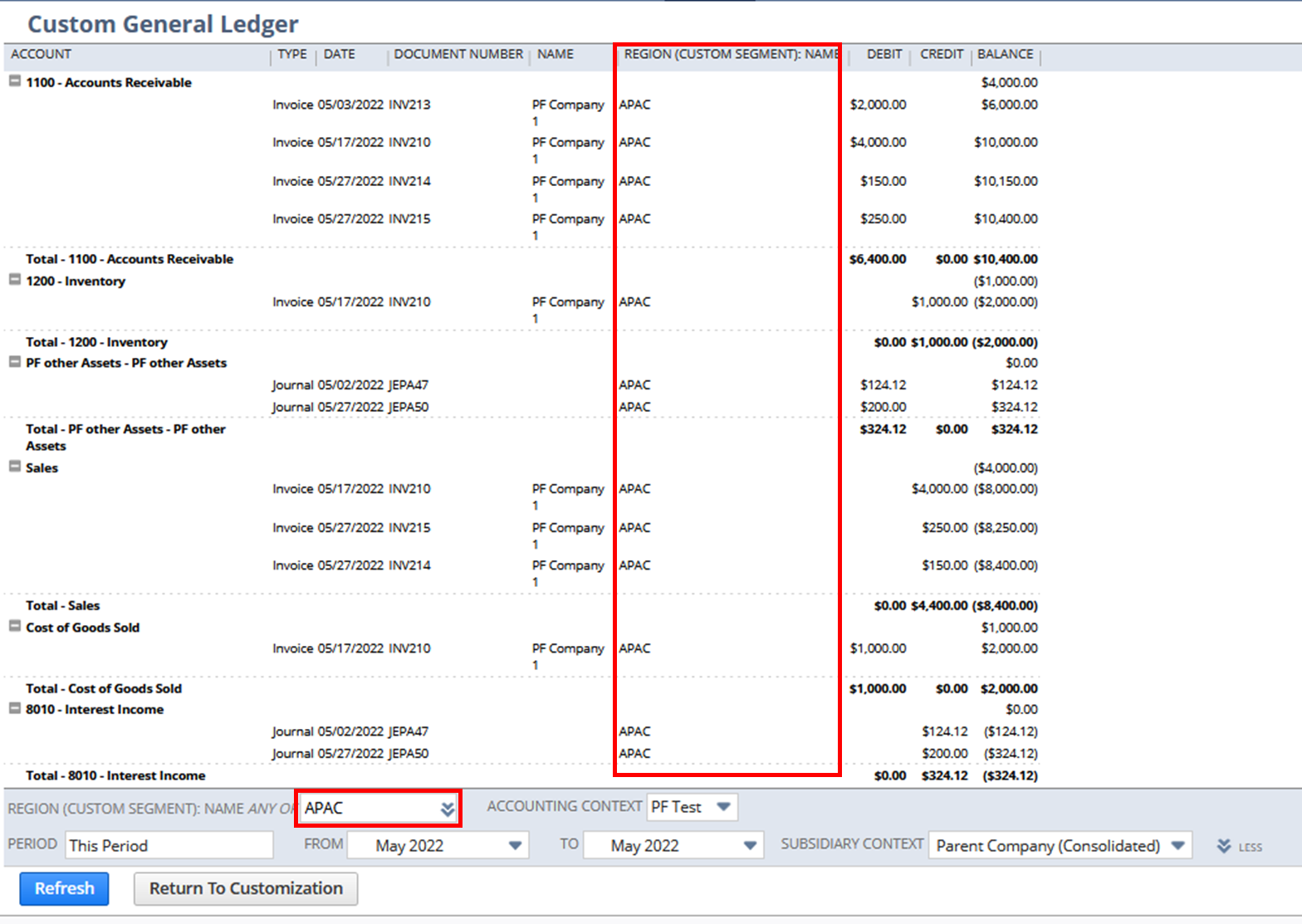
Users can also select the sections easily by clicking the double chevron in the custom segment filter:
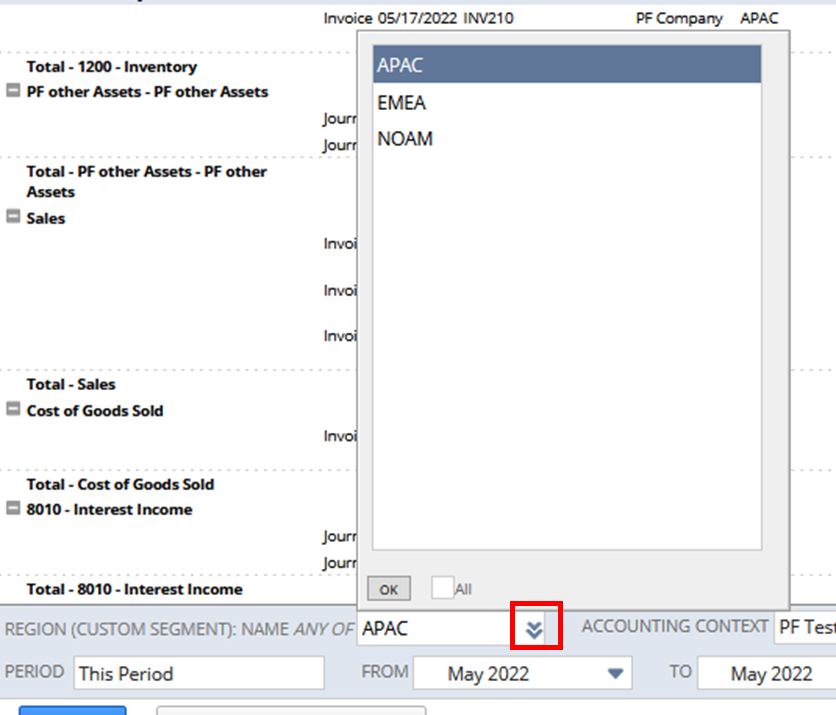
Have you tried this report customization? Feel free to share your tips!
Hope this helps
Re: How do I add Tax Code to Deposit form?
Hello @User_L1AA7
Currently, the Tax setup doesn't support the Make Bank deposit transactions. An alternative solution is to Pass the Journals and add required tax codes on line level.
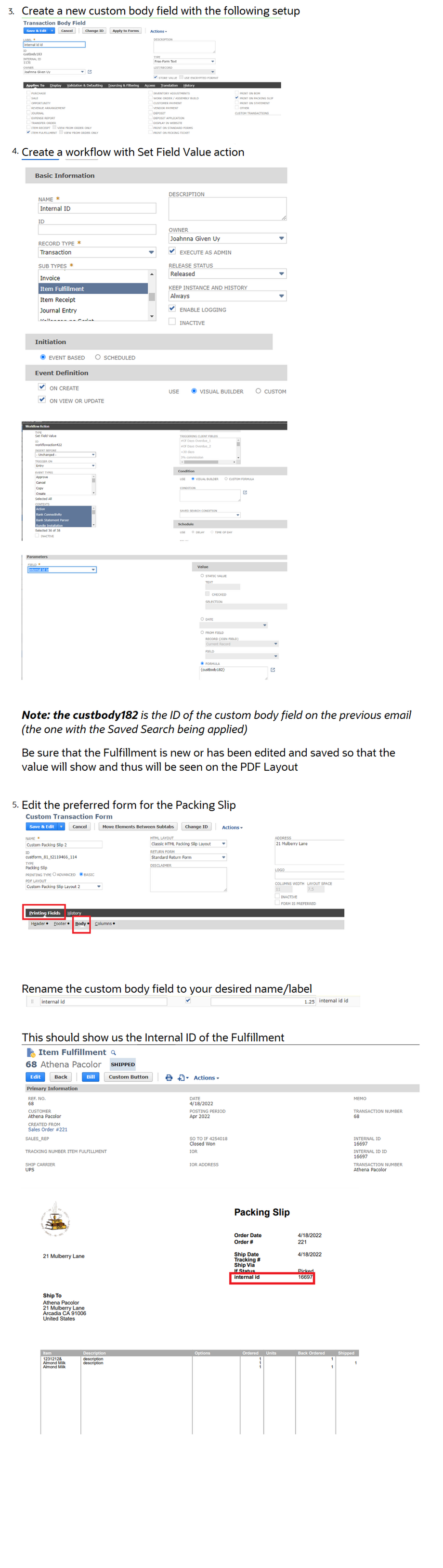
NSC | Show Item Fulfillment Internal ID on Packing Slip printout

Some Customers/Users want to add the Internal ID of the Item Fulfillment to the Packing Slip PDF prints outs. This is achievable through customization.
1. Create a Saved Search
1. Navigate to Lists > Search > Saved Searches > New
2. Click on Transaction
3. Set the following setup:
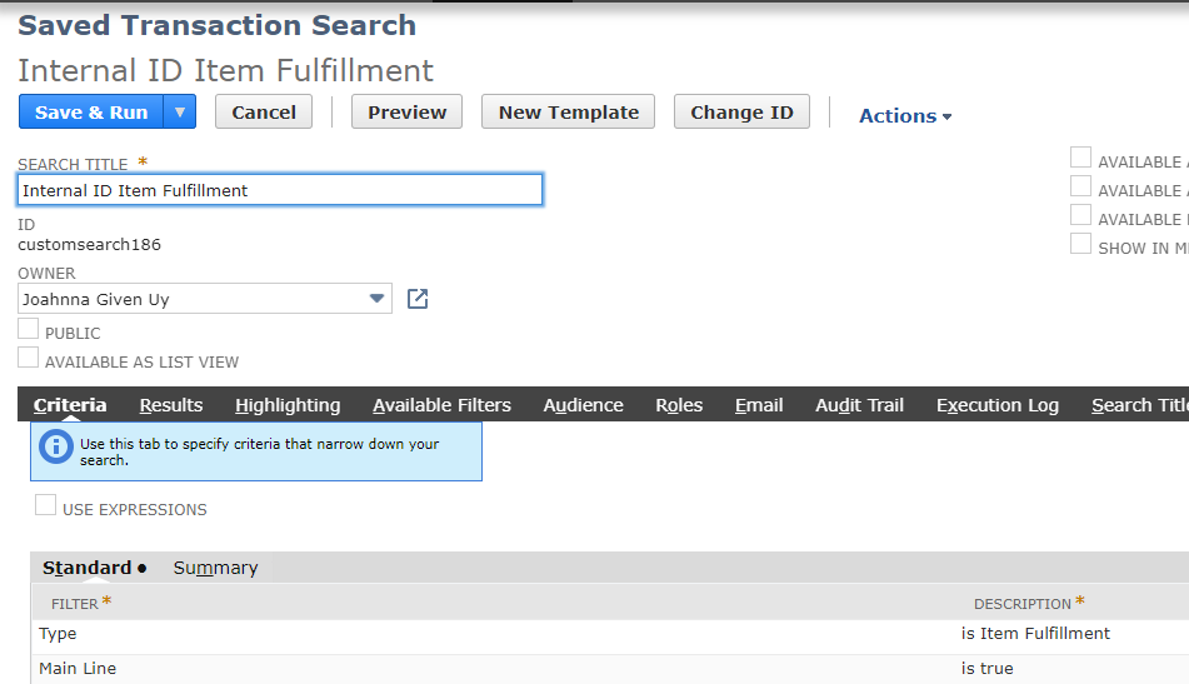
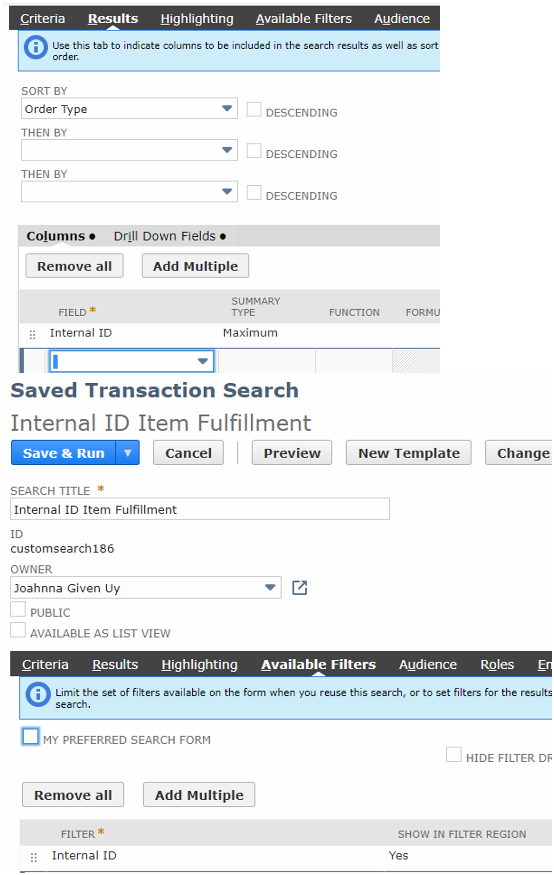
2. Create a Custom Body Field
1. Navigate to Customization > Lists, Records, & Fields > Transaction Body Field > New
2. Enter Label
3. Type: Free-Form Text
4. Store Value: Uncheck
5. Applies To: Item Fulfillment
6. Click on Validation & Defaulting
7. Search: Select the Saved Search created above
8. Click Save
Feel free to share us about your thoughts and tips 😊
