Best Of
Re: Regexp Substring in Workflow
That wouldn't work as it's not looking for a particular phrase and is just extracting a number (while here, I need to extract anything after the phrase and before the first blank space after the phrase).
The following is working
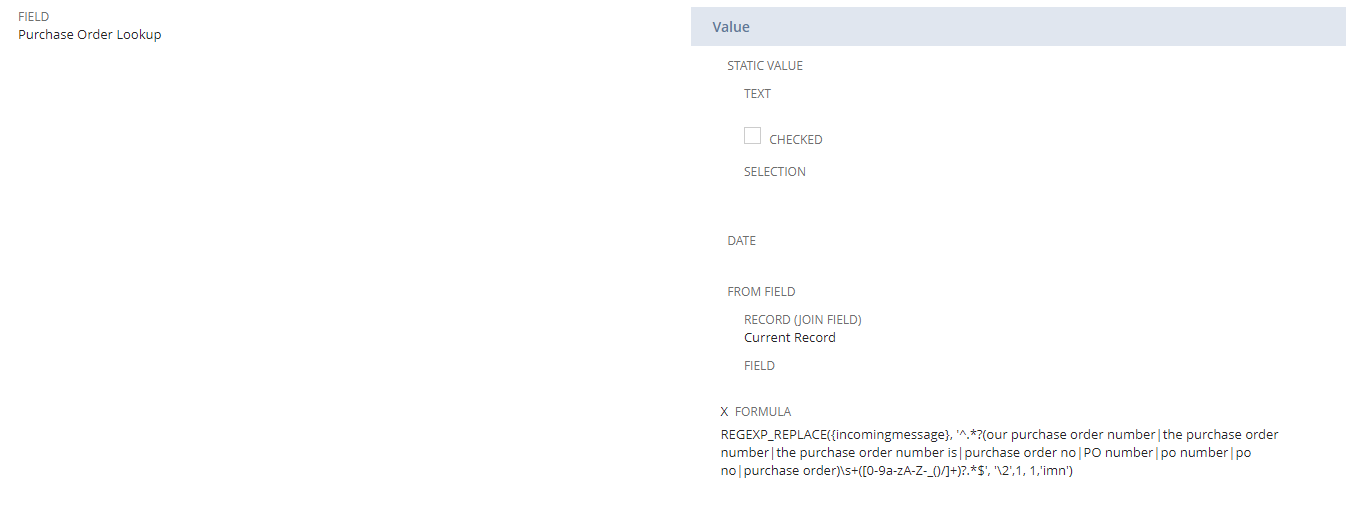
REGEXP_REPLACE({incomingmessage}, '^.*?(our purchase order number|the purchase order number|the purchase order number is|purchase order no|PO number|po number|po no|purchase order)\s+([0-9a-zA-Z-_()/]+)?.*$', '\2',1, 1,'imn')
It does need a second field to get rid of the additional text that is extracted by this formula. The second field's formula is:
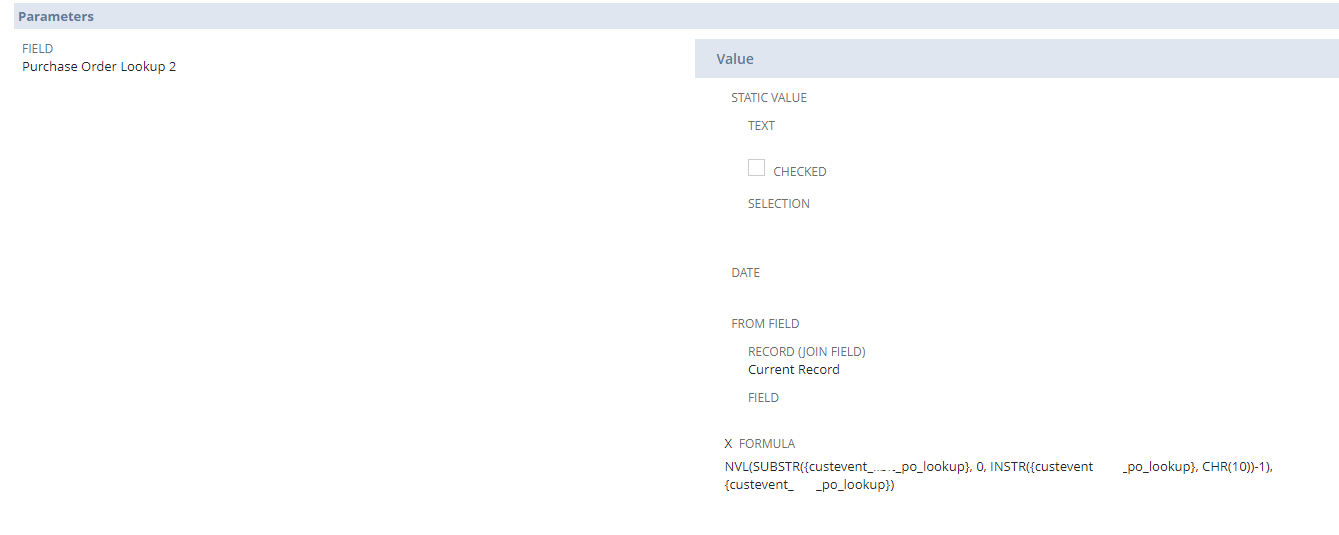
NVL(SUBSTR({custevent_po_lookup}, 0, INSTR({custevent_po_lookup}, CHR(10))-1), {custevent_po_lookup})
 Vernita
Re: Attach Saved Document file to posted AP Invoice
Hi All
I found this Knowledge Article 8930 useful. Please let me know if there is any other way for mass attachments using import method, thanks!
Attaching Files to Records
Published 03/04/2011 11:44 AM | Updated 05/08/2022 11:02 PM | Answer Id: 8930
 Kedalene
Re: Invoice reporting for commission
Have you tried the result field "Amount (Transaction Total)"? Be forwarned that if your invoice has multiple lines, the same amount will be repeated

Re: Unrealized Foreign Currency Report - Empty
Hello @User_XQ321,
Is it possible that the period range that you have selected in your Unrealized Exchange Rate Gains and Losses report does not have any Currency Revaluation yet?
For example for the month of June 2022:
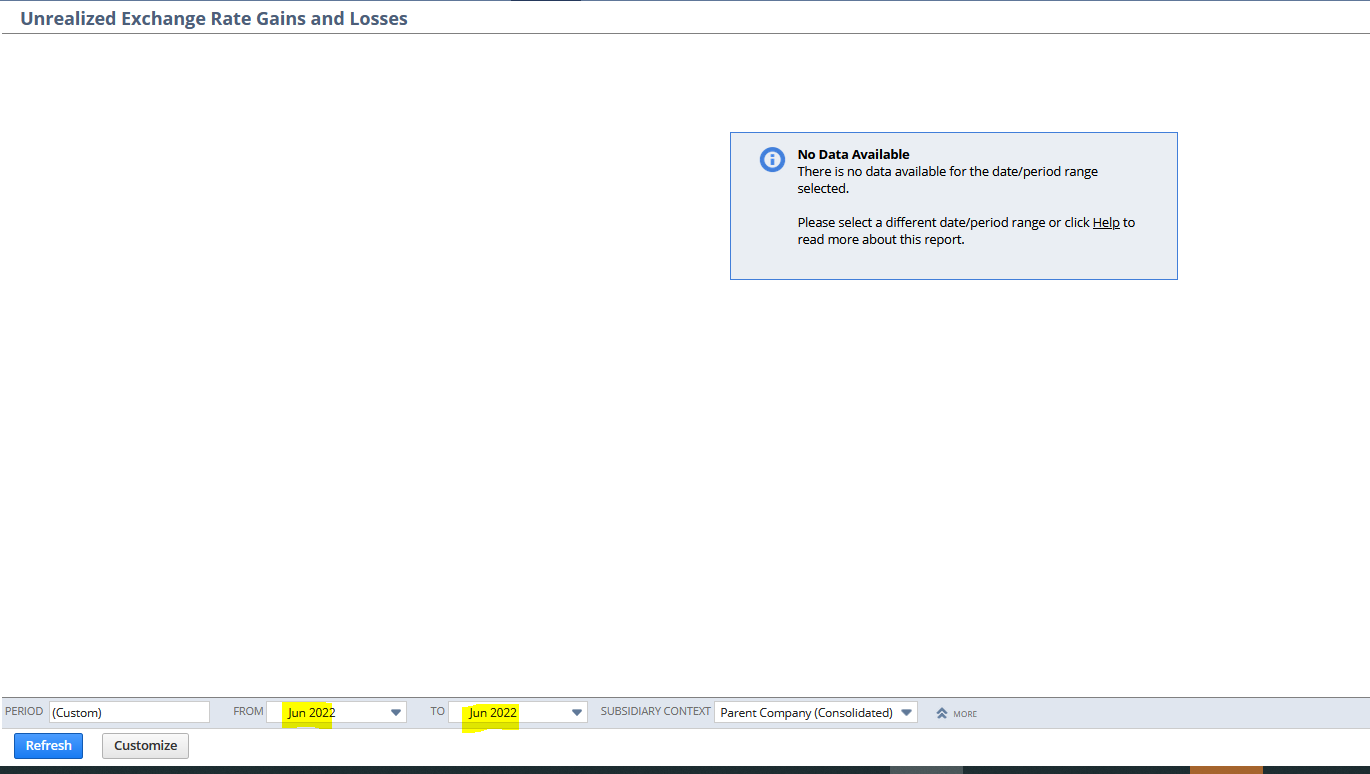
Since I have not yet ran the Currency Revaluation for the month of June 2022 no data will appear in the report.
However, if I set it from April 2022 to May 2022, I am able to see results:
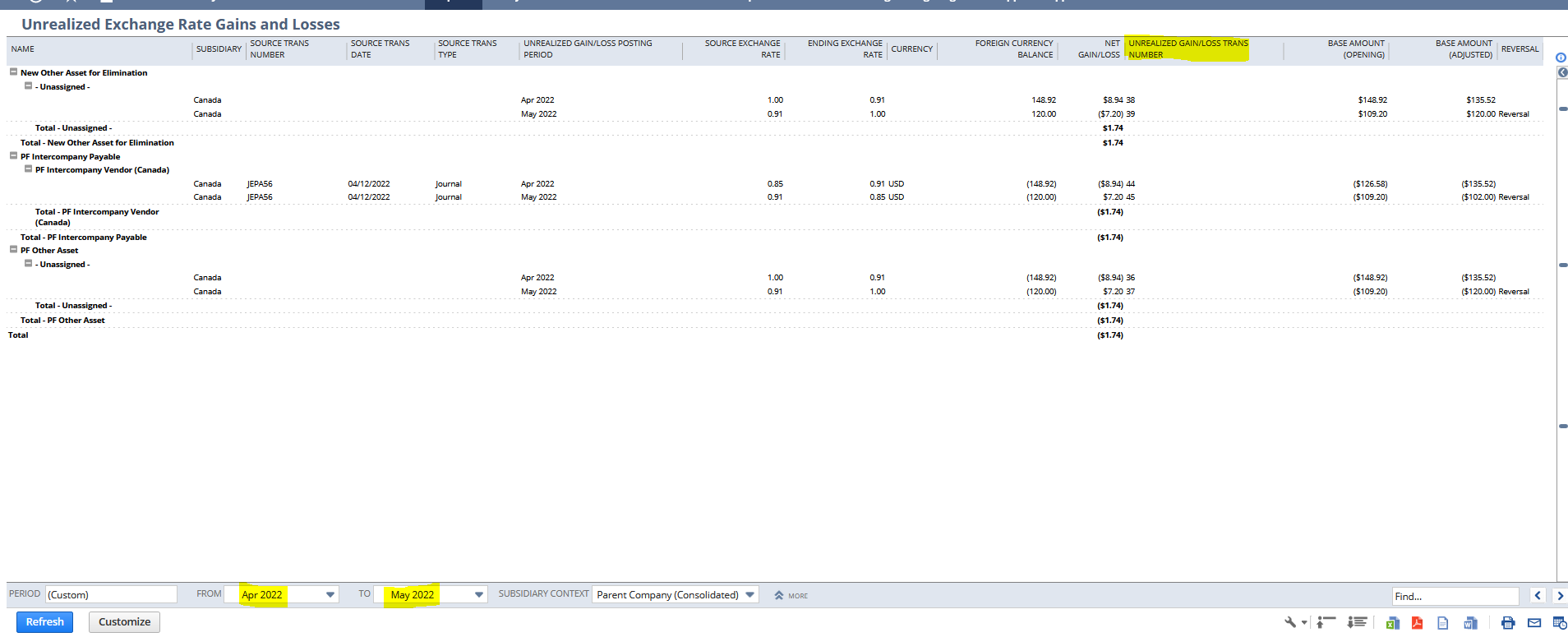
This is because unrealized/gain loss was posted for these periods as indicated by the Unrealized Gain/Loss Trans Number column
I hope this clarifies ?
==============
If you find this reply to your question as helpful, others with the same question might find it helpful as well. By marking “Yes” on the “Did this answer your question?”, you’ll be able to aid the community to find the solution much easier and faster without the need to read through all the replies, and you will also get closer to earning your next Answer Accepter badge.

Re: Bank Reconciliation- Deletion and Updated Statement Import
Hello @User_XQ321 ,
When you would like to delete the reconciliation from January, you need to delete first the following reconciliations as well. It is nicely explained in our SuiteAnswers # 70168 - Deleting Reconciled Statements.
Regarding the new Bank Statement import you would need to do steps as you described. I recommend you to unreconciled, unclear, unmatched all transaction :-) and regarding the statement items I believe you don't need to exclude them, just delete the statement as per provided information above. After you import a new statement you will be able to reconcile all items again with the new statement.
Please, let me know if you have any other questions related to this concern.
“Kindly click "Yes" on "Did this answer the question?" if you find the reply on your thread helpful. This will aid the others with the same question to easily find the correct answer. Thank you!

Re: Dunning Module
No worries about it, User_XQ321.
Yes, I have tested it successfully. ?

NSC | Revenue Recognition Method: How is Straight-line, prorate first and last period calculated?

Scenario:
Straight-line, prorate first and last period method is used to assign revenue in equal amounts for periods other than the first and final periods. Revenue Amounts are prorated for the first and last period based on the total number of days of the revenue recognition period.
Here is an example:
Amount: $10,000.00
Start Date: February 11, 2022
End Date: May 27, 2022
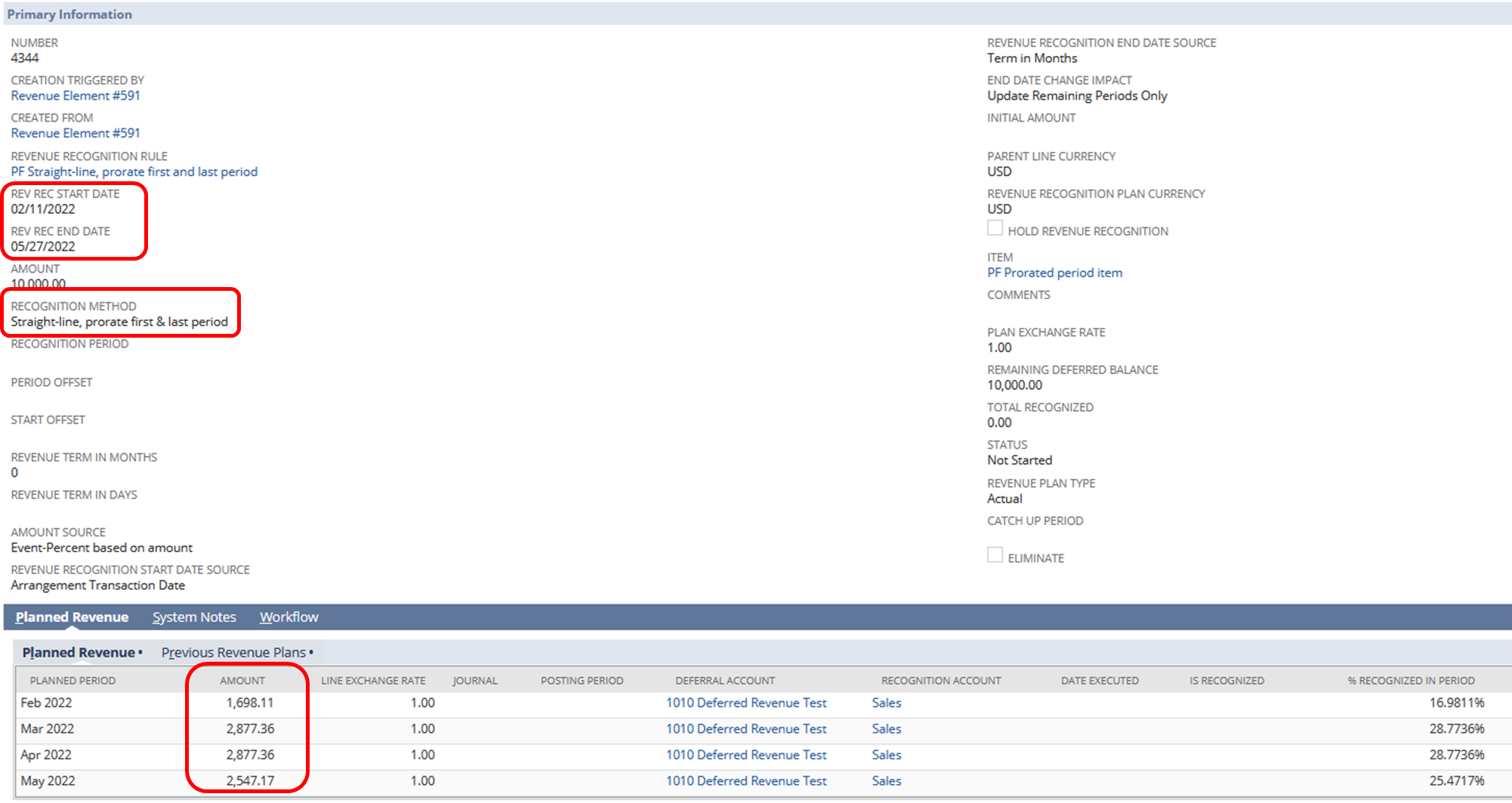
Solution:
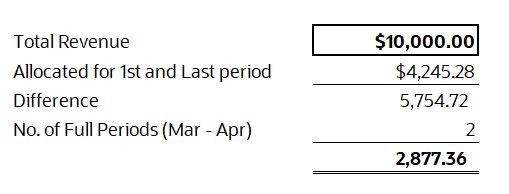
1. Get the sum of the actual number of days that is inclusive of the Rev Rec start to end date.
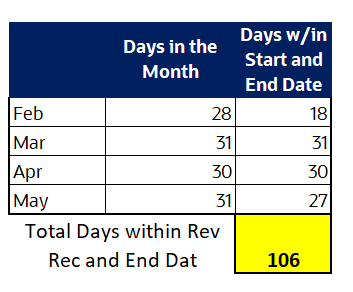
2. Divide the total of the transaction amount over the amount in (1).
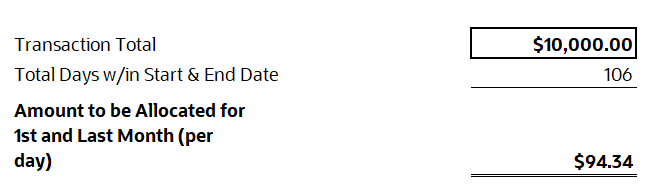
3. Use the actual number of days of the first month multiplied by the amount in (2) to get the amount to be recognized for the 1st month.
4. Use the actual number of days of the last month multiplied by the amount in (2) to get the amount to be recognized for the last month.
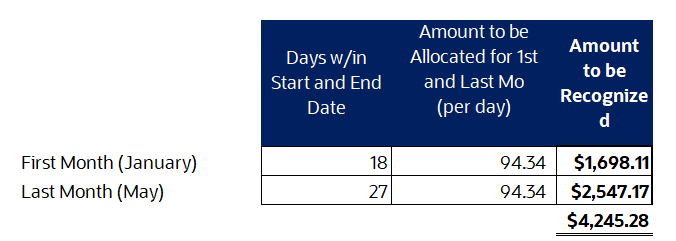
5. Add the amounts recognized in (3) and (4).
6. Subtract the sum in (5) from the total transaction amount.
7. Divide the amount in (6) to the remaining complete periods.
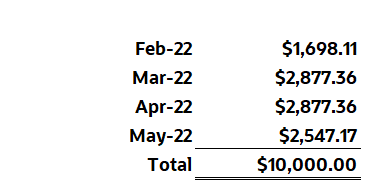
Allocation per period:
Were you able to check this one?
Hope this helps
Re: Dunning Module
Hi User_XQ321,
Thank you for patiently waiting. ?
I made some testing on my end with the same setup as yours, and I was able to generate a Dunning Letter correctly.
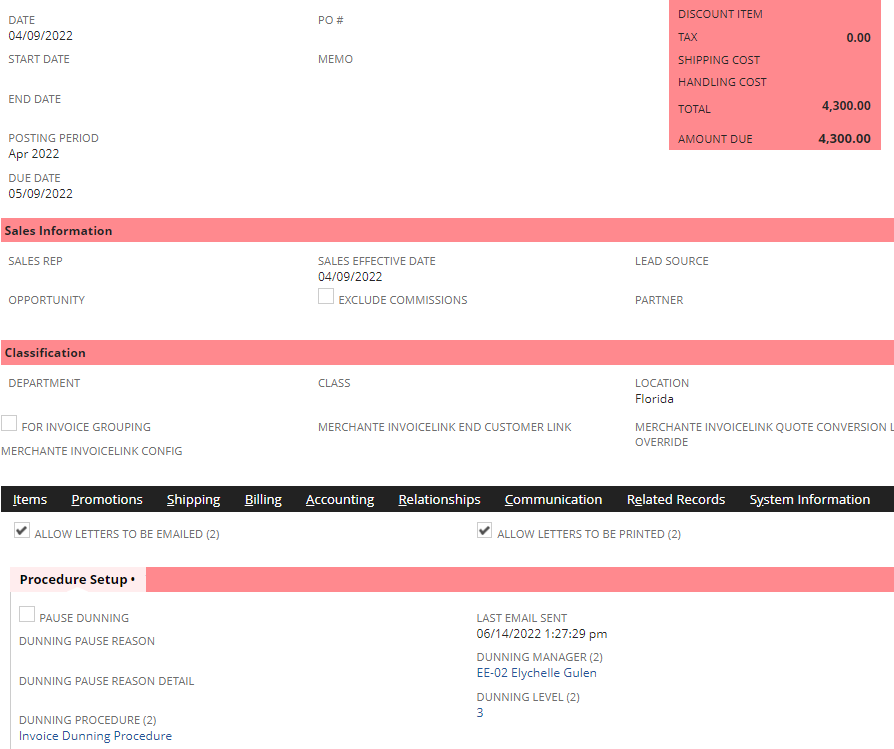
Here is a 44-day overdue Invoice that was picked up by the Invoice Dunning Procedure.
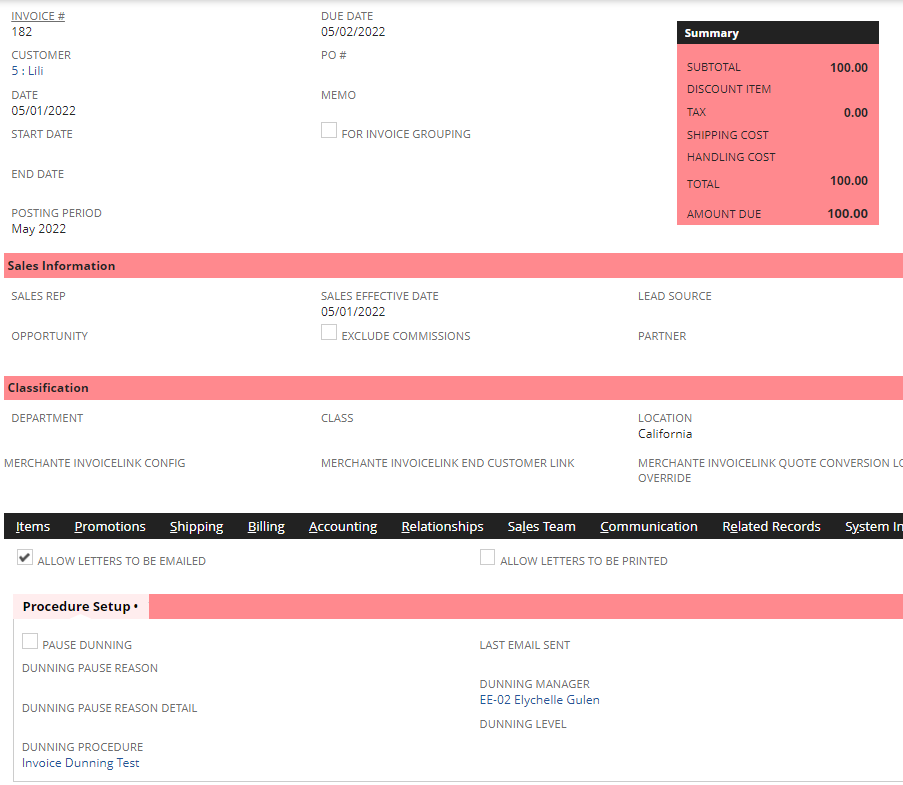
I have also tested an Invoice Dunning Procedure with 90 Days Overdue rule, and the Invoice I created was not picked up as no Dunning Level was assigned to it.
I think this may be a potential defect and Customer Support may assist you to check and further test on the back-end what could be the issue of your Dunning Procedures.
Thank you! ?
Re: PO approval by limited user - works differently for different employees
Hi @User_XQ321,
Just following up on this. Were you able to check any workflows/scripts that may be running on Purchase Orders? ?