Best Of
Re: Export/Download Currency Exchange Rate History
Hello @User_UFOSV,
Currently, the ability to export the data in the Currency Exchange Rate page is a system limitation filed under enhancement 158715 Lists > Accounting > Currency Exchange Rates/Currencies. Ability to export exchange rates and historical exchange rates.
There are two options in generating the data:
Option 1:
Via Currency page:
1.) Navigate to Lists>Accounting>Currencies
2.) On the page, click the Currency Exchange Rate History
3.) In Exchange Rate History page
You can copy the data on this page and paste into an Excel spreadsheet
On the spreadsheet, you can add filters, sort the data, or do any data manipulation to be able to show the desired report
Note: You will need to copy per page on an Excel spreadsheet
Option 2:
You can create a Saved Search
1. Navigate to Lists>Accounting>Currency Exchange Rates>New
2. On the upper left side of the screen right above the page title click on Search
3. Click Create Saved Search
4. On the Criteria tab add the following fields:
• Base Currency = Select a Base Currency for example: USD
• Transaction Currency = Select a Currency for example: GBP
• Effective Date is within (for example 6/01/2022 to 6/30/22)

5. On the Results tab add the following fields:
• Base Currency
• Transaction Currency
• Exchange Rate
• Effective Date
6. Hit Preview or Save and run.
7. Export the saved search.
Note that the results will show the Internal ID of the Currency and not the actual Currency Name.

Apologies for this system limitation. You can vote for this in the SuiteIdeas page.
Re: Deploy Project - Access Denied
Hey @Mikko De La Fuente-Oracle - after some experimentation, I figured out that if I changed deploy.xml to just deploy objects, the deploy succeeded.
I then realised that I don't have a 'Web Site Hosting Files' folder in my development account. When I just deploy my SuiteScripts folder, deployment succeeds.
So the 'access denied' seems to relate to the non-existent (or at least not currently visible to me) web site hosting files folder.
Thanks for you help!
 PhilMc
Re: AskAGuruLive with Jack about Customizations and Workflows (July 20, 2022)
How are you doing @User_VAYT1?
Glad that you asked that question.
Looping in an Approval Workflow is usually caused by having Exit States where the workflow restarts once it has reached any of them. See one of my answers in the following thread to fix the issue:
-Jack

Re: Customizing component portion of Assembly/BOM Item Type
Hello @Emil T.,
Good day!
Customizing the Component Sublist is possible via the Advanced Bill of Materials feature.
For further information, kindly check the SuiteAnswers below:
Utilizing Advanced Bill of Materials with Advanced Manufacturing - ID: 67434

Re: AskAGuruLive with Jack about Customizations and Workflows (July 20, 2022)
Tip#1: Unsure which checkbox to mark under the Applies To subtab to apply a Custom Field for a certain Transaction Type?
Look no further! Have the appropriate checkbox marked for you by going to Customize link (form's upper-right side) > New Body Field/New Column Field on the target transaction page you need to apply the custom field to.
Notes:
- For some records, the Customize link is only available on Edit mode.
- Applying Custom Fields to types which multiple transaction records are categorized under such as Sale, Purchase, etc. will automatically show the field for all the underlying records. To exclude some records, click the Apply to Forms button after creating the custom field, then unmark the checkbox(es) under the Show column for each Transaction Form for exclusion, then click Save.
-Jack
Re: How to display Gross amount with tax amount on the Sales by Item Detail
Good day! I tried to check also on the report but it seems the gross amount is not captured. Can you try creating a custom column field that will copy the tax rate. Then check if the field will be available in report. Pull that rate then create a formula column to multiple the amount to the custom column rate?
I usually just use the saved search for that one and use this formula.
ABS(({amount}*{taxitem.rate})/100)
Hope any of my suggestion would help. Thanks!
Best regards,
Emil
 Emil T.
Re: Item Approval Workflow. Approve Button does not appear for Approver
Hi @User_VAYT1
Good day! Can you check the workflow settings? For the event of the workflow since this is an approval workflow, maybe set to create only as image below. Then try again if the same scenario will happen for the button.
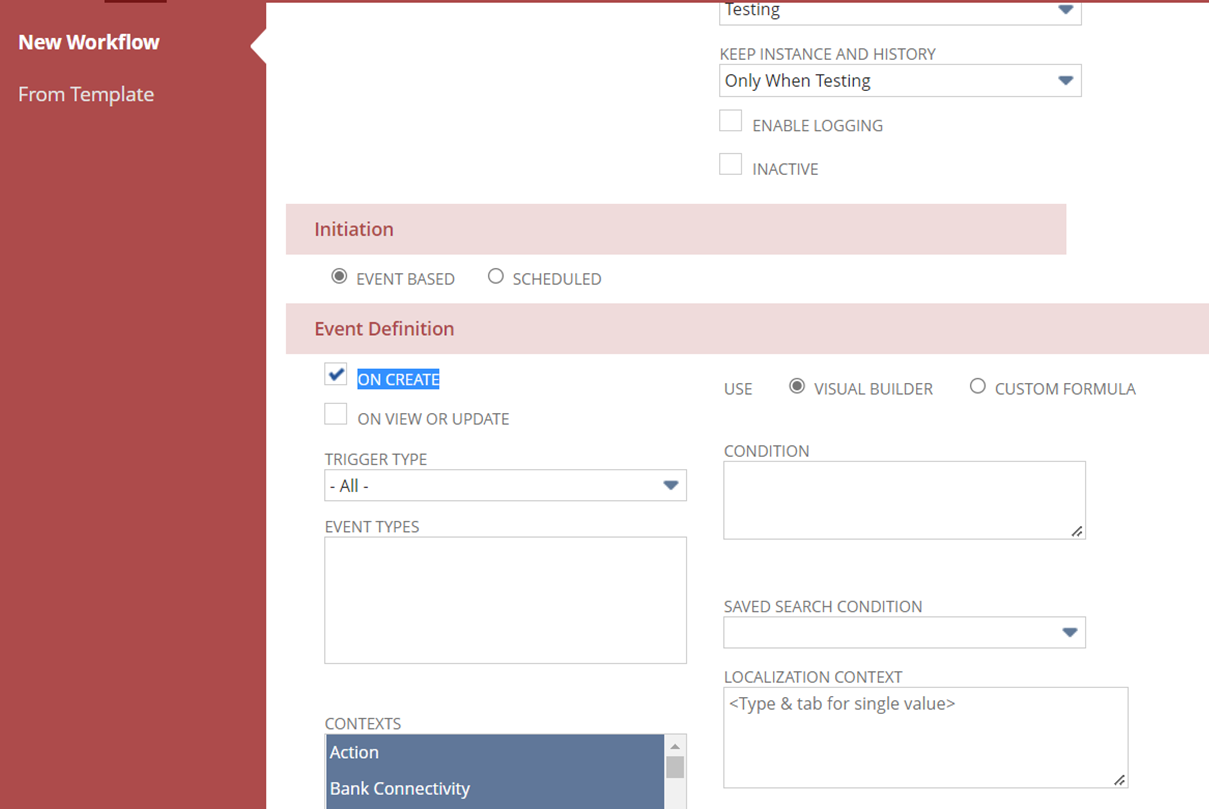
Hope this helps. Thanks!
Best regards,
Emil
Emil T.
Re: Billing Schedule
You can use a workflow to change forms based on “role” & just use 2 forms.
 CDuf
CDuf
Re: Uses of Class in transaction
Class are like classification similar to department, location for tracking the financial segment. You can rename it as required.
Classes are categories that you can create to track records such as financials, transactions, and employees. Classes are useful for wider segments within your business. For example, if you have created a department for your sales team, you can create classes to track information on sales transactions such as new customers and repeat customers. Sales orders would then indicate whether the transaction was created for a new or repeat customer. This is useful in tracking where income and expenses are generated.

Re: Billing Schedule
Hi @Paul Salkeld,
Good day! When I checked the standard form of the SO, it seems when you tick both billing schedule, the billing schedule will only show on the lines. If you untick in the sublist, then it will appear on the billing tab. So it seems you really need to create 2 separate custom form. And label it properly for identification. Now if you want it to be triggered by identification, you can create a workflow to change the custom form once a class is selected, so meaning class is first selection then it will load the form you prefer to use. Hope this helps. Thanks!
Best regards,
Emil
Emil T.