Best Of
Re: What permission to add to see the Item Pricing sublist on the Customer object?
Hi @jb123
Can you cross check if item pricing sublist is unchecked from custom form under sublist.

Re: Bank matching error message on charge creation
Hello @Vernita ,
Can you please double check if both of the mentioned items are active?
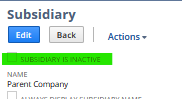
To check if the Subsidiary is Active, please follow the steps below:
- Navigate to Setup -> Company -> Subsidiaries
- Search for the Subsidiary Internal ID 1
- Edit the Subsidiary and check if is Active
To check if the Tax Code is Active, please follow the steps below:
- Navigate to Setup -> Accounting -> Tax Codes
- Search for the Tax Code Internal ID 7
- Edit the Tax Code and check if is Active as well
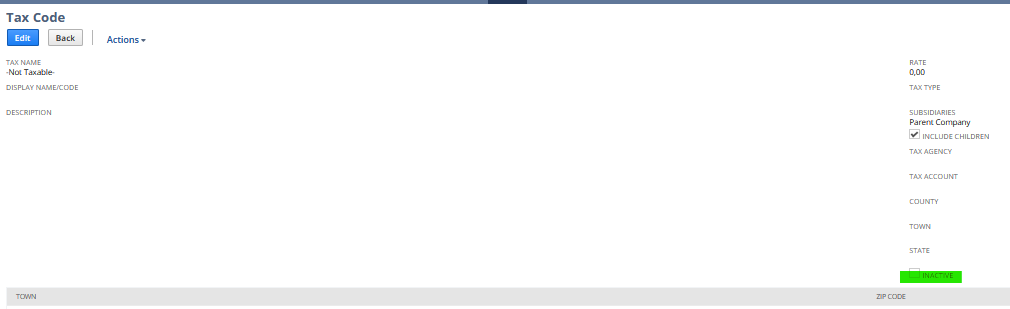
Please, let me know how it is looks like. Both of the Items must be Active so the process can be done without errors. Thank you very much.
“Kindly click "Yes" on "Did this answer the question?" if you find the reply on your thread helpful. This will aid the others with the same question to easily find the correct answer. Thank you!

Re: Best Practices around Project Change Requests
Hello @Mark Robichaux
You may refer to the below OpenAir SuiteAnswers article that you can utilize on your end.
Answer ID: 48554
Link: https://netsuite.custhelp.com/app/answers/detailoa/a_id/48554/kw/issue
Hope this helps.

Re: Very Slow Print Template for Saved Search
@Kristoffer Viray-Oracle - I have found the answer to this.
My search does not have any Criteria to specify the Transaction. I run this search from a custom link on the Item Receipt transaction (which passes the document ID in the URL string as a filter) so that only items from that Receipt are shown.
It would seem that something within the print process is running the criteria without the filter applied - hence the long load time.
I have preset the criteria with a transaction Document ID (which doesn't impact the search functionality as the filter Document ID overrides this), but seems to make the print template and print process behave as expected.
The template now prints (and saves after editing) within 2-3 seconds.
Very strange, but glad I have found the answer to this!

Re: Approve Vendor Payment page's bug
Checked this at my end by customizing the user role. It works absolutely fine with this setup at role level.
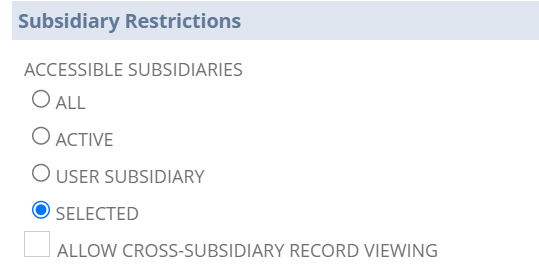
Did you Try clearing browser history once. If you have multiple roles, sometimes switching between role might cause cache issue.
Re: Shortcuts lost
Hi SanjeevV
This could have been because of dashboard re publishing. Was this activity recently performed at the user role end.
Re: Migrating NS ARM Configurations
HI User_EKY01,
NetSuite has a native functionality of using SDF (SuiteCloud Development Framework). Can you try it.
Re: I need to retrieve Dunning Recipients through Web services
I figured it out. After confirming the name of the Custom Record with the Customer (this is found in Netsuite under Customizations -> Records, List, etc) of customrecord_3805_dunning_recipient
I then extracted all of the Custom Record records using the function getCustomizationType of the NetSuiteService and extracting the scriptIds, and Internal Ids
Once I had the internal Id, I used a CustomRecordSearch to read all the custom records. The data contained within the custom Records can be found in the customFieldList. The Custom fields I was looking for were
custrecord_3805_dunning_recipient_cont (the contact)
custrecord_dl_recipient_email (the email for the contact)
custrecord_3805_dunning_recipient_cust (the customer for the contact)
This gave me all the information I needed. I have attached the vb.net code from my tester so you can use it as needed
Thanks
See code below (attachment does not appear to be working properly)
Private Sub LoadCustomizationList()
Dim nsCustomizationType As New CustomizationType
Dim RRList As ReadResponseList
Dim nsResult As String = ""
Dim strGetValues As String = ""
nsCustomizationType.getCustomizationTypeSpecified = True
nsCustomizationType.getCustomizationType = GetCustomizationType.customRecordType
‘Set up connection to NS (nonce and token signature)
SetupNSCredentials()
Dim nsGetCustIDResult As GetCustomizationIdResult = NSService.getCustomizationId(nsCustomizationType, False)
For Each gcir In nsGetCustIDResult.customizationRefList
If gcir.scriptId.Contains("dunning") Then
strGetValues = strGetValues & "|(" & gcir.scriptId & ":" & gcir.internalId & ")"
End If
Next
End Sub
Private Sub LoadCustomRecord()
Dim nsCustomList As New CustomRecordSearch
Dim nsRecRef As New RecordRef
Dim nsGet(0) As RecordRef
Dim strGet As String = ""
Dim CustRT As New CustomRecord
Dim sContName As String = ""
Dim sContEmail As String = ""
Dim sContCust As String = ""
Try
nsCustomList.basic = New CustomRecordSearchBasic
nsCustomList.basic.recType = New RecordRef
nsCustomList.basic.recType.internalId = 260
'Do this to get a new nonce for token purposes.
SetupNSCredentials()
NSSrchResults = _NSService.search(nsCustomList)
If NSSrchResults.status.isSuccess Then
If NSSrchResults.totalRecords > 0 Then
For Each CL As CustomRecord In NSSrchResults.recordList
sContName = ""
sContEmail = ""
sContCust = ""
If Not IsNothing(CL.customFieldList) Then
For Each cfl As CustomFieldRef In CL.customFieldList
Select Case cfl.scriptId
Case "custrecord_3805_dunning_recipient_cont"
Dim slctCol As SelectCustomFieldRef = cfl
sContName = slctCol.value.name.ToString
Case "custrecord_dl_recipient_email"
Dim strCol As StringCustomFieldRef = cfl
sContEmail = strCol.value.ToString
Case "custrecord_3805_dunning_recipient_cust"
Dim slctCol As SelectCustomFieldRef = cfl
sContCust = slctCol.value.internalId.ToString
End Select
Next
If Not String.IsNullOrWhiteSpace(sContName) AndAlso Not String.IsNullOrWhiteSpace(sContEmail) AndAlso Not String.IsNullOrWhiteSpace(sContCust) Then
'Process this as a contact
strGet = strGet & " | " & sContName & ":" & sContEmail & ":" & sContCust
End If
End If
Next
End If
Else
_Common.LogSyncMessage("An issue occurred retrieving Custom Record Info. " & NSSrchResults.status.statusDetail.FirstOrDefault.message, Common.SyncEventLogType.Information, System.Reflection.MethodBase.GetCurrentMethod.Name())
End If
Catch ex As Exception
_Common.LogSyncMessage("Error Loading NetSuite Custom Record Data: " & _Common.HandleExMsg(ex), Common.SyncEventLogType.SyncError, System.Reflection.MethodBase.GetCurrentMethod.Name())
End Try
End Sub
Re: INVENTORY TRANSFER IMPORT ERROR
Hi Aldarmseu,
If your CSV Import fails and you see the error: Please enter value(s) for: Status, check the item record and make sure that the current quantity on hand is not zero or already underwater and that you are not making a negative adjustment.
The error prompt is related to the quantity on hand. You cannot do a negative adjustment when you no longer have any available quantity. The reason why the error is related to Inventory Status is because it is the next field needed to be populated after the item line level but the system can no longer proceed.
The solution is to remove lines in your CSV Import that will process negative adjustment for inventories without enough quantity.
This is also documented under SuiteAnswers ID: 78035.
I hope this helps!
=========================
If you find this reply to your question as helpful, others with the same question might find it helpful as well. By marking “Yes” on the “Did this answer your question?”, you’ll be able to help other community members who might have the same concern find the answer easier and you will also get closer to earning your next Answer Accepter badge.

NSC | Sales Order > Difference Between Next Bill and Bill Remaining

Some users are reporting that they are encountering unexpected amount when billing a Sales Order. One possible cause is the button they used when billing. Here's the difference between the Next Bill and Bill Remaining buttons you see on Sales Orders.

Both the Next Bill and Bill Remaining button relates to the Billing Schedule. When you view an open Sales Order that has an attached Billing Schedule, you can use the Next Bill and Bill Remaining buttons to generate Invoices as follows:
- Click Next Bill to generate an Invoice that bills the next cycle.
- Click Bill Remaining to ignore the Billing Schedule and issue a single Invoice for the total outstanding amount.
I hope this helps! ❤ Feel free to share your own tips and tricks under NetSuite Admin Corner to help other members as well. Thank you very much! 😊
