Best Of
Re: How to find out which data source is being used?
Hi @GSONI,
- The easier way would be to check the naming convention for tables and fields in NetSuite.com contains underlines for spaces and uses plural while NetSuite2.com only uses camel case and is in singular. for example, TRANSACTION_LINES for NetSuite.com is transactionLine in NetSuite2.com.
- Here's the schema for NetSuite.com: https://system.netsuite.com/help/helpcenter/en_US/srbrowser/Browser2023_1/odbc/record/task_contacts.html
- Meanwhile, you check the NetSuite2.com schema from Setup > Records Catalog
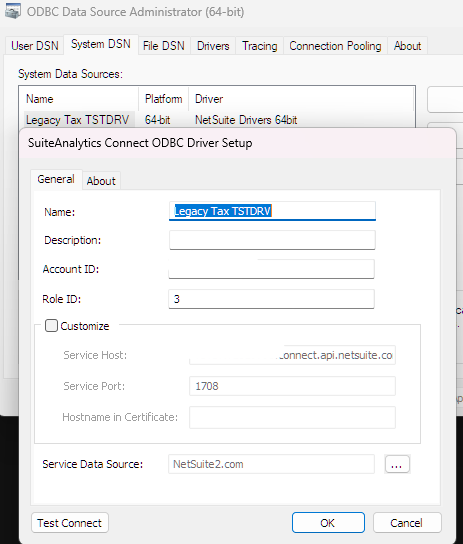
- You can also check the ODBC Driver for the DSN you are using. Service Data Source field at the bottom shows which data source is used.
I hope this helps!
If you find this reply to your question useful, others might as well. By clicking the “Yes” button for “Did this answer the question?” below, you’ll be able to help the community members who might have a similar concern find the answer easier and you will also get closer to earning your next Answer Accepter badge.

Re: Number of questions around importing/creating intercompany expense reports.
Hello @Dext3r,
Good day and thank you for posting this new thread!
Hello everyone! We'd greatly appreciate your support in this matter.
Re: Number of questions around importing/creating intercompany expense reports.
Hi Sam,
If memory serves, to import, you must default your expense reports to use Multi Currency. For each line, you will select the currency and amount for that expense - I don't think exchange rate is importable, it's sourced by the exchange rate in NetSuite.
The billing subsidiary is coming from the feature - multi Subsidiary expense reports - allowing you to bill customers in different subsidiaries time and expenses.
I hope this helps.
~angela

Re: Number of questions around importing/creating intercompany expense reports.
Thanks, Angela.
Hello @Dext3r,
Upon investigation in a test account, the possible reason for this Please go to Home > Set Preferences > uncheck Use Multicurrency Expense Reports
After you have unchecked this, please go to:
1.) Set Up > Import/Export > Import CSV records
2.) Set the following in Step 1
Import Type = Employees
Record Type = Expense Report
3.) Step 2, set to Add
4.) Step 3, Map the field
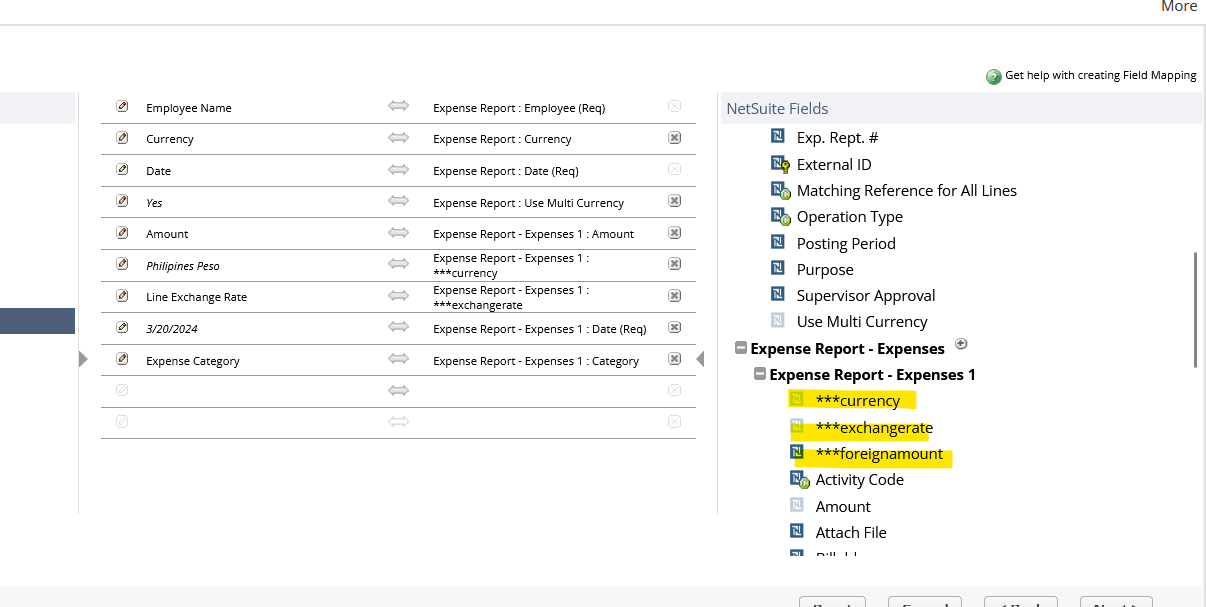
You should be able to select the Multi Currency fields. (if this doesn't show, please log in or log out)
5.) Run .csv import
I hope this helps 🙂

Re: Number of questions around importing/creating intercompany expense reports.
Hi Sam,
This may seem like a really dumb question, but have you cleared your internet Cache? When making config changes, I clear my cache multiple times a day. I'll explain why if you'd like, otherwise - trust me?
Give it a try, and let us know?
~angela
Re: How to use summary function on formula text?
Hi Jeremy, I finally change to other summary function and it works. Thanks a lot

Re: Display Sales Order total in contract form
Hello User_KSN9M,
This is possible but we cannot add it in the total box since it is still not customizable.
What we can do here, is create a saved search that will be the source of the value that we will be displaying in the custom field, but please be advised that it will only show the field in the main body of the record or the custom subtab. Let me know if you want to proceed with this. Thank you!
-Lyka

Re: How to find an email source
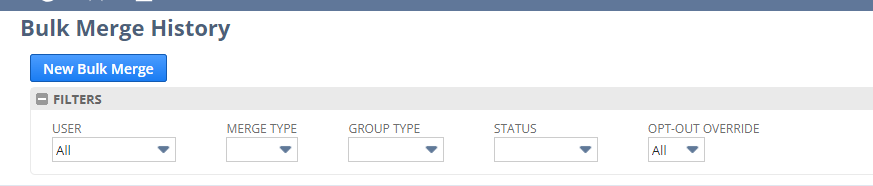
In this case, I believe this is not a bulk mail merge based on the fact that I can't see anything for that in the bulk merge history (the last bulk merge was done in 2022)
I was wondering what other types of email sends exist which don't keep a copy of the message on the customer record.
The only two I am aware of are saved searches (scheduled emails or emails sent from updates) or bulk mail merges
Based on what I mentioned above, I suspect it is neither of these.
thanks
 Vernita