Best Of
Re: Number of questions around importing/creating intercompany expense reports.
That did the trick, excellent! The fields were indeed not checked to show on the form. I wouldn't have guessed that was the case since they were showing anyway, how odd.
Thank you both for your help with this, the accounting team will be delighted to have this working.
I am still trying to populate the list for selecting billing subsidiaries. If anyone has any guidance on how to do that, would also be very helpful.
 Dext3r
Re: Is it possible to a vendor with Vendor Center access to modify a purchase order?
Thanks for the information.
I just wanted to make sure there are no other more convenient or straightforward solutions before we look into other options.
 MTL_MIA
Re: Issues with some Saved Search Results after 2024.1 Update
Hi lcrumling_42244. I've actually had similar results but thought there was something wrong with my search so I just left the filter off and dealt with it after downloading it... Thinking it was my issue.
I'll watch for it to happen to me again and add documentation here as well, to support this anomaly so it comes from more than just you.
Thanks for reporting...
 CDuf
CDuf
Re: Saved search of updated time entry list
Thanks User_E6ME3,
Do you get a preview of updated fields with the new information, before processing? Any errors should be highlighted in red.
Hope someone else can help.
Best,
CDuf
Re: Saved search of updated time entry list
Does this get you any more information?
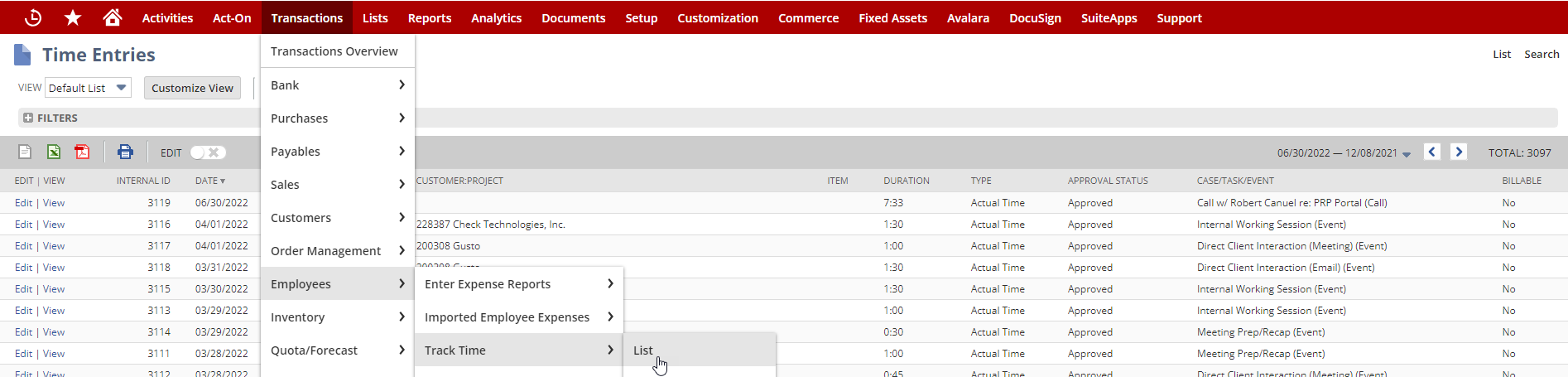
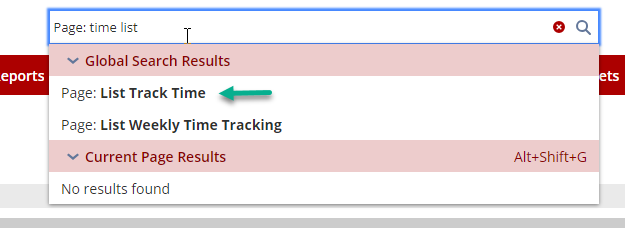
If you don't have the same menu path, you can use the Global search & get to the same place
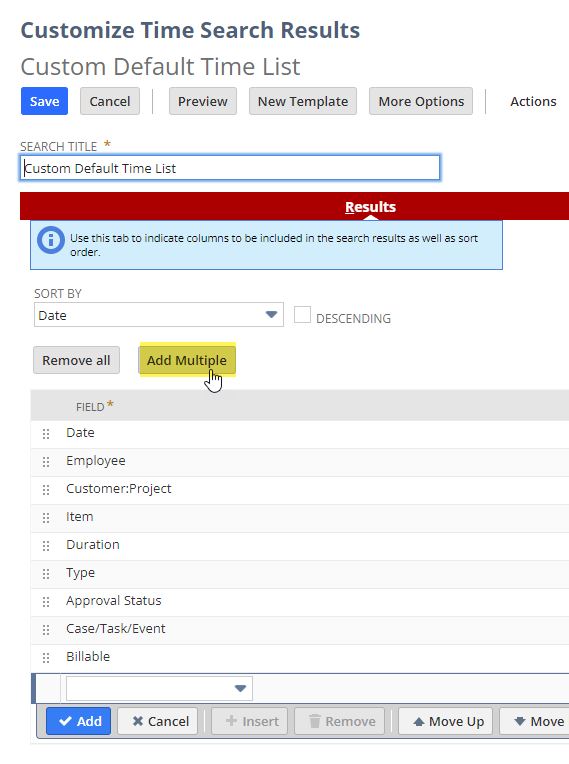
If you need more fields you can also "customize" the default view and add fields
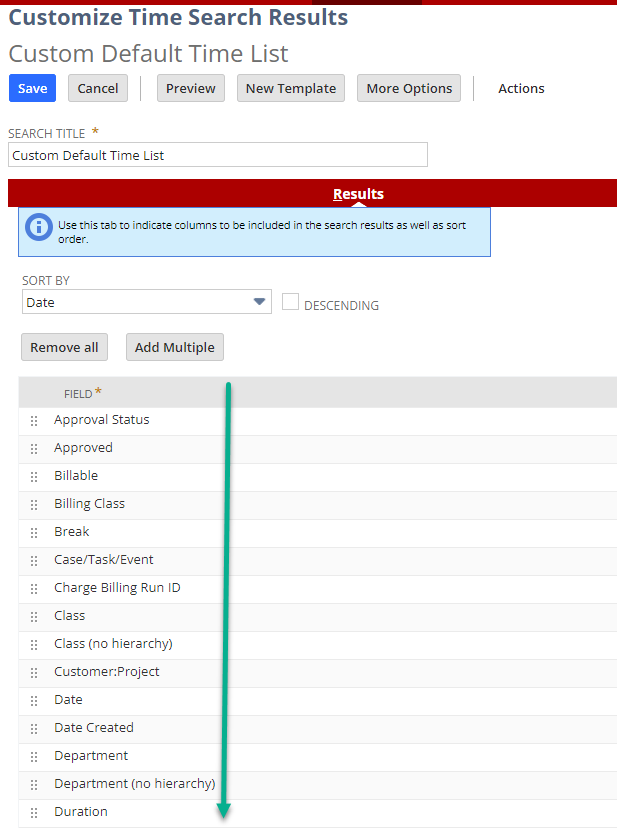
Just as a sample, I Removed all then Add Multiple and added every field to see what fields really held information I was looking for then, Removed the unnecessary fields.
Hope this helps a bit.
CDuf
Re: 2024.1 Broke Auto Lot Numbering Suiteapp
Hi Angela,
Thank you for posting here in the community!
I initially checked my resources if anyone else filed a similar case, but I didn't find any.
Let's see if any of our other members encountered this error and how they were able to resolve.

Re: How to find out which data source is being used?
Hi @GSONI,
- The easier way would be to check the naming convention for tables and fields in NetSuite.com contains underlines for spaces and uses plural while NetSuite2.com only uses camel case and is in singular. for example, TRANSACTION_LINES for NetSuite.com is transactionLine in NetSuite2.com.
- Here's the schema for NetSuite.com: https://system.netsuite.com/help/helpcenter/en_US/srbrowser/Browser2023_1/odbc/record/task_contacts.html
- Meanwhile, you check the NetSuite2.com schema from Setup > Records Catalog
- You can also check the ODBC Driver for the DSN you are using. Service Data Source field at the bottom shows which data source is used.
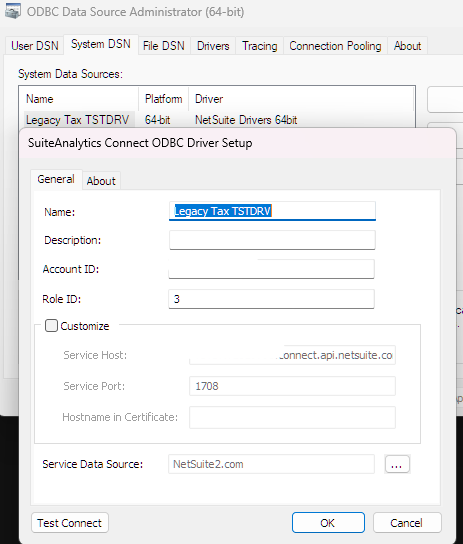
I hope this helps!
If you find this reply to your question useful, others might as well. By clicking the “Yes” button for “Did this answer the question?” below, you’ll be able to help the community members who might have a similar concern find the answer easier and you will also get closer to earning your next Answer Accepter badge.

Re: Number of questions around importing/creating intercompany expense reports.
Hello @Dext3r,
Good day and thank you for posting this new thread!
Hello everyone! We'd greatly appreciate your support in this matter.
Re: Number of questions around importing/creating intercompany expense reports.
Hi Sam,
If memory serves, to import, you must default your expense reports to use Multi Currency. For each line, you will select the currency and amount for that expense - I don't think exchange rate is importable, it's sourced by the exchange rate in NetSuite.
The billing subsidiary is coming from the feature - multi Subsidiary expense reports - allowing you to bill customers in different subsidiaries time and expenses.
I hope this helps.
~angela

Re: Number of questions around importing/creating intercompany expense reports.
Thanks, Angela.
Hello @Dext3r,
Upon investigation in a test account, the possible reason for this Please go to Home > Set Preferences > uncheck Use Multicurrency Expense Reports
After you have unchecked this, please go to:
1.) Set Up > Import/Export > Import CSV records
2.) Set the following in Step 1
Import Type = Employees
Record Type = Expense Report
3.) Step 2, set to Add
4.) Step 3, Map the field
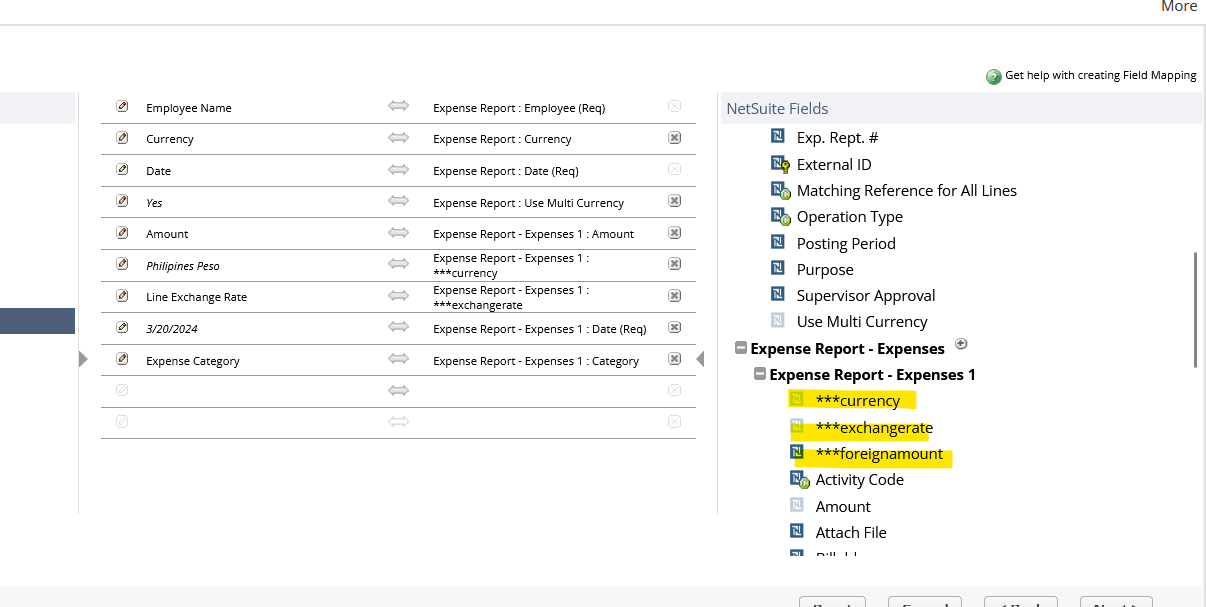
You should be able to select the Multi Currency fields. (if this doesn't show, please log in or log out)
5.) Run .csv import
I hope this helps 🙂
