Best Of

Re: Purchase Price Variance is being triggered at Item Receipt (IR) instead of at Vendor Bill
Hi, @Angela Bayliss,
Thank you for your explanation.
Yes, I got the same answer from ChatGPT . I just want to have confirmation from the gurus here on this matter.
Thank you for your valuable inputs.
This is meant we can set different GL code to differentiate this variance at Item Master page. please correct me if i'm wrong.
 Bee Yook
Re: USE OF AI Here in the community?
Sorry, I lol'd at the thought. Using AI for responses on a community site flies in the face in the entire point of the site in the first place.


Feedback on new MFA requirement TOTP
I love that the community site finally has MFA - that's a great step toward better security for all of us users of the site. However, your TOTP (Time-Based One-Time Password) implementation isn't working for me. For the record, I'm using 1Password, and I do not want to add a separate authenticator just for one website. Also for the record, 1Password successfully performs the TOTP on our Netsuite instances itself - nothing wrong there.
For the Oracle Communities site however, 1Password throws this error: "The one-time password URL is incorrect: the scheme is invalid. Check the URL and try again. If you still have trouble, contact support for the site you're trying to add."
Did you make a proprietary TOTP implementation that requires the Oracle Authenticator and isn't compatible with any other TOTP app? Please say it isn't so.
Hopefully this is just an oversight that will be corrected. Have any of you community users had success activating TOTP MFA with an authenticator other than the Oracle one?
For now I'll just take the super slow, significantly less secure, MFA-by-email route I suppose.
-ben
Re: Customer Return Variance Account - Is the documentation incorrect?
@Ramu Komireddy_9891 Did you review my reply before asking this? No, I am not satisfied with your answer. I read the documentation 19 years ago.

Re: How do I close or mark done multiple pick tasks?
It depends on your "management" style, but for some cases it is worth considering using a heavy whip such as restricting who can create an IF. Make sure you have support from the bosses before pulling the trigger on something like this 😉
Re: Suiteql Search error occurred: Invalid or unsupported search
Thank you @Francesca Nicole Mendoza-Oracle. The solution proposed is not helping us. Possibly, I will give the problem statement with more detail below:
Our requirement is to fetch the values of all GRNs which have been received as transfer order. We have constructed the following query for the same:
(Select sum(X1.netamount) from transactionline X1 INNER JOIN transaction X ON X.id=X1.transaction Where X.type = 'ItemRcpt' and X1.mainline='F' and X1.item=t1.item and isinventoryaffecting='T' and X1.location=t1.location and X1.subsidiary=t1.subsidiary and X.trandate> = '" + pfromDate + "' and X.trandate< = '" + ptoDate + "' and X1.createdfrom in (Select X3.id from transactionline X2 INNER JOIN transaction X3 ON X3.id=X2.transaction Where X3.type ='TrnfrOrd' and X2.item=X1.item and X2.subsidiary=X1.subsidiary and X2.location=X1.location and X3.id=X1.createdfrom)) as transgrnvalue
For some locations we are getting the results properly. For some locations, we are getting the error:
Search error occurred: Invalid or unsupported search
Please advice us if there is any solution for the same.
Regards,
Raghu
Re: CSV import account number and name
Hey @Karen See,
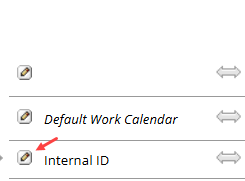
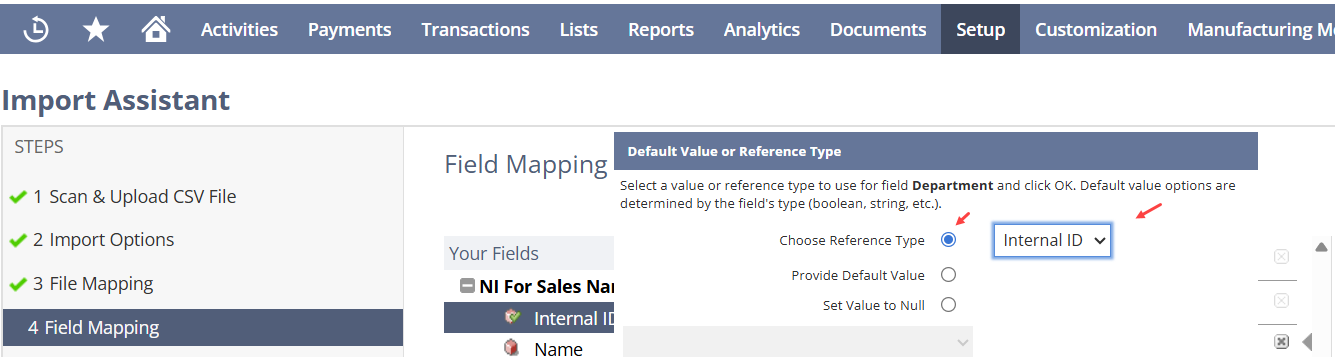
I recommend using "Internal ID" instead of the Name for most records.
Instead of entering the "Department Name" in the CSV Import File, you have to enter "Department's Internal IDs". In the Import Mapping Screen, ensure you let NetSuite know you are using "Internal ID" instead of "Name".

Re: Understanding Financial Exception Management Results
I did open a ticket for this functionality. After several months of Oracle passing around the ticket, they gave me a non-answer. Since I opened the ticket mainly to help Oracle improve the product and they seemed uninterested, I asked them to close the ticket and turned the feature off.
Based on my experience, this is functionality for marketing AI and has nothing to do with efficiently closing. I did not see any performance degradation when it was turned on, but our environment is small so I doubt that it would.
If you want to wade through a bunch of exceptions that aren't really exceptions, this feature is for you.
Good luck.
