Best Of
Re: Customer setup for a multi-branch manufacturing
Hey @MHS Crane,
The best practice is to set up one customer with multiple Ship To Addresses.
To facilitate reporting, you can create a custom "Branch" field and tag Ship To addresses and Contacts.


Re: Custom field on entity not available as filter on a transaction saved search
Hi @Dolev ,
Open the custom field in customizations and check the check box as show in list and the save the field now please check in saved search
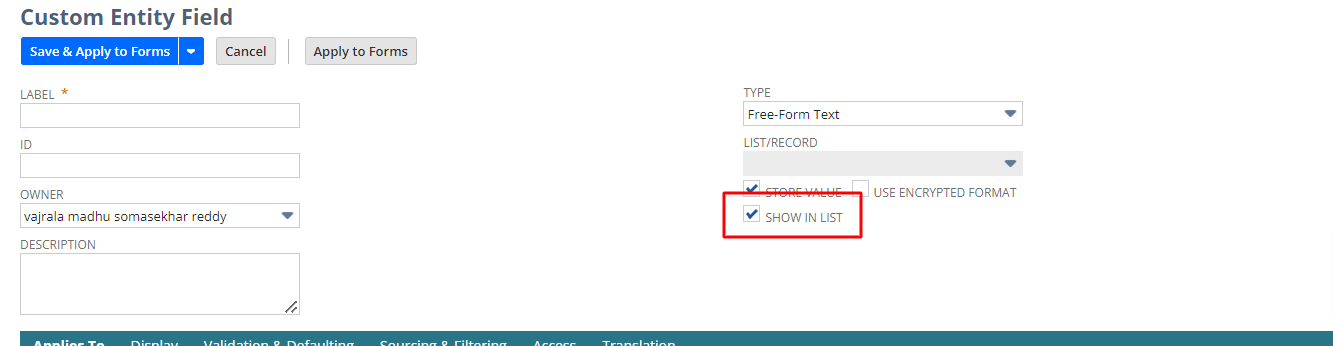

Re: Custom field on entity not available as filter on a transaction saved search
perfect! it works this way!

Re: Unable to inactivate SiteBuilder
Dear @Leslie Macahia-Oracle ,
Thanks a lot! This worked :)

Re: Unable to inactivate SiteBuilder
Can you try doing the following:
- Go to Setup > Company > Enable Features
- Under Web Presence
- Enable the Website
- Go to Commerce > Website > Website List
- Edit the Site
- Changed the Web Site Scope field to Information and Catalog
- Enable the SuiteTax feature
Thank you.
Regards,
Leslie
If you find this reply to your question useful, others might be as well. By clicking the “Yes” button for “Did this answer the question?” below, you’ll be able to help the community members who might have a similar concern find the answer easier and you will also get closer to earning your next Answer Accepter Badge.
Re: what is Revenue Recognition Events?
Hi @Vajrala Madhu Reddy,
You have to refer couple of reports to see the revenue details based on SO, RA and Rev Rec journals.
1. Revenue recognition forecast summary - run by monthly/accounting periods - you can see customer and RA wise, revenue recognized, planned, and forecast.
2. Billing and Revenue summary - you can see SO and RA-wise total value, billed, planned, recognized, and deferred.

Re: Permission to Access the Manage Integration Page
Thank you so much for your guides.
No question as for now. will post here if any questions.
Once again, thank you.
Best Regards, Bee Yook.
 Bee Yook
Re: Saved Search formula to lookup a Project ID and return the Project Manager
Sorry for the delayed reply. I wanted to give the process a few days and see how it was working for us. So far, so good. Our PM fields are populating nicely.
Please allow me to go back to the above directions to clarify a few things for non-experts like me:
- Jervin writes "Create a Custom Field". but he does not specifically say which type of Custom Field to use. SuiteAnswer 10092 https://suiteanswers.custhelp.com/app/answers/detail/a_id/10092/loc/en_US does not do a great job of helping a person to make a selection. I took a guess and chose a CUSTOM TRANSACTION LINE FIELD because the timesheet entries appear as separate line items in a Timesheet Record. It would be great if when suggesting that a custom field be created, to call out which field to choose per NetSuite best practices.
- The In the Create the Workflow section of Jervin's directions, please add that you must SAVE after completing the first set of steps. I fumbled around for a while before figuring out that CREATE THE WORKFLOW and CREATE THE WORKFLOW ACTION was a two-step process.
- Jervin writes "… every time a user CREATES or EDITS a timesheet, the custom field will be populated…". That did not seem to work well for us. When CREATING a timesheet, the PM field populates perfectly every time. However, when EDITING a timesheet, it seemed to be more hit or miss. What I found was that, when EDITING a timesheet, I typically had to go to each row and add a SPACE character to the end of the MEMO field. Then, when I clicked SAVE, the PM fields would populate.
Otherwise, this solution is terrific. Thank you BOTH, very much.
 esabis
Re: Replacement Files in File Cabinet
Hi @User_KWDL4 ,
A replacement of a file in File cabinet can be done if you save it with the same name and you confirm the replacement. You can make changes to a file, save it with a different name and upload it again in the file cabinet. The original file will keep the name and the new file saved will be tracked under the new name.
Do you mean that other users might replace your original file when they perform changes? You can just rename your file and upload it again to have it stored in your folders, somewhere you prefer.
About replacement, we have an enhancement request for updates: #99828 File Tab on Custom Records - Ability to access the File Cabinet Document record itself to allow update/replacement of the uploaded document directly from the custom record
If this would be a feature you would like to be implemented, I hope you spare some time to vote for the enhancement in SuiteIdeas so we can raise the number of votes it has. Best regards,
